
அறிமுகம்
This user manual provides comprehensive instructions for the setup, operation, and maintenance of your KinYo R-565 5.1 Surround Sound Home Theater System. Please read this manual thoroughly before using the product to ensure proper functionality and safety.
முக்கியமான பாதுகாப்பு தகவல்
- சக்தி ஆதாரம்: Ensure the system is connected to a power source that matches the voltagஇ அலகு மீது குறிப்பிடப்பட்டுள்ளது.
- காற்றோட்டம்: எந்த காற்றோட்ட திறப்புகளையும் தடுக்க வேண்டாம். உற்பத்தியாளரின் அறிவுறுத்தல்களின்படி நிறுவவும்.
- நீர் மற்றும் ஈரப்பதம்: இந்த கருவியை சொட்டு சொட்டாகவோ அல்லது தெறிப்பதாகவோ வெளிப்படுத்த வேண்டாம் மற்றும் குவளைகள் போன்ற திரவங்களால் நிரப்பப்பட்ட பொருட்கள் எதுவும் கருவியில் வைக்கப்படவில்லை என்பதை உறுதிப்படுத்தவும்.
- சுத்தம்: சுத்தம் செய்வதற்கு முன் இந்த தயாரிப்பை சுவர் கடையிலிருந்து துண்டிக்கவும். திரவ கிளீனர்கள் அல்லது ஏரோசல் கிளீனர்களைப் பயன்படுத்த வேண்டாம்.
- சேவை: இந்த தயாரிப்பை நீங்களே சேவை செய்ய முயற்சிக்காதீர்கள், ஏனெனில் கவர்களைத் திறப்பது அல்லது அகற்றுவது உங்களை ஆபத்தான தொகுதிகளுக்கு ஆளாக்கலாம்tagஇ அல்லது பிற ஆபத்துகள். அனைத்து சேவைகளையும் தகுதிவாய்ந்த சேவை பணியாளர்களிடம் பார்க்கவும்.
தொகுப்பு உள்ளடக்கங்கள்
கீழே பட்டியலிடப்பட்டுள்ள அனைத்து பொருட்களும் உங்கள் தொகுப்பில் சேர்க்கப்பட்டுள்ளதா என்பதை சரிபார்க்கவும்:
- 1 x Subwoofer (with integrated ampஆயுட்காலம்)
- 5 x சேட்டிலைட் ஸ்பீக்கர்கள்
- 1 x ரிமோட் கண்ட்ரோல்
- ஸ்பீக்கர் கேபிள்கள்
- Audio Input Cables
- பயனர் கையேடு (இந்த ஆவணம்)
தயாரிப்பு முடிந்துவிட்டதுview
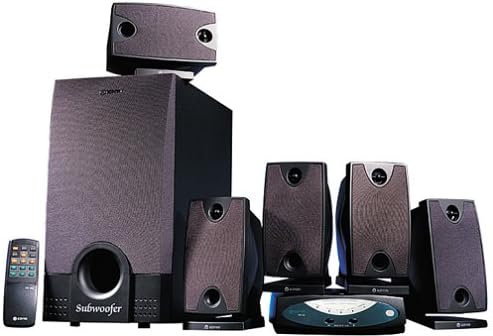
Figure 1: KinYo R-565 5.1 Surround Sound Home Theater System components. This image displays the main subwoofer unit, five satellite speakers, and the included remote control, illustrating the complete system setup.
முக்கிய கூறுகள்:
- ஒலிபெருக்கி: The central unit, housing the main amplifier and providing deep bass frequencies. Features a wooden cabinet for enhanced bass performance.
- Satellite Speakers (5): Compact speakers designed for clear mid-range and high-frequency audio, providing surround sound effects.
- ரிமோட் கண்ட்ரோல்: Allows convenient adjustment of volume, input selection, and other settings from a distance.
- Control Unit/Receiver: This unit manages audio inputs and outputs to the speakers.
அமைவு வழிமுறைகள்
1. இடம்:
- ஒலிபெருக்கி: Place the subwoofer on the floor, ideally in a corner or near a wall for optimal bass response.
- முன்பக்க ஒலிபெருக்கிகள் (இடது, வலது): Position these speakers on either side of your TV or display, equidistant from the listening position.
- மைய பேச்சாளர்: Place the center speaker directly above or below your TV, ensuring dialogue is clear and centered.
- Rear Speakers (Left, Right): Position these speakers behind your main listening area, slightly to the sides, to create an immersive surround sound experience.
2. இணைப்புகள்:
- Connect Satellite Speakers to Subwoofer: Use the provided speaker cables to connect each satellite speaker to its corresponding output terminal on the back of the subwoofer unit. Ensure correct polarity (+ to + and - to -).
- ஆடியோ மூலத்தை இணைக்கவும்: Connect your audio source (e.g., DVD player, TV, computer) to the audio input jacks on the subwoofer or control unit. The system supports 5.1 channel input for true surround sound.
- மின் இணைப்பு: ஒலிபெருக்கியிலிருந்து மின் கம்பியை ஒரு நிலையான மின் நிலையத்தில் செருகவும்.
குறிப்பு: The system is magnetically shielded to prevent interference with nearby electronic devices, such as televisions.
இயக்க வழிமுறைகள்
பவர் ஆன்/ஆஃப்:
அழுத்தவும் சக்தி button on the front panel of the subwoofer or on the remote control to turn the system on or off.
ஒலியளவு கட்டுப்பாடு:
இதைப் பயன்படுத்தி முதன்மை ஒலியளவை சரிசெய்யவும் தொகுதி + மற்றும் தொகுதி - buttons on the remote control or the main volume knob on the subwoofer/control unit.
உள்ளீடு தேர்வு:
பயன்படுத்தவும் உள்ளீடு button on the remote control or control unit to cycle through available audio inputs (e.g., PC, DVD, AUX).
ரிமோட் கண்ட்ரோல் பயன்பாடு:
The remote control allows for convenient operation of all primary functions. Ensure batteries are correctly inserted and point the remote towards the main unit's sensor.
பராமரிப்பு
- சுத்தம்: Use a soft, dry cloth to clean the surfaces of the speakers and subwoofer. Do not use abrasive cleaners, waxes, or solvents.
- தூசி: Regularly dust the speaker grilles and vents to prevent accumulation that could affect performance.
- சேமிப்பு: கணினியை நீண்ட நேரம் சேமித்து வைத்திருந்தால், அதை மின்சாரத்திலிருந்து துண்டித்து, நேரடி சூரிய ஒளி மற்றும் தீவிர வெப்பநிலையிலிருந்து விலகி குளிர்ந்த, உலர்ந்த இடத்தில் சேமிக்கவும்.
சரிசெய்தல்
| பிரச்சனை | சாத்தியமான காரணம் | தீர்வு |
|---|---|---|
| சக்தி இல்லை | Power cord not connected; Power outlet faulty; System is off. | Ensure power cord is securely plugged in; Try a different outlet; Press the POWER button. |
| ஒலி இல்லை | Volume too low; Incorrect input selected; Audio cables loose/disconnected; Mute function active. | Increase volume; Select correct input; Check all audio cable connections; Deactivate mute. |
| சிதைந்த ஒலி | Volume too high; Poor audio source quality; Speaker cables not properly connected. | Reduce volume; Check audio source; Verify speaker cable connections and polarity. |
| ரிமோட் கண்ட்ரோல் வேலை செய்யவில்லை | Batteries drained/incorrectly inserted; Obstruction between remote and unit; Remote sensor blocked. | Replace batteries and check polarity; Remove obstructions; Ensure sensor is clear. |
விவரக்குறிப்புகள்
| அம்சம் | விவரம் |
|---|---|
| பிராண்ட் | கினியோ |
| மாதிரி எண் | R-565 |
| சரவுண்ட் சவுண்ட் சேனல் உள்ளமைவு | 5.1 |
| பேச்சாளர்களின் எண்ணிக்கை | 6 (1 Subwoofer, 5 Satellites) |
| ஒலிபெருக்கி அலமாரி பொருள் | Wood (for enhanced bass performance) |
| Ampஆயுள் | ஒருங்கிணைக்கப்பட்டது |
| கட்டுப்பாட்டு வகை | ரிமோட் கண்ட்ரோல் |
| கேடயம் | காந்தமாக பாதுகாக்கப்பட்டது |
| சக்தி ஆதாரம் | கம்பியூட்டப்பட்ட மின்சாரம் |
| தயாரிப்பு எடை | 12.25 கிலோ (27 பவுண்டுகள்) |
| பேச்சாளர் வகை | செயற்கைக்கோள் |
| மவுண்டிங் வகை | Table Mount, Floor Standing |
| சிறப்பு அம்சம் | டிவீட்டர்களை |
உத்தரவாதம் மற்றும் ஆதரவு
For information regarding warranty coverage, technical support, or service inquiries, please refer to the warranty card included with your product or contact KINYO customer service through their official webதளம் அல்லது தொடர்பு சேனல்கள்.
குறிப்பு: This product has been discontinued by the manufacturer. Support availability may vary.