
1. அறிமுகம்
The Technoline WS 7208 is a versatile weather station designed to provide accurate local weather information. It features a clear display for weather forecasts, temperature trends, and a radio alarm clock. This device monitors both indoor and outdoor temperatures, including minimum and maximum values, and supports up to three external transmitters. The package includes one TX16 external transmitter.
முக்கிய அம்சங்கள் அடங்கும்:
- Weather forecast and trend display
- Radio alarm clock function
- Internal and external temperature display with min/max memory
- Support for up to 3 external transmitters (one TX16 included)
- சுவரில் பொருத்தக்கூடிய அல்லது மேசை மேல் பொருத்துதல்
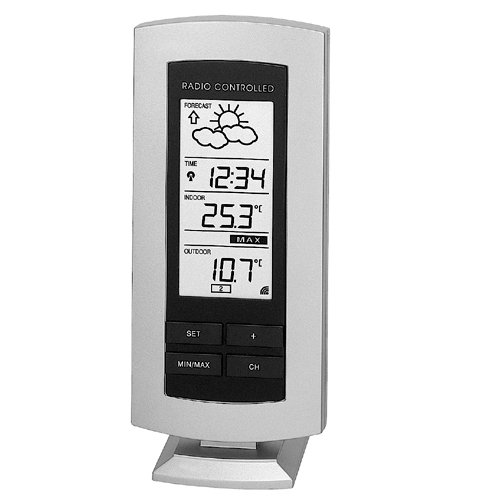
Figure 1: The Technoline WS 7208 Weather Station main unit. This image shows the front display and overall design of the weather station.
2. தொகுப்பு உள்ளடக்கங்கள்
தொகுப்பின் உள்ளடக்கங்களை கவனமாகச் சரிபார்க்கவும். ஏதேனும் பொருட்கள் காணவில்லை அல்லது சேதமடைந்திருந்தால், உங்கள் சில்லறை விற்பனையாளரைத் தொடர்பு கொள்ளவும்.
- Technoline WS 7208 Weather Station (Main Unit)
- TX16 External Transmitter
- அறிவுறுத்தல் கையேடு (இந்த ஆவணம்)
3 அமைவு
3.1. பேட்டரி நிறுவல்
Both the main weather station unit and the external transmitter require batteries for operation.
- முக்கிய அலகு: Open the battery compartment on the back of the main unit. Insert 2 x AA (LR06, stylus) 1.5 V batteries, ensuring correct polarity (+/-). Close the compartment.
- External Transmitter (TX16): Open the battery compartment on the back of the transmitter. Insert 2 x AA (LR06, stylus) 1.5 V batteries, ensuring correct polarity (+/-). Close the compartment.
முக்கியமானது: Always replace all batteries at the same time. Do not mix old and new batteries, or different types of batteries.
3.2. சென்சார் வேலை வாய்ப்பு
Proper placement of the external transmitter is crucial for accurate outdoor temperature readings.
- Place the external transmitter in a shaded, dry location, protected from direct sunlight and rain.
- Ensure the transmitter is within the operational range of the main unit, which is up to 100 meters in an open field. Walls, metal structures, and electronic devices can reduce this range.
- The main unit can be placed on a table or mounted on a wall. Choose a location that allows for easy viewகாட்சியின் ing.
4. இயக்க வழிமுறைகள்
4.1. ஆரம்ப ஒத்திசைவு
After battery installation, the main unit will automatically search for the external transmitter. This process may take a few minutes. Ensure both units are close to each other during initial setup.
- The indoor temperature is displayed immediately.
- Once synchronized, the outdoor temperature will appear on the display.
- The main unit receives data from the external transmitter approximately every 5 minutes.
4.2. தகவல் காட்சி
The display provides various pieces of information:
- உட்புற வெப்பநிலை: பிரதான அலகால் அளவிடப்படுகிறது.
- வெளிப்புற வெப்பநிலை: Received from the external transmitter.
- குறைந்தபட்சம்/அதிகபட்ச வெப்பநிலை: The station automatically records the minimum and maximum indoor and outdoor temperatures. Consult the specific buttons on your device (e.g., "MIN/MAX" button) to view and reset these values.
- வானிலை முன்னறிவிப்பு: Indicated by graphical icons (e.g., sun, clouds, rain) and a trend arrow. This forecast is based on atmospheric pressure changes.
- Radio Alarm Clock: The time is automatically set via radio signal. Refer to the device's buttons for setting alarms and other time-related functions.
4.3. Temperature Measurement Details
The device offers precise temperature measurements:
- உள் வெப்பநிலை வரம்பு: 0°C முதல் 60°C வரை
- External Temperature Range: -29.9°C முதல் +69.9°C வரை
- அளவீட்டு துல்லியம்: ±0.1°C
- Room Temperature Test Interval: ஒவ்வொரு 10 வினாடிகளுக்கும்
5. பராமரிப்பு
- பேட்டரி மாற்று: When the battery indicator appears on the display, replace the batteries in both the main unit and the external transmitter as described in Section 3.1.
- சுத்தம்: Clean the device and transmitter with a soft, damp துணி. சிராய்ப்பு கிளீனர்கள் அல்லது கரைப்பான்களைப் பயன்படுத்த வேண்டாம்.
- சேமிப்பு: சாதனம் நீண்ட காலத்திற்குப் பயன்படுத்தப்படாவிட்டால், கசிவைத் தடுக்க பேட்டரிகளை அகற்றவும்.
6. சரிசெய்தல்
| பிரச்சனை | சாத்தியமான காரணம் | தீர்வு |
|---|---|---|
| No outdoor temperature display (shows "----") |
|
|
| தவறான வானிலை முன்னறிவிப்பு |
|
|
| காட்சி மங்கலாக அல்லது வெறுமையாக உள்ளது | Low batteries in the main unit. | Replace batteries in the main unit. |
7. விவரக்குறிப்புகள்
| அம்சம் | விவரம் |
|---|---|
| மாதிரி | WS7208 |
| Main Unit Dimensions (L x W x H) | 73 x 26 x 169 மிமீ |
| External Transmitter Dimensions (L x W x H) | 59 x 22 x 65 மிமீ |
| Internal Temperature Range | 0°C முதல் 60°C வரை |
| External Temperature Range | -29.9°C முதல் +69.9°C வரை |
| Temperature Measurement Error Margin | ±0.1°C |
| ஈரப்பதம் வரம்பு | 1% to 99% (Error Margin ±1%) |
| Room Temperature Test Interval | ஒவ்வொரு 10 வினாடிகளுக்கும் |
| External Transmitter Data Reception | ஒவ்வொரு 5 நிமிடங்களுக்கும் |
| பரிமாற்ற வரம்பு | 100 மீ வரை (திறந்த மைதானம்) |
| பிரதான அலகு மின்சாரம் | 2 x AA (LR06, stylus) 1.5 V batteries |
| External Transmitter Power Supply | 2 x AA (LR06, stylus) 1.5 V batteries |
| வேலை வாய்ப்பு விருப்பங்கள் | Wall-mounted or table-top |
8. உத்தரவாதம் மற்றும் ஆதரவு
This Technoline WS 7208 Weather Station comes with a 2 வருட உத்தரவாதம் வாங்கிய தேதியிலிருந்து. உத்தரவாதக் கோரிக்கைகளுக்காக உங்கள் வாங்கியதற்கான ஆதாரத்தை வைத்திருங்கள்.
For technical support, troubleshooting assistance, or warranty inquiries, please contact your retailer or the Technoline customer service department. Contact information can typically be found on the product packaging or the manufacturer's official webதளம்.