
அறிமுகம்
The 3Dconnexion SpaceNavigator 3D Mouse is a USB navigation device designed for intuitive control within 3D applications. It enhances the user experience by allowing simultaneous manipulation of camera views and models, facilitating intricate adjustments such as changing direction, zooming, and rotating without interruption. This device is compatible with a wide range of 3D applications across Windows, Mac, and Linux operating systems.

படம் 1: மேலிருந்து கீழ் view of the 3Dconnexion SpaceNavigator 3D Mouse.
முக்கிய அம்சங்கள்:
- Advanced 6 degrees-of-freedom optical sensor for precise control.
- Enables simultaneous pan, zoom, and rotate functionality for 3D models.
- Equipped with 2 programmable function keys for customized shortcuts.
- Includes a commercial use license and full technical support.
- Optimized for 3D designers, CAD engineers, and architects.
அமைவு
To set up your 3Dconnexion SpaceNavigator 3D Mouse, follow these steps:
- சாதனத்தை இணைக்கவும்: Plug the USB cable of the SpaceNavigator into an available USB port on your computer.
- இயக்கிகளை நிறுவவும்: The necessary drivers for your operating system (Windows, Mac, or Linux) are typically installed automatically. If not, please visit the official 3Dconnexion website to download and install the latest drivers for your specific model.
- மென்பொருள் கட்டமைப்பு: After driver installation, the 3Dconnexion software will allow you to customize settings, including sensitivity, button assignments, and application-specific profiles.
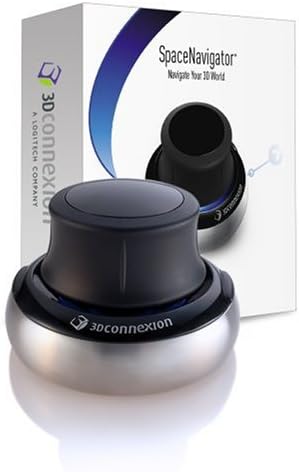
Figure 2: The SpaceNavigator 3D Mouse as it appears in its packaging.
இயக்க வழிமுறைகள்
The SpaceNavigator utilizes a spring-mounted, pressure-sensitive controller cap to provide 6 degrees-of-freedom (6DoF) navigation. This allows for intuitive control of 3D environments and models.

Figure 3: A user's hand demonstrating interaction with the SpaceNavigator's controller cap.
அடிப்படை வழிசெலுத்தல்:
- பான்: Gently push the cap forward, backward, left, or right to move your model or camera view along the X and Y axes.
- பெரிதாக்கு: Pull the cap upwards to zoom out, or push it downwards to zoom in.
- சுழற்று: Twist the cap clockwise or counter-clockwise to rotate your model or camera view around its Z-axis.
- சாய்: Tilt the cap forward, backward, left, or right to tilt your model or camera view, allowing you to look up, down, or sideways.
The unique design allows for combining these movements simultaneously, providing a fluid and efficient navigation experience. For example, you can pan and zoom at the same time, or rotate while tilting.

Figure 4: The SpaceNavigator used in conjunction with a standard mouse for dual-hand workflow.
நிரல்படுத்தக்கூடிய பொத்தான்கள்:
The SpaceNavigator includes two programmable function keys. These can be customized via the 3Dconnexion software to execute frequently used commands or macros within your applications, further streamlining your workflow.
வீடியோ ஆர்ப்பாட்டம்:
Video 1: A demonstration of the 3Dconnexion SpaceNavigator's navigation capabilities within a 3D environment, showcasing pan, zoom, and rotate functions.
பராமரிப்பு
To ensure the longevity and optimal performance of your SpaceNavigator, follow these general maintenance guidelines:
- சுத்தம்: Use a soft, dry, lint-free cloth to clean the device. For stubborn dirt, a slightly damp துணியைப் பயன்படுத்தலாம், ஆனால் ஈரப்பதம் சாதனத்திற்குள் நுழையாமல் பார்த்துக் கொள்ளுங்கள்.
- திரவங்களை தவிர்க்கவும்: Do not immerse the device in water or any cleaning solutions. Avoid spraying cleaners directly onto the device.
- சேமிப்பு: Store the SpaceNavigator in a clean, dry environment when not in use to prevent dust accumulation and potential damage.
சரிசெய்தல்
If you encounter issues with your 3Dconnexion SpaceNavigator, consider the following troubleshooting steps:
- இணைப்புச் சரிபார்ப்பு: Ensure the USB cable is securely plugged into both the SpaceNavigator and your computer. Try a different USB port.
- ஓட்டுநர் சரிபார்ப்பு: Confirm that the latest 3Dconnexion drivers are installed. Reinstalling drivers can often resolve software-related issues.
- பயன்பாட்டு இணக்கத்தன்மை: Verify that your 3D application officially supports 3Dconnexion devices. Check the application's settings for 3D mouse integration.
- மறுதொடக்கம்: Restart your computer and the 3D application.
For further assistance, refer to the Support section below.
விவரக்குறிப்புகள்
| அம்சம் | விவரம் |
|---|---|
| தயாரிப்பு பரிமாணங்கள் | 3 x 3 x 2 அங்குலம் |
| பொருளின் எடை | 1.06 பவுண்டுகள் (479 கிராம்) |
| மாதிரி எண் | 3DX-700028 |
| இணைப்பு | USB (கம்பி) |
| சுதந்திரத்தின் பட்டங்கள் | 6DoF (Pan, Zoom, Rotate, Tilt) |
| நிரல்படுத்தக்கூடிய விசைகள் | 2 |
| இணக்கத்தன்மை | விண்டோஸ், மேக், லினக்ஸ் |
| முதல் தேதி கிடைக்கும் | நவம்பர் 28, 2006 |
| உற்பத்தியாளர் | 3D இணைப்பு |
உத்தரவாதம் மற்றும் ஆதரவு
The 3Dconnexion SpaceNavigator SE model includes a commercial use license and full technical support. For detailed warranty information, product registration, and access to support resources, please visit the official 3Dconnexion webதளம் அல்லது அவர்களின் வாடிக்கையாளர் சேவையை தொடர்பு கொள்ளவும்.
ஆன்லைன் ஆதரவு: www.3dconnexion.com/support