BlackBerry BB 9900 Bold Touch Smartphone User Manual
மாடல்: பிபி 9900
1. அறிமுகம்
This manual provides essential instructions for setting up, operating, and maintaining your BlackBerry BB 9900 Bold Touch smartphone. Please read this guide thoroughly to ensure proper use and to maximize the device's capabilities. The BlackBerry BB 9900 Bold Touch combines a capacitive touchscreen with a full QWERTY keyboard, running on BlackBerry OS 7.
2. தொகுப்பு உள்ளடக்கங்கள்
உங்கள் தொகுப்பில் பின்வரும் உருப்படிகள் உள்ளதா என்பதைச் சரிபார்க்கவும்:
BlackBerry BB 9900 Bold Touch Smartphone
ரிச்சார்ஜபிள் பேட்டரி
வால் சார்ஜர்
USB கேபிள்
பயனர் கையேடு (இந்த ஆவணம்)
3. சாதனம் முடிந்ததுview
Familiarize yourself with the physical features of your BlackBerry BB 9900 Bold Touch.
3.1 முன்னணி View
படம்: முன்பக்கம் view of the BlackBerry BB 9900 Bold Touch, highlighting the 2.8-inch touchscreen and the physical QWERTY keyboard below it. The device also features a trackpad and call/end buttons.
தொடுதிரை காட்சி: 2.8-inch capacitive display for interactive navigation.
QWERTY விசைப்பலகை: Full physical keyboard for efficient typing.
Optical Trackpad: For precise navigation and selection.
Call/End Buttons: Standard telephony controls.
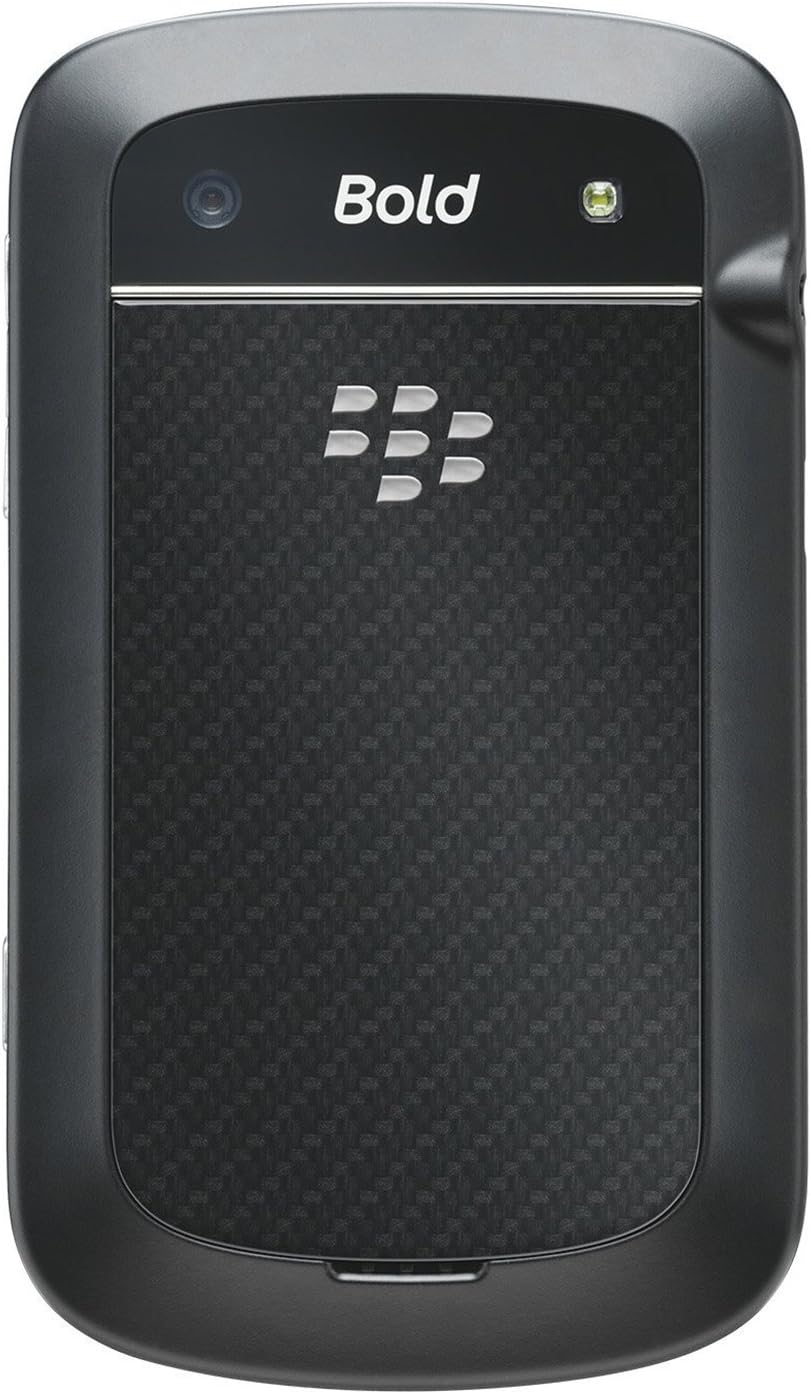
3.2 பின்புறம் View
படம்: பின்புறம் view of the BlackBerry BB 9900 Bold Touch, featuring the 5-megapixel camera lens, LED flash, and the BlackBerry logo.
5MP கேமரா: Primary camera with autofocus and LED flash.
மின்கல உறை: Removable cover for battery and SIM card access.
3.3 பக்கம் View
படம்: பக்கம் view of the BlackBerry BB 9900 Bold Touch, illustrating the placement of the volume control buttons and a customizable convenience key.
Remove the battery cover from the back of the device.
சிம் கார்டு ஸ்லாட்டைக் கண்டறியவும்.
தங்க நிற காண்டாக்ட்கள் கீழே இருக்கும்படியும், வெட்டப்பட்ட மூலை ஸ்லாட்டுடன் சீரமைக்கப்படும்படியும் சிம் கார்டைச் செருகவும்.
Ensure the SIM card is securely in place.
4.2 பேட்டரியைச் செருகுதல்
After inserting the SIM card, align the battery's gold contacts with the contacts in the battery compartment.
பேட்டரி கிளிக் செய்யும் வரை மெதுவாக அழுத்தவும்.
பேட்டரி அட்டையை மாற்றவும்.
4.3 சாதனத்தை சார்ஜ் செய்தல்
Connect the USB cable to the charging port on your device.
Plug the other end of the USB cable into the wall charger, then into a power outlet.
முதல் பயன்பாட்டிற்கு முன் சாதனத்தை முழுமையாக சார்ஜ் செய்ய அனுமதிக்கவும். திரையில் உள்ள பேட்டரி காட்டி சார்ஜிங் நிலையைக் காண்பிக்கும்.
4.4 பவர் ஆன்/ஆஃப்
பவர் ஆன் செய்ய: Press and hold the Power/Lock button (usually located on the top edge) until the BlackBerry logo appears.
பவர் ஆஃப் செய்ய: Press and hold the Power/Lock button until the 'Power Off' option appears on the screen. Tap 'Power Off' to confirm.
5. இயக்க வழிமுறைகள்
5.1 தொடுதிரை வழிசெலுத்தல்
தட்டவும்: Touch the screen briefly to open applications, select items, or activate buttons.
ஸ்வைப்: Drag your finger across the screen to scroll through lists or switch between home screen panels.
பெரிதாக்க பின்ச்: Use two fingers to zoom in or out on photos, web பக்கங்கள் அல்லது வரைபடங்கள்.
5.2 QWERTY விசைப்பலகையைப் பயன்படுத்துதல்
The physical QWERTY keyboard allows for fast and accurate text entry. Each key corresponds to a letter, number, or symbol. Use the 'Alt' key for alternate characters and the 'Shift' key for capitalization.
5.3 அழைப்புகளைச் செய்தல்
From the home screen, tap the Phone icon or press the green Call button.
Enter the phone number using the keyboard.
Press the green Call button to initiate the call.
To end a call, press the red End Call button.
5.4 செய்திகளை அனுப்புதல்
Tap the Messages icon from the home screen.
Select 'Compose New' or similar option.
பெறுநரின் எண்ணை உள்ளிடவும் அல்லது தொடர்புகளிலிருந்து தேர்ந்தெடுக்கவும்.
Type your message using the QWERTY keyboard.
Tap 'Send'.
5.5 கேமராவைப் பயன்படுத்துதல்
கேமரா பயன்பாட்டைத் திறக்க கேமரா ஐகானைத் தட்டவும்.
திரையைப் பயன்படுத்தி உங்கள் ஷாட்டை ஃபிரேம் செய்யுங்கள்: viewகண்டுபிடிப்பாளர்.
Tap the screen or press the convenience key (if configured) to take a photo.
The 5MP camera features autofocus and an LED flash for improved image quality.
5.6 Wi-Fi உடன் இணைக்கிறது
Go to 'Options' > 'Networks and Connections' > 'Wi-Fi'.
Turn Wi-Fi on. The device will scan for available networks.
Once connected, the Wi-Fi indicator will appear in the status bar.
5.7 Using NFC (Near Field Communication)
The BlackBerry BB 9900 Bold Touch supports NFC for short-range wireless communication. This allows for quick pairing with compatible accessories or sharing data with other NFC-enabled devices by tapping them together.
உங்கள் சாதன அமைப்புகளில் NFC இயக்கப்பட்டுள்ளதை உறுதிசெய்யவும்.
Hold your device close to another NFC-enabled device or tag.
Follow on-screen prompts to complete the desired action (e.g., pairing, data transfer).
6. பராமரிப்பு
6.1 உங்கள் சாதனத்தை சுத்தம் செய்தல்
Use a soft, lint-free cloth to wipe the screen and body of the device.
கடுமையான இரசாயனங்கள், சிராய்ப்பு கிளீனர்கள் அல்லது ஏரோசல் ஸ்ப்ரேக்களைப் பயன்படுத்துவதைத் தவிர்க்கவும்.
சாதனத்தை அதிக ஈரப்பதத்திற்கு வெளிப்படுத்த வேண்டாம்.
6.2 பேட்டரி பராமரிப்பு
பேட்டரி செயல்திறனைக் குறைக்கும் தீவிர வெப்பநிலையைத் தவிர்க்கவும்.
Use only the original or approved charger.
பேட்டரியை பஞ்சர் செய்யவோ அல்லது சேதப்படுத்தவோ வேண்டாம்.
6.3 மென்பொருள் புதுப்பிப்புகள்
Periodically check for software updates to ensure your device has the latest features and security enhancements. Updates can typically be found in the device's 'Options' or 'Settings' menu under 'Software Updates'.
Connect the device to the charger and wait a few minutes before attempting to power on again.
If the issue persists, try removing and reinserting the battery.
7.2 நெட்வொர்க் இணைப்பு சிக்கல்கள்
Check if your SIM card is correctly inserted and activated with your carrier.
Verify that cellular data or Wi-Fi is enabled in your device settings.
சாதனத்தை மறுதொடக்கம் செய்யுங்கள்.
If using Wi-Fi, ensure your router is working and you have entered the correct password.
7.3 தொடுதிரை பதிலளிக்கவில்லை
சாதனத்தை மறுதொடக்கம் செய்யுங்கள்.
திரை சுத்தமாகவும், குப்பைகள் அல்லது ஈரப்பதம் இல்லாமல் இருப்பதையும் உறுதிசெய்யவும்.
If the issue is intermittent, check for any recent software installations that might be causing conflicts.
8. விவரக்குறிப்புகள்
அம்சம்
விவரம்
மாதிரி பெயர்
பிபி 9900
இயக்க முறைமை
பிளாக்பெர்ரி ஓஎஸ் 7
காட்சி
2.8-inch Capacitive Touchscreen, 640 x 480 Resolution
செயலி
Not specified (typically 1.2 GHz for this model)
ரேம்
768 எம்பி
உள் சேமிப்பு
8 ஜிபி
பின்புற கேமரா
5 MP, Autofocus, LED Flash
இணைப்பு
Wi-Fi 802.11 b/g/n, NFC, Bluetooth, GPS
பிணைய ஆதரவு
Quad-band GSM/GPRS/EDGE, Tri-band HSPA+
பரிமாணங்கள்
4.53 x 2.6 x 0.41 அங்குலம் (115 x 66 x 10.5 மிமீ)
எடை
4.6 அவுன்ஸ் (130 கிராம்)
ஆடியோ ஜாக்
3.5 மி.மீ
9. ஆதரவு மற்றும் உத்தரவாதம்
9.1 வாடிக்கையாளர் ஆதரவு
For technical assistance, troubleshooting beyond this manual, or service inquiries, please visit the official BlackBerry support website or contact your local service provider. Refer to the packaging or official webகுறிப்பிட்ட தொடர்பு விவரங்களுக்கான தளம்.
9.2 உத்தரவாதத் தகவல்
Your BlackBerry BB 9900 Bold Touch is covered by a limited warranty. Please refer to the warranty card included in your product packaging or visit the official BlackBerry webஉத்தரவாத காலம் மற்றும் கவரேஜ் விவரங்கள் உட்பட விரிவான விதிமுறைகள் மற்றும் நிபந்தனைகளுக்கு தளத்தைப் பார்வையிடவும். உத்தரவாதக் கோரிக்கைகளுக்கு உங்கள் வாங்கியதற்கான ஆதாரத்தை வைத்திருங்கள்.
Ask a question about this manual
Ask about setup, troubleshooting, compatibility, parts, safety, or missing instructions. Manuals+ will review the question and use this page’s manual context to help answer it.