
அறிமுகம்
The Jabra Music Street2 Bluetooth Stereo Headset is designed to provide high-quality audio and hands-free communication. This manual provides essential information for the proper use, maintenance, and troubleshooting of your device. Please read it carefully before use.
அமைவு
1. ஹெட்செட்டை சார்ஜ் செய்தல்
Before first use, fully charge the headset. Connect the micro-USB charging cable to the charging port on the headset and the other end to a USB power source.
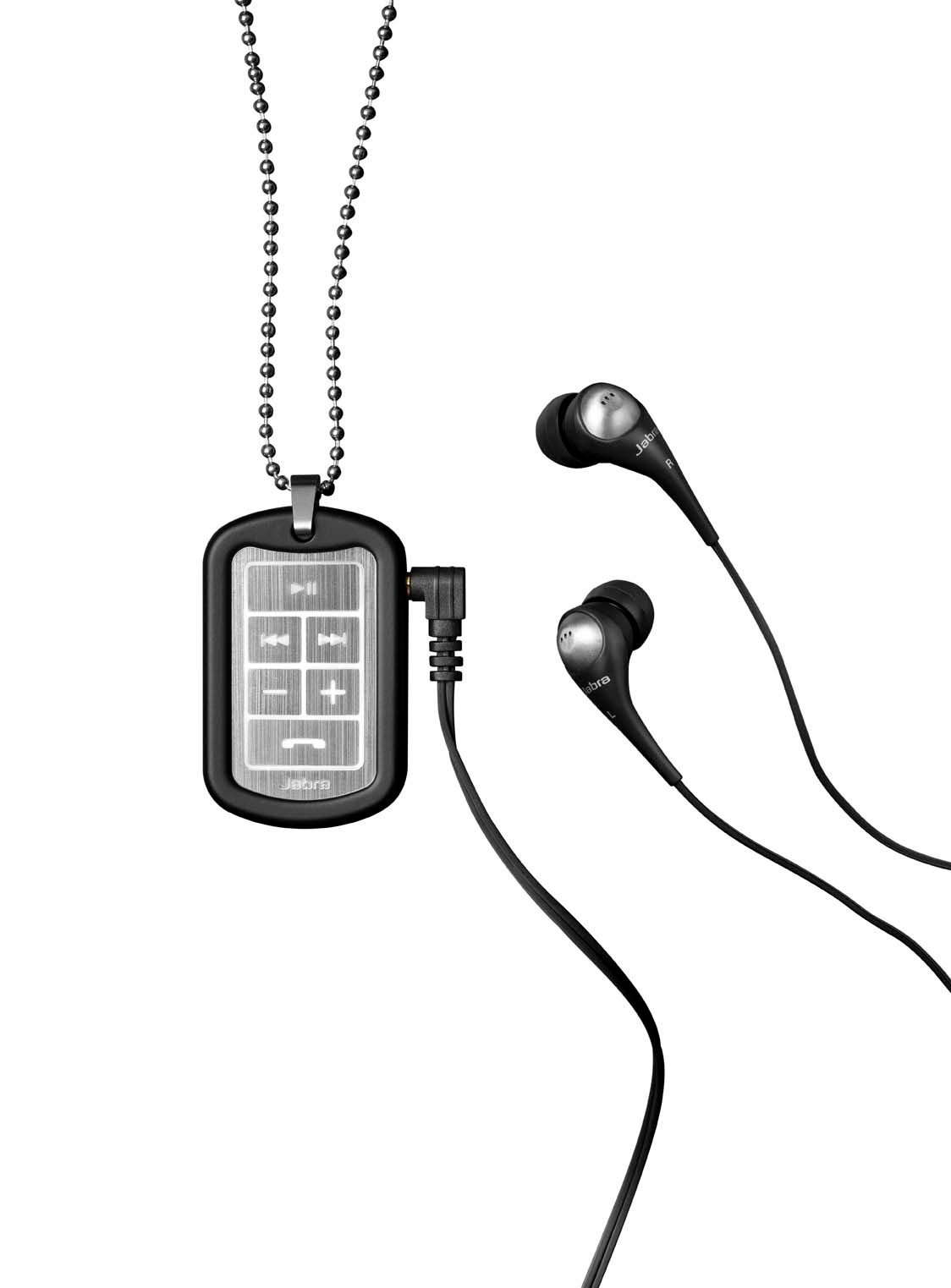
Image: The Jabra Music Street2 headset, highlighting the micro-USB charging port located on the side of the control unit.
- முழு சார்ஜ் பொதுவாக தோராயமாக 2 மணிநேரம் ஆகும்.
- LED காட்டி சார்ஜிங் நிலையைக் காண்பிக்கும் (எ.கா., சார்ஜ் செய்வதற்கு சிவப்பு, முழுமையாக சார்ஜ் செய்யப்பட்டதற்கு நீலம்).
2. புளூடூத் சாதனத்துடன் இணைத்தல்
- ஹெட்செட் அணைக்கப்பட்டுள்ளதா என்பதை உறுதிப்படுத்தவும்.
- Press and hold the Multi-function button (usually the play/pause button) for approximately 5-7 seconds until the LED indicator flashes blue rapidly. This indicates pairing mode.
- உங்கள் புளூடூத்-இயக்கப்பட்ட சாதனத்தில் (ஸ்மார்ட்போன், டேப்லெட், முதலியன), புளூடூத் அமைப்புகளுக்குச் சென்று புளூடூத்தை இயக்கவும்.
- தேடுங்கள் available devices. "Jabra Street2" should appear in the list.
- Select "Jabra Street2" to connect. If prompted for a passcode, enter "0000" (four zeros).
- வெற்றிகரமாக இணைக்கப்பட்டதும், LED காட்டி மெதுவாக நீல நிறத்தில் ஒளிரும்.
The headset can remember multiple paired devices but can only be connected to one at a time.
இயக்க வழிமுறைகள்
பவர் ஆன்/ஆஃப்
- பவர் ஆன்: Press and hold the Multi-function button until the LED flashes blue.
- பவர் ஆஃப்: Press and hold the Multi-function button until the LED flashes red and then turns off.
இசை கட்டுப்பாடு
- விளையாடு/இடைநிறுத்தம்: பல செயல்பாட்டு பொத்தானை ஒரு முறை அழுத்தவும்.
- அடுத்த ட்ராக்: Press the "Next Track" button (usually marked with a forward arrow).
- முந்தைய ட்ராக்: Press the "Previous Track" button (usually marked with a backward arrow).
- ஒலியை பெருக்கு: "+" பொத்தானை அழுத்தவும்.
- ஒலியை குறை: "-" பொத்தானை அழுத்தவும்.
அழைப்பு மேலாண்மை
- பதில் அழைப்பு: பல செயல்பாட்டு பொத்தானை ஒரு முறை அழுத்தவும்.
- அழைப்பை முடிக்கவும்: அழைப்பின் போது பல செயல்பாட்டு பொத்தானை ஒரு முறை அழுத்தவும்.
- அழைப்பை நிராகரி: மல்டி ஃபங்க்ஷன் பட்டனை 2 வினாடிகள் அழுத்திப் பிடிக்கவும்.
- கடைசி எண்ணை மீண்டும் அனுப்பவும்: அழைப்பில் இல்லாதபோது, மல்டி-ஃபங்க்ஷன் பட்டனை இருமுறை அழுத்தவும்.
- குரல் டயலிங்: Press the Multi-function button once when not on a call (if supported by your phone).
The headset automatically switches between music and calls.
பராமரிப்பு
- Keep the headset dry. Moisture can damage the electronic circuits.
- Avoid extreme temperatures. High temperatures can shorten the life of electronic devices, damage batteries, and warp or melt certain plastics.
- Do not attempt to open the headset. Unauthorized modifications can damage the unit and void your warranty.
- Clean the headset with a soft, dry cloth. Do not use harsh chemicals or detergents.
- Store the headset in a cool, dry place when not in use for extended periods.
சரிசெய்தல்
சக்தி இல்லை
- Ensure the headset is fully charged. Connect it to a power source and check the charging indicator.
சாதனத்துடன் இணைக்க முடியாது
- Make sure the headset is in pairing mode (LED flashing blue rapidly).
- Ensure Bluetooth is enabled on your device and it is within range (typically 10 meters or 33 feet).
- Try turning off and on both the headset and your Bluetooth device.
- If previously paired, try deleting "Jabra Street2" from your device's Bluetooth list and re-pairing.
ஒலி அல்லது மோசமான ஒலி தரம் இல்லை
- ஹெட்செட் மற்றும் இணைக்கப்பட்ட சாதனம் இரண்டிலும் ஒலி அளவுகளைச் சரிபார்க்கவும்.
- ஹெட்செட் உங்கள் சாதனத்துடன் சரியாக இணைக்கப்பட்டுள்ளதா என்பதை உறுதிப்படுத்தவும்.
- குறுக்கீட்டைத் தவிர்க்க உங்கள் சாதனத்திற்கு அருகில் செல்லவும்.
- Ensure the ear buds are correctly inserted and fit snugly to block external noise.
Calls Not Switching Automatically
- Verify that the headset is the active audio device for calls on your phone's Bluetooth settings.
- Some phone models may require manual selection of the audio output during a call.
விவரக்குறிப்புகள்
| மாதிரி பெயர் | Jabra Music Street2 |
| புளூடூத் பதிப்பு | 3.0 + EDR |
| வயர்லெஸ் வீச்சு | 10 மீட்டர் (33 அடி) வரை |
| பேச்சு நேரம் | 8 மணி நேரம் வரை |
| காத்திருப்பு நேரம் | 9.5 நாட்கள் வரை |
| சார்ஜிங் நேரம் | சுமார் 2 மணி நேரம் |
| இணைப்பு | Bluetooth, 3.5 mm Jack (for wired connection if applicable) |
| அம்சங்கள் | Virtual surround sound, power bass, noise-blocking ear buds, automatic music/call switching |
உத்தரவாதம் & ஆதரவு
Jabra products are covered by a limited warranty. For specific warranty terms and conditions, please refer to the warranty card included with your product or visit the official Jabra webதளம்.
For technical support, frequently asked questions, or to download the latest software/firmware updates, please visit the official Jabra support page:
You may also contact Jabra customer service directly for assistance.