
Keystone KSTAD70B
Keystone KSTAD70B 70-Pint Dehumidifier User Manual
1. அறிமுகம்
This manual provides essential information for the safe and efficient operation of your Keystone KSTAD70B 70-Pint Dehumidifier. This unit is designed to remove up to 70 pints of moisture from the air daily, suitable for rooms up to 4500 square feet. Key features include electronic controls with an LED display, a 24-hour timer, a transparent water level indicator, and a full bucket alert with automatic shutoff. It also offers a continuous draining option and a removable, easy-to-clean dust filter with a clean-filter alert. The auto-restart function preserves your settings after a power outage, and rolling casters facilitate easy movement.
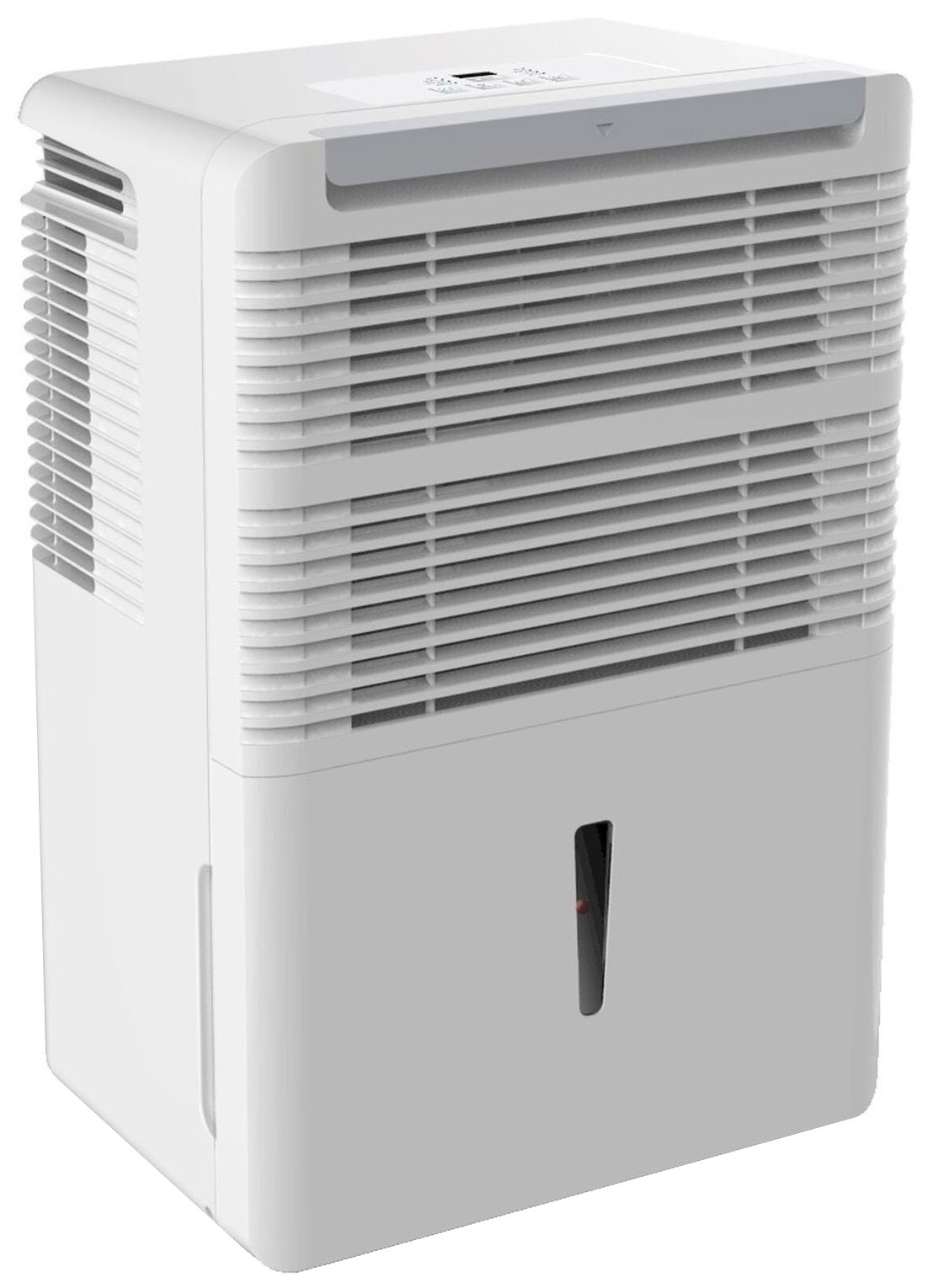
படம் 1: முன் view of the Keystone KSTAD70B Dehumidifier.
2. பாதுகாப்பு தகவல்
காயம் அல்லது சேதத்தைத் தடுக்க ஈரப்பதமூட்டியை இயக்குவதற்கு முன் அனைத்து பாதுகாப்பு வழிமுறைகளையும் படிக்கவும். எதிர்கால குறிப்புக்காக இந்த கையேட்டை வைத்திருங்கள்.
- Always connect the unit to a properly grounded electrical outlet of the correct voltage.
- சேதமடைந்த மின் கம்பி அல்லது பிளக் மூலம் யூனிட்டை இயக்க வேண்டாம்.
- Ensure adequate clearance (at least 12-18 inches) around the air intake and outlet to prevent overheating and ensure efficient operation.
- காற்று துவாரங்களைத் தடுக்க வேண்டாம்.
- Do not use the dehumidifier near water or in excessively wet environments.
- சுத்தம் செய்வதற்கு முன் அல்லது பராமரிப்பு செய்வதற்கு முன் யூனிட்டைத் துண்டிக்கவும்.
- இந்த சாதனம் அவர்களின் பாதுகாப்பிற்குப் பொறுப்பான ஒருவரால் உபகரணத்தைப் பயன்படுத்துவது தொடர்பான மேற்பார்வை அல்லது அறிவுறுத்தல் வழங்கப்படாவிட்டால், குறைந்த உடல், உணர்ச்சி அல்லது மன திறன்கள் அல்லது அனுபவம் மற்றும் அறிவு இல்லாமை கொண்ட நபர்கள் (குழந்தைகள் உட்பட) பயன்படுத்துவதை நோக்கமாகக் கொண்டிருக்கவில்லை.
- Do not use chemical solvents or abrasive cleaners on the unit.
3. அமைப்பு மற்றும் வேலை வாய்ப்பு
3.1 பேக்கிங்
ஈரப்பதமூட்டியை அதன் பேக்கேஜிங்கிலிருந்து கவனமாக அகற்றவும். எதிர்கால சேமிப்பு அல்லது போக்குவரத்துக்காக பேக்கேஜிங் பொருட்களை வைத்திருங்கள். ஏதேனும் கப்பல் சேதம் உள்ளதா என யூனிட்டை ஆய்வு செய்யவும்.
3.2 வேலை வாய்ப்பு
For optimal performance, place the dehumidifier in a location where air can circulate freely around it. The unit circulates air from the sides, not the top. Therefore, avoid placing it directly in a corner or against walls. Maintain a minimum clearance of 12-18 inches (30-45 cm) on all sides to ensure proper airflow.
3.3 ஆரம்ப பவர் ஆன்
மின் கம்பியை தரையிறக்கப்பட்ட மின் நிலையத்தில் செருகவும். இப்போது அலகு செயல்படத் தயாராக உள்ளது.
4. இயக்க வழிமுறைகள்
4.1 கண்ட்ரோல் பேனல் முடிந்துவிட்டதுview

Figure 2: Control panel of the Keystone KSTAD70B Dehumidifier.
The control panel features an LED display and various buttons for setting the dehumidifier's functions:
- பவர் பட்டன்: யூனிட்டை ஆன் அல்லது ஆஃப் செய்கிறது.
- ரசிகர் பட்டன்: Adjusts fan speed (typically Low, Medium, High).
- டைமர் பட்டன்: 24 மணிநேர ஆன்/ஆஃப் டைமரை அமைக்கிறது.
- மேல்/கீழ் அம்புகள்: Adjust humidity level settings or timer duration.
- வடிகட்டி காட்டி: காற்று வடிகட்டியை சுத்தம் செய்ய வேண்டியிருக்கும் போது ஒளிரும்.
- முழு காட்டி: Illuminates when the water bucket is full and needs emptying.
- Cont. (Continuous) Indicator: Illuminates when the unit is set for continuous operation.
- டர்போ பயன்முறை: Activates maximum dehumidification.
- இயல்பான பயன்முறை: நிலையான ஈரப்பத நீக்க செயல்பாடு.
- ஆட்டோ டிஃப்ராஸ்ட்: Automatically defrosts the coils if ice builds up.
4.2 விரும்பிய ஈரப்பத அளவை அமைத்தல்
Press the Up or Down arrow buttons to set your desired humidity level. The unit will operate until the set humidity is reached, then cycle on and off to maintain it. The recommended humidity range for comfort is typically between 45% and 55%.
4.3 தொடர்ச்சியான செயல்பாடு
To run the dehumidifier continuously, select the 'Cont.' setting. In this mode, the unit will operate regardless of the ambient humidity level. Note that when continuous operation is selected, the humidity setpoint buttons will not respond.
4.4 டைமர் செயல்பாடு
Use the Timer button to program the unit to turn on or off automatically after a set number of hours (up to 24 hours).
4.5 Auto-Restart
The unit features an auto-restart function that saves your settings. In the event of a power outage, மின்சாரம் மீட்டமைக்கப்பட்டவுடன், ஈரப்பதமூட்டி தானாகவே கடைசி அமைப்புகளுடன் மீண்டும் செயல்படும்.
5. பராமரிப்பு
வழக்கமான பராமரிப்பு உங்கள் ஈரப்பதமூட்டியின் உகந்த செயல்திறன் மற்றும் நீண்ட ஆயுளை உறுதி செய்கிறது.
5.1 தண்ணீர் வாளியை காலி செய்தல்
When the water bucket is full, the 'Full' indicator light will illuminate, and the unit will automatically shut off. Carefully remove the bucket and empty the collected water. Reinsert the bucket firmly until it clicks into place to resume operation.

Figure 3: Removing the water collection bucket.

Figure 4: Transparent water level indicator.
5.2 Continuous Draining Option
For continuous operation without emptying the bucket, you can connect a standard garden hose (not included) to the unit's low-level drain. The unit includes an adapter with a clear hose that pushes onto a smooth plastic fitting inside the unit. This adapter has male hose threads for attaching a garden hose. Ensure the hose is routed downwards to a suitable drain to allow gravity to remove the water.
5.3 காற்று வடிகட்டியை சுத்தம் செய்தல்
The 'Filter' indicator light will remind you when it's time to clean the air filter. A clean filter ensures efficient operation and better air quality. To clean, lift the filter straight up from the top at the front corner of the unit and slide it out. Wash the filter with warm, soapy water, rinse thoroughly, and allow it to air dry completely before reinserting.

Figure 5: Removing the air filter for cleaning.
6. சரிசெய்தல்
ஆதரவைத் தொடர்புகொள்வதற்கு முன், இந்த பொதுவான சரிசெய்தல் படிகளை முயற்சிக்கவும்:
| பிரச்சனை | சாத்தியமான காரணம் | தீர்வு |
|---|---|---|
| ஈரப்பதமூட்டி இயக்கப்படவில்லை. | No power; power cord loose; 'Full' indicator on. | Check power supply; ensure cord is plugged in; empty water bucket. |
| அலகு இயங்குகிறது ஆனால் ஈரப்பதத்தை குறைக்காது. | Air filter clogged; room temperature too low; unit size too small for area. | Clean air filter; ensure room temperature is above 41°F (5°C); consider unit placement. |
| அலகு சத்தமாக உள்ளது. | அலகு சமமாக இல்லை; விசிறி அடைப்பு. | Place on a flat, stable surface; check for obstructions in fan area. |
| யூனிட்டில் இருந்து தண்ணீர் கசிகிறது. | Water bucket not properly seated; continuous drain hose loose or clogged. | Ensure bucket is fully inserted; check continuous drain hose connection and clear any blockages. |
7. விவரக்குறிப்புகள்
| அம்சம் | விவரம் |
|---|---|
| பிராண்ட் | கீஸ்டோன் |
| மாதிரி பெயர் | KSTAD70B |
| டிஹைமிடிஃபிகேஷன் திறன் | ஒரு நாளைக்கு 70 பைண்டுகள் |
| பரிந்துரைக்கப்பட்ட அறை அளவு | 4500 சதுர அடி வரை |
| நிறம் | வெள்ளை |
| சிறப்பு அம்சங்கள் | Automatic Restart, Automatic Shutoff |
| வேகங்களின் எண்ணிக்கை | 3 |
| செயல்பாட்டு முறை | Normal, Turbo, Auto-Defrost |
| வாட்tage | 720 வாட்ஸ் |
| பொருளின் எடை | 40 பவுண்டுகள் |
| தயாரிப்பு பரிமாணங்கள் (L x W x H) | 11.25 x 15.5 x 23.25 அங்குலம் |
| பரிந்துரைக்கப்பட்ட பயன்பாடுகள் | குடியிருப்பு |
8. உத்தரவாதத் தகவல்
The Keystone KSTAD70B Dehumidifier comes with a 1 வருட உத்தரவாதம் on parts and labor, and a வரையறுக்கப்பட்ட 5 ஆண்டு உத்தரவாதம் on the sealed system. Please refer to the physical warranty card included with your product for full terms and conditions.
9. வாடிக்கையாளர் ஆதரவு
For product registration, warranty claims, or technical assistance, please refer to the contact information provided in the physical instruction manual that came with your dehumidifier. Online registration or direct manufacturer contact information may not be readily available; therefore, retaining your original manual is important for support inquiries.
Ask a question about this manual
Ask about setup, troubleshooting, compatibility, parts, safety, or missing instructions. Manuals+ will review the question and use this page’s manual context to help answer it.