
1. அறிமுகம்
This manual provides detailed instructions for the installation, operation, and maintenance of the Simplex E-Plex 5700 Cylindrical Prox Lock, model E5731BWL-626-41. This advanced electronic lock offers secure access control through proximity card/fob and keypad entry, featuring robust audit trail capabilities. Please read this manual thoroughly before installation and use to ensure proper function and longevity of your lock.
2. பாதுகாப்பு தகவல்
Always follow basic safety precautions to reduce the risk of injury or damage. This lock is designed for indoor use unless otherwise specified. Do not expose the lock to extreme temperatures, moisture, or corrosive substances. Only use specified components and tools for installation. Unauthorized modifications may void the warranty and compromise security.
3. தொகுப்பு உள்ளடக்கங்கள்
நிறுவலைத் தொடங்குவதற்கு முன் அனைத்து கூறுகளும் உள்ளனவா என்பதைச் சரிபார்க்கவும்:
- Simplex E-Plex 5700 Cylindrical Prox Lock Assembly
- மவுண்டிங் ஹார்டுவேர் கிட்
- நிறுவல் வார்ப்புரு
- பயனர் கையேடு (இந்த ஆவணம்)
- நிரலாக்க வழிகாட்டி
- SFIC Cylinder Prep (less core)
4. அமைவு மற்றும் நிறுவல்
4.1 முன் நிறுவல் சோதனைகள்
Ensure the door is suitable for a cylindrical lock. The door thickness should be between 1-3/8" (35mm) and 2-1/4" (57mm). Verify the backset measurement is 2-3/4" (70mm).
4.2 இயந்திர நிறுவல்
- கதவை தயார் செய்யுங்கள்: Use the provided template to mark and drill holes for the lockset and latch assembly.
- தாழ்ப்பாளை நிறுவவும்: Insert the latch into the door edge and secure it with screws. Ensure the latch bolt operates smoothly.
- Install Outside Housing: Feed the cable from the outside housing through the door hole. Position the outside housing flush against the door.
- Install Inside Housing: Connect the cable from the outside housing to the inside housing. Align the inside housing with the mounting posts and secure it with screws.
- Insert SFIC Core: If using an SFIC core, insert it into the cylinder housing.
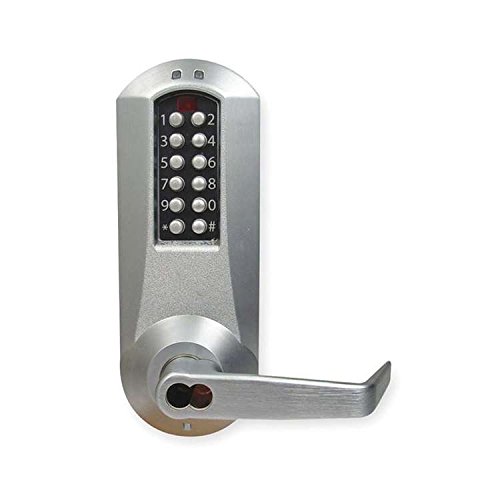
Image 1: Simplex E-Plex 5700 Cylindrical Prox Lock. This image displays the front view of the lock, highlighting its keypad and proximity reader area, along with the cylindrical design for door installation.
4.3 ஆரம்ப நிரலாக்கம்
Upon first power-up, the lock will require a Master Code to be set. Refer to the separate Programming Guide for detailed steps on setting the Master Code, adding/deleting user codes, and enrolling proximity cards/fobs.
5. இயக்க வழிமுறைகள்
5.1 Unlocking with Proximity Card/Fob
Present an enrolled proximity card or fob to the reader area on the outside housing. The lock will emit an audible signal and the LED will illuminate green, indicating successful access. Turn the lever to open the door.
5.2 Unlocking with Code
Enter a valid user code on the keypad, followed by the # key. The lock will emit an audible signal and the LED will illuminate green, indicating successful access. Turn the lever to open the door.
5.3 பூட்டுதல் பொறிமுறை
The lock automatically re-locks after a preset time (typically 5 seconds) once the door is closed or the lever is released. No action is required to re-lock the door.
5.4 Audit Trail Retrieval
The E-Plex 5700 stores up to 30,000 audit events. To retrieve audit trail data, specialized software and a data transfer device (sold separately) are required. Consult the Programming Guide for detailed instructions on audit trail management.
6. பராமரிப்பு
6.1 பேட்டரி மாற்று
The lock is powered by batteries (typically AA alkaline, quantity varies by model). When the batteries are low, the lock will provide a low battery warning (e.g., specific LED flash or audible tone) upon entry. Replace all batteries simultaneously with new, high-quality alkaline batteries. Refer to the Programming Guide for specific battery compartment access.
6.2 சுத்தம் செய்தல்
பூட்டின் வெளிப்புறத்தை மென்மையான, d துணியால் சுத்தம் செய்யவும்.amp cloth. Do not use abrasive cleaners, solvents, or chemical sprays, as these can damage the finish and electronic components.
7. சரிசெய்தல்
- பூட்டு பதிலளிக்கவில்லை: Check battery levels. Replace batteries if necessary. Ensure the cable connection between the inside and outside housings is secure.
- Code Not Working: Verify the code is entered correctly, followed by the # key. Ensure the code is active and has not expired. Check if the lock is in a lockout or passage mode.
- Proximity Card Not Recognized: Ensure the card is enrolled in the lock's memory. Present the card firmly and directly to the reader. Check for interference from other RFID devices.
- Lever Does Not Turn: Check for any obstructions in the door or latch mechanism. Ensure the lock is receiving power and is not in a locked state.
- இடைப்பட்ட செயல்பாடு: This may indicate low batteries or a loose connection. Replace batteries or re-check wiring.
8. விவரக்குறிப்புகள்
| அம்சம் | விவரம் |
|---|---|
| மாதிரி எண் | E5731BWL-626-41 |
| பூட்டு வகை | Cylindrical Prox Lock |
| அணுகல் குறியீடுகள் | 3,000 வரை |
| தணிக்கை நிகழ்வுகள் | 30,000 வரை |
| Cylinder Prep | 6/7-Pin SFIC Prep (Less Core) |
| பேக்ஸெட் | 2-3/4" (70மிமீ) |
| தாழ்ப்பாள் வீசுதல் | 1/2" (13மிமீ) |
| முடிக்கவும் | சாடின் குரோம் |
| சக்தி ஆதாரம் | Battery Operated (Type and quantity not specified, typically AA) |
9. உத்தரவாதத் தகவல்
Simplex products are backed by a manufacturer's warranty against defects in materials and workmanship. The specific terms and duration of the warranty may vary. Please retain your proof of purchase. For detailed warranty information, refer to the documentation included with your product or visit the official Simplex webதளம்.
10. ஆதரவு
For technical assistance, troubleshooting, or further inquiries regarding your Simplex E-Plex 5700 lock, please contact Simplex customer support. Contact information can typically be found on the manufacturer's webதளத்தில் அல்லது தயாரிப்பு பேக்கேஜிங்கில்.
ஆன்லைன் ஆதாரங்கள்: www.simplex.com