
1. அறிமுகம்
Thank you for choosing the Makita HP457DWE 18V Cordless Hammer Drill Driver. This tool is designed for drilling in wood, metal, and plastic, as well as for hammer drilling in masonry and for screwdriving tasks. This manual provides essential information for safe operation, maintenance, and troubleshooting to ensure optimal performance and longevity of your tool.
2. பொது பாதுகாப்பு வழிமுறைகள்
தீ, மின்சார அதிர்ச்சி மற்றும் தனிப்பட்ட காயம் ஏற்படும் அபாயத்தைக் குறைக்க மின்சார கருவிகளைப் பயன்படுத்தும் போது எப்போதும் அடிப்படை பாதுகாப்பு முன்னெச்சரிக்கை நடவடிக்கைகளைப் பின்பற்றவும்.
- வேலை பகுதி பாதுகாப்பு: உங்கள் பணியிடத்தை சுத்தமாகவும், நல்ல வெளிச்சத்துடனும் வைத்திருங்கள். இரைச்சலான அல்லது இருண்ட பகுதிகள் விபத்துக்களை அழைக்கின்றன. எரியக்கூடிய திரவங்கள், வாயுக்கள் அல்லது தூசி போன்ற வெடிக்கும் வளிமண்டலங்களில் மின் கருவிகளை இயக்க வேண்டாம்.
- மின் பாதுகாப்பு: குழாய்கள், ரேடியேட்டர்கள், ரேஞ்ச்கள் மற்றும் குளிர்சாதன பெட்டிகள் போன்ற மண் அல்லது தரையிறக்கப்பட்ட மேற்பரப்புகளுடன் உடல் தொடர்பைத் தவிர்க்கவும். மழை அல்லது ஈரமான சூழ்நிலைகளில் மின் கருவிகளை வெளிப்படுத்த வேண்டாம்.
- தனிப்பட்ட பாதுகாப்பு: எப்போதும் கண் பாதுகாப்பு அணியுங்கள். சுத்தியல் பயிற்சிகளை இயக்கும்போது காது கேட்கும் பாதுகாப்பைப் பயன்படுத்துங்கள். ஒழுங்காக உடை அணியுங்கள்; தளர்வான ஆடைகள் அல்லது நகைகளைத் தவிர்க்கவும். நீண்ட முடியைப் பாதுகாக்கவும்.
- கருவி பயன்பாடு மற்றும் பராமரிப்பு: மின் கருவியை வலுக்கட்டாயமாகப் பயன்படுத்த வேண்டாம். உங்கள் பயன்பாட்டிற்கு ஏற்ற சரியான மின் கருவியைப் பயன்படுத்தவும். ஏதேனும் மாற்றங்களைச் செய்வதற்கு முன், துணைக்கருவிகளை மாற்றுவதற்கு முன் அல்லது மின் கருவிகளைச் சேமிப்பதற்கு முன், மின் கருவியிலிருந்து பேட்டரி பேக்கைத் துண்டிக்கவும்.
- பேட்டரி கருவி பயன்பாடு மற்றும் பராமரிப்பு: உற்பத்தியாளரால் குறிப்பிடப்பட்ட சார்ஜரைப் பயன்படுத்தி மட்டுமே ரீசார்ஜ் செய்யவும். குறிப்பாக நியமிக்கப்பட்ட பேட்டரி பேக்குகளுடன் மட்டுமே மின் கருவிகளைப் பயன்படுத்தவும்.
3. தொகுப்பு உள்ளடக்கங்கள்
பிரித்தெடுக்கும் போது அனைத்து பொருட்களும் உள்ளனவா மற்றும் நல்ல நிலையில் உள்ளனவா என்பதை சரிபார்க்கவும்.
- 1 x Makita HP457DWE Cordless Hammer Drill Driver
- 2 x 18V 1.5 Ah Li-ion Batteries (BL1813G)
- 1 x DC18WA Charger
- 1 x Transport Case
- 1 x Double-ended bit (PH2 and S5 flat)
4. தயாரிப்பு முடிந்துவிட்டதுview
Familiarize yourself with the main components of your Makita HP457DWE drill driver.
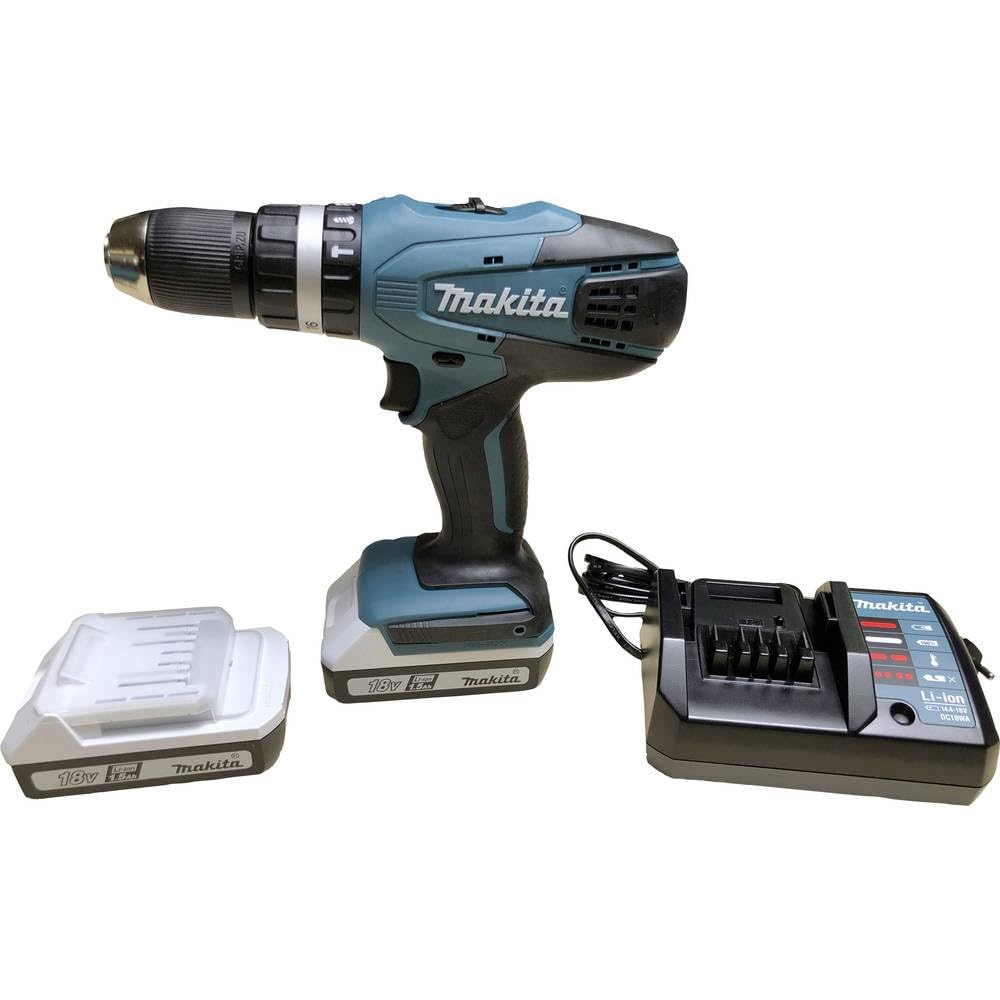
The Makita HP457DWE 18V Cordless Hammer Drill Driver, shown with its battery attached.
முக்கிய கூறுகள்:
- கீலெஸ் சக்: விரைவான மற்றும் எளிதான பிட் மாற்றங்களுக்கு.
- Torque/Mode Selector Ring: Adjusts clutch settings for screwdriving or selects drilling/hammer drilling modes.
- வேகத் தேர்வி சுவிட்ச்: Allows selection between high and low-speed ranges.
- தூண்டுதல் சுவிட்ச்: கருவியைச் செயல்படுத்தி வேகத்தைக் கட்டுப்படுத்துகிறது.
- முன்னோக்கி/தலைகீழ் சுவிட்ச்: சுழற்சியின் திசையை மாற்றுகிறது.
- பேட்டரி பேக்: கருவிக்கு சக்தியை வழங்குகிறது.

ஒரு விரிவான view of the drill's keyless chuck and the adjustable torque/mode selection ring.
5 அமைவு
5.1 பேட்டரி நிறுவுதல் மற்றும் அகற்றுதல்
- நிறுவ: Align the battery pack with the grooves in the tool's handle and slide it in until it clicks into place. Ensure it is securely latched.
- அகற்ற: பேட்டரி பேக்கில் உள்ள ரிலீஸ் பட்டனை அழுத்தி, கருவியிலிருந்து பேட்டரியை வெளியே இழுக்கவும்.
5.2 பேட்டரி சார்ஜிங்
Use only the specified Makita DC18WA charger for your 18V Li-ion batteries.
- சார்ஜரை ஒரு நிலையான பவர் அவுட்லெட்டில் செருகவும்.
- Insert the battery pack into the charger. The charging indicator light will show the charging status.
- A full charge typically takes approximately 60 minutes for a 1.5 Ah battery.
- சார்ஜ் முடிந்ததும், சார்ஜரிலிருந்து பேட்டரியை அகற்றவும்.
5.3 பிட் நிறுவல்
- பாதுகாப்பிற்காக கருவி அணைக்கப்பட்டுள்ளதையும், பேட்டரி அகற்றப்பட்டுள்ளதையும் உறுதிசெய்யவும்.
- தாடைகளைத் திறக்க சக்கை எதிரெதிர் திசையில் சுழற்றுங்கள்.
- Insert the drill bit or screwdriver bit into the chuck as far as it will go.
- பிட்டைச் சுற்றி தாடைகளை உறுதியாக இறுக்க சக்கை கடிகார திசையில் சுழற்றுங்கள். பிட் மையமாகவும் பாதுகாப்பாகவும் இருப்பதை உறுதிசெய்யவும்.
6. இயக்க வழிமுறைகள்
6.1 இயக்க முறைமையைத் தேர்ந்தெடுப்பது
Rotate the torque/mode selector ring to choose the desired mode:
- Screwdriving Mode (1-16): For driving screws. Adjust the torque setting (1-16) to match the screw size and material. Lower numbers are for smaller screws or softer materials; higher numbers for larger screws or harder materials.
- Drilling Mode (Drill Symbol): சுத்தியல் நடவடிக்கை இல்லாமல் மரம், உலோகம் அல்லது பிளாஸ்டிக்கில் துளையிடுவதற்கு.
- சுத்தியல் துளையிடும் முறை (சுத்தியல் சின்னம்): கொத்து அல்லது கான்கிரீட்டில் துளையிடுவதற்கு.
6.2 வேகத்தைத் தேர்ந்தெடுப்பது
Use the speed selector switch located on top of the tool:
- நிலை 1 (குறைந்த வேகம்): For heavy-duty applications, large diameter drilling, or screwdriving where high torque is required.
- நிலை 2 (அதிவேகம்): For faster drilling in smaller diameters or lighter materials.
6.3 முன்னோக்கி/தலைகீழ் சுழற்சி
The forward/reverse switch is located above the trigger. Push it to the left for forward rotation (drilling/driving) and to the right for reverse rotation (removing screws or freeing jammed bits). Ensure the switch is in the center position to lock the trigger and prevent accidental startup.
6.4 கருவியைத் தொடங்குதல் மற்றும் நிறுத்துதல்
- தொடங்க: Squeeze the trigger switch. The tool speed increases with increased pressure on the trigger.
- நிறுத்து: Release the trigger switch. The electric brake will stop the chuck rotation quickly.
7. பராமரிப்பு
வழக்கமான பராமரிப்பு உங்கள் கருவியின் நீண்ட ஆயுளையும் பாதுகாப்பான செயல்பாட்டையும் உறுதி செய்கிறது.
- சுத்தம்: அதிக வெப்பமடைவதைத் தடுக்க கருவியின் காற்றோட்டத் திறப்புகளை தவறாமல் சுத்தம் செய்யவும். மென்மையான, டி-ஷர்ட்டைப் பயன்படுத்தவும்.amp வெளிப்புறத்தைத் துடைக்க துணி. கடுமையான இரசாயனங்கள் அல்லது சிராய்ப்பு கிளீனர்களைப் பயன்படுத்த வேண்டாம்.
- சக் பராமரிப்பு: சரியான பிட் பிடிப்பை உறுதி செய்ய சக் தாடைகளை சுத்தமாகவும் குப்பைகள் இல்லாமல் வைத்திருக்கவும்.
- பேட்டரி பராமரிப்பு: நேரடி சூரிய ஒளி படாத குளிர்ந்த, உலர்ந்த இடத்தில் பேட்டரிகளை சேமிக்கவும். முழுமையாக டிஸ்சார்ஜ் செய்யப்பட்ட பேட்டரிகளை நீண்ட காலத்திற்கு சேமிக்க வேண்டாம்.
- சேமிப்பு: When not in use, store the tool, batteries, and charger in the transport case in a secure, dry place out of reach of children.
8. சரிசெய்தல்
பொதுவான பிரச்சினைகள் மற்றும் அவற்றின் தீர்வுகளுக்கு இந்தப் பகுதியைப் பார்க்கவும்.
| பிரச்சனை | சாத்தியமான காரணம் | தீர்வு |
|---|---|---|
| கருவி தொடங்கவில்லை | Battery not charged or improperly installed; Forward/Reverse switch in center (locked) position. | Charge battery and ensure it is correctly installed; Move F/R switch to forward or reverse position. |
| குறைக்கப்பட்ட சக்தி அல்லது செயல்திறன் | Low battery charge; Incorrect mode/speed/torque setting for the task. | Recharge battery; Adjust mode, speed, or torque setting appropriately. |
| பேட்டரி சார்ஜ் ஆகவில்லை | Charger not plugged in; Faulty battery or charger. | Check power connection; Contact Makita service for inspection. |
| சக்கில் பிட் நழுவுகிறது | சக் போதுமான அளவு இறுக்கப்படவில்லை; பிட் ஷாங்க் அழுக்காகவோ அல்லது சேதமடைந்தோ உள்ளது. | சக்கை உறுதியாக இறுக்குங்கள்; பிட்டை சுத்தம் செய்யவும் அல்லது மாற்றவும். |
9. விவரக்குறிப்புகள்
Technical data for the Makita HP457DWE Cordless Hammer Drill Driver.
- மாதிரி எண்: HP457DWE
- தொகுதிtage: 18 வி
- பேட்டரி வகை: லித்தியம்-அயன்
- பேட்டரி திறன்: 1.5 ஆ
- சராசரி சார்ஜிங் நேரம்: 60 நிமிடங்கள்
- Max. Rotation Speed: 1400 ஆர்பிஎம்
- அதிகபட்சம். முறுக்கு: 42 என்எம்
- சக் அளவு: 13 மி.மீ
- வேகங்களின் எண்ணிக்கை: 2
- முறுக்கு அமைப்புகள்: 16 + Drill + Hammer Drill
- Drilling Capacity (Wood): 36 மி.மீ
- Drilling Capacity (Metal): 13 மி.மீ
- Vibration Hammer Drilling (ah): 7 மீ/வி²
- Sound Pressure (Lpa): 81 dB (A)
- Sound Power (Lwa): 92 dB (A)
- எடை: 1.7 கிலோ
- பரிமாணங்கள் (L x W x H): 24L x 8W x 24H செ.மீ
10. உத்தரவாதம் மற்றும் ஆதரவு
Makita products are manufactured under strict quality control. For warranty information, service, or technical support, please refer to the official Makita website or contact your local authorized Makita service center. Keep your purchase receipt as proof of purchase for warranty claims.
For further assistance, visit the official Makita webதளம்: www.makita.com