
1. அறிமுகம்
The 1byone OUS00-01861 Amplified HDTV Antenna is designed to receive digital over-the-air (OTA) television broadcasts. This antenna allows access to local news, weather, sitcoms, children's programming, and sports channels without requiring cable or satellite subscriptions. Its slim design and detachable amplifier provide flexibility for optimal reception.

Image: The 1byone OUS00-01861 Amplified HDTV Antenna, showcasing அதன் சிறிய மற்றும் நேர்த்தியான வடிவமைப்பு.
2. பெட்டியில் என்ன இருக்கிறது
தொகுப்பில் அனைத்து கூறுகளும் இருப்பதை உறுதிசெய்யவும்:
- Amplified HDTV ஆண்டெனா
- பிரிக்கக்கூடியது Ampலைஃபையர் கிட்
- 10 Feet Coaxial Cable

Image: Contents of the 1byone TV Antenna package, including the antenna, amplifier, and coaxial cable.
3. அமைவு & நிறுவல்
Follow these steps to set up your 1byone HDTV Antenna:
Step 1: Place the Antenna
Position the antenna in an area with good reception. Higher placement, such as on a window or wall, is often recommended. Consider locations facing the direction of broadcast towers for optimal signal strength.
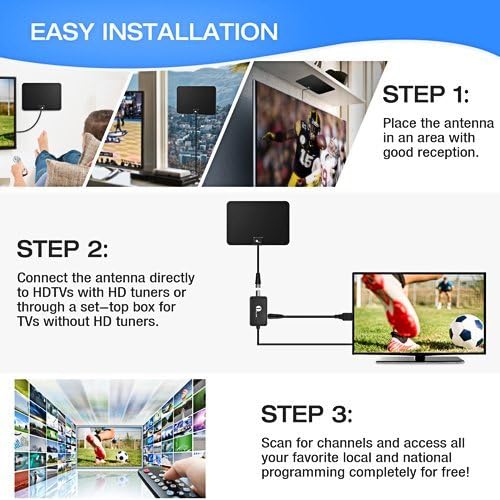
Image: Step 1 of installation, showing the antenna being placed on a wall or window for optimal reception.
Step 2: Connect the Antenna
Connect the antenna's coaxial cable to the "CABLE/ANT IN" port on the back of your HDTV. If your TV does not have a built-in HD tuner or if you are using an older TV, connect the antenna through a separate digital converter box (not included). The detachable amplifier can be used for extended range (up to 50 miles) or removed if you are closer to broadcast towers and experience signal interference.

Image: Diagram illustrating how to connect the antenna to an HDTV with or without a digital converter box, including the ampஆயுள் இணைப்பு.
Step 3: Power the Amplifier (if used)
If using the detachable amplifier, connect its USB cable to a USB port on your TV or to a USB power adapter (5V/100mA) plugged into a wall outlet.
படி 4: சேனல்களை ஸ்கேன் செய்யவும்
Access your TV's menu and navigate to the "Channel Search" or "Auto Program" function. Select "Antenna" or "Air" as the input source. Initiate the channel scan to find available local and national programming.
4. இயக்க வழிமுறைகள்
Once channels are scanned, you can begin watching free over-the-air television. Use your TV remote to change channels as you normally would. The antenna provides access to all available digital and HD broadcasts in your area.
5. Placement Optimization
Signal quality is highly dependent on antenna placement. Experiment with different locations to find the best reception:
- Higher is Better: Generally, placing the antenna higher on a wall or window can improve reception.
- Near Windows: Windows often provide clearer line-of-sight to broadcast towers.
- Directional Alignment: Try to orient the antenna towards the nearest broadcast towers. Webபோன்ற தளங்கள் fcc.gov/media/engineering/dtvmap can help locate towers in your area.
- தடைகளைத் தவிர்க்கவும்: Large metal objects, concrete walls, and other electronic devices can interfere with signals.
- Re-scan After Moving: Always perform a channel scan after repositioning the antenna to update the channel list.

Image: Various placement options for the 1byone TV Antenna, including wall, window, table, and flat on a surface.
6. சரிசெய்தல்
- சிக்னல் இல்லை அல்லது மோசமான படத் தரம்:
- அனைத்து இணைப்புகளும் பாதுகாப்பானவை என்பதை உறுதிப்படுத்தவும்.
- Reposition the antenna and perform a new channel scan.
- Try placing the antenna in a different location, such as higher up or closer to a window.
- பயன்படுத்தினால் amplifier, try removing it. In some cases, if you are very close to broadcast towers, the amplifier can cause over-amplification and signal interference.
- பயன்படுத்தாவிட்டால் amplifier, try connecting it.
- Check if your TV has a built-in digital tuner. If not, a separate ATSC digital converter box is required.
- காணாமல் போன சேனல்கள்:
- Perform a new channel scan. Broadcast signals can change, and re-scanning periodically ensures you receive all available channels.
- Adjust antenna orientation. Slight changes in angle can significantly impact channel reception.
- Consult online resources (e.g., fcc.gov/media/engineering/dtvmap) to confirm available channels and tower locations in your area.
- இடைப்பட்ட சமிக்ஞை இழப்பு:
- Weather conditions (heavy rain, snow) can temporarily affect signal strength.
- Ensure the antenna is not obstructed by new structures or foliage.
7. விவரக்குறிப்புகள்
| அம்சம் | விவரம் |
|---|---|
| மாதிரி எண் | OUS00-01861 |
| அதிர்வெண் வரம்பு | 47-230MHz, 470-862MHz |
| வரம்பைப் பெறுதல் | FM/VHF/UHF |
| ஆதாயம் | 28dB |
| வெளியீட்டு நிலை | 100dBµV |
| மின்மறுப்பு | 75Ω |
| இரைச்சல் படம் | ≤3dB |
| பவர் சப்ளை | Via USB Power Adapter (5V/100mA) |
| அதிகபட்ச வரம்பு | 50 மைல்கள் |
| தயாரிப்பு பரிமாணங்கள் | 13.3 x 9.3 x 0.2 அங்குலம் |
| பொருளின் எடை | 1 பவுண்டு |
8. பராமரிப்பு
The 1byone TV Antenna requires minimal maintenance. Keep the antenna clean and free from dust. If necessary, gently wipe it with a soft, dry cloth. Avoid using harsh chemicals or abrasive cleaners. Ensure the coaxial cable and amplifier connections remain secure.
The antenna can be safely painted to match your home décor without affecting reception or signal quality.
9. உத்தரவாதம் & ஆதரவு
1byone TV Antennas come with a 90-day money-back guarantee and a 24-month warranty. For any issues or support inquiries, please contact 1byone customer service. Refer to the product packaging or the official 1byone webதொடர்பு விவரங்களுக்கு தளம்.