
1. தயாரிப்பு முடிந்துவிட்டதுview
The Soundstream VR-930B is a single DIN car DVD player featuring a 9.3-inch motorized LCD touchscreen display and Bluetooth connectivity. This unit supports playback of various media types including CD, CD-R/RW, DVD, DVD-R/RW, MP3, WMA, and AAC. It includes a front USB input and a front SD card slot for expanded media options. The device also offers AM/FM radio tuning and MP3 ID3 Tag Display for track information.
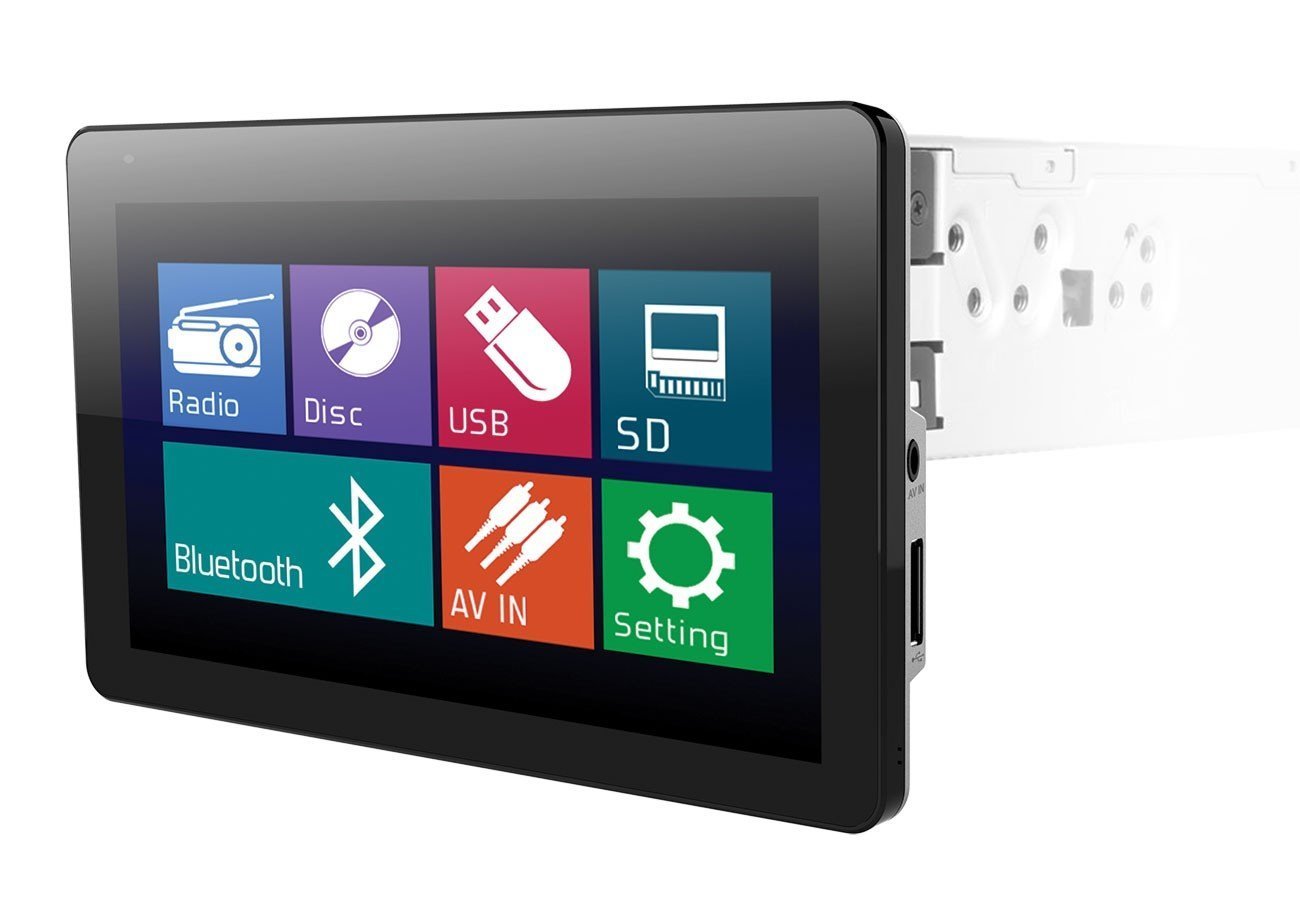
Image: The Soundstream VR-930B car DVD player, showcasing its large 9.3-inch motorized LCD touchscreen display in a vehicle dashboard.
முக்கிய அம்சங்கள்:
- Single DIN chassis with a 9.3-inch motorized LCD touchscreen display.
- Bluetooth for audio streaming and hands-free calling.
- Media playback from CD, DVD, USB, and SD cards.
- AM/FM tuner with MP3 ID3 Tag காட்சி.
- Maximum power output of 52 watts x 4 channels.
- Removable faceplate for security.
- Includes a wireless remote control.
2. பாதுகாப்பு தகவல்
Read all instructions carefully before installation and operation. Failure to follow these instructions may result in damage to the unit, vehicle, or personal injury. Always ensure the vehicle is parked and the parking brake is engaged when operating features that require visual attention, such as DVD playback or extensive menu navigation. Do not operate the unit in a manner that distracts you from driving safely. Consult a professional for installation if you are unsure about any wiring or mounting procedures.
3. தொகுப்பு உள்ளடக்கங்கள்
Verify that all items are present in the package before beginning installation. The typical package includes:
- Soundstream VR-930B Head Unit
- வயரிங் சேணம்
- வயர்லெஸ் ரிமோட் கண்ட்ரோல்
- மவுண்டிங் வன்பொருள்
- பயனர் கையேடு (இந்த ஆவணம்)
4 அமைவு
4.1 நிறுவல்
The VR-930B is designed for single DIN dashboard openings. Professional installation is highly recommended to ensure proper wiring and functionality. Incorrect installation can lead to damage to the unit or vehicle electrical system. Ensure the vehicle's battery is disconnected before starting any installation work.
4.2 வயரிங் வரைபடம்
Refer to the detailed wiring diagram provided in the separate installation guide or on the unit's chassis for specific connections. Key connections include power (constant 12V, accessory 12V, ground), speaker outputs, antenna, parking brake sensor, and reverse gear input.
4.3 ஆரம்ப பவர் ஆன்
After installation, reconnect the vehicle battery. Press the power button on the unit or remote control. The unit should power on and display the Soundstream logo. Follow any on-screen prompts for initial setup, such as language selection or clock setting.
5. இயக்க வழிமுறைகள்
5.1 அடிப்படை கட்டுப்பாடுகள்
- பவர் பட்டன்: யூனிட்டை ஆன்/ஆஃப் செய்ய அழுத்தவும்.
- Volume Knob/Buttons: ஆடியோ வெளியீட்டு அளவை சரிசெய்யவும்.
- பயன்முறை பொத்தான்: Cycle through available audio sources (Radio, DVD, USB, SD, Bluetooth, AUX).
- மெனு பட்டன்: Access the main system settings and options.
5.2 DVD/CD பிளேபேக்
Insert a DVD or CD into the disc slot. The unit will automatically detect the disc and begin playback. Use the on-screen controls or remote control for functions such as Play, Pause, Stop, Skip Track/Chapter, and Fast Forward/Rewind. Ensure the parking brake is engaged for video playback.
5.3 புளூடூத் இணைப்பு
புளூடூத் சாதனத்தை இணைக்க:
- உங்கள் மொபைல் சாதனத்தில் புளூடூத்தை இயக்கவும்.
- On the VR-930B, select the Bluetooth source.
- தேடுங்கள் available devices on your mobile phone. The unit's name will typically appear as "Soundstream VR-930B" or similar.
- Select the unit and enter the default PIN (usually "0000") if prompted.
Once paired, you can stream audio from your device or make/receive hands-free calls through the unit.
5.4 USB/SD மீடியா பிளேபேக்
Insert a USB drive into the front USB port or an SD card into the front SD card slot. The unit will automatically switch to the respective source and display the media files. Navigate through folders and select files using the touchscreen or remote control. Supported formats include MP3, WMA, and AAC.
5.5 வானொலி செயல்பாடு (AM/FM)
Select the Radio source. Use the 'Seek' or 'Tune' functions to find radio stations. You can save your favorite stations as presets for quick access. Press the 'Band' button to switch between AM and FM bands.
5.6 தொடுதிரை செயல்பாடு
The 9.3-inch LCD is a resistive touchscreen. Use light pressure with your fingertip or a stylus to interact with on-screen icons and menus. The motorized screen allows for angle adjustment to optimize viewing.
6. பராமரிப்பு
6.1 அலகு சுத்தம்
Wipe the unit's surface and touchscreen with a soft, dry cloth. For stubborn dirt, use a slightly damp cloth with a mild, non-abrasive cleaner. Avoid using harsh chemicals or solvents, as they can damage the finish or screen. Ensure the unit is powered off before cleaning.
6.2 வட்டு பராமரிப்பு
Handle discs by their edges to avoid fingerprints and scratches. Store discs in their cases when not in use. Clean dirty discs with a soft, lint-free cloth, wiping from the center outwards. Do not use abrasive cleaners or solvents on discs.
7. சரிசெய்தல்
If you encounter issues with your VR-930B, refer to the table below for common problems and solutions.
| பிரச்சனை | சாத்தியமான காரணம் | தீர்வு |
|---|---|---|
| அலகு இயங்காது. | தவறான வயரிங்; வெடித்த ஃபியூஸ்; வாகன பேட்டரி குறைவாக உள்ளது. | மின்சாரம் மற்றும் தரை இணைப்புகளைச் சரிபார்க்கவும். வாகன உருகிகளைச் சரிபார்க்கவும். பேட்டரி சார்ஜ் செய்யப்பட்டுள்ளதா என்பதை உறுதிப்படுத்தவும். |
| ஒலி இல்லை. | Volume too low; Mute activated; Speaker wires disconnected. | Increase volume. Deactivate mute. Check speaker wiring connections. |
| Disc error. | Dirty or scratched disc; Unsupported disc format. | Clean the disc. Try a different disc. Ensure disc format is supported. |
| புளூடூத் இணைக்கப்படவில்லை. | சாதனத்தில் புளூடூத் இயக்கப்படவில்லை; யூனிட் இணைத்தல் பயன்முறையில் இல்லை; குறுக்கீடு. | Ensure Bluetooth is on and visible. Put unit in pairing mode. Move closer to the unit. |
| Video not playing. | Parking brake not engaged; Incorrect video format. | Ensure parking brake is fully engaged. Check video file வடிவம் பொருந்தக்கூடிய தன்மை. |
8. விவரக்குறிப்புகள்
Below are the technical specifications for the Soundstream VR-930B:
| அம்சம் | விவரக்குறிப்பு |
|---|---|
| மாதிரி எண் | வி.ஆர் -930 பி |
| காட்சி அளவு | 9.3 அங்குலம் |
| காட்சி வகை | Motorized LCD Touchscreen |
| காட்சித் தீர்மானம் | 800 x 480 |
| அதிகபட்ச ஆற்றல் வெளியீடு | 52 வாட்ஸ் x 4 சேனல்கள் |
| ஊடக வகைகள் ஆதரிக்கப்படுகின்றன | CD+RW, CD-R, MP3, DVD, DVD-R/RW, WMA, AAC |
| இணைப்பு தொழில்நுட்பம் | புளூடூத், யு.எஸ்.பி |
| சக்தி ஆதாரம் | 12V |
| தயாரிப்பு எடை | 2.8 பவுண்டுகள் |
| GTIN / UPC | 709483047792 |
9. உத்தரவாதத் தகவல்
Soundstream products are designed and manufactured to the highest quality standards. This product is covered by a limited warranty against defects in materials and workmanship. The duration and terms of the warranty may vary by region and retailer. Please retain your proof of purchase for warranty claims. For specific warranty details, refer to the warranty card included with your product or contact Soundstream customer support.
10. வாடிக்கையாளர் ஆதரவு
For technical assistance, troubleshooting beyond this manual, or warranty inquiries, please contact Soundstream customer support. Visit the official Soundstream website for contact information, FAQs, and additional resources. When contacting support, please have your product model number (VR-930B) and proof of purchase readily available.