
அறிமுகம்
This manual provides detailed instructions for the setup, operation, and maintenance of your Homtime C12PRO Docking Station Speaker. The C12PRO integrates a Bluetooth speaker, FM radio, alarm clock, and dual USB charging capabilities, designed for convenient everyday use.
தொகுப்பு உள்ளடக்கங்கள்
கீழே பட்டியலிடப்பட்டுள்ள அனைத்து பொருட்களும் உங்கள் தொகுப்பில் சேர்க்கப்பட்டுள்ளதா என்பதை சரிபார்க்கவும்:
- 1 x Homtime C12PRO Speaker Unit
- 1 x பவர் அடாப்டர்
- 1 x பயனர் கையேடு
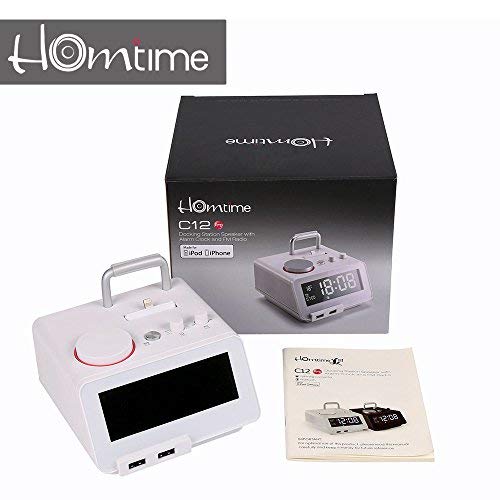
படம்: Contents of the Homtime C12PRO package, showing the main speaker unit, power adapter, and the user manual.
தயாரிப்பு முடிந்துவிட்டதுview
Familiarize yourself with the various components and controls of your C12PRO unit.

படம்: முன் view of the Homtime C12PRO with an iPhone docked. The large digital display shows time and temperature, and the front features dual USB charging ports.

படம்: முன் view of the Homtime C12PRO without a phone docked. This image clearly shows the digital display, the docking connector, and the control buttons on the top surface.
Front Panel and Display
- Large 4.2-inch LCD Display: Shows time, alarm status, and room temperature (Celsius or Fahrenheit). Brightness is adjustable.
- இரட்டை USB சார்ஜிங் போர்ட்கள்: Located at the front base for convenient charging of external devices.
சிறந்த குழு கட்டுப்பாடுகள்
- டாக்கிங் இணைப்பான்: Apple Certified Lightning connector for iPod/iPhone.
- Control Buttons/Knobs: For setting time, alarm, volume, mode selection, and FM radio tuning.
பின்புற பேனல் இணைப்புகள்
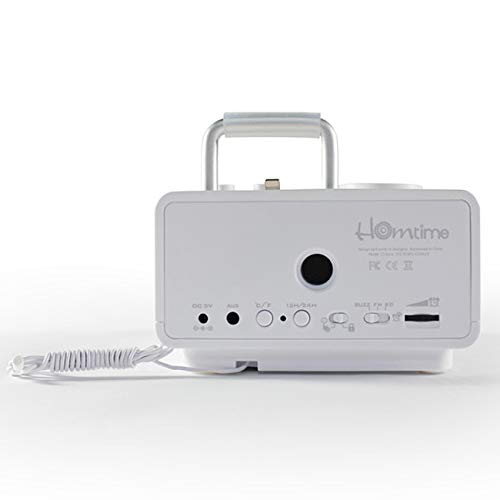
படம்: பின்புறம் view of the Homtime C12PRO. This image displays the DC 9V power input, AUX-in port, 12H/24H time format button, and other rear controls.
- DC 9V பவர் உள்ளீடு: வழங்கப்பட்ட பவர் அடாப்டரை இங்கே இணைக்கவும்.
- AUX-இன் போர்ட்: வெளிப்புற ஆடியோ மூலங்களை இணைப்பதற்கான 3.5 மிமீ ஜாக்.
- 12H/24H Button: Toggles between 12-hour and 24-hour time display formats.
- பிற கட்டுப்பாடுகள்: May include snooze/dimmer, alarm on/off, and FM antenna connection.
அமைவு
- அலகைத் திறக்கவும்: Carefully remove the C12PRO speaker and all accessories from the packaging.
- பவர் இணைக்கவும்: Insert the DC plug of the power adapter into the DC 9V input port on the rear of the unit. Plug the power adapter into a standard wall outlet. The display will illuminate.
- ஆரம்ப நேர அமைப்பு:
- அழுத்திப் பிடிக்கவும் நேரம் அமை button (location may vary, typically on top or rear).
- பயன்படுத்தவும் +/- buttons or rotary knob to adjust the hour. Press நேரம் அமை மீண்டும் உறுதிப்படுத்த.
- Adjust the minute using the +/- buttons or rotary knob. Press நேரம் அமை நேர அமைப்பு பயன்முறையை உறுதிப்படுத்தி வெளியேற.
- 12-மணிநேர மற்றும் 24-மணிநேர வடிவமைப்பிற்கு இடையில் மாற, அழுத்தவும் 12H/24H பின்புற பேனலில் உள்ள பொத்தான்.
- காட்சி பிரகாசத்தை சரிசெய்யவும்: அழுத்தவும் SNOOZE / DIMMER button (often combined) repeatedly to cycle through brightness levels.
- வெப்பநிலை அலகு அமைக்கவும்: பொருந்தினால், அழுத்தவும் ° C/° F button to switch between Celsius and Fahrenheit display for room temperature.
இயக்க வழிமுறைகள்
பவர் ஆன்/ஆஃப்
அழுத்தவும் சக்தி button to turn the unit on or off. When off, the clock display remains active.
அலாரத்தை அமைத்தல்
- அழுத்திப் பிடிக்கவும் அலாரம் அமை பொத்தான். அலாரம் மணி ஒலிக்கும்.
- பயன்படுத்தவும் +/- buttons or rotary knob to adjust the alarm hour. Press அலாரம் அமை உறுதி செய்ய.
- Adjust the alarm minute. Press அலாரம் அமை உறுதி செய்ய.
- Select the alarm source (Buzzer, FM Radio, or Docked Device). Use +/- or rotary knob and press அலாரம் அமை உறுதி செய்ய.
- அலாரத்தை இயக்க/முடக்க, அழுத்தவும் அலாரம் ஆன் / ஆஃப் button. An alarm icon will appear on the display when active.
- அலாரம் ஒலிக்கும்போது, அழுத்தவும் உறக்கநிலை button to temporarily silence it for a few minutes. Press சக்தி அன்றைய அலாரத்தை அணைக்க.
எஃப்எம் ரேடியோ ஆபரேஷன்
- அழுத்தவும் பயன்முறை காட்சியில் "FM" தோன்றும் வரை பொத்தான்.
- For automatic station scanning, press and hold the விளையாடு/இடைநிறுத்தம் button (or a dedicated ஸ்கேன் button). The radio will scan and save available stations.
- கைமுறையாக டியூன் செய்ய, பயன்படுத்தவும் முன்/அடுத்து buttons or rotary knob to adjust the frequency.
- To select a saved station, press the முன்னமைவு பொத்தானை பின்னர் பயன்படுத்தவும் முன்/அடுத்து வழிசெலுத்த.
- ஐப் பயன்படுத்தி அளவை சரிசெய்யவும் தொகுதி knob or buttons.
புளூடூத் இணைத்தல்
- அழுத்தவும் பயன்முறை button until "BT" or "Bluetooth" appears on the display. The Bluetooth indicator will flash, indicating pairing mode.
- உங்கள் மொபைல் சாதனத்தில், புளூடூத்தை இயக்கி, புதிய சாதனங்களைத் தேடுங்கள்.
- Select "Homtime C12PRO" from the list of available devices.
- Once paired, the Bluetooth indicator on the C12PRO will stop flashing and remain solid. You can now play audio wirelessly from your device.
- Adjust volume on both the C12PRO and your connected device.
நறுக்குதல் நிலையத்தைப் பயன்படுத்துதல்
The C12PRO features an Apple Certified Lightning connector for compatible iPod/iPhone devices.
- Carefully align your iPhone/iPod with the Lightning connector on the top of the unit.
- Gently push down until the device is securely seated.
- The C12PRO will automatically charge your device and can play audio from it.
- அழுத்தவும் பயன்முறை button to select the docking station as the audio source.
USB சார்ஜிங்
The unit includes dual USB ports for charging other devices.
- Connect your USB charging cable to one of the USB ports on the front of the C12PRO.
- Connect the other end of the cable to your device (e.g., Android phone, tablet).
- The C12PRO will provide power to charge your device.
AUX-in Connection
Connect external audio players via the 3.5mm AUX-in port.
- Connect a 3.5mm audio cable (not included) from your external audio device's headphone jack to the AUX-in port on the rear of the C12PRO.
- அழுத்தவும் பயன்முறை "AUX" காட்சியில் தோன்றும் வரை பொத்தானை அழுத்தவும்.
- Play audio from your external device. Adjust volume on both the C12PRO and the external device.
பராமரிப்பு
- சுத்தம்: Disconnect the power adapter before cleaning. Use a soft, dry cloth to wipe the exterior surfaces. Do not use abrasive cleaners, waxes, or solvents.
- சேமிப்பு: யூனிட்டை நீண்ட நேரம் சேமித்து வைத்திருந்தால், அதை மின் இணைப்பிலிருந்து துண்டித்து, நேரடி சூரிய ஒளி மற்றும் தீவிர வெப்பநிலையிலிருந்து விலகி குளிர்ந்த, உலர்ந்த இடத்தில் சேமிக்கவும்.
- பேட்டரி: The unit contains a CR2 battery (included) for clock memory backup. This battery is not user-replaceable for general operation and should only be replaced by qualified service personnel if necessary.
சரிசெய்தல்
| பிரச்சனை | சாத்தியமான காரணம் | தீர்வு |
|---|---|---|
| பவர்/டிஸ்ப்ளே ஆஃப் இல்லை | பவர் அடாப்டர் இணைக்கப்படவில்லை அல்லது அவுட்லெட் பழுதடைந்துள்ளது. | பவர் அடாப்டர் யூனிட்டிலும் வேலை செய்யும் சுவர் அவுட்லெட்டிலும் பாதுகாப்பாக செருகப்பட்டுள்ளதா என்பதை உறுதிப்படுத்தவும். |
| ஸ்பீக்கரிலிருந்து ஒலி இல்லை | Volume too low; incorrect source selected; device not connected properly. | ஒலியளவை அதிகரிக்கவும். அழுத்தவும் பயன்முறை to select the correct audio source (BT, FM, Dock, AUX). Reconnect Bluetooth device or docked phone. |
| புளூடூத் இணைத்தல் தோல்வியடைந்தது | C12PRO not in pairing mode; device too far; interference. | Ensure C12PRO is in BT mode and flashing. Move device closer. Turn off other Bluetooth devices. |
| எஃப்எம் ரேடியோ நிலையான/மோசமான வரவேற்பு | பலவீனமான சிக்னல்; ஆண்டெனா நீட்டிக்கப்படவில்லை. | Extend the FM antenna fully. Reposition the unit for better reception. Perform auto-scan again. |
| அலாரம் ஒலிக்கவில்லை | Alarm not activated; alarm volume too low. | Ensure the alarm icon is visible on the display. Check alarm volume settings. |
| Device not charging via USB/Dock | கேபிள் பிரச்சனை; சாதனம் இணக்கமாக இல்லை; யூனிட் இயக்கப்படவில்லை. | Try a different USB cable. Ensure the C12PRO is powered on. Verify device compatibility with the Lightning dock. |
விவரக்குறிப்புகள்

படம்: A table detailing the specifications of the Homtime C12PRO, including driver units, S/N ratio, Bluetooth version, range, radio frequency, power, and dimensions.
| மாதிரி | C12 ப்ரோ |
| இயக்கி அலகுகள் | 2x40 மிமீ |
| S/N விகிதம் | >70dB |
| புளூடூத் பதிப்பு | 2.1 + EDR |
| புளூடூத் வரம்பு | 10M |
| ரேடியோ அதிர்வெண் வரம்பு | 87.5 மெகா ஹெர்ட்ஸ் - 108 மெகா ஹெர்ட்ஸ் |
| இணக்கமான சாதனங்கள் | iPad, iPhone, Android, Windows Phone, Computer |
| பவர் அடாப்டர் | AC100-240V, 50/60Hz, DC 5V 3A |
| வெளியீட்டு சக்தி | 3W + 3W (6 Watts total) |
| பரிமாணங்கள் (LxWxH) | 12.8 x 12.9 x 10.7 செ.மீ |
| பொருளின் எடை | 800 கிராம் |
| ஆடியோ ஆதாரங்கள் | Apple Lightning, USB, Bluetooth, Aux-in |
| காட்சி வகை | Digital LCD (4.2 inches) |
| பேட்டரிகள் | 1 CR2 battery required (included for clock memory) |
உத்தரவாதம் மற்றும் ஆதரவு
உத்தரவாத தகவல்
The Homtime C12PRO comes with a 1 வருட வரையறுக்கப்பட்ட உத்தரவாதம் from the date of purchase. This warranty covers manufacturing defects in materials and workmanship under normal use. It does not cover damage caused by misuse, accidents, unauthorized modifications, or external causes.
உத்திரவாதக் கோரிக்கைகளுக்காக உங்கள் வாங்கியதற்கான ஆதாரத்தை வைத்துக் கொள்ளவும்.
வாடிக்கையாளர் ஆதரவு
For technical assistance, troubleshooting not covered in this manual, or warranty inquiries, please contact Homtime customer support. Refer to the contact information provided with your product packaging or visit the official Homtime webமிகவும் புதுப்பித்த ஆதரவு விவரங்களுக்கான தளம்.