
1. அறிமுகம்
நன்றி, நன்றி.asing the Edifier R1700BT Bluetooth Bookshelf Speakers. This manual provides essential information for the proper setup, operation, and maintenance of your new audio system. Please read it thoroughly before use to ensure optimal performance and longevity of your speakers.
2. முக்கியமான பாதுகாப்பு வழிமுறைகள்
- இந்த வழிமுறைகளை கவனமாக படிக்கவும்.
- எதிர்கால குறிப்புக்காக இந்த வழிமுறைகளை வைத்திருங்கள்.
- எல்லா எச்சரிக்கைகளையும் கவனியுங்கள்.
- அனைத்து வழிமுறைகளையும் பின்பற்றவும்.
- இந்த கருவியை தண்ணீருக்கு அருகில் பயன்படுத்த வேண்டாம்.
- உலர்ந்த துணியால் மட்டுமே சுத்தம் செய்யவும்.
- எந்த காற்றோட்ட திறப்புகளையும் தடுக்க வேண்டாம். உற்பத்தியாளரின் அறிவுறுத்தல்களின்படி நிறுவவும்.
- ரேடியேட்டர்கள், வெப்பப் பதிவேடுகள், அடுப்புகள் அல்லது பிற சாதனங்கள் (உட்பட) போன்ற எந்த வெப்ப மூலங்களுக்கும் அருகில் நிறுவ வேண்டாம் ampலிஃபையர்ஸ்) வெப்பத்தை உற்பத்தி செய்யும்.
- துருவப்படுத்தப்பட்ட அல்லது தரையிறங்கும் வகை பிளக்கின் பாதுகாப்பு நோக்கத்தை தோற்கடிக்க வேண்டாம். ஒரு துருவப்படுத்தப்பட்ட பிளக்கில் இரண்டு கத்திகள் உள்ளன, ஒன்று மற்றொன்றை விட அகலமானது. ஒரு கிரவுண்டிங்-வகை பிளக்கில் இரண்டு கத்திகள் மற்றும் மூன்றாவது கிரவுண்டிங் ப்ராங் உள்ளது. அகலமான கத்தி அல்லது மூன்றாவது முனை உங்கள் பாதுகாப்பிற்காக வழங்கப்படுகிறது. வழங்கப்பட்ட பிளக் உங்கள் கடையில் பொருந்தவில்லை என்றால், வழக்கற்றுப் போன கடையை மாற்றுவதற்கு எலக்ட்ரீஷியனை அணுகவும்.
- குறிப்பாக பிளக்குகள், கன்வீனியன் ரிசெப்டக்கிள்கள் மற்றும் எந்திரத்தில் இருந்து அவை வெளியேறும் இடத்தில் பவர் கார்டு நடக்காமல் அல்லது கிள்ளப்படாமல் பாதுகாக்கவும்.
- உற்பத்தியாளரால் குறிப்பிடப்பட்ட இணைப்புகள் / துணைக்கருவிகளை மட்டுமே பயன்படுத்தவும்.
- மின்னல் புயல்களின் போது அல்லது நீண்ட காலத்திற்கு பயன்படுத்தப்படாத போது இந்த கருவியை துண்டிக்கவும்.
- அனைத்து சேவைகளையும் தகுதிவாய்ந்த சேவை பணியாளர்களிடம் பார்க்கவும். மின்சாரம் வழங்கல் தண்டு அல்லது பிளக் சேதமடைந்தது, திரவம் சிந்தப்பட்டால் அல்லது கருவியில் பொருட்கள் விழுந்துவிட்டன, இயந்திரம் மழை அல்லது ஈரப்பதத்திற்கு வெளிப்படும், சாதாரணமாக இயங்காதது போன்ற எந்த வகையிலும் சாதனம் சேதமடைந்தால் சேவை தேவைப்படுகிறது. , அல்லது கைவிடப்பட்டது.
3. தொகுப்பு உள்ளடக்கங்கள்
பிரித்தெடுத்தவுடன், கீழே பட்டியலிடப்பட்டுள்ள அனைத்து பொருட்களும் நல்ல நிலையில் இருப்பதை உறுதிசெய்து கொள்ளவும்:
- Edifier R1700BT Active Speaker (with controls)
- Edifier R1700BT Passive Speaker
- ரிமோட் கண்ட்ரோல்
- RCA-RCA Audio Cable
- 3.5mm-RCA Audio Cable
- ஸ்பீக்கர் இணைக்கும் கேபிள்
- பயனர் கையேடு

Image: Contents of the Edifier R1700BT package, including the active and passive speakers, remote control, and all necessary audio cables.
4. தயாரிப்பு முடிந்துவிட்டதுview
The Edifier R1700BT speakers are active near-field studio monitors designed for high-quality audio reproduction. They feature a classic wood finish and offer versatile connectivity options.
4.1 ஸ்பீக்கர் கூறுகள்

படம்: ஒரு விரிவான view of the speaker's front, highlighting the 19mm silk dome tweeter and the 4-inch bass driver.
- ட்வீட்டர்: 19mm silk dome tweeter for clear high frequencies.
- வூஃபர்: 4-inch bass driver for rich, deep lows.
- Front-facing Bass Reflex Port: பாஸ் பதிலை மேம்படுத்துகிறது.
4.2 Side Panel Controls (Active Speaker)
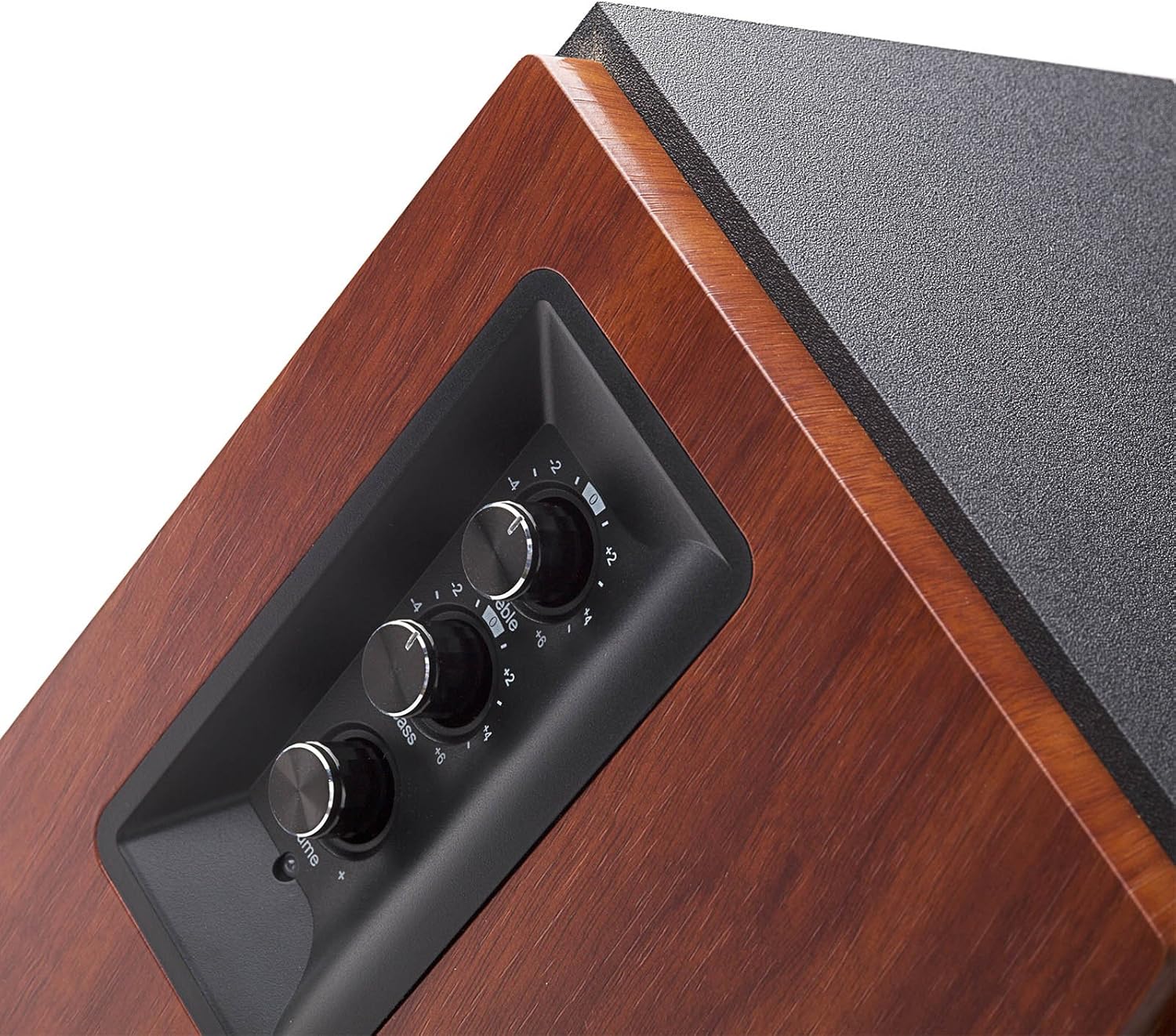
Image: The side panel of the active speaker, showing the treble, bass, and master volume controls.
- ட்ரெபிள் கட்டுப்பாடு: உயர் அதிர்வெண் வெளியீட்டை சரிசெய்கிறது.
- பாஸ் கட்டுப்பாடு: குறைந்த அதிர்வெண் வெளியீட்டை சரிசெய்கிறது.
- முதன்மை தொகுதி கட்டுப்பாடு: Adjusts overall volume and acts as an input selector (press to cycle through inputs).
4.3 Rear Panel Connections (Active Speaker)

Image: The back panel of the active speaker, displaying the PC In, AUX In, L Speaker Out, and power input.
- PC In: RCA input for connecting to a computer.
- AUX இல்: RCA input for connecting to other audio devices.
- L Speaker Out: Connects to the passive (left) speaker.
- ஆற்றல் உள்ளீடு: மின் கம்பியை இணைப்பதற்கு.
- மின்விசை மாற்றும் குமிழ்: To turn the speakers on or off.
5 அமைவு
5.1 பேச்சாளர் இடம்
For optimal sound, place the speakers on a stable, flat surface. Position them at ear level, forming an equilateral triangle with your listening position. The R1700BT speakers are designed with a slight upward angle to direct sound towards the listener.

படம்: Example of speaker placement on a desktop for a personal computer setup.
5.2 ஸ்பீக்கர்களை இணைத்தல்
- Connect the active speaker (right speaker) to the passive speaker (left speaker) using the provided speaker connecting cable. Ensure the connectors are firmly inserted.
- Connect the power cord to the active speaker's power input and then to a power outlet.
5.3 ஆடியோ மூலங்களை இணைத்தல்
The R1700BT offers multiple ways to connect your audio devices:
- பிசி உள்ளீடு: Use the RCA-RCA audio cable to connect your computer's audio output to the 'PC In' ports on the active speaker.
- AUX உள்ளீடு: Use the 3.5mm-RCA audio cable to connect devices like smartphones, tablets, or MP3 players to the 'AUX In' ports on the active speaker.
- புளூடூத் இணைப்பு: வயர்லெஸ் ஆடியோ ஸ்ட்ரீமிங்கிற்கு, புளூடூத் இணைத்தல் வழிமுறைகளுக்கு 'இயக்குதல்' பகுதியைப் பார்க்கவும்.
6. இயக்க வழிமுறைகள்
6.1 பவர் ஆன்/ஆஃப்
Flip the power switch on the rear panel of the active speaker to the 'ON' position to power on the speakers. Flip it to 'OFF' to power them down.
6.2 Adjusting Volume, Bass, and Treble
Use the knobs on the side panel of the active speaker to adjust the audio output:
- சுழற்று முதன்மை தொகுதி knob to increase or decrease the overall sound level.
- சுழற்று பாஸ் knob to adjust the low-frequency response.
- சுழற்று மும்மடங்கு knob to adjust the high-frequency response.
6.3 உள்ளீடு தேர்வு
அழுத்தவும் முதன்மை தொகுதி knob to cycle through the available audio inputs: PC In, AUX In, and Bluetooth. The LED indicator on the active speaker will change color to indicate the selected input.
6.4 ப்ளூடூத் இணைத்தல்
- Turn on the speakers and select the Bluetooth input by pressing the Master Volume knob until the LED indicator flashes blue.
- On your Bluetooth-enabled device (e.g., smartphone, tablet), search for available Bluetooth devices.
- Select 'EDIFIER R1700BT' from the list to pair. Once paired, the LED indicator will glow solid blue.
- You can now stream audio wirelessly to your speakers.
6.5 ரிமோட் கண்ட்ரோல் பயன்பாடு

Image: The compact remote control for the Edifier R1700BT speakers.
The included remote control allows you to conveniently manage your speakers from a distance:
- முடக்கு பொத்தான்: ஆடியோவை முடக்குகிறது அல்லது ஒலியை முடக்குகிறது.
- வால்யூம் அதிக/கீழ்: முதன்மை அளவை சரிசெய்கிறது.
- புளூடூத் பட்டன்: புளூடூத் உள்ளீட்டைத் தேர்ந்தெடுக்கிறது.
- Line In Button: Selects the AUX/PC input (cycles between them).
7. பராமரிப்பு
To ensure the longevity and optimal performance of your Edifier R1700BT speakers, follow these maintenance guidelines:
- சுத்தம்: Use a soft, dry cloth to wipe the speaker cabinets. Do not use abrasive cleaners, waxes, or solvents as they may damage the finish.
- தூசி பாதுகாப்பு: Keep the speakers free from dust. You may use a soft brush or a vacuum cleaner with a soft brush attachment to gently clean the speaker grilles.
- ஈரப்பதத்தைத் தவிர்க்கவும்: Do not expose the speakers to water or excessive moisture. If liquid spills on the speakers, immediately disconnect power and allow them to dry completely before re-use.
- காற்றோட்டம்: Ensure adequate ventilation around the speakers to prevent overheating. Do not block the rear or side vents.
- வெப்பநிலை: Avoid placing speakers in direct sunlight or near heat sources. Operate them within recommended temperature ranges.
8. சரிசெய்தல்
If you encounter any issues with your Edifier R1700BT speakers, please refer to the following troubleshooting guide:
| பிரச்சனை | சாத்தியமான காரணம் | தீர்வு |
|---|---|---|
| ஒலி இல்லை | No power; Incorrect input selected; Volume too low; Loose connections | Ensure power is on; Select correct input (PC, AUX, Bluetooth); Increase volume; Check all cables are securely connected. |
| புளூடூத் இணைப்பு தோல்வியடைந்தது | Speakers not in pairing mode; Device too far; Interference; Device already paired to another speaker | Ensure LED flashes blue; Move device closer; Reduce interference; Disconnect from other devices and try again. |
| ஒலி சிதைவு | Volume too high; Source audio quality is poor; Incorrect bass/treble settings | Lower volume; Try a different audio source; Adjust bass/treble controls. |
| ரிமோட் கண்ட்ரோல் வேலை செய்யவில்லை | Battery depleted; Obstruction between remote and speaker; Remote not pointed at IR receiver | Replace battery; Remove obstructions; Point remote directly at the active speaker's IR receiver. |
If the problem persists after trying these solutions, please contact Edifier customer support.
9. விவரக்குறிப்புகள்
Detailed technical specifications for the Edifier R1700BT speakers:
| அம்சம் | விவரக்குறிப்பு |
|---|---|
| மாதிரி பெயர் | R1700BT |
| பேச்சாளர் வகை | Bookshelf, Tweeter |
| பொருள் | Wood (MDF with walnut wood effect vinyl) |
| வெளியீட்டு சக்தி | 66W RMS (15W x 2 + 18W x 2) |
| அதிர்வெண் பதில் | 60ஹெர்ட்ஸ் - 20கிஹெர்ட்ஸ் |
| சிக்னல்-டு-சத்தம் விகிதம் | ≥85dBA |
| உள்ளீடு உணர்திறன் | PC: 700±50mV; AUX: 550±50mV |
| உள்ளீடு வகை | PC, AUX, Bluetooth |
| புளூடூத் பதிப்பு | 4.0 with aptX |
| புளூடூத் வரம்பு | 10 மீட்டர் |
| வூஃபர் விட்டம் | 4 அங்குலம் |
| ட்வீட்டர் விட்டம் | 19 மில்லிமீட்டர்கள் |
| தயாரிப்பு பரிமாணங்கள் | 6.1"டி x 8.4"அடி x 10"ஹெட் |
| பொருளின் எடை | 14.6 பவுண்டுகள் |
| கட்டுப்பாட்டு முறை | Remote, On-speaker knobs |
| UPC | 875674001352 |
10. உத்தரவாதம் மற்றும் ஆதரவு
The Edifier R1700BT speakers come with a Limited or Full Warranty. For specific warranty terms, service, and support, please refer to the official Edifier webதளத்தில் அல்லது உங்கள் உள்ளூர் விநியோகஸ்தரைத் தொடர்பு கொள்ளவும்.
You can visit the Edifier Store for more information: Edifier Official Store