
1. அறிமுகம்
The AVerMedia AW330 Wireless Voice Amplifier is a portable audio system designed to enhance vocal clarity and projection in various settings such as classrooms, training sessions, meetings, and public speaking events. Its lightweight design, wireless microphone, and powerful speaker ensure your voice is heard clearly and effortlessly.
முக்கிய அம்சங்கள்:
- போர்ட்டபிள் வடிவமைப்பு: Lightweight and compact for easy transport and use.
- வயர்லெஸ் மைக்ரோஃபோன்: 2.4 GHz wireless lavalier microphone for stable 360° transmission.
- சக்திவாய்ந்த ஒலி: Built-in 20W speaker delivers loud, clear audio.
- நீண்ட பேட்டரி ஆயுள்: Rechargeable lithium polymer battery provides 4 to 5 hours of use, or up to 8 hours of continuous use (depending on volume and usage).
- மல்டிமீடியா இணைப்பு: Audio input port for connecting smartphones, tablets, or laptops.
- Quick Smart Pairing: Automatic microphone-to-speaker pairing for simple setup.
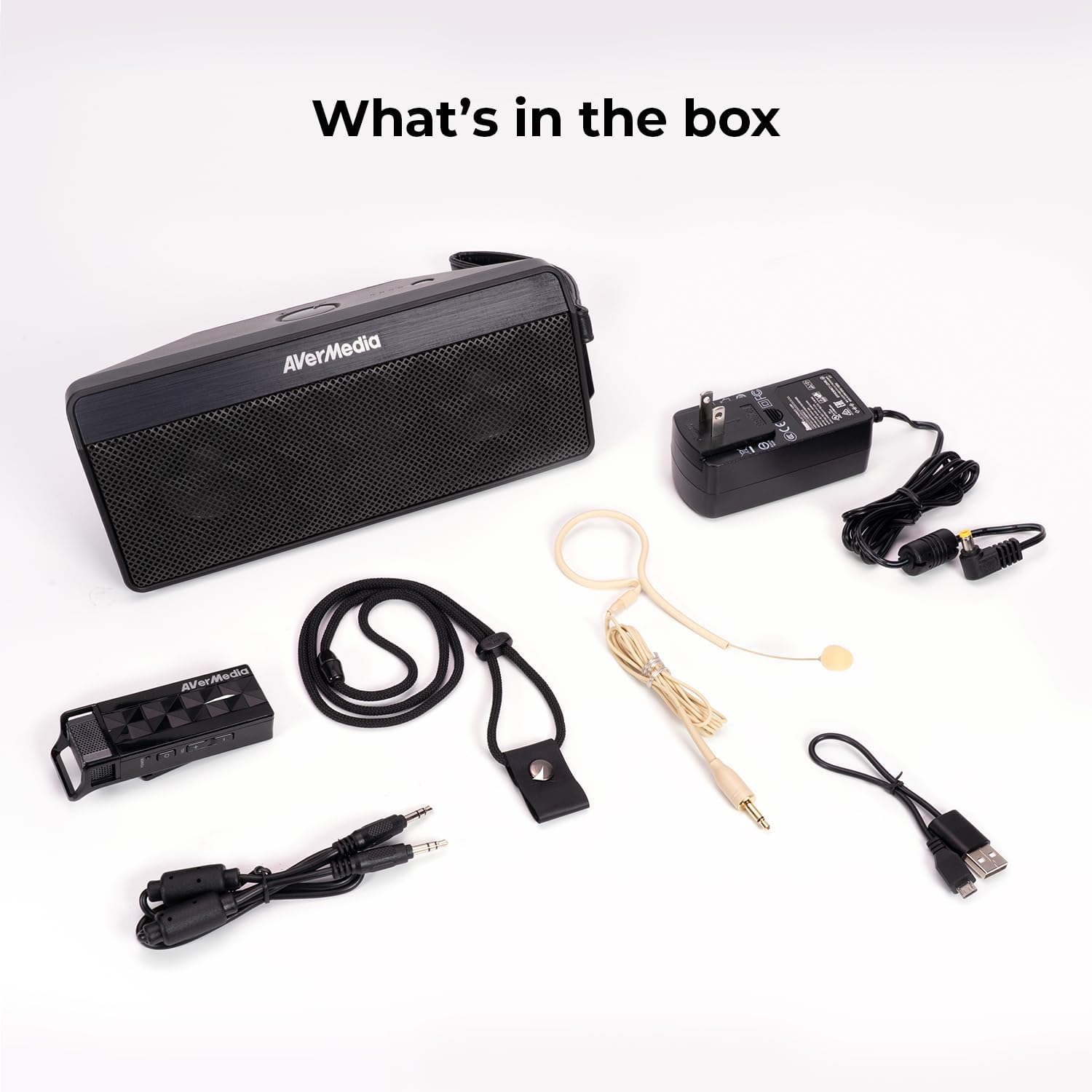
2. பெட்டியில் என்ன இருக்கிறது
- Microphone & Headset Mic
- பேச்சாளர்
- AC Power Adapter & USB Power Cable
- 3.5 மிமீ ஆடியோ கேபிள்
- Lanyard & Buckle
3. தயாரிப்பு முடிந்துவிட்டதுview
பேச்சாளர் அலகு

The main speaker unit features a power button, volume controls, and an audio input port for connecting external devices. It also includes a clip for attaching to clothing or a strap.
வயர்லெஸ் மைக்ரோஃபோன்
The wireless microphone includes a flexible gooseneck boom with a windscreen, volume controls, and a power button. It can be worn as a headset or clipped onto clothing.

4 அமைவு
- சாதனங்களை சார்ஜ் செய்யவும்: Before first use, fully charge both the speaker unit and the wireless microphone using the provided AC power adapter and USB power cable. The microphone uses a USB-C connection.
- மைக்ரோஃபோனை இணைக்கவும்: Plug the headset microphone into the wireless microphone unit.
- பவர் ஆன்: Turn on the speaker unit by pressing its power button. Turn on the wireless microphone unit by pressing its power button.
- இணைத்தல்: The speaker microphone system features automatic microphone-to-speaker pairing for hassle-free setup. They should pair automatically upon powering on.
- ஒலியளவைச் சரிசெய்யவும்: Adjust the volume on both the speaker and the microphone to your desired level.
5. இயக்க வழிமுறைகள்
- குரல் Ampஉயர்வு: Once paired, speak into the microphone. Your voice will be amplified through the speaker. Adjust volume as needed.
- வெளிப்புற ஆடியோ உள்ளீடு: To play multimedia audio alongside your voice, connect your smartphone, tablet, or laptop to the speaker unit's Audio In port using the 3.5 mm audio cable.
- அணியும் விருப்பங்கள்: Utilize the clip on the speaker to attach it to your clothing, or use the lanyard and buckle for hands-free operation. The microphone can be worn as a headset or clipped directly.
- மின் சேமிப்பு: If the microphone is turned off, the speaker will automatically turn off after five minutes to conserve battery.

6. பராமரிப்பு
- சுத்தம்: Use a soft, dry cloth to clean the surfaces of the speaker and microphone. Do not use liquid cleaners or aerosols.
- சேமிப்பு: நேரடி சூரிய ஒளி மற்றும் தீவிர வெப்பநிலையிலிருந்து விலகி, குளிர்ந்த, உலர்ந்த இடத்தில் சாதனத்தை சேமிக்கவும்.
- பேட்டரி பராமரிப்பு: பேட்டரி ஆயுளை நீட்டிக்க, அடிக்கடி பேட்டரியை முழுமையாக டிஸ்சார்ஜ் செய்வதைத் தவிர்க்கவும். நீண்ட நேரம் பயன்படுத்தப்படாவிட்டாலும், சாதனத்தை தொடர்ந்து ரீசார்ஜ் செய்யவும்.
- தண்ணீரை தவிர்க்கவும்: The device is not waterproof. Keep it away from water and moisture.
7. சரிசெய்தல்
- ஒலி இல்லை:
- Ensure both the speaker and microphone are powered on and fully charged.
- Check that the microphone and speaker are successfully paired.
- Increase the volume on both the speaker and the microphone.
- Feedback/Squealing Sound:
- Reduce the volume on the speaker or microphone.
- மைக்ரோஃபோனுக்கும் ஸ்பீக்கருக்கும் இடையிலான தூரத்தை அதிகரிக்கவும்.
- மைக்ரோஃபோன் நேரடியாக ஸ்பீக்கரை நோக்கிச் செல்லவில்லை என்பதை உறுதிப்படுத்திக் கொள்ளுங்கள்.
- மோசமான ஒலி தரம்:
- Check for obstructions between the microphone and speaker.
- Ensure the microphone is positioned correctly near your mouth.
- Verify that the microphone windscreen is properly attached.
- சாதனம் சார்ஜ் ஆகவில்லை:
- Ensure the charging cables are securely connected to both the device and the power source.
- வேறு பவர் அவுட்லெட் அல்லது USB போர்ட்டை முயற்சிக்கவும்.
8. விவரக்குறிப்புகள்
| அம்சம் | விவரக்குறிப்பு |
|---|---|
| பிராண்ட் | AVerMedia |
| மாதிரி எண் | AW330 |
| பேச்சாளர் அதிகபட்ச வெளியீட்டு சக்தி | 20 வாட்ஸ் |
| இணைப்பு தொழில்நுட்பம் | புளூடூத், வைஃபை |
| ஆடியோ வெளியீட்டு முறை | மோனோ |
| மவுண்டிங் வகை | டேப்லெட் மவுண்ட் |
| கூடுதல் அம்சங்கள் | தொகுதி கட்டுப்பாடு |
| கட்டுப்படுத்தி வகை | பேட்டரி மூலம் இயங்கும் |
| பேட்டரி சராசரி ஆயுள் | 4 Hours (up to 8 hours continuous use) |
| அதிகபட்ச வரம்பு | 60 அடி |
| கட்டுப்பாட்டு முறை | தொடவும் |
| பொருளின் எடை | 2.6 பவுண்டுகள் |
| தயாரிப்புக்கான குறிப்பிட்ட பயன்பாடுகள் | Educational/Classroom |
9. உத்தரவாதம் மற்றும் ஆதரவு
The AVerMedia AW330 Wireless Voice Ampலைஃபையர் ஒரு உடன் வருகிறது 3 வருட உற்பத்தியாளரின் உத்தரவாதம். For technical support, troubleshooting, or warranty claims, please contact AVerMedia customer service.
10. தயாரிப்பு வீடியோக்கள்
AVerMedia AW330 வயர்லெஸ் வகுப்பறை ஆடியோ சிஸ்டம்
Video: An official product video from AVerMedia showcasing the AW330 Wireless Classroom Audio System. It highlights its features and benefits in a classroom environment, demonstrating how teachers can use it to project their voice clearly and effectively to students.