
Monitor Audio Apex AW-12-BK
Monitor Audio Apex AW-12 Subwoofer User Manual
Model: Apex AW-12-BK
அறிமுகம்
Thank you for choosing the Monitor Audio Apex AW-12 Subwoofer. This compact, high-performance subwoofer is designed to deliver powerful and precise bass, enhancing your home audio experience. Featuring a 12-inch C-CAM driver, a 500-watt Class D amplifier, and a high-efficiency switched-mode power supply, the Apex AW-12 integrates seamlessly into any compatible A/V system. This manual provides essential information for safe installation, optimal operation, and proper maintenance of your subwoofer.
பாதுகாப்பு தகவல்
Please read all safety instructions before operating the subwoofer. Keep this manual for future reference.
- சக்தி ஆதாரம்: Connect the subwoofer only to an AC power source as indicated on the unit.
- காற்றோட்டம்: அலகு சுற்றி போதுமான காற்றோட்டத்தை உறுதி செய்யவும். காற்றோட்ட திறப்புகளை அடைக்க வேண்டாம்.
- நீர் மற்றும் ஈரப்பதம்: அலகு மழை, ஈரப்பதம் அல்லது அதிக ஈரப்பதத்திற்கு ஆளாக வேண்டாம்.
- வெப்பம்: ரேடியேட்டர்கள், வெப்பப் பதிவேடுகள், அடுப்புகள் அல்லது வெப்பத்தை உருவாக்கும் பிற சாதனங்கள் போன்ற வெப்ப மூலங்களிலிருந்து யூனிட்டை விலக்கி வைக்கவும்.
- சேவை: இந்த தயாரிப்புக்கு நீங்களே சேவை செய்ய முயற்சிக்காதீர்கள். தகுதிவாய்ந்த சேவை ஊழியர்களுக்கு அனைத்து சேவைகளையும் பார்க்கவும்.
- சுத்தம்: சுத்தம் செய்வதற்கு முன் மின்சார இணைப்பைத் துண்டிக்கவும். மென்மையான, உலர்ந்த துணியைப் பயன்படுத்தவும்.
தயாரிப்பு முடிந்துவிட்டதுview
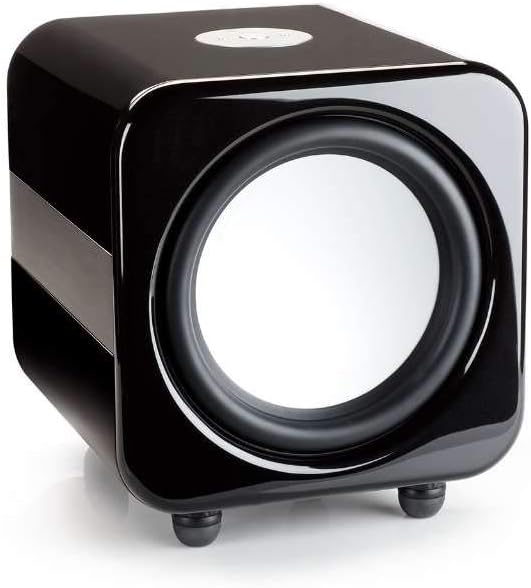
The Monitor Audio Apex AW-12 Subwoofer is designed for robust audio performance and aesthetic integration.


அமைவு
1. வேலை வாய்ப்பு
The Apex AW-12 is designed as a floor-standing subwoofer. For optimal performance, place the subwoofer on a solid, level surface. Experiment with different positions in your room to find the best bass response, typically in a corner or along a wall.
2. இணைப்புகள்
Ensure all audio equipment is turned off before making connections.
- ஆடியோ உள்ளீடு: Connect the subwoofer to your A/V receiver or processor's subwoofer output (LFE) using a high-quality RCA cable.
- 12V தூண்டுதல் உள்ளீடு: If your A/V receiver or processor has a 12V trigger output, connect it to the subwoofer's 12V trigger input. This allows for automatic power activation/deactivation with your main system.
- மின் இணைப்பு: Once all audio connections are made, connect the supplied AC power cord to the subwoofer's power inlet and then to a suitable wall outlet.
இயங்குகிறது
ஆன்/ஆஃப்
If using the 12V trigger input, the subwoofer will power on automatically when your connected A/V receiver or processor is turned on. Otherwise, locate the power switch on the subwoofer and set it to the 'ON' position.
Volume and EQ Controls
The Apex AW-12 features top-mounted controls for volume and EQ settings. Adjust the volume to blend seamlessly with your main speakers. The EQ settings allow you to fine-tune the bass response to suit your room acoustics and personal preference. Refer to your A/V receiver's manual for initial setup and calibration of subwoofer levels.
பராமரிப்பு
To ensure the longevity and optimal performance of your Monitor Audio Apex AW-12 Subwoofer, follow these maintenance guidelines:
- சுத்தம்: Regularly wipe the cabinet with a soft, dry, lint-free cloth. Avoid using abrasive cleaners, waxes, or solvents, as these can damage the finish.
- தூசி: Use a soft brush or a vacuum cleaner with a brush attachment to gently remove dust from the driver and ventilation areas.
- சுற்றுச்சூழல்: Keep the subwoofer in a stable environment, away from direct sunlight, extreme temperatures, and high humidity.
- ஆய்வுகள்: அனைத்து கேபிள் இணைப்புகளும் பாதுகாப்பாக இருப்பதை உறுதிசெய்ய அவ்வப்போது அவற்றைச் சரிபார்க்கவும்.
சரிசெய்தல்
If you experience issues with your Apex AW-12 Subwoofer, consult the following table for common problems and solutions.
| பிரச்சனை | சாத்தியமான காரணம் | தீர்வு |
|---|---|---|
| ஒலிபெருக்கியிலிருந்து சத்தம் இல்லை | மின்சாரம் இணைக்கப்படவில்லை அல்லது இயக்கப்படவில்லை. Audio cable loose or faulty ரிசீவர்/செயலி அமைப்புகள் தவறானவை. | Check power cord and power switch Ensure audio cable is securely connected at both ends; try a different cable Verify subwoofer output is enabled and volume is up on your receiver/processor |
| Distorted or weak bass | Subwoofer volume too high/low தவறான EQ அமைப்புகள் மோசமான இடம் | Adjust subwoofer volume on the unit and/or receiver Experiment with EQ settings Try repositioning the subwoofer in the room |
| Subwoofer does not turn on with receiver (12V trigger) | 12V trigger cable loose or faulty Receiver's 12V trigger output not active | Check 12V trigger cable connection Consult your receiver's manual to ensure 12V trigger output is enabled |
If the problem persists after trying these solutions, please contact Monitor Audio customer support.
விவரக்குறிப்புகள்
Key technical specifications for the Monitor Audio Apex AW-12 Subwoofer:
| அம்சம் | விவரக்குறிப்பு |
|---|---|
| மாதிரி | Apex AW-12-BK |
| பேச்சாளர் வகை | ஒலிபெருக்கி |
| ஒலிபெருக்கி விட்டம் | 12 அங்குலம் (30.48 செமீ) |
| Ampஆயுள் வகை | வகுப்பு டி |
| வாட்tage / Max Output Power | 500 வாட்ஸ் |
| சக்தி ஆதாரம் | AC |
| பொருள் | உலோகம் |
| நிறம் | உலோக கருப்பு |
| பரிமாணங்கள் (D x W x H) | 49.5 செமீ x 47.5 செமீ x 47.2 செமீ (19.5 x 18.7 இல் x 18.6 அங்குலம்) |
| மவுண்டிங் வகை | மாடி நிற்கும் |
உத்தரவாத தகவல்
Monitor Audio products are manufactured to the highest quality standards. For detailed warranty terms and conditions, please refer to the warranty card included with your product or visit the official Monitor Audio webஉத்தரவாதக் கோரிக்கைகளுக்கு உங்கள் வாங்கியதற்கான ஆதாரத்தை வைத்திருங்கள்.
வாடிக்கையாளர் ஆதரவு
If you require further assistance or have questions not covered in this manual, please contact Monitor Audio customer support or your authorized dealer. Contact information can typically be found on the official Monitor Audio webதளத்தில் அல்லது உங்கள் தயாரிப்பு பேக்கேஜிங்கில்.
Ask a question about this manual
Ask about setup, troubleshooting, compatibility, parts, safety, or missing instructions. Manuals+ will review the question and use this page’s manual context to help answer it.