
அறிமுகம்
This manual provides instructions for the proper setup, operation, maintenance, and troubleshooting of your Excalibur Deluxe Virtual Casino 5-in-1 Video Game. Please read this manual thoroughly before using the device to ensure optimal performance and longevity.
The Excalibur Deluxe Virtual Casino is a handheld electronic gaming device featuring five classic casino games: Poker, Blackjack, Slots, Craps, and Roulette. It is designed for portable entertainment.
அமைவு
1. பேட்டரி நிறுவல்
The Excalibur Deluxe Virtual Casino requires 3 AAA batteries (not included) for operation.
- சாதனத்தின் பின்புறத்தில் பேட்டரி பெட்டியின் அட்டையைக் கண்டறியவும்.
- அம்புக்குறி சுட்டிக்காட்டப்பட்ட திசையில் அட்டையை திறந்து ஸ்லைடு செய்யவும்.
- Insert 3 AAA batteries, ensuring the correct polarity (+ and -) as marked inside the compartment.
- பேட்டரி பெட்டியின் அட்டையை மாற்றவும், அது பாதுகாப்பாக இடத்தில் கிளிக் செய்வதை உறுதிசெய்யவும்.
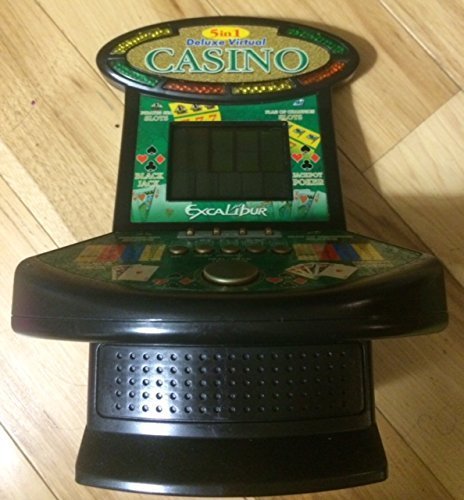
படம் 1: Excalibur Deluxe Virtual Casino handheld device. This image shows the front of the device, featuring the LED display and control buttons, which include a directional pad and action buttons.
2. ஆரம்ப பவர்-ஆன்
பேட்டரிகளை நிறுவிய பின், அழுத்தவும் சக்தி button, usually located on the top or front of the device, to turn it on. The screen should illuminate, displaying the main menu or game selection screen.
இயக்க வழிமுறைகள்
கட்டுப்படுத்துகிறதுview
- திசை திண்டு (டி-பேட்): Used for navigating menus and making selections within games.
- SELECT/MENU Button: Typically used to confirm selections or access in-game menus.
- ACTION Buttons (A, B, C, etc.): Used for specific game actions, such as dealing cards, spinning reels, or placing bets. Refer to individual game instructions for specific button functions.
- SOUND/VOLUME Button: Adjusts the device's sound level or mutes audio.
- ஆற்றல் பொத்தானை: சாதனத்தை ஆன் அல்லது ஆஃப் செய்கிறது.
விளையாட்டு தேர்வு
From the main menu, use the டி-பேட் to highlight your desired game (Poker, Blackjack, Slots, Craps, or Roulette). Press the தேர்ந்தெடுக்கவும் button to confirm your choice and start the game.
Basic Gameplay (General)
- Placing Bets: பயன்படுத்தவும் டி-பேட் to select bet amounts or areas on the table (for Craps/Roulette). Confirm with an நடவடிக்கை பொத்தான்.
- Game Actions: Follow on-screen prompts. For example, in Poker/Blackjack, use நடவடிக்கை buttons to "Hit," "Stand," "Deal," or "Fold." In Slots, press an நடவடிக்கை button to "Spin."
- Viewing Rules: Some games may have an option to view rules within their respective menus. Access this via the மெனு button if available.
பராமரிப்பு
சுத்தம் செய்தல்
To clean the device, gently wipe the exterior with a soft, dry cloth. Do not use abrasive cleaners, solvents, or immerse the device in water. For the screen, use a soft, lint-free cloth specifically designed for electronics displays.
பேட்டரி பராமரிப்பு மற்றும் சேமிப்பு
- சாதனம் நீண்ட காலத்திற்குப் பயன்படுத்தப்படாவிட்டால், கசிவைத் தடுக்க பேட்டரிகளை அகற்றவும்.
- நேரடி சூரிய ஒளி மற்றும் தீவிர வெப்பநிலையிலிருந்து விலகி, குளிர்ந்த, உலர்ந்த இடத்தில் சாதனத்தை சேமிக்கவும்.
- பழைய மற்றும் புதிய பேட்டரிகள் அல்லது பல்வேறு வகையான பேட்டரிகளை கலக்க வேண்டாம்.
சரிசெய்தல்
| பிரச்சனை | சாத்தியமான காரணம் | தீர்வு |
|---|---|---|
| சாதனம் இயக்கப்படவில்லை. | செயலிழந்த அல்லது தவறாக நிறுவப்பட்ட பேட்டரிகள். | பேட்டரி துருவமுனைப்பைச் சரிபார்க்கவும். புதிய AAA பேட்டரிகளால் மாற்றவும். |
| திரை காலியாக உள்ளது அல்லது மின்னுகிறது. | Low batteries or a temporary software glitch. | Replace batteries. Turn the device off and on again. |
| பொத்தான்கள் பதிலளிக்கவில்லை. | Low batteries or a software issue. | Replace batteries. Turn the device off and on again. Ensure buttons are not stuck. |
| ஒலி இல்லை. | ஒலியளவு முடக்கப்பட்டுள்ளது அல்லது மிகக் குறைவாக அமைக்கப்பட்டுள்ளது. | அழுத்தவும் SOUND/VOLUME button to adjust volume or unmute. |
விவரக்குறிப்புகள்
- மாதிரி: B01GGZSPTA
- பிராண்ட்: எக்ஸ்காலிபர்
- காட்சி வகை: LED
- படிவக் காரணி: கையடக்கமானது
- சக்தி ஆதாரம்: 3 x AAA பேட்டரிகள் (சேர்க்கப்படவில்லை)
- சேர்க்கப்பட்ட விளையாட்டுகள்: Poker, Blackjack, Slots, Craps, Roulette
உத்தரவாதம் மற்றும் ஆதரவு
Excalibur products are designed for quality and reliability. For information regarding warranty coverage, please refer to the warranty card included with your purchase or visit the official Excalibur webதளம்.
For technical support or customer service inquiries, please contact Excalibur customer support through their official channels. Contact details are typically available on the product packaging or the manufacturer's webதளம்.