
LyxPro SPA-5.5
LyxPro SPA-5.5 சிறிய PA ஸ்பீக்கர் கண்காணிப்பு அறிவுறுத்தல் கையேடு
Model: SPA-5.5
1. அறிமுகம்
This manual provides detailed instructions for the proper setup, operation, and maintenance of your LyxPro SPA-5.5 Small PA Speaker Monitor. Please read this manual thoroughly before using the device to ensure optimal performance and safety.
The LyxPro SPA-5.5 is a compact and powerful active speaker system featuring a Class-D amplifier, a 3-channel mixer, and a 3-band equalizer. It is designed for various applications including vocal and instrument monitoring, public address, and as a guitar amplifier or karaoke system.
2. பாதுகாப்பு வழிமுறைகள்
- சக்தி ஆதாரம்: Connect the unit only to the specified power supply (100V – 240V AC). Ensure the power cord is not damaged or pinched.
- காற்றோட்டம்: காற்றோட்ட திறப்புகளைத் தடுக்க வேண்டாம். அதிக வெப்பமடைவதைத் தடுக்க அலகு சுற்றி போதுமான காற்றோட்டத்தை உறுதி செய்யவும்.
- நீர் மற்றும் ஈரப்பதம்: Do not expose the unit to rain, moisture, or any liquids. Do not place objects filled with liquids on the unit.
- வெப்ப ஆதாரங்கள்: ரேடியேட்டர்கள், வெப்பப் பதிவேடுகள், அடுப்புகள் அல்லது பிற வெப்பத்தை உற்பத்தி செய்யும் சாதனங்கள் போன்ற வெப்ப மூலங்களிலிருந்து யூனிட்டை விலக்கி வைக்கவும்.
- சுத்தம்: Clean only with a dry cloth. Disconnect from power before cleaning.
- சேவை: இந்த தயாரிப்புக்கு நீங்களே சேவை செய்ய முயற்சிக்காதீர்கள். தகுதிவாய்ந்த சேவை ஊழியர்களுக்கு அனைத்து சேவைகளையும் பார்க்கவும்.
- இடம்: Place the unit on a stable surface. If mounting on a microphone stand, ensure the stand is stable and capable of supporting the unit's weight.
3. தொகுப்பு உள்ளடக்கங்கள்
தொகுப்பில் அனைத்து பொருட்களும் உள்ளதா என சரிபார்க்கவும்:
- LyxPro SPA-5.5 Speaker Monitor
- பவர் கேபிள்
- Microphone Stand Mounting Hardware
- பயனர் கையேடு (இந்த ஆவணம்)
4. தயாரிப்பு அம்சங்கள்
- 125W RMS / 150W Peak Class-D Ampஆயுள்
- Integrated 3-Channel Mixer
- 3-Band Equalizer (Bass, Mid, Treble)
- +48V Phantom Power Supply for Condenser Microphones
- Multiple Inputs: XLR, 1/4" (6.35mm), RCA, and 3.5mm (1/8") Aux
- Instrument Switch for Direct Instrument Connection
- XLR Thru Connection for Daisy-Chaining
- எதிரொலி கட்டுப்பாடு
- உள்ளமைக்கப்பட்ட புளூடூத் இணைப்பு
- SD கார்டு இணக்கத்தன்மை
- Mounts on Standard Microphone Stands
- Durable and Compact Design
5. கட்டுப்பாடுகள் மற்றும் இணைப்புகள்
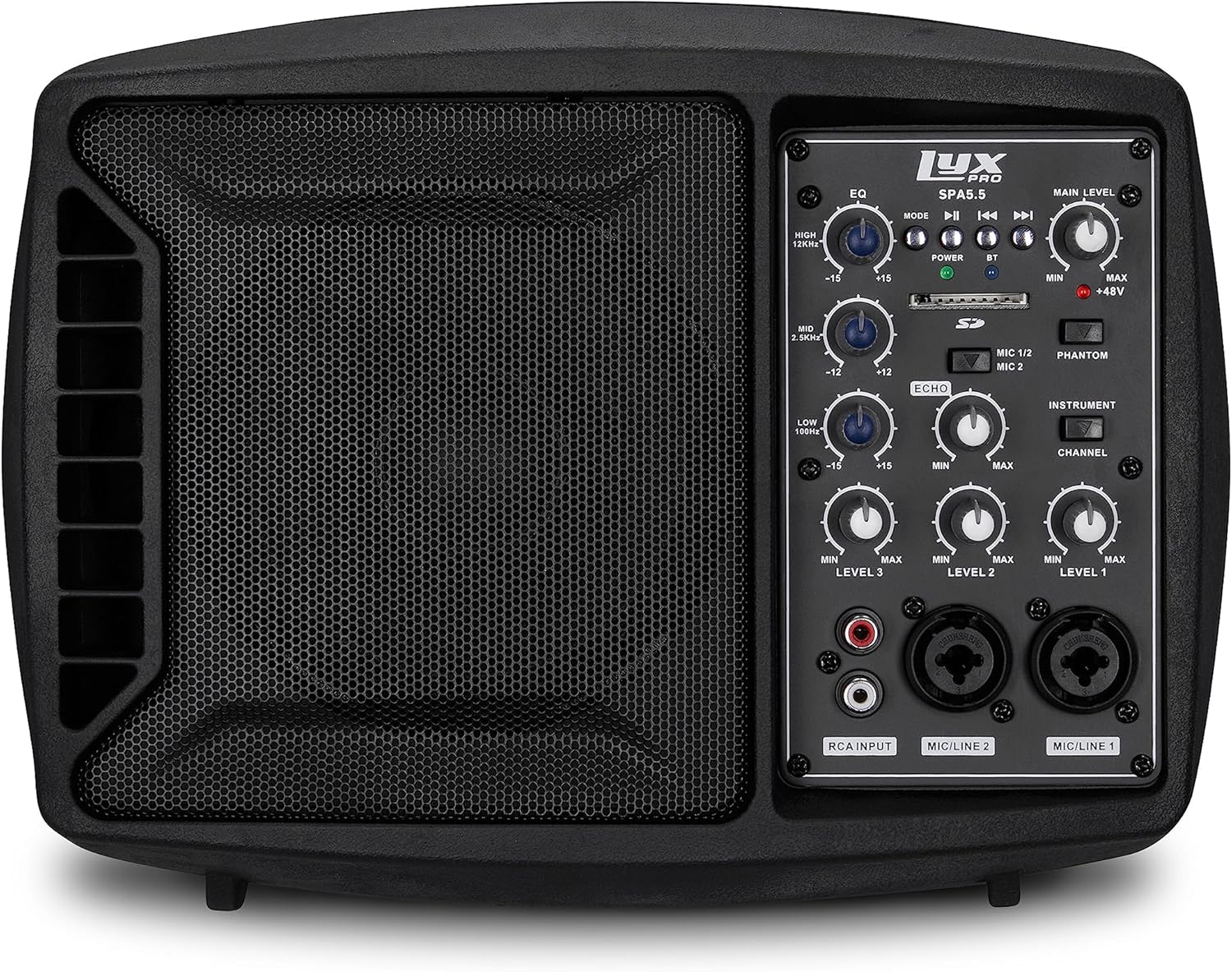
படம் 5.1: முன் view of the LyxPro SPA-5.5 speaker monitor, showing the speaker grille and control panel.
5.1 முன் குழு கட்டுப்பாடுகள்

Figure 5.2: Detailed diagram of the LyxPro SPA-5.5 front control panel with labeled components.
- சமநிலைப்படுத்தி (EQ):
- HIGH (12kHz): Adjusts high frequencies. Range: ±15dB.
- MID (2.5kHz): Adjusts mid frequencies. Range: ±15dB.
- LOW (80Hz): Adjusts low frequencies. Range: ±15dB.
- முக்கிய நிலை: ஸ்பீக்கரின் ஒட்டுமொத்த வெளியீட்டு அளவைக் கட்டுப்படுத்துகிறது.
- பவர் லைட்: அலகு எப்போது இயக்கப்படுகிறது என்பதைக் குறிக்கிறது.
- BT (Bluetooth) Light: புளூடூத் இணைப்பு நிலையைக் குறிக்கிறது.
- SD கார்டு ஸ்லாட்: ஆடியோவை இயக்குவதற்கு fileஒரு SD கார்டில் இருந்து கள்.
- Phantom Power Switch (+48V): Activates +48V phantom power for condenser microphones connected to MIC 1 or MIC 2.
- MIC 1/2 Switch: Selects between MIC 1 and MIC 2 inputs for Channel 1.
- Instrument Switch: Optimizes input impedance for direct connection of instruments (e.g., guitar) to Channel 1.
- எதிரொலி கட்டுப்பாடு: Adjusts the level of echo effect applied to microphone inputs.
- Channel Level Controls (LEVEL 1, LEVEL 2, LEVEL 3): Adjusts the individual volume for each input channel.
- RCA Input (LINE 3): Stereo RCA inputs for connecting devices like CD players, MP3 players, or keyboards.
- MIC/LINE 2 Input: Combo XLR/1/4" (6.35mm) input for microphones or line-level devices.
- MIC/LINE 1 Input: Combo XLR/1/4" (6.35mm) input for microphones or line-level devices.
5.2 பின்புற பேனல் இணைப்புகள்

Figure 5.3: Detailed diagram of the LyxPro SPA-5.5 rear panel with labeled connections.
- MAIN IN (XLR): Main input for connecting external audio sources.
- MIC/LINE Level Switch: Selects between microphone or line level for the MAIN IN.
- THRU (XLR): XLR output for daisy-chaining to other speakers or sending the mixed signal to another device.
- மின்விசை மாற்றும் குமிழ்: யூனிட்டை ஆன் அல்லது ஆஃப் செய்கிறது.
- ஏசி உள்ளீடு: Power connector for the included AC power cable (100V – 240V AC).
6 அமைவு
6.1 ஆரம்ப பவர்-அப்
- Ensure all level controls (Main Level, Channel Levels) are set to minimum.
- Connect the provided AC power cable to the AC INPUT on the rear panel and then to a suitable power outlet.
- Flip the Power Switch on the rear panel to the "ON" position. The Power Light on the front panel will illuminate.
6.2 மவுண்டிங் விருப்பங்கள்
The SPA-5.5 can be used in various configurations:
- மாடி மானிட்டர்: Place the unit on the floor in front of the performer, angled upwards.
- டேப்லெட்: ஒரு தட்டையான, நிலையான மேற்பரப்பில் நிலை.
- Microphone Stand Mounting: The unit includes hardware to mount it directly onto a standard microphone stand.

Figure 6.1: The LyxPro SPA-5.5 speaker monitor positioned on a microphone stand, demonstrating its use as a personal monitor for a musician.

Figure 6.2: A band performing outdoors, utilizing the compact LyxPro SPA-5.5 speaker for sound reinforcement.
7. இயக்க வழிமுறைகள்
7.1 மைக்ரோஃபோன்கள் மற்றும் கருவிகளை இணைத்தல்
- ஒலிவாங்கிகள்: Connect dynamic or condenser microphones to the MIC/LINE 1 or MIC/LINE 2 inputs using XLR cables. If using a condenser microphone, activate the +48V Phantom Power Switch. Adjust the corresponding Channel Level control.
- கருவிகள்: Connect instruments (e.g., guitar, bass) directly to MIC/LINE 1 or MIC/LINE 2 using a 1/4" (6.35mm) cable. Engage the Instrument Switch for optimal impedance matching. Adjust the corresponding Channel Level control.
- வரிசை-நிலை சாதனங்கள்: Connect devices like keyboards or audio interfaces to MIC/LINE 1 or MIC/LINE 2 using 1/4" (6.35mm) cables. Ensure the Instrument Switch is disengaged. Adjust the corresponding Channel Level control.
- Stereo Audio Sources: Connect CD players, MP3 players, or other stereo sources to the RCA Input (LINE 3). Adjust LEVEL 3.
7.2 ஒலியை சரிசெய்தல்
- Channel Levels: Use the LEVEL 1, LEVEL 2, and LEVEL 3 controls to balance the volume of individual inputs.
- முக்கிய நிலை: Adjust the Main Level knob to control the overall output volume of the speaker.
- சமநிலைப்படுத்தி (EQ): Use the HIGH, MID, and LOW knobs to shape the tone of your sound.
- Increase HIGH for brighter sound.
- Adjust MID for vocal clarity or instrument presence.
- Increase LOW for more bass.
- எதிரொலி கட்டுப்பாடு: Turn the Echo knob to add a reverberation effect to the microphone inputs.
7.3 Media Playback (SD Card & Bluetooth)

Figure 7.1: Icons indicating SD card compatibility and built-in Bluetooth functionality on the LyxPro SPA-5.5.
- SD கார்டு: Insert an SD card containing audio files into the SD Card Slot. The unit will automatically detect and begin playback. Use the built-in controls (Mode, Play/Pause, Skip) to manage playback.
- புளூடூத்:
- யூனிட் இயக்கப்பட்டிருப்பதை உறுதிசெய்யவும்.
- உங்கள் மொபைல் சாதனத்தில் புளூடூத்தை இயக்கவும்.
- தேடுங்கள் "LyxPro SPA-5.5" in your device's Bluetooth settings and pair. The BT light on the unit will indicate a successful connection.
- Play audio from your device. Adjust volume using both your device and the SPA-5.5's Main Level control.

Figure 7.2: A musician utilizing the LyxPro SPA-5.5 as a personal monitor in a studio environment.
8. பராமரிப்பு
- சுத்தம்: அலகின் வெளிப்புறத்தை சுத்தம் செய்ய மென்மையான, உலர்ந்த துணியைப் பயன்படுத்தவும். திரவ கிளீனர்கள் அல்லது ஏரோசோல்களைப் பயன்படுத்த வேண்டாம்.
- சேமிப்பு: நீண்ட நேரம் பயன்பாட்டில் இல்லாதபோது, நேரடி சூரிய ஒளி மற்றும் தீவிர வெப்பநிலையிலிருந்து விலகி, குளிர்ந்த, உலர்ந்த இடத்தில் யூனிட்டை சேமிக்கவும்.
- உருகி மாற்று: If the unit does not power on, check the fuse located near the AC input. Replace with a fuse of the same type and rating (T 3.15 A H 250V). Refer to qualified personnel if unsure.
9. சரிசெய்தல்
| பிரச்சனை | சாத்தியமான காரணம் | தீர்வு |
|---|---|---|
| சக்தி இல்லை | Power cable disconnected; Power switch off; Blown fuse | Check power cable connection; Turn power switch on; Replace fuse (refer to Maintenance section) |
| ஒலி வெளியீடு இல்லை | Main Level or Channel Levels too low; Input device not connected or muted; Incorrect input selected | Increase Main Level and Channel Levels; Check input device connection and volume; Verify correct input is used |
| சிதைந்த ஒலி | Input signal too high; Main Level too high; EQ settings incorrect | Reduce input device volume; Lower Main Level; Adjust EQ settings |
| மைக்ரோஃபோன் வேலை செய்யவில்லை (கண்டன்சர் மைக்) | பாண்டம் பவர் இயக்கப்படவில்லை | Activate the +48V Phantom Power Switch |
| புளூடூத் இணைக்கப்படவில்லை | Unit not in pairing mode; Device too far; Incorrect device selected | Ensure Bluetooth is active on SPA-5.5 and device; Move device closer; Select "LyxPro SPA-5.5" from device list |
10. விவரக்குறிப்புகள்

Figure 10.1: Diagram illustrating the compact dimensions of the LyxPro SPA-5.5 speaker monitor.
| அம்சம் | விவரம் |
|---|---|
| சக்தி வெளியீடு | 125W RMS / 150W பீக் |
| பேச்சாளர் அளவு | 5 அங்குலம் |
| Ampஆயுள் வகை | வகுப்பு-டி |
| அதிர்வெண் பதில் (-10dB) | 80Hz - 14kHz |
| அதிர்வெண் பதில் (-3dB) | 100Hz - 10kHz |
| அதிகபட்சம் SPL | 114dB SPL @ 1M |
| பாண்டம் பவர் | +48V |
| உள்ளீடு மின்மறுப்பு | 20 கே |
| EQ High (12kHz) | ±15dB |
| EQ Mid (2.5kHz) | ±15dB |
| EQ Low (80Hz) | ±15dB |
| உள்ளீடு தொகுதிtage | 100V - 240V ஏசி |
| மின் நுகர்வு | 180W அதிகபட்சம். |
| பரிமாணங்கள் (L x W x H) | 13.5" x 9" x 11.8" (34.3 செ.மீ x 22.9 செ.மீ x 30 செ.மீ) |
| எடை | 6.1 பவுண்ட் (2.77 கிலோ) |
11. உத்தரவாதம் மற்றும் ஆதரவு
For warranty information and technical support, please refer to the warranty card included with your product or visit the official LyxPro webவாங்கியதற்கான சான்றாக உங்கள் கொள்முதல் ரசீதை வைத்திருங்கள்.
For further assistance, contact LyxPro customer support.
Ask a question about this manual
Ask about setup, troubleshooting, compatibility, parts, safety, or missing instructions. Manuals+ will review the question and use this page’s manual context to help answer it.