
அறிமுகம்
This manual provides detailed instructions for the setup, operation, and maintenance of your Axess CKRD3803 Digital AM/FM Clock Radio. Please read this manual thoroughly before using the device to ensure proper function and to maximize your user experience.
தயாரிப்பு முடிந்துவிட்டதுview
The Axess CKRD3803 is a versatile clock radio featuring a 1.2-inch red LED display, digital AM/FM radio, dual alarm settings, and a calendar function. It includes an Aux input jack for external audio devices and a battery backup system to maintain settings during power interruptions.
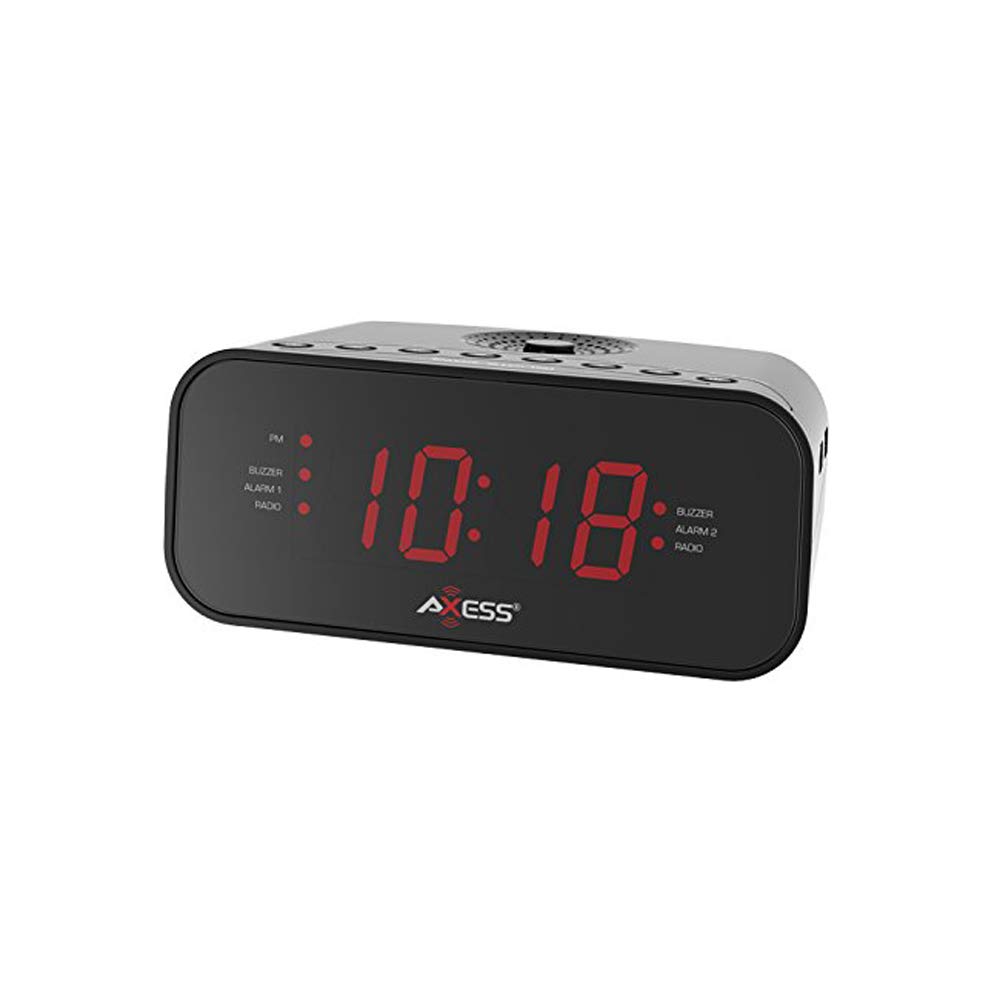
படம்: முன்பக்கம் view of the Axess CKRD3803 Digital AM/FM Clock Radio. The device is black with a large red LED display showing '10:18'. Indicators for PM, Buzzer, Alarm 1, Radio, and Alarm 2 are visible on either side of the time display.
முக்கிய அம்சங்கள்:
- Large 1.2-inch Red LED Display with two-step dimmer.
- Digital AM/FM Radio.
- Dual Alarm with Buzzer or Radio options.
- Sleep and Snooze Functions.
- Calendar Function.
- Auxiliary Input Jack.
- Battery Backup (2 x AAA batteries, not included) for power outages.
அமைவு
மின் இணைப்பு:
- Uncoil the built-in power cord (pigtail antenna).
- Plug the power cord into a standard AC wall outlet (120V, 60Hz).
- The LED display will light up, indicating the unit is receiving power.
பேட்டரி காப்பு நிறுவல்:
For uninterrupted timekeeping during power outages, காப்பு பேட்டரிகளை நிறுவவும்.
- யூனிட்டின் அடிப்பகுதியில் பேட்டரி பெட்டியைக் கண்டறியவும்.
- பேட்டரி பெட்டியின் அட்டையைத் திறக்கவும்.
- Insert two (2) AAA batteries (not included), observing the correct polarity (+ and -) as indicated inside the compartment.
- பேட்டரி பெட்டியின் அட்டையை பாதுகாப்பாக மூடு.
Note: Batteries are for backup only and will not power the display or radio functions during a power outage. They only preserve time and alarm settings.
இயக்க வழிமுறைகள்
நேரத்தை அமைத்தல்:
- அழுத்திப் பிடிக்கவும் நேரம் அமை மணிநேர இலக்கங்கள் ஒளிரத் தொடங்கும் வரை பொத்தானை அழுத்தவும்.
- அழுத்தவும் மணிநேரம் button repeatedly to adjust the hour. Observe the 'PM' indicator for correct AM/PM setting.
- அழுத்தவும் நிமிடம் நிமிடங்களை சரிசெய்ய மீண்டும் மீண்டும் பொத்தானை அழுத்தவும்.
- 12-மணிநேர மற்றும் 24-மணிநேர (இராணுவ) நேர வடிவமைப்பிற்கு இடையில் மாற, அழுத்தவும் 12/24H button while the time is flashing.
- அழுத்தவும் நேரம் அமை நேர அமைப்பு பயன்முறையை உறுதிப்படுத்தவும் வெளியேறவும் மீண்டும் பொத்தானை அழுத்தவும்.
Setting the Alarm (Alarm 1 and Alarm 2):
The CKRD3803 features two independent alarms.
- அழுத்திப் பிடிக்கவும் அலாரம் 1 செட் (அல்லது அலாரம் 2 செட்) அலாரம் மணிநேர இலக்கங்கள் ஒளிரத் தொடங்கும் வரை பொத்தான்.
- அழுத்தவும் மணிநேரம் button to adjust the alarm hour. Observe the 'PM' indicator.
- அழுத்தவும் நிமிடம் அலாரம் நிமிடங்களை சரிசெய்ய பொத்தான்.
- அழுத்தவும் அலாரம் 1 செட் (அல்லது அலாரம் 2 செட்) button again to confirm the time.
- Immediately after confirming the time, press the ALARM 1 MODE (அல்லது ALARM 2 MODE) button repeatedly to select the alarm source: பஸர் or வானொலி. The corresponding indicator light will illuminate.
- அலாரத்தை இயக்க அல்லது செயலிழக்க, அழுத்தவும் அலாரம் 1 ஆன்/ஆஃப் (அல்லது அலாரம் 2 ஆன்/ஆஃப்) button. The alarm indicator will light up when active.
வானொலி செயல்பாடு:
- அழுத்தவும் ரேடியோ ஆன்/ஆஃப் ரேடியோவை இயக்குவதற்கான பொத்தான்.
- அழுத்தவும் AM/FM AM மற்றும் FM பட்டைகளுக்கு இடையில் மாற பொத்தான்.
- அழுத்தவும் டியூன் + or டியூன் - விரும்பிய அதிர்வெண்ணுக்கு கைமுறையாக டியூன் செய்ய பொத்தான்கள்.
- அழுத்திப் பிடிக்கவும் டியூன் + or டியூன் - தானியங்கி நிலைய ஸ்கேனிங்கிற்கு.
- ஐப் பயன்படுத்தி அளவை சரிசெய்யவும் தொகுதி + or தொகுதி - பொத்தான்கள்.
- To improve FM reception, extend the pigtail antenna fully. For AM reception, rotate the unit for best signal.
- அழுத்தவும் ரேடியோ ஆன்/ஆஃப் ரேடியோவை அணைக்க மீண்டும் பொத்தானை அழுத்தவும்.
உறக்கநிலை செயல்பாடு:
அலாரம் ஒலிக்கும்போது, அழுத்தவும் உறக்கநிலை button to temporarily silence the alarm for approximately 9 minutes. The alarm will sound again after this period.
தூக்க செயல்பாடு:
தூங்குவதற்கு வானொலியைக் கேட்க, அழுத்தவும் தூங்கு button while the radio is playing. Repeatedly press the தூங்கு button to cycle through sleep timer options (e.g., 90, 60, 30, 15 minutes, or OFF). The radio will automatically turn off after the selected time.
டிஸ்ப்ளே டிம்மர்:
அழுத்தவும் டிம்மர் button to adjust the brightness of the LED display between two levels (bright and dim).
துணை உள்ளீடு:
வெளிப்புற ஆடியோ சாதனத்தை (எ.கா., MP3 பிளேயர், ஸ்மார்ட்போன்) இணைக்கவும் AUX IN jack on the unit using a 3.5mm audio cable (not included). The audio from the external device will play through the clock radio's speaker.
பராமரிப்பு
To ensure the longevity and optimal performance of your Axess CKRD3803, follow these simple maintenance guidelines:
- சுத்தம்: Wipe the unit with a soft, dry cloth. Do not use abrasive cleaners, waxes, or solvents as they may damage the finish.
- மின் கம்பி: Regularly check the power cord for any signs of damage. If damaged, discontinue use and seek professional repair.
- பேட்டரி மாற்று: Replace backup batteries annually or when the unit is stored for extended periods to prevent leakage.
- இடம்: நேரடி சூரிய ஒளியில், வெப்ப மூலங்களுக்கு அருகில் அல்லது அதிக ஈரப்பதம் அல்லது தூசி உள்ள பகுதிகளில் அலகு வைப்பதைத் தவிர்க்கவும்.
சரிசெய்தல்
If you encounter issues with your Axess CKRD3803, please refer to the following common problems and solutions:
| பிரச்சனை | சாத்தியமான காரணம் | தீர்வு |
|---|---|---|
| காட்சி காலியாக உள்ளது. | No AC power; Dimmer set to lowest setting. | Ensure power cord is securely plugged in. Press the டிம்மர் பிரகாசத்தை அதிகரிக்க பொத்தான். |
| நேரம்/அலாரம் அமைக்க முடியவில்லை. | Buttons not pressed correctly or in sequence. | Refer to the "Setting the Time" and "Setting the Alarm" sections for precise steps. Ensure you press and hold the SET button until digits flash. |
| அலாரம் ஒலிக்கவில்லை. | Alarm not activated; Volume too low (for radio alarm). | Ensure the alarm is set and the alarm indicator light is on. For radio alarm, increase radio volume. |
| மோசமான வானொலி வரவேற்பு. | Antenna not positioned correctly; Weak signal. | Fully extend the pigtail antenna for FM. Rotate the unit for optimal AM reception. Try a different location. |
| மின்சாரம் நிறுத்தப்பட்ட பிறகு இழந்த நேரம்/அமைப்புகள்tage. | காப்பு பேட்டரிகள் நிறுவப்படவில்லை அல்லது தீர்ந்து போயுள்ளன. | Install fresh AAA batteries in the battery compartment. |
| Stuck in 24-hour (military) time. | 12/24H setting not adjusted during time setup. | Enter time setting mode (press and hold நேரம் அமை). While digits are flashing, press the 12/24H button to toggle between formats. |
விவரக்குறிப்புகள்
- மாதிரி: CKRD3803
- காட்சி: 1.2-இன்ச் சிவப்பு LED
- சக்தி ஆதாரம்: ஏசி 120 வி ~ 60 ஹெர்ட்ஸ்
- பேட்டரி காப்புப்பிரதி: 2 x AAA பேட்டரிகள் (சேர்க்கப்படவில்லை)
- ரேடியோ பேண்டுகள்: AM/FM
- பரிமாணங்கள்: 2.95 x 6.89 x 4.21 அங்குலம் (அடி x அடர் x ஆழம்)
- எடை: 1 பவுண்டு
- பொருள்: அக்ரிலோனிட்ரைல் புடாடியீன் ஸ்டைரீன்
- சிறப்பு அம்சங்கள்: Dual Alarm, Calendar Function, Aux-in, Sleep/Snooze, Dimmer
உத்தரவாதம் மற்றும் ஆதரவு
For warranty information or technical support, please refer to the documentation included with your purchase or visit the official Axess webஎந்தவொரு உத்தரவாதக் கோரிக்கைகளுக்கும் வாங்கியதற்கான சான்றாக உங்கள் கொள்முதல் ரசீதை வைத்திருங்கள்.


