
1. அறிமுகம்
This manual provides detailed instructions for the installation, operation, maintenance, and troubleshooting of your FSP 400W Micro ATX Power Supply (Model FSP400-60GHS(85)-R1). This power supply unit is designed for compact small form factor PC systems, offering 400 watts of power output with 80 Plus Bronze certification for high efficiency. It is compatible with Intel and AMD CPU systems and standard PC configurations.
Please read this manual thoroughly before installation and operation to ensure proper usage and to prevent damage to the unit or other components.
2. பாதுகாப்பு தகவல்
எச்சரிக்கை: Power supplies contain high voltage கூறுகள். மின்சார விநியோகத்தைத் திறக்க வேண்டாம் casing. உள்ளே பயனர் சேவை செய்யக்கூடிய பாகங்கள் எதுவும் இல்லை. c ஐத் திறக்கிறதுasing will void the warranty and poses a risk of electric shock.
- Ensure the power supply is disconnected from the AC power outlet before installation or maintenance.
- நன்கு காற்றோட்டமான பகுதியில் மின்சார விநியோகத்தை நிறுவவும்.
- Do not operate the power supply in high humidity or extreme temperature environments.
- மின்சார விநியோகத்துடன் வழங்கப்பட்ட கேபிள்களை மட்டும் பயன்படுத்தவும்.
- Ensure all cables are securely connected before powering on the system.
- இந்த தயாரிப்பு தனிப்பட்ட கணினிகளில் பயன்படுத்த வடிவமைக்கப்பட்டுள்ளது. வேறு எந்த நோக்கத்திற்காகவும் இதைப் பயன்படுத்த வேண்டாம்.
3. தொகுப்பு உள்ளடக்கங்கள்
கீழே பட்டியலிடப்பட்டுள்ள அனைத்து பொருட்களும் உங்கள் தொகுப்பில் உள்ளதா என்பதைச் சரிபார்க்கவும்:
- FSP 400W Micro ATX Power Supply (FSP400-60GHS(85)-R1)
- ஏசி பவர் கார்டு
- SFX to PS2 Bracket
- பயனர் கையேடு
- Mounting Screws (typically included with PC cases, but sometimes with PSUs)

Figure 3.1: Package Contents. Shows the power supply unit, user manual, various power cables, an AC power cord, and an SFX to PS2 adapter bracket.
4. தயாரிப்பு முடிந்துவிட்டதுview
The FSP400-60GHS(85)-R1 is a compact power supply designed for small form factor systems. Key features include an 80mm cooling fan with thermal sensing technology and an energy-saving 1-watt standby mode.
4.1 இயற்பியல் அமைப்பு

படம் 4.1: கோணல் view of the FSP 400W Micro ATX Power Supply, highlighting the fan grille, power switch, and AC power input.

படம் 4.2: பின்புறம் view of the power supply, detailing the main power switch and the AC power input socket.

படம் 4.3: மேல் view of the power supply, showing the protective grille over the 80mm cooling fan.
4.2 வெளியீட்டு இணைப்பிகள்
The power supply includes various connectors to power your system components:
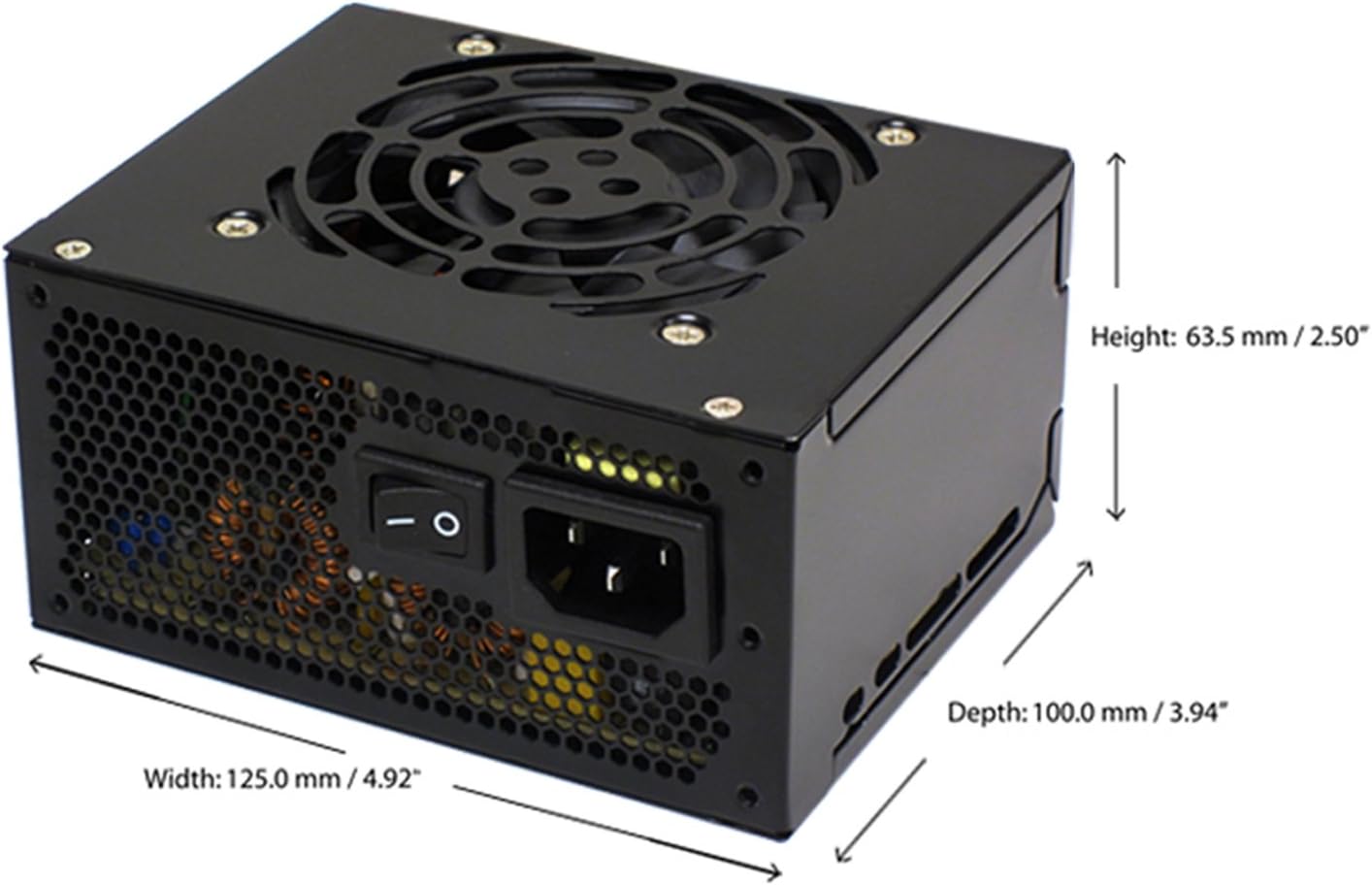
Figure 4.4: Diagram illustrating the types and quantities of output connectors available on the FSP400-60GHS(85)-R1 power supply.
- Main 24 Pin (1): For motherboard power.
- P4 | EPS 4+4 Pin (1): For CPU power.
- PCI-E 8 Pin (6+2) (1): கிராபிக்ஸ் அட்டைகளுக்கு.
- Molex 4 Pin (3): For older peripherals and fans.
- Serial ATA 15 Pin (3): For SATA hard drives and SSDs.
- FDD 4 Pin (1): For floppy disk drives or other legacy devices.
5. அமைவு மற்றும் நிறுவல்
Before beginning installation, ensure your computer system is powered off and disconnected from the AC power outlet. It is recommended to wear an anti-static wrist strap to prevent electrostatic discharge (ESD) damage to components.
5.1 மின்சார விநியோகத்தை நிறுவுதல்
- வழக்கைத் தயாரிக்கவும்: Open your computer case. Identify the power supply mounting area.
- PSU ஐ ஏற்றுதல்:
- For SFX cases: Insert the FSP400-60GHS(85)-R1 directly into the SFX power supply bay and secure it with screws.
- For standard ATX cases: Attach the included SFX to PS2 bracket to the power supply. Then, mount the power supply with the bracket into the ATX power supply bay and secure it with screws.

Figure 5.1: The FSP 400W Micro ATX Power Supply shown with the SFX to PS2 adapter bracket installed, ready for mounting in a standard ATX case.

Figure 5.2: Illustration demonstrating how the SFX power supply fits into a PS2 (ATX) case using the provided adapter bracket.
5.2 இணைக்கும் கேபிள்கள்
Connect the appropriate cables to your motherboard and components. Refer to your motherboard and component manuals for specific connection points.
- மதர்போர்டு பவர்: Connect the 24-pin ATX connector to the corresponding socket on your motherboard.
- CPU பவர்: Connect the 4+4-pin EPS/ATX 12V connector to the CPU power socket on your motherboard.
- Graphics Card Power: If your graphics card requires external power, connect the 6+2-pin PCI-E connector(s) to the graphics card.
- சேமிப்பக சாதனங்கள்: Connect SATA power connectors to your SATA hard drives, SSDs, and optical drives.
- புறப்பொருட்கள்: Use Molex 4-pin connectors for case fans or other legacy peripherals as needed.
- கேபிள் மேலாண்மை: Route cables neatly to ensure proper airflow within the case.
Once all internal connections are made, close your computer case.
5.3 வெளிப்புற இணைப்பு
- ஏசி பவர் கார்டை பவர் சப்ளையின் ஏசி இன்லெட்டுடன் இணைக்கவும்.
- Plug the other end of the AC power cord into a grounded wall outlet or surge protector.
- Ensure the power switch on the back of the power supply is in the "OFF" (O) position before plugging it in.
6. இயக்க வழிமுறைகள்
6.1 உங்கள் கணினியை இயக்குதல்
- After all connections are secure, flip the power switch on the back of the power supply to the "ON" (I) position.
- கணினியைத் தொடங்க உங்கள் கணினி உறையில் உள்ள ஆற்றல் பொத்தானை அழுத்தவும்.
6.2 Thermal Control System
The FSP400-60GHS(85)-R1 features an 80mm cooling fan with thermal sensing technology. This system automatically adjusts the fan speed based on the internal temperature of the power supply, optimizing cooling performance while minimizing noise.
6.3 Energy Saver Standby Mode
This power supply is designed with an energy-saving 1-watt standby mode, reducing power consumption when the system is in a low-power state or turned off but still connected to AC power.
7. பராமரிப்பு
சரியான பராமரிப்பு உங்கள் மின்சார விநியோகத்தின் நீண்ட ஆயுளையும் உகந்த செயல்திறனையும் உறுதி செய்கிறது.
- சுத்தம்: Periodically clean the exterior of the power supply and its fan grille to prevent dust buildup. Use a soft, dry cloth or compressed air. Ensure the power supply is disconnected from AC power before cleaning.
- காற்றோட்டம்: Ensure that the power supply's fan and ventilation openings are not obstructed. Good airflow is crucial for cooling.
- கேபிள் ஒருமைப்பாடு: தேய்மானம், உடைப்பு அல்லது சேதம் போன்ற அறிகுறிகள் ஏதேனும் உள்ளதா என அனைத்து மின் கேபிள்களையும் தவறாமல் சரிபார்க்கவும். சேதமடைந்த கேபிள்களை உடனடியாக மாற்றவும்.
Do not attempt to open the power supply unit for internal cleaning or repair. This will void the warranty and can be dangerous.
8. சரிசெய்தல்
உங்கள் மின்சார விநியோகத்தில் சிக்கல்களை எதிர்கொண்டால், பின்வரும் பொதுவான சிக்கல்கள் மற்றும் தீர்வுகளைப் பார்க்கவும்:
8.1 No Power to System
- Check AC Power: Ensure the AC power cord is securely plugged into both the power supply and a working wall outlet.
- மின்விசை மாற்றும் குமிழ்: Verify that the power switch on the back of the power supply is in the "ON" (I) position.
- உள் இணைப்புகள்: Confirm that the 24-pin ATX and 4+4-pin EPS/ATX 12V connectors are firmly seated in the motherboard.
- குறைந்த மின்னழுத்தம்: Disconnect all peripheral power cables (SATA, Molex, PCI-E) and attempt to power on. If the system powers on, a short circuit may exist in one of the connected components or cables. Reconnect them one by one to identify the faulty component.
8.2 System Instability or Random Shutdowns
- அதிக சுமை: உங்கள் கணினியின் மின் தேவைகள் மின் விநியோகத்தின் 400W திறனை விட அதிகமாக இல்லை என்பதை உறுதிப்படுத்திக் கொள்ளுங்கள்.
- காற்றோட்டம்: Check for proper airflow within the case and ensure the power supply's fan is not obstructed. Overheating can cause instability.
- கேபிள் இணைப்புகள்: Re-check all power connections to ensure they are secure. Loose connections can lead to intermittent power delivery.
8.3 அதிகப்படியான மின்விசிறி சத்தம்
- தூசி படிதல்: Clean the fan grille and fan blades with compressed air.
- தடை: Ensure no cables or foreign objects are interfering with the fan's rotation.
- செயல்படும் சூழல்: High ambient temperatures can cause the thermal control system to increase fan speed. Ensure adequate room ventilation.
If troubleshooting steps do not resolve the issue, contact FSP customer support or your retailer for assistance.
9. விவரக்குறிப்புகள்
Detailed technical specifications for the FSP400-60GHS(85)-R1 power supply:
| மாதிரி பெயர் | FSP 400W Micro ATX Power Supply |
| மாதிரி எண் | FSP400-60GHS(85)-R1 |
| பிராண்ட் | எஃப்எஸ்பி |
| வெளியீடு வாட்tage | 400 வாட்ஸ் |
| 80 பிளஸ் சான்றிதழ் | 80 பிளஸ் வெண்கலம் |
| படிவம் காரணி | Micro ATX (SFX with PS2 bracket) |
| குளிரூட்டும் முறை | Air (80mm fan with thermal control) |
| பவர் சப்ளை வடிவமைப்பு | மாடுலர் அல்லாதது |
| உள்ளீடு தொகுதிtage | 100 - 265 Volts (AC) |
| பரிமாணங்கள் (L x W x H) | 4.9 x 3.9 x 2.5 அங்குலம் (125.0 x 100.0 x 63.5 மிமீ) |
| பொருளின் எடை | 2.31 பவுண்டுகள் |
| இணக்கமான சாதனங்கள் | Personal Computer (AMD/Intel CPU systems) |
| இணைப்பிகள் | Main 24 Pin (1), P4 | EPS 4+4 Pin (1), PCI-E 8 Pin (6+2) (1), Molex 4 Pin (3), Serial ATA 15 Pin (3), FDD 4 Pin (1) |
| சுற்றுச்சூழல் இணக்கம் | RoHS, ஈயம் இல்லாத, பசுமை தயாரிப்பு (GP) |

Figure 9.1: Physical dimensions of the FSP 400W Micro ATX Power Supply.

Figure 9.2: Illustrative diagram showing typical cable lengths for the power supply connectors.
10. உத்தரவாதத் தகவல்
The FSP 400W Micro ATX Power Supply (FSP400-60GHS(85)-R1) is covered by a 3 வருட உற்பத்தியாளரின் உத்தரவாதம். This warranty guarantees the quality and performance of the product for the specified period from the date of purchase.
The warranty covers defects in materials and workmanship under normal use. It does not cover damage resulting from improper installation, accidents, misuse, abuse, natural disasters, or unauthorized modifications or repairs. Opening the power supply casing உத்தரவாதத்தை ரத்து செய்யும்.
For warranty claims or service, please retain your proof of purchase and contact FSP customer support.
11. வாடிக்கையாளர் ஆதரவு
If you require further assistance, have questions, or need to report an issue that cannot be resolved using the troubleshooting guide, please contact FSP customer support.
- எஃப்எஸ்பி Webதளம்: Visit the official FSP webதயாரிப்பு தகவல், அடிக்கடி கேட்கப்படும் கேள்விகள் மற்றும் ஆதரவு ஆதாரங்களுக்கான தளம்.
- தொடர்பு தகவல்: Refer to the FSP website or your product packaging for the most current customer service contact details (phone, email, or support portal).
When contacting support, please have your product model number (FSP400-60GHS(85)-R1) and proof of purchase readily available.