
1. அறிமுகம்
This manual provides detailed instructions for the installation, operation, and maintenance of your Thomson SB260IBT 2.1 Channel Soundbar. Please read this manual thoroughly before using the product and retain it for future reference.
1.1 பாதுகாப்பு தகவல்
- மின்சாரம் வழங்கல் தொகுதியை உறுதி செய்யவும்tage தயாரிப்பு லேபிளில் குறிப்பிடப்பட்டுள்ள தேவைகளுக்கு பொருந்துகிறது.
- Do not expose the soundbar or subwoofer to rain, moisture, or extreme temperatures.
- வெப்ப மூலங்களுக்கு அருகில் அல்லது நேரடி சூரிய ஒளியில் அலகு வைப்பதைத் தவிர்க்கவும்.
- அதிக வெப்பமடைவதைத் தடுக்க, சாதனத்தைச் சுற்றி சரியான காற்றோட்டத்தை உறுதிப்படுத்தவும்.
- c-ஐ திறக்க வேண்டாம்.asing; அனைத்து சேவைகளையும் தகுதிவாய்ந்த பணியாளர்களிடம் பரிந்துரைக்கவும்.
- ஒரு மென்மையான, உலர்ந்த துணியால் மட்டுமே அலகு சுத்தம் செய்யவும்.
2. தொகுப்பு உள்ளடக்கங்கள்
தொகுப்பில் அனைத்து பொருட்களும் உள்ளதா என சரிபார்க்கவும்:
- Thomson SB260IBT Soundbar
- ஒலிபெருக்கி
- ரிமோட் கண்ட்ரோல்
- பவர் கேபிள்
- Audio Cables (e.g., Optical, AUX - may vary by region)
- பயனர் கையேடு
3. தயாரிப்பு முடிந்துவிட்டதுview
3.1 சவுண்ட்பார் மற்றும் ஒலிபெருக்கி

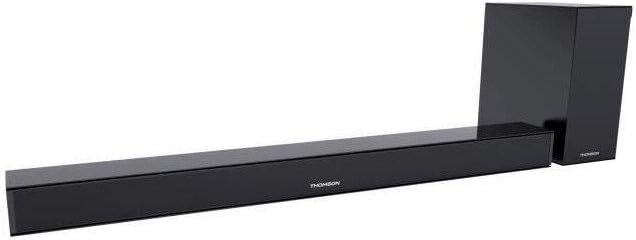
This image displays the Thomson SB260IBT soundbar unit alongside its accompanying subwoofer. The soundbar is a long, slender black unit, and the subwoofer is a compact black cube, both designed to complement modern home entertainment systems.
3.2 கட்டுப்பாட்டுப் பலகம் மற்றும் துறைமுகங்கள்
This image shows a close-up of the soundbar's side panel, revealing various control buttons and input/output ports. These include buttons for power, mode selection, volume control, and ports such as USB, SD card slot, and auxiliary input.
3.2.1 முன் குழு
- LED காட்டி: தற்போதைய பயன்முறை அல்லது நிலையைக் காட்டுகிறது.
- ஐஆர் ரிசீவர்: ரிமோட் கண்ட்ரோல் சிக்னல்களுக்கு.
3.2.2 பின்புற பேனல்
- ஆற்றல் உள்ளீடு: Connects to the AC power cable.
- ஆப்டிகல் உள்ளீடு: For digital audio connection from a TV or other device.
- AUX உள்ளீடு: For analog audio connection using a 3.5mm cable.
3.2.3 பக்க பேனல்
- USB போர்ட்: ஆடியோவை இயக்குவதற்கு fileUSB டிரைவிலிருந்து கள்.
- SD கார்டு ஸ்லாட்: ஆடியோவை இயக்குவதற்கு fileஒரு SD கார்டில் இருந்து கள்.
- கட்டுப்பாட்டு பொத்தான்கள்: Power, Mode, Volume Up/Down.
3.2.4 தொலை கட்டுப்பாடு
The remote control provides full functionality for power, input selection, volume adjustment, and playback controls.
4 அமைவு
4.1 வேலை வாய்ப்பு
Place the soundbar on a stable, flat surface directly in front of your television. Position the subwoofer on the floor near the soundbar for optimal bass response. Ensure adequate ventilation around both units.
4.2 சக்தியுடன் இணைத்தல்
- பவர் கேபிளை சவுண்ட்பாரின் பவர் உள்ளீட்டுடன் இணைக்கவும்.
- மின் கேபிளின் மறுமுனையை ஒரு சுவர் கடையில் செருகவும்.
- Connect the subwoofer to its power source (if separate).
4.3 ஆடியோ இணைப்புகள்
4.3.1 ஒளியியல் இணைப்பு
For high-quality digital audio, connect an optical cable from your TV's optical output to the soundbar's OPTICAL input. Select 'Optical' mode on the soundbar.
4.3.2 AUX இணைப்பு
Use a 3.5mm audio cable to connect your device's audio output (e.g., smartphone, MP3 player) to the soundbar's AUX input. Select 'AUX' mode on the soundbar.
4.3.3 புளூடூத் இணைப்பு
For wireless audio, select 'Bluetooth' mode on the soundbar. Refer to section 5.4 for detailed pairing instructions.
5. இயக்க வழிமுறைகள்
5.1 பவர் ஆன்/ஆஃப்
அழுத்தவும் சக்தி button on the soundbar or remote control to turn the unit on or off.
5.2 உள்ளீடு தேர்வு
அழுத்தவும் பயன்முறை button on the soundbar or remote control to cycle through available input sources: Bluetooth, Optical, AUX, USB, SD Card. The LED indicator will show the selected mode.
5.3 தொகுதி கட்டுப்பாடு
பயன்படுத்தவும் தொகுதி + மற்றும் தொகுதி - buttons on the soundbar or remote control to adjust the master volume level.
5.4 ப்ளூடூத் இணைத்தல்
- சவுண்ட்பாரை இயக்கி அழுத்தவும் பயன்முறை button to select Bluetooth mode. The LED indicator will flash, indicating it is in pairing mode.
- உங்கள் புளூடூத்-இயக்கப்பட்ட சாதனத்தில் (எ.கா., ஸ்மார்ட்போன், டேப்லெட்), புளூடூத்தை இயக்கி, கிடைக்கும் சாதனங்களைத் தேடுங்கள்.
- Select "SB260IBT" from the list of found devices to pair.
- Once successfully paired, the soundbar's LED indicator will stop flashing and remain solid. You can now play audio from your device through the soundbar.
5.5 USB/SD கார்டு பிளேபேக்
Insert a USB drive or SD card (containing compatible audio files) into the corresponding port on the soundbar's side panel. The soundbar will automatically switch to USB/SD mode and begin playback. Use the remote control for playback functions such as Play/Pause, Next Track, and Previous Track.
6. பராமரிப்பு
6.1 சுத்தம் செய்தல்
Disconnect the soundbar from the power supply before cleaning. Use a soft, dry cloth to gently wipe the surfaces. Do not use liquid cleaners, abrasive materials, or chemical solvents, as these may damage the finish.
6.2 சேமிப்பு
If storing the unit for an extended period, disconnect it from power and store it in a cool, dry place, away from direct sunlight and extreme temperatures. It is recommended to keep the original packaging for storage.
7. சரிசெய்தல்
| பிரச்சனை | தீர்வு |
|---|---|
| சக்தி இல்லை | Check if the power cable is securely connected to the soundbar and the wall outlet. Ensure the wall outlet is functional. |
| ஒலி இல்லை | Ensure the correct input source (e.g., Optical, AUX, Bluetooth) is selected. Check all audio cable connections. Increase the volume on both the soundbar and the connected device. |
| Bluetooth Disconnection or Failure to Pair | Ensure the device is within the Bluetooth operating range (approximately 10 meters). Turn off and on Bluetooth on your device, then try re-pairing. Ensure no other devices are actively connected to the soundbar. |
| ரிமோட் கண்ட்ரோல் வேலை செய்யவில்லை | Check the battery in the remote control and replace if necessary. Ensure there are no obstacles between the remote control and the soundbar's IR receiver. |
8. விவரக்குறிப்புகள்
- மாதிரி பெயர்: SB260IBT
- பிராண்ட்: தாம்சன்
- சேனல் கட்டமைப்பு: 2.1 சேனல்
- அதிகபட்ச வெளியீட்டு சக்தி: 200 வாட்ஸ்
- இணைப்பு தொழில்நுட்பம்: Bluetooth, Wired/Wireless
- உள்ளீட்டு வகை: Multiple (Optical, AUX, USB, SD Card)
- சக்தி ஆதாரம்: கம்பியூட்டப்பட்ட மின்சாரம்
- கட்டுப்பாட்டு முறை: Via App, Remote Control, On-unit Buttons
- சிறப்பு அம்சங்கள்: புளூடூத்
- பரிந்துரைக்கப்பட்ட பயன்பாடுகள்: For Computers, Gaming Consoles, Music Players, Smartphones or Tablets, Televisions
- தயாரிப்பு பரிமாணங்கள்: 100 x 15 x 7 செமீ (சவுண்ட்பார்)
- தயாரிப்பு எடை: Approximately 3 kg (Soundbar and Subwoofer combined)
- அலகுகளின் எண்ணிக்கை: 2 (சவுண்ட்பார் மற்றும் சப்வூஃபர்)
- நீர் எதிர்ப்பு: இல்லை
- மவுண்டிங் வகை: டேப்லெட்
9. உத்தரவாதம் மற்றும் ஆதரவு
9.1 உத்தரவாதத் தகவல்
This product comes with a limited warranty. Please refer to the warranty card included in your package for specific terms and conditions, including the warranty period and coverage details. Retain your proof of purchase for warranty claims.
9.2 வாடிக்கையாளர் ஆதரவு
For technical assistance, troubleshooting, or service inquiries, please contact Thomson customer support. Contact details can typically be found on the manufacturer's official website or in your product documentation. Please have your model number (SB260IBT) and purchase information ready when contacting support.