
1. அறிமுகம்
Thank you for choosing the SportPlus SP-TM-1006 Compact Treadmill. This manual provides essential information for the safe assembly, operation, and maintenance of your new fitness equipment. Please read all instructions carefully before use and retain this manual for future reference.
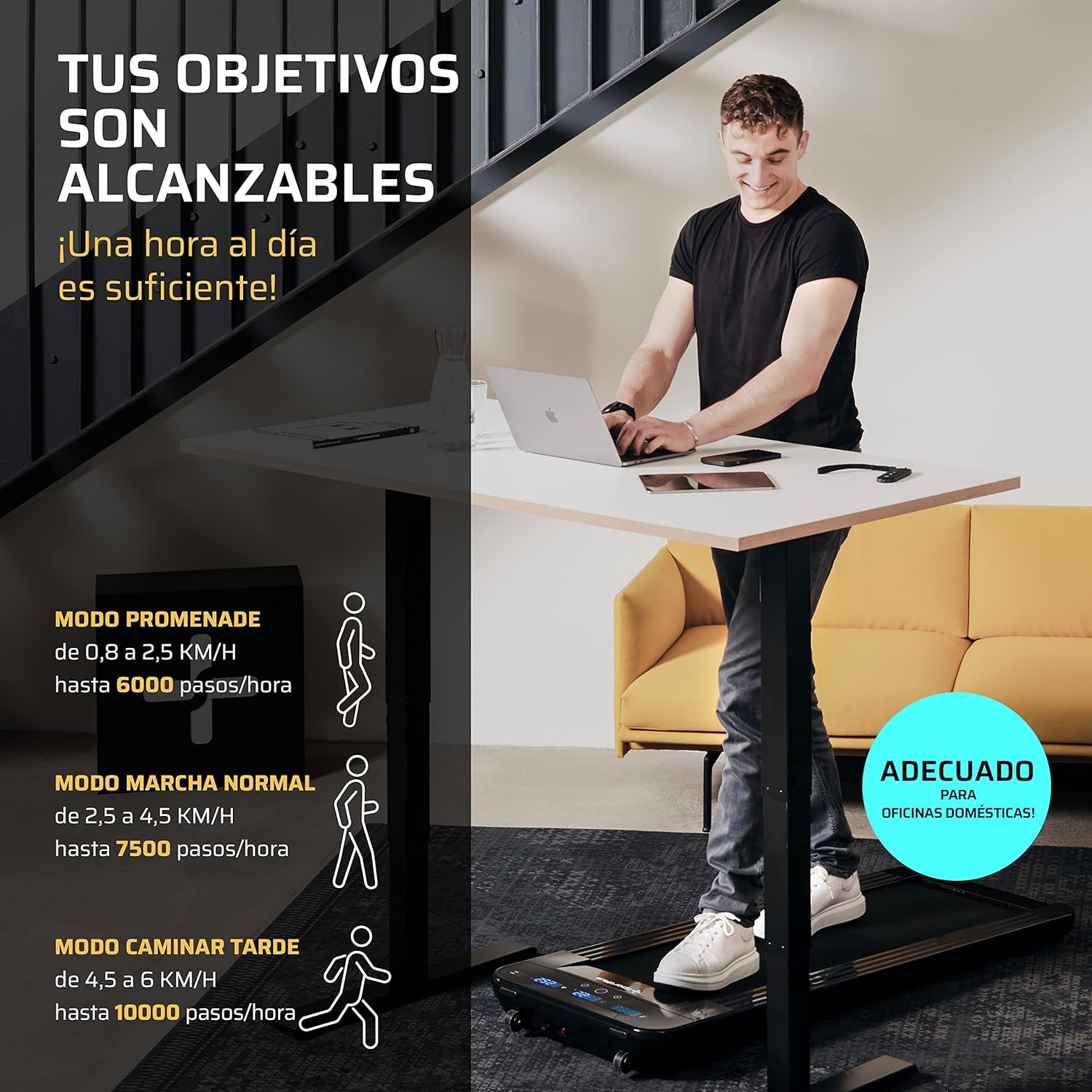
The SportPlus SP-TM-1006 is designed for home use, offering a compact solution for walking and light jogging, suitable for various environments including home offices and under standing desks.
2. பாதுகாப்பு வழிமுறைகள்
To reduce the risk of serious injury, read the following important safety instructions before using the treadmill:
- எப்போதும் டிரெட்மில்லை ஒரு தட்டையான, நிலையான மேற்பரப்பில் வைக்கவும்.
- Ensure adequate clear space around the treadmill (at least 2 meters behind and 0.6 meters on each side).
- அறுவை சிகிச்சையின் போது குழந்தைகள் மற்றும் செல்லப்பிராணிகளை டிரெட்மில்லில் இருந்து விலக்கி வைக்கவும்.
- உங்கள் எடை 120 கிலோ (264 பவுண்ட்)க்கு மேல் இருந்தால் டிரெட்மில்லைப் பயன்படுத்த வேண்டாம்.
- பொருத்தமான விளையாட்டு காலணிகள் மற்றும் ஆடைகளை அணியுங்கள்.
- உங்களுக்கு வலி, தலைச்சுற்றல் அல்லது மூச்சுத் திணறல் ஏற்பட்டால், உடனடியாக உடற்பயிற்சி செய்வதை நிறுத்துங்கள்.
- பயன்பாட்டில் இல்லாதபோது அல்லது சுத்தம்/பராமரிப்பதற்கு முன் பவர் அவுட்லெட்டிலிருந்து டிரெட்மில்லைத் துண்டிக்கவும்.
- மின் கம்பி அல்லது பிளக் சேதமடைந்தால் டிரெட்மில்லை இயக்க வேண்டாம்.
- This treadmill is not compatible with external applications.
3. தொகுப்பு உள்ளடக்கங்கள்
தொகுப்பில் அனைத்து கூறுகளும் இருப்பதை உறுதிசெய்யவும்:
- SportPlus SP-TM-1006 Walking Pad
- ரிமோட் கண்ட்ரோல்
- Power Supply Cable (European and UK plugs may be included)
- Silicone Oil for Lubrication
- அறிவுறுத்தல் கையேடு
4 அமைவு
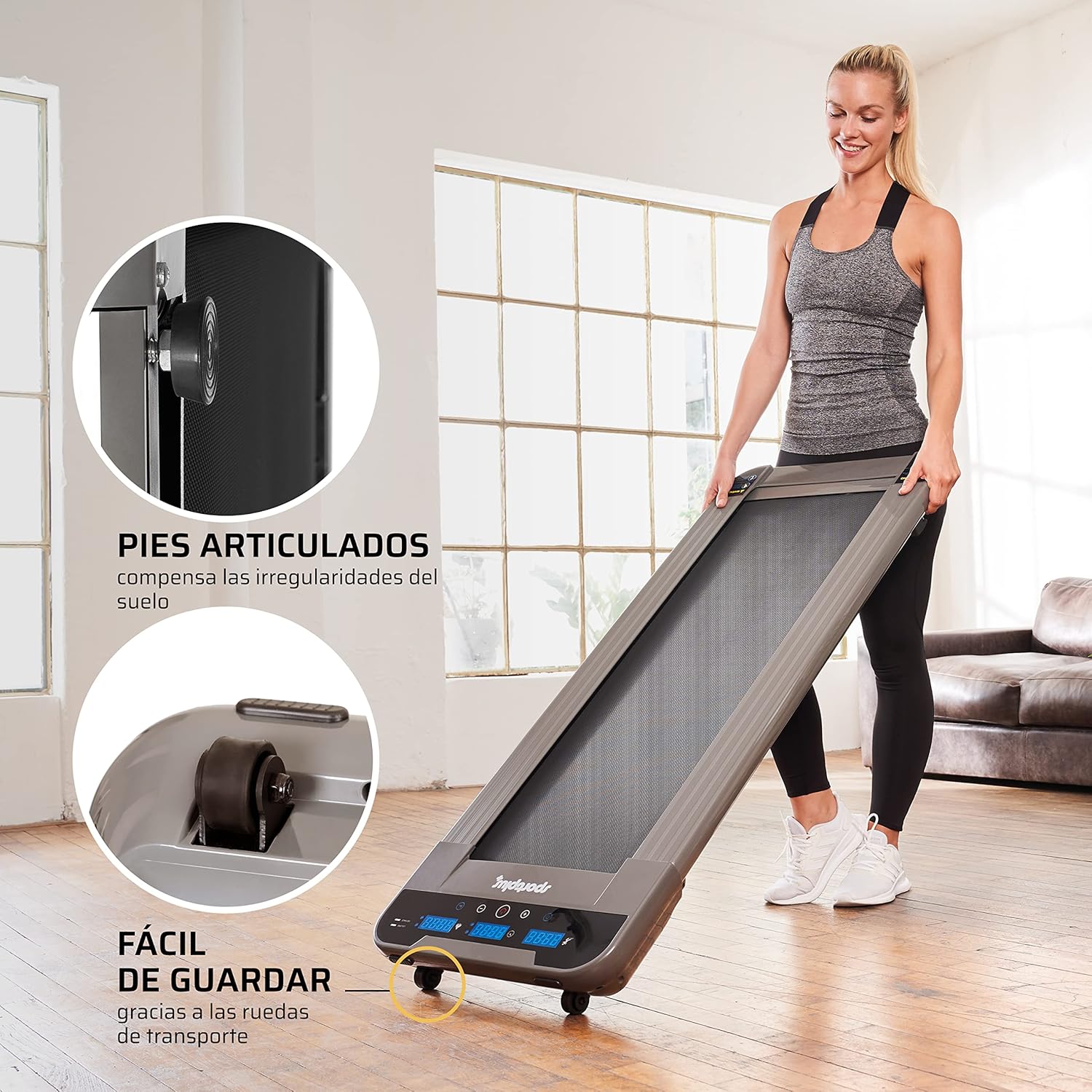
The SportPlus SP-TM-1006 treadmill requires minimal setup. It arrives largely pre-assembled.
- பேக்கிங்: டிரெட்மில்லை அதன் பேக்கேஜிங்கிலிருந்து கவனமாக அகற்றவும்.
- இடம்: Place the treadmill on a firm, level surface. Ensure there is sufficient space around the unit for safe operation.
- மின் இணைப்பு: Connect the power cable to the treadmill and then to a suitable electrical outlet.
- ரிமோட் கண்ட்ரோல்: Insert the provided battery into the remote control.

5. இயக்க வழிமுறைகள்
5.1 அடிப்படை செயல்பாடு
The treadmill is operated using the included remote control.
- பவர் ஆன்: Press the power button on the remote control to turn on the treadmill. The LED display will illuminate.
- ஆரம்பம்/நிறுத்தம்: Press the 'Start' button on the remote to begin the walking belt movement. Press 'Stop' to halt the belt.
- வேக சரிசெய்தல்: Use the '+' and '-' buttons on the remote control to adjust the speed. The speed can be adjusted in increments of 0.1 km/h, ranging from 0.8 km/h to a maximum of 6 km/h.
- பவர் ஆஃப்: Press and hold the power button on the remote control to turn off the treadmill.
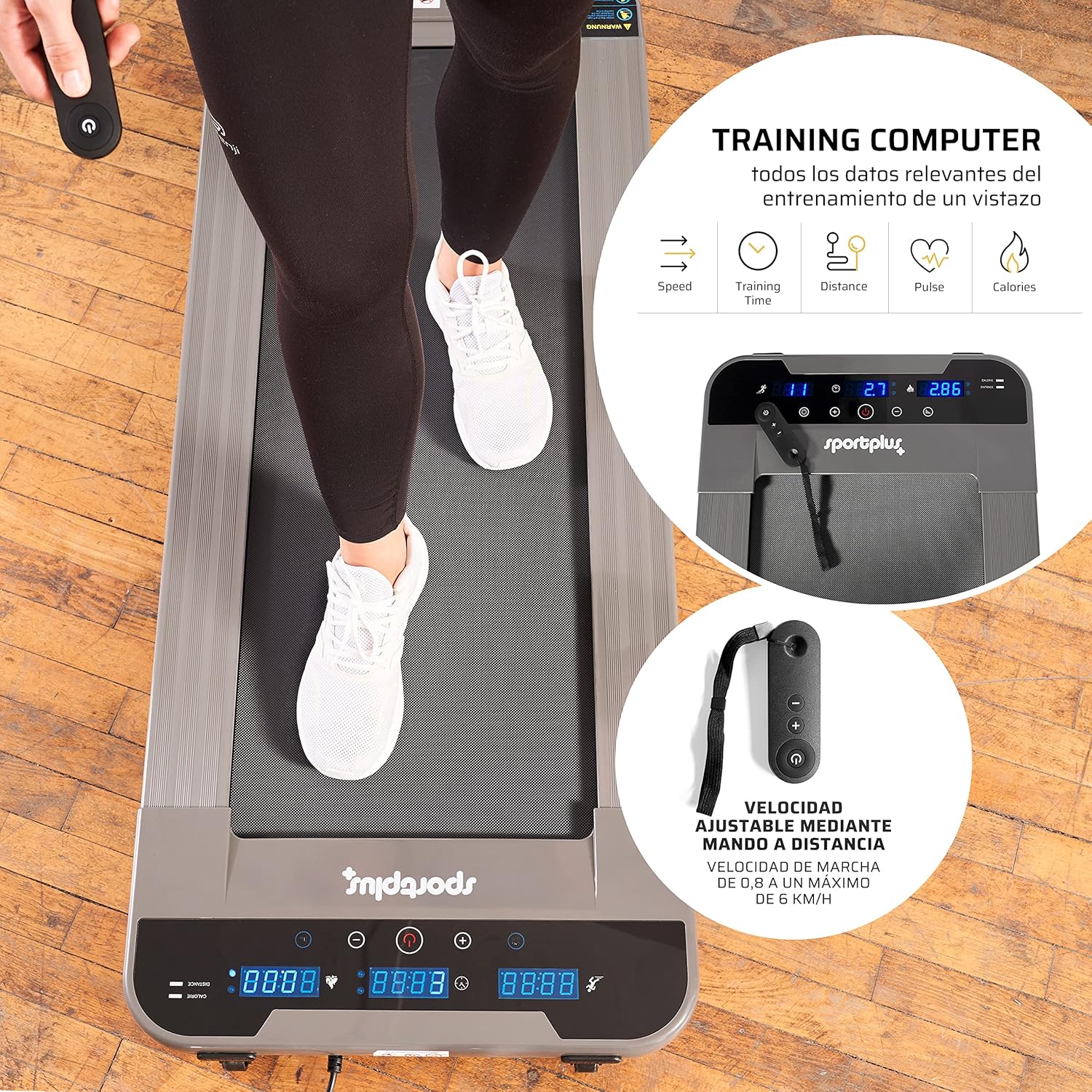
5.2 காட்சி செயல்பாடுகள்
The illuminated LED display provides real-time workout data:
- நேரம்: உங்கள் உடற்பயிற்சியின் காலம்.
- வேகம்: தற்போதைய நடை வேகம் கிமீ/மணிக்கு.
- தூரம்: உடற்பயிற்சியின் போது பயணித்த மொத்த தூரம்.
- கலோரிகள்: மதிப்பிடப்பட்ட கலோரிகள் எரிக்கப்பட்டன.
- படிகள்: எடுக்கப்பட்ட படிகளின் எண்ணிக்கை.
5.3 பயன்பாட்டு முறைகள்
The treadmill supports various walking modes to suit your activity level:
- Promenade Mode: 0.8 to 2.5 km/h (up to 6000 steps/hour) - Ideal for light activity.
- Normal Walk Mode: 2.5 to 4.5 km/h (up to 7500 steps/hour) - Suitable for a brisk walk.
- Late Walk Mode: 4.5 to 6 km/h (up to 10000 steps/hour) - For faster walking or light jogging.
6. பராமரிப்பு
வழக்கமான பராமரிப்பு உங்கள் டிரெட்மில்லின் நீண்ட ஆயுளையும் உகந்த செயல்திறனையும் உறுதி செய்கிறது.
6.1 உயவு
The walking belt requires periodic lubrication with the provided silicone oil to reduce friction and wear.
- டிரெட்மில்லை அணைத்து துண்டிக்கவும்.
- Lift the edge of the walking belt and apply a small amount of silicone oil directly onto the running deck, underneath the belt.
- Repeat on both sides of the belt.
- Plug in the treadmill and run it at a low speed (e.g., 1 km/h) for a few minutes to distribute the lubricant evenly.
- Frequency of lubrication depends on usage; generally, every 30-50 hours of use.
6.2 சுத்தம் செய்தல்
Clean the treadmill regularly to prevent dust and debris buildup.
- Turn off and unplug the treadmill before cleaning.
- விளம்பரத்துடன் மேற்பரப்புகளை துடைக்கவும்amp துணி. சிராய்ப்பு கிளீனர்கள் அல்லது கரைப்பான்களைப் பயன்படுத்த வேண்டாம்.
- Vacuum underneath the treadmill periodically to remove dust and lint.
6.3 பெல்ட் சரிசெய்தல்
If the walking belt becomes off-center or slips, it may require adjustment. Refer to the detailed instructions in the full manual for specific steps, which typically involve using an Allen key to adjust tension bolts at the rear of the treadmill.
7. சரிசெய்தல்
இந்தப் பிரிவு உங்கள் டிரெட்மில்லில் நீங்கள் சந்திக்கக்கூடிய பொதுவான சிக்கல்களைக் கையாள்கிறது.
| பிரச்சனை | சாத்தியமான காரணம் | தீர்வு |
|---|---|---|
| டிரெட்மில்லில் மின்சாரம் இயங்கவில்லை. | Power cable not connected, power outlet issue, main power switch off. | Check power cable connection. Ensure the power outlet is functional. |
| ரிமோட் கண்ட்ரோல் வேலை செய்யவில்லை. | Battery depleted, remote out of range, sensor obstruction. | Replace remote control battery. Ensure remote is pointed towards the treadmill's sensor (typically at the front display). Maintain close proximity (within 30 cm). |
| Walking belt slips or is off-center. | Belt tension too loose, belt alignment issue. | Adjust belt tension and alignment according to the detailed instructions in the full manual. |
| செயல்பாட்டின் போது அசாதாரண சத்தம். | உயவு இல்லாமை, தளர்வான கூறுகள், வெளிநாட்டு பொருள். | Lubricate the walking belt. Check for and tighten any loose screws. Inspect for foreign objects. If the noise persists, contact customer support. |
8. விவரக்குறிப்புகள்
| அம்சம் | விவரக்குறிப்பு |
|---|---|
| மாதிரி எண் | SP-TM-1006 |
| பரிமாணங்கள் (L x W x H) | 134 x 54 x 12 செமீ (52.4 x 20.9 x 3.9 அங்குலம்) |
| இயங்கும் மேற்பரப்பு (L x W) | 101 x 36 செ.மீ |
| தயாரிப்பு எடை | 25 கிலோ (55 பவுண்ட்) |
| அதிகபட்ச பயனர் எடை | 120 கிலோ (264 பவுண்ட்) |
| பொருள் | எஃகு அலாய் |
| அதிகபட்ச வேகம் | மணிக்கு 6 கி.மீ |
| சிறப்பு அம்சங்கள் | Electric with cable, LED indicator, Remote Control |
| பரிந்துரைக்கப்பட்ட பயன்பாடு | Walking, light jogging |
| இலக்கு பார்வையாளர்கள் | வயது வந்தோர் |

9. உத்தரவாதம் மற்றும் ஆதரவு
SportPlus has been producing high-quality sports equipment for 20 years. We are committed to providing durable products and excellent customer service.
If you have any questions or require assistance, our customer service department in Hamburg will be happy to help. We maintain a stock of spare and wear parts to ensure the long-term usability and sustainability of your equipment.
For support, please visit the official SportPlus webதளம் அல்லது உங்கள் சில்லறை விற்பனையாளரைத் தொடர்புகொள்ளவும்.
தொடர்பு தகவல்:
- Webதளம்: www.sportplus.de (எ.காample, please refer to your product documentation for exact contact details)
- மின்னஞ்சல்: service@sportplus.org