
1. அறிமுகம்
நன்றி, நன்றி.asing the Edifier R501BT 5.1 Channel Wireless Bluetooth Multimedia Speaker System. This manual provides detailed instructions for the proper installation, operation, and maintenance of your speaker system. Please read this manual thoroughly before use to ensure optimal performance and longevity of your product.
2. முக்கியமான பாதுகாப்பு வழிமுறைகள்
- இந்த வழிமுறைகளை கவனமாக படிக்கவும்.
- எதிர்கால குறிப்புக்காக இந்த வழிமுறைகளை வைத்திருங்கள்.
- எல்லா எச்சரிக்கைகளையும் கவனியுங்கள்.
- அனைத்து வழிமுறைகளையும் பின்பற்றவும்.
- இந்த கருவியை தண்ணீருக்கு அருகில் பயன்படுத்த வேண்டாம்.
- உலர்ந்த துணியால் மட்டுமே சுத்தம் செய்யவும்.
- எந்த காற்றோட்ட திறப்புகளையும் தடுக்க வேண்டாம். உற்பத்தியாளரின் அறிவுறுத்தல்களின்படி நிறுவவும்.
- ரேடியேட்டர்கள், வெப்பப் பதிவேடுகள், அடுப்புகள் அல்லது பிற சாதனங்கள் (உட்பட) போன்ற எந்த வெப்ப மூலங்களுக்கும் அருகில் நிறுவ வேண்டாம் ampலிஃபையர்ஸ்) வெப்பத்தை உற்பத்தி செய்யும்.
- குறிப்பாக பிளக்குகள், கன்வீனியன் ரிசெப்டக்கிள்கள் மற்றும் எந்திரத்தில் இருந்து அவை வெளியேறும் இடத்தில் பவர் கார்டு நடக்காமல் அல்லது கிள்ளப்படாமல் பாதுகாக்கவும்.
- உற்பத்தியாளரால் குறிப்பிடப்பட்ட இணைப்புகள் / துணைக்கருவிகளை மட்டுமே பயன்படுத்தவும்.
- மின்னல் புயல்களின் போது அல்லது நீண்ட காலத்திற்கு பயன்படுத்தப்படாத போது இந்த கருவியை துண்டிக்கவும்.
- அனைத்து சேவைகளையும் தகுதிவாய்ந்த சேவை பணியாளர்களிடம் பார்க்கவும். மின்சாரம் வழங்கல் தண்டு அல்லது பிளக் சேதமடைந்தது, திரவம் சிந்தப்பட்டால் அல்லது கருவியில் பொருட்கள் விழுந்துவிட்டன, இயந்திரம் மழை அல்லது ஈரப்பதத்திற்கு வெளிப்படும், சாதாரணமாக இயங்காதது போன்ற எந்த வகையிலும் சாதனம் சேதமடைந்தால் சேவை தேவைப்படுகிறது. , அல்லது கைவிடப்பட்டது.
3. தொகுப்பு உள்ளடக்கங்கள்
கீழே பட்டியலிடப்பட்டுள்ள அனைத்து பொருட்களும் உங்கள் தொகுப்பில் இருப்பதை உறுதி செய்து கொள்ளவும்:
- 1x Subwoofer Unit (main unit)
- 1x Center Satellite Speaker
- 4x Satellite Speakers (Front Left, Front Right, Surround Left, Surround Right)
- 1x ரிமோட் கண்ட்ரோல்
- Audio Connection Cables (e.g., 3.5mm to RCA, RCA to RCA)
- பயனர் கையேடு (இந்த ஆவணம்)

Image: Complete Edifier R501BT 5.1 speaker system, showcasing the subwoofer, five satellite speakers, and the included remote control.
4. தயாரிப்பு முடிந்துவிட்டதுview
4.1 Subwoofer Unit
The subwoofer unit houses the main amplifier, power supply, and control interface for the entire system. It features an 8-inch (210mm) woofer for deep bass reproduction.

படம்: முன்பக்கம் view of the Edifier R501BT subwoofer, highlighting its design and front-facing port.

படம்: மேலிருந்து கீழ் view of the Edifier R501BT subwoofer, showing the internal structure and the downward-firing woofer.

Image: The base of the Edifier R501BT subwoofer, illustrating its elevated design for enhanced bass resonance.
4.2 செயற்கைக்கோள் ஒலிபெருக்கிகள்
The system includes one center channel speaker and four satellite speakers (front left, front right, surround left, surround right), each featuring a 3-inch driver for clear mid-range and treble audio.

Image: The Edifier R501BT center channel speaker, designed for clear dialogue.
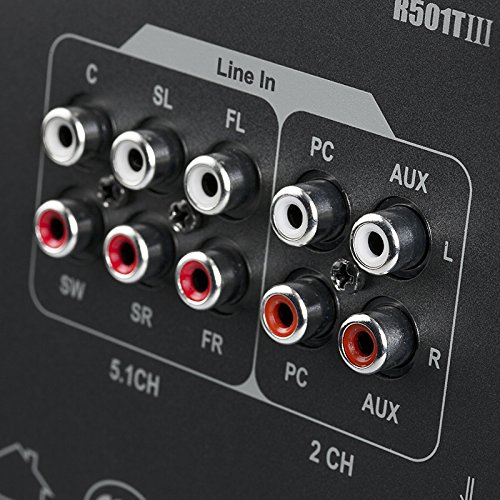
Image: A single Edifier R501BT satellite speaker, representative of the four surround speakers.
4.3 கண்ட்ரோல் பேனல் மற்றும் ரிமோட் கண்ட்ரோல்
The subwoofer features an integrated control panel for direct adjustments, complemented by a full-function remote control for convenient operation from a distance.

Image: Close-up of the subwoofer's control panel, displaying the digital screen and control buttons.
4.4 பின்புற பேனல் இணைப்புகள்
The rear panel of the subwoofer provides various input and output options for connecting to different audio sources and the satellite speakers.

படம்: விரிவானது view of the Edifier R501BT subwoofer's rear panel, showing 5.1 channel outputs, Line In, PC, and AUX inputs.
5 அமைவு
5.1 பேச்சாளர் இடம்
Optimal speaker placement is crucial for achieving the best 5.1 surround sound experience:
- ஒலிபெருக்கி: Place the subwoofer on the floor, preferably in a corner or near a wall, to enhance bass response.
- மைய பேச்சாளர்: Position the center speaker directly above or below your display (TV/monitor), facing the listening area.
- Front Speakers (FL/FR): Place the front left and front right speakers equidistant from your listening position, forming an equilateral triangle with the listener. They should be at ear level.
- சரவுண்ட் ஸ்பீக்கர்கள் (SL/SR): Position the surround left and surround right speakers to the sides or slightly behind your listening position, also at ear level or slightly higher.
5.2 ஸ்பீக்கர்களை இணைத்தல்
- Ensure the main power switch on the subwoofer is in the OFF position before making any connections.
- Connect the satellite speakers to the corresponding output ports on the rear panel of the subwoofer. Match the color-coded cables and ports:
- FL (முன் இடது)
- FR (முன் வலது)
- சி (மையம்)
- SL (சுற்று இடது)
- எஸ்ஆர் (சுற்று வலதுபுறம்)
- Connect your audio source (e.g., TV, PC, DVD player) to the appropriate input ports on the subwoofer's rear panel.
- 5.1 CH Input: For devices with dedicated 5.1 channel analog outputs. Connect the corresponding FL, FR, C, SL, SR, and SW (subwoofer) outputs from your source to the speaker system.
- பிசி உள்ளீடு: For connecting to a computer's audio output.
- AUX உள்ளீடு: For general stereo audio devices (e.g., smartphones, tablets, MP3 players) using a 3.5mm to RCA cable.
- வரிசையில்: Another stereo input option.
- பவர் கார்டை ஒரு சுவர் கடையில் செருகவும்.
6. இயக்க வழிமுறைகள்
6.1 பவர் ஆன்/ஆஃப்
To power on the system, flip the main power switch on the rear of the subwoofer to the ON position. The display on the front panel will illuminate. To power off, flip the switch to OFF.
6.2 உள்ளீடு தேர்வு
Press the "Input" button on the subwoofer's control panel or the remote control to cycle through available input modes: Bluetooth, AUX, PC, 5.1 CH, USB, SD Card.
6.3 தொகுதி கட்டுப்பாடு
Adjust the master volume using the volume knob on the subwoofer or the Volume +/- buttons on the remote control.
6.4 ப்ளூடூத் இணைத்தல்
- Select "Bluetooth" as the input mode on the speaker system. The display will show "BT" and blink, indicating it's in pairing mode.
- On your Bluetooth-enabled device (e.g., smartphone, tablet), search for available Bluetooth devices.
- Select "EDIFIER R501BT" from the list. Once paired, the "BT" indicator on the speaker system will stop blinking and remain solid.
- If pairing fails, try restarting the speaker system and your device, then repeat the steps.
6.5 USB/SD கார்டு பிளேபேக்
Insert a USB drive or SD card containing MP3/WMA audio files into the corresponding slot on the subwoofer. The system will automatically switch to USB or SD mode and begin playback. Use the remote control to navigate tracks (Previous/Next), Play/Pause, and adjust volume.
6.6 ரிமோட் கண்ட்ரோல் செயல்பாடுகள்
The remote control provides convenient access to various functions:
- சக்தி: காத்திருப்பு/ஆன்
- உள்ளீடு: Cycle through input modes (Bluetooth, AUX, PC, 5.1 CH, USB, SD)
- தொகுதி +/-: முதன்மை ஒலியளவை சரிசெய்யவும்
- முடக்கு: Mute/unmute audio
- பாஸ் +/-: Adjust subwoofer bass level
- ட்ரெபிள் +/-: மும்மடங்கு அளவை சரிசெய்யவும்
- முந்தைய/அடுத்து: Skip tracks (USB/SD/Bluetooth modes)
- விளையாடு/இடைநிறுத்தம்: Play or pause audio (USB/SD/Bluetooth modes)
- 5.1/2.1: Switch between 5.1 and 2.1 channel output modes (virtual 5.1 for stereo sources).
7. பராமரிப்பு
- சுத்தம்: Use a soft, dry cloth to clean the surfaces of the speakers. Do not use liquid cleaners or aerosol sprays.
- காற்றோட்டம்: அதிக வெப்பமடைவதைத் தடுக்க, ஒலிபெருக்கியில் காற்றோட்டத் திறப்புகள் தடுக்கப்படாமல் பார்த்துக் கொள்ளுங்கள்.
- சேமிப்பு: கணினியை நீண்ட நேரம் சேமித்து வைத்திருந்தால், அதை மின் இணைப்பிலிருந்து துண்டித்து, குளிர்ந்த, உலர்ந்த இடத்தில் சேமிக்கவும்.
- ஈரப்பதத்தைத் தவிர்க்கவும்: Keep the speakers away from water, rain, and excessive humidity.
8. சரிசெய்தல்
| பிரச்சனை | சாத்தியமான காரணம் | தீர்வு |
|---|---|---|
| ஒலி இல்லை |
|
|
| புளூடூத் இணைத்தல் தோல்வியடைந்தது |
|
|
| சிதைந்த ஒலி |
|
|
| ரிமோட் கண்ட்ரோல் வேலை செய்யவில்லை |
|
|
9. விவரக்குறிப்புகள்
| அம்சம் | விவரம் |
|---|---|
| மாதிரி | R501BT |
| மொத்த சக்தி வெளியீடு | 93 வாட்ஸ் (ஆர்.எம்.எஸ்) |
| ஒலிபெருக்கி ஓட்டுநர் | 8 அங்குல (210 மி.மீ) |
| சேட்டிலைட் ஸ்பீக்கர் டிரைவர்கள் | 3 அங்குல (78 மி.மீ) |
| அதிர்வெண் பதில் | 150 Hz (General, specific subwoofer range not provided) |
| இணைப்பு | Bluetooth, RCA (Line In, PC, AUX, 5.1 CH) |
| சிறப்பு அம்சங்கள் | SD Card, USB Playback, Class D amplifier with Digital Signal Processing (DSP) |
| ஒலிபெருக்கி பரிமாணங்கள் (அடி x அட்சரேகை x அடி) | 23D x 17.8W x 28.8H சென்டிமீட்டர்கள் |
| பொருளின் எடை | 13.7 கிலோ |
| வயர்லெஸ் வீச்சு | 10 மீட்டர் வரை (புளூடூத்) |

Image: Diagram illustrating the dimensions of the Edifier R501BT subwoofer unit.
10. உத்தரவாதம் மற்றும் ஆதரவு
10.1 உத்தரவாதத் தகவல்
This Edifier R501BT speaker system comes with a 1 வருட உத்தரவாதம் from the date of purchase. Please retain your proof of purchase for warranty claims. The warranty covers manufacturing defects and workmanship under normal use. It does not cover damage caused by misuse, accidents, unauthorized modifications, or natural disasters.
10.2 வாடிக்கையாளர் ஆதரவு
For technical assistance, troubleshooting, or warranty inquiries, please contact your local Edifier distributor or authorized service center. In India, support is provided by:
Nikita Distributors
Green Terrace Building, Lane Number 5,
South Koregaon Park, Pune 411001, MH, India
For the most up-to-date support information, please visit the official Edifier webதளம் அல்லது உங்கள் சில்லறை விற்பனையாளரைத் தொடர்புகொள்ளவும்.