
1. அறிமுகம்
Thank you for choosing the Eurolite FD-32+1 DMX Dimmer Panel. This manual provides essential information for the safe and efficient operation of your device. Please read these instructions carefully before initial use and keep them for future reference. This device is designed for professional stage and show applications, offering precise DMX control over lighting fixtures.
2. பாதுகாப்பு வழிமுறைகள்
மின்சார அதிர்ச்சி, தீ அல்லது சாதனத்திற்கு சேதம் ஏற்படாமல் தடுக்க பின்வரும் பாதுகாப்பு முன்னெச்சரிக்கைகளை எப்போதும் பின்பற்றவும்.
- மின் பாதுகாப்பு: Ensure the power supply matches the device's requirements (9V - 12V / 300 mA DC). Disconnect power before cleaning or servicing.
- சுற்றுச்சூழல்: Do not expose the device to rain, moisture, or extreme temperatures. Operate in a dry, well-ventilated area.
- கையாளுதல்: Avoid strong impacts or dropping the device. Do not open the housing or attempt repairs yourself; refer servicing to qualified personnel.
- காற்றோட்டம்: அதிக வெப்பமடைவதைத் தடுக்க அலகு முழுவதும் சரியான காற்றோட்டத்தை உறுதி செய்யவும். காற்றோட்ட திறப்புகளைத் தடுக்க வேண்டாம்.
3. தயாரிப்பு முடிந்துவிட்டதுview
The Eurolite FD-32+1 DMX Dimmer Panel is a compact DMX controller designed for precise control of lighting effects. It features multiple faders for individual channel control and a master fader for overall intensity adjustment.
3.1 முன் குழு கட்டுப்பாடுகள்
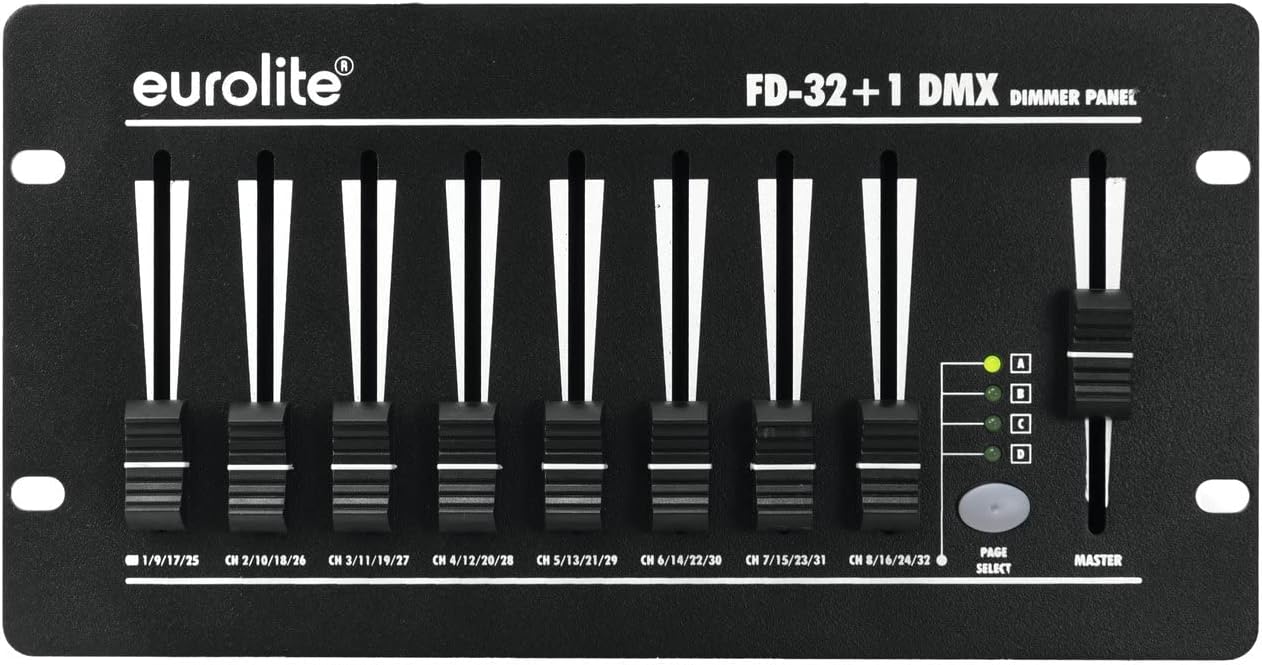
படம் 1: முன் view of the Eurolite FD-32+1 DMX Dimmer Panel. This image displays the eight individual channel faders, the master fader on the right, and the 'PAGE SELECT' button with its corresponding indicator LEDs (A, B, C, D).
முன் குழுவில் பின்வருவன அடங்கும்:
- Channel Faders (1-8): Control the intensity of individual DMX channels. Each fader is labeled with its corresponding channel range (e.g., CH 1/9/17/25).
- மாஸ்டர் ஃபேடர்: Controls the overall output intensity of all active channels.
- PAGE SELECT Button: Cycles through four pages (A, B, C, D) to access a total of 32 DMX channels (8 channels x 4 pages).
- Page Indicator LEDs (A, B, C, D): Indicate the currently selected page.
3.2 பின்புற பேனல் இணைப்புகள்

படம் 2: பின்புறம் view of the Eurolite FD-32+1 DMX Dimmer Panel. This image shows the power input (DC INPUT), DMX OUT connector, and the main power switch.
The rear panel provides the necessary connections:
- DC INPUT (9V - 12V / 300 mA DC): Power input connector for the external power adapter.
- டிஎம்எக்ஸ் வெளியே: 3-pin XLR connector for sending DMX signals to compatible lighting fixtures.
- மின்விசை மாற்றும் குமிழ்: யூனிட்டிற்கான பிரதான பவர் ஆன்/ஆஃப் சுவிட்ச்.
4 அமைவு
Follow these steps to set up your DMX Dimmer Panel:
- பேக்கிங்: Carefully remove the device from its packaging. Inspect for any signs of damage during transit.
- இடம்: Place the dimmer panel on a stable, flat surface, such as a table (Bordsmontering). Ensure adequate ventilation around the unit.
- மின் இணைப்பு: வழங்கப்பட்ட பவர் அடாப்டரை இணைக்கவும் DC உள்ளீடு on the rear panel. Plug the adapter into a suitable power outlet.
- DMX இணைப்பு: Connect a 3-pin DMX cable from the DMX வெளியே connector on the dimmer panel to the DMX IN of your first DMX-compatible lighting fixture. Daisy-chain additional fixtures as required.
- பவர் ஆன்: புரட்டவும் சக்தி switch on the rear panel to the 'ON' position. The unit should power up.
5. இயக்க வழிமுறைகள்
This section details how to operate your Eurolite FD-32+1 DMX Dimmer Panel.
5.1 அடிப்படை செயல்பாடு
- பவர் ஆன்: Ensure the unit is powered on using the switch on the rear panel.
- பக்கத்தைத் தேர்ந்தெடுக்கவும்: அழுத்தவும் பக்கம் தேர்வு button to cycle through pages A, B, C, and D. The corresponding LED will illuminate to indicate the active page. Each page controls a different set of 8 DMX channels. For exampலெ:
- Page A: Channels 1-8
- Page B: Channels 9-16
- Page C: Channels 17-24
- Page D: Channels 25-32
- Adjust Channel Intensity: Move the individual channel faders (1-8) up or down to control the intensity of the assigned DMX channels on the selected page. Moving a fader up increases intensity, while moving it down decreases intensity.
- Adjust Master Intensity: பயன்படுத்தவும் மாஸ்டர் fader to control the overall output intensity of all active channels on the currently selected page. This acts as a global dimmer for the page.
5.2 டிஎம்எக்ஸ் முகவரி
The FD-32+1 sends DMX signals starting from channel 1. Ensure your DMX lighting fixtures are addressed correctly to respond to the channels controlled by the dimmer panel. For example, if a fixture is set to DMX address 1, it will respond to fader 1 on Page A. If a fixture is set to DMX address 9, it will respond to fader 1 on Page B.
6. பராமரிப்பு
Regular maintenance ensures the longevity and optimal performance of your device.
- சுத்தம்: அலகின் வெளிப்புறத்தை சுத்தம் செய்ய மென்மையான, உலர்ந்த துணியைப் பயன்படுத்தவும். திரவ கிளீனர்கள் அல்லது கரைப்பான்களைப் பயன்படுத்த வேண்டாம்.
- உருகி மாற்று: If the unit does not power on, check the fuse located near the power input on the rear panel. Replace it with a fuse of the exact same type and rating. Refer to the specifications for fuse details.
- சேமிப்பு: When not in use for extended periods, store the device in a dry, dust-free environment, preferably in its original packaging.
7. சரிசெய்தல்
நீங்கள் சிக்கல்களை எதிர்கொண்டால், பின்வரும் சரிசெய்தல் வழிகாட்டியைப் பார்க்கவும்:
| பிரச்சனை | சாத்தியமான காரணம் | தீர்வு |
|---|---|---|
| அலகு இயங்காது. | No power from outlet; faulty power adapter; blown fuse. | Check power outlet; test power adapter; replace fuse (see Maintenance). |
| No DMX output to fixtures. | Incorrect DMX cable connection; fixture DMX address mismatch; faulty DMX cable. | Ensure DMX cable is securely connected; verify fixture DMX addresses; try a different DMX cable. |
| Individual channels not responding. | Incorrect page selected; fixture DMX address mismatch. | Press PAGE SELECT to ensure the correct page is active; verify fixture DMX addresses correspond to the active page's channels. |
8. விவரக்குறிப்புகள்
- பிராண்ட்: யூரோலைட்
- மாதிரி: 70063830 (FD-32+1 DMX Dimmer Panel)
- மவுண்டிங் வகை: அட்டவணை ஏற்றுதல்
- பொருளின் எடை: 1250 கிராம்
- ஆற்றல் உள்ளீடு: 9V - 12V DC, 300 mA
- டிஎம்எக்ஸ் சேனல்கள்: 32 (8 faders x 4 pages)
- DMX வெளியீடு: 3-முள் எக்ஸ்எல்ஆர்
9. உத்தரவாதம் மற்றும் ஆதரவு
For warranty information and technical support, please refer to the documentation provided with your purchase or contact your authorized Eurolite dealer. Keep your proof of purchase for any warranty claims.