
1. அறிமுகம்
நன்றி, நன்றி.asing the BLOW BT910 Portable Bluetooth Speaker. This manual provides essential information for the safe and efficient operation of your device. Please read it thoroughly before use and keep it for future reference.
2. பாதுகாப்பு தகவல்
- சாதனத்தை தீவிர வெப்பநிலை, நேரடி சூரிய ஒளி அல்லது அதிக ஈரப்பதத்திற்கு வெளிப்படுத்த வேண்டாம்.
- ஸ்பீக்கரை தண்ணீர் மற்றும் பிற திரவங்களிலிருந்து விலக்கி வைக்கவும்.
- சாதனத்தை நீங்களே பிரிக்கவோ அல்லது சரிசெய்யவோ முயற்சிக்காதீர்கள். அனைத்து சேவைகளையும் தகுதிவாய்ந்த பணியாளர்களிடம் பரிந்துரைக்கவும்.
- கொடுக்கப்பட்டுள்ள சார்ஜிங் கேபிள் மற்றும் அடாப்டரை மட்டும் பயன்படுத்தவும்.
- குழந்தைகளுக்கு எட்டாத இடத்தில் வைக்கவும்.
- கேட்கும் திறனைப் பாதிக்காமல் இருக்க, அதிக ஒலியில் நீண்ட நேரம் கேட்பதைத் தவிர்க்கவும்.
3. தொகுப்பு உள்ளடக்கங்கள்
தொகுப்பில் அனைத்து பொருட்களும் இருப்பதை உறுதி செய்து கொள்ளுங்கள்:
- BLOW Bazooka 30-331 Speaker (Black)
- சார்ஜிங் கேபிள்
- ஆடியோ கேபிள்
- பயனர் கையேடு
4. தயாரிப்பு முடிந்துவிட்டதுview
Familiarize yourself with the components of your BLOW BT910 speaker.
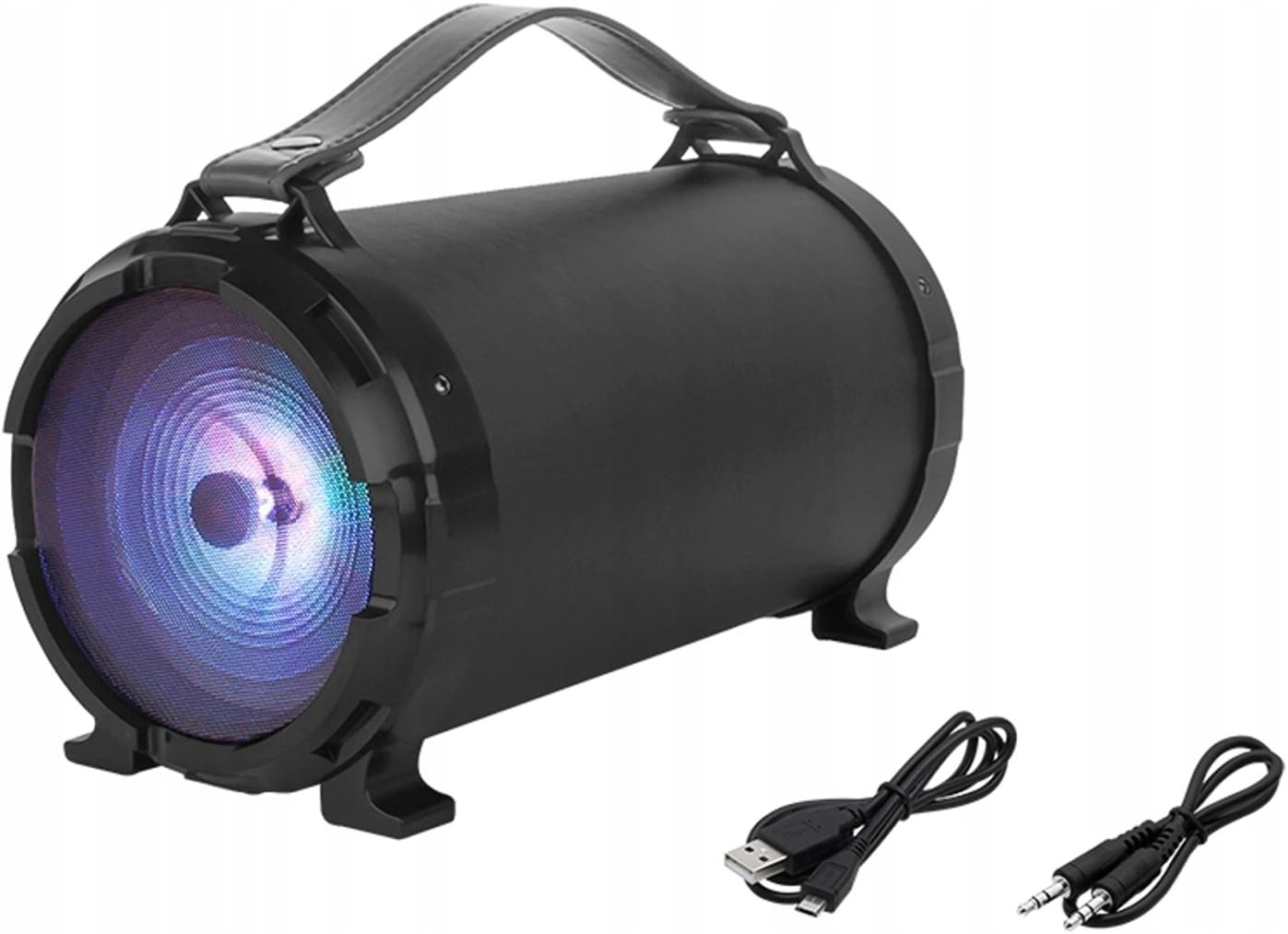
படம் 1: முன் view of the BLOW BT910 Portable Bluetooth Speaker, showing the main speaker grille and included charging and audio cables.

படம் 2: பின்புறம் view of the BLOW BT910 Portable Bluetooth Speaker, highlighting the BLOW brand logo.

படம் 3: The BLOW BT910 Portable Bluetooth Speaker shown within its retail packaging, displaying key features.

படம் 4: Diagram illustrating the dimensions of the BLOW BT910 Portable Bluetooth Speaker: 34cm length, 17cm width, and 18cm height.
கட்டுப்பாடுகள் மற்றும் துறைமுகங்கள்:
- பவர் பட்டன்: Turns the speaker On/Off.
- பயன்முறை பொத்தான் (எம்): Switches between Bluetooth, FM Radio, USB, SD, and AUX modes.
- ப்ளே/இடைநிறுத்த பட்டன்: Plays or pauses audio. Also answers/ends calls in Bluetooth mode.
- Volume Up (+)/Next Track: ஒலியளவை அதிகரிக்க சிறிது நேரம் அழுத்தவும், அடுத்த டிராக்கிற்கு நீண்ட நேரம் அழுத்தவும்.
- Volume Down (-)/Previous Track: ஒலியைக் குறைக்க சுருக்கமாக அழுத்தவும், முந்தைய டிராக்கைக் கேட்க நீண்ட நேரம் அழுத்தவும்.
- LED லைட் பட்டன்: Controls LED lighting modes.
- USB போர்ட்: USB ஃபிளாஷ் டிரைவ் பிளேபேக்கிற்கு.
- SD கார்டு ஸ்லாட்: SD கார்டு பிளேபேக்கிற்கு.
- AUX உள்ளீடு: For connecting external audio devices via 3.5mm audio cable.
- மைக்ரோஃபோன் உள்ளீடு: For karaoke function.
- சார்ஜிங் போர்ட்: ஸ்பீக்கரின் உள் பேட்டரியை சார்ஜ் செய்வதற்கு.
5 அமைவு
5.1 ஸ்பீக்கரை சார்ஜ் செய்தல்
- Connect the charging cable to the speaker's charging port.
- சார்ஜிங் கேபிளின் மறுமுனையை இணக்கமான USB பவர் அடாப்டரில் (சேர்க்கப்படவில்லை) அல்லது USB போர்ட்டில் செருகவும்.
- The LED indicator will show charging status. It will typically turn off or change color once fully charged.
5.2 பவர் ஆன்/ஆஃப்
- பவர் ஆன் செய்ய: Press and hold the Power button for a few seconds until you hear an audible prompt or see the LED indicators light up.
- பவர் ஆஃப் செய்ய: Press and hold the Power button again for a few seconds until you hear an audible prompt or the LED indicators turn off.
6. இயக்க வழிமுறைகள்
6.1 ப்ளூடூத் இணைத்தல்
- ஸ்பீக்கர் இயக்கப்பட்டு புளூடூத் பயன்முறையில் இருப்பதை உறுதிசெய்து கொள்ளுங்கள் (ஒளிரும் நீல LED ஆல் குறிக்கப்படுகிறது). இல்லையென்றால், புளூடூத் பயன்முறைக்கு மாற பயன்முறை பொத்தானை அழுத்தவும்.
- உங்கள் ஸ்மார்ட்போன், டேப்லெட் அல்லது பிற புளூடூத்-இயக்கப்பட்ட சாதனத்தில் புளூடூத்தை இயக்கவும்.
- தேடுங்கள் available Bluetooth devices and select "BT910" from the list.
- Once paired, the speaker will emit an audible confirmation, and the blue LED will stop flashing and remain solid.
- இப்போது உங்கள் சாதனத்திலிருந்து ஸ்பீக்கர் மூலம் ஆடியோவை இயக்கலாம்.
6.2 FM ரேடியோ பயன்முறை
- Press the Mode button to switch to FM Radio mode.
- கிடைக்கக்கூடிய FM நிலையங்களைத் தானாக ஸ்கேன் செய்து சேமிக்க, Play/Pause பொத்தானை ஒருமுறை அழுத்தவும்.
- Use the Next Track/Previous Track buttons to navigate between saved stations.
6.3 USB/SD கார்டு பிளேபேக்
- Insert a USB flash drive or SD card (with MP3 files) into the respective port/slot.
- The speaker will automatically switch to USB or SD mode and begin playing music. If not, press the Mode button to select the correct mode.
- Use the Play/Pause, Next Track, and Previous Track buttons to control playback.
6.4 AUX உள்ளீட்டு முறை
- Connect one end of a 3.5mm audio cable (AUX cable) to the speaker's AUX input port.
- Connect the other end of the audio cable to the audio output jack of your external device.
- Press the Mode button to switch to AUX mode.
- உங்கள் வெளிப்புற சாதனத்திலிருந்து ஆடியோ பிளேபேக்கைக் கட்டுப்படுத்தவும்.
6.5 கரோக்கி செயல்பாடு
- Connect a microphone (not included) to the microphone input port.
- Adjust the microphone volume and echo effects using the dedicated controls on the speaker (if available).
- Play music through any of the available modes and sing along.
6.6 LED விளக்கு கட்டுப்பாடு
- Press the LED Light button to cycle through different lighting modes or to turn the lights off.
6.7 ஒலி அளவு மற்றும் தடக் கட்டுப்பாடு
- ஒலியை பெருக்கு: '+' பொத்தானை சுருக்கமாக அழுத்தவும்.
- ஒலியை குறை: '-' பொத்தானை சுருக்கமாக அழுத்தவும்.
- அடுத்த ட்ராக்: '+' பொத்தானை நீண்ட நேரம் அழுத்தவும்.
- முந்தைய ட்ராக்: '-' பொத்தானை நீண்ட நேரம் அழுத்தவும்.
6.8 காணொளி செயல்விளக்கங்கள்
No relevant product videos from the seller were found for the BLOW BT910 speaker (ASIN: B07FPH955W).
7. பராமரிப்பு
- மென்மையான, உலர்ந்த துணியால் ஸ்பீக்கரை சுத்தம் செய்யவும். சிராய்ப்பு கிளீனர்கள் அல்லது கரைப்பான்களைப் பயன்படுத்த வேண்டாம்.
- ஸ்பீக்கரை பயன்படுத்தாத போது குளிர்ந்த, உலர்ந்த இடத்தில் சேமிக்கவும்.
- பேச்சாளரை கீழே போடுவதையோ அல்லது வலுவான தாக்கங்களுக்கு ஆளாக்குவதையோ தவிர்க்கவும்.
8. சரிசெய்தல்
| பிரச்சனை | சாத்தியமான தீர்வு |
|---|---|
| ஸ்பீக்கர் இயக்கப்படவில்லை. | பேட்டரி சார்ஜ் செய்யப்பட்டுள்ளதா என்பதை உறுதிப்படுத்திக் கொள்ளுங்கள். ஸ்பீக்கரை ஒரு மின் மூலத்துடன் இணைத்து மீண்டும் முயற்சிக்கவும். |
| புளூடூத் வழியாக இணைக்க முடியாது. | Make sure the speaker is in Bluetooth pairing mode. Ensure your device's Bluetooth is on and within range. Forget previous pairings on your device and try again. |
| ஸ்பீக்கரிலிருந்து சத்தம் இல்லை. | ஸ்பீக்கர் மற்றும் இணைக்கப்பட்ட சாதனம் இரண்டிலும் ஒலி அளவைச் சரிபார்க்கவும். சரியான உள்ளீட்டு முறை தேர்ந்தெடுக்கப்பட்டுள்ளதா என்பதை உறுதிப்படுத்தவும். |
| எஃப்எம் ரேடியோ வரவேற்பு மோசமாக உள்ளது. | Extend the antenna (if available) or reposition the speaker for better signal. |
9. விவரக்குறிப்புகள்
| அம்சம் | விவரம் |
|---|---|
| பிராண்ட் | ஊதி |
| மாதிரி எண் | IN-ACT-AKGBLOGLO0016 |
| பேச்சாளர் வகை | போர்ட்டபிள் |
| இணைப்பு தொழில்நுட்பம் | துணை, ப்ளூடூத், யுஎஸ்பி |
| அதிகபட்ச ஸ்பீக்கர் வெளியீட்டு சக்தி | 50 வாட்ஸ் |
| ஆடியோ வெளியீட்டு முறை | ஸ்டீரியோ |
| இணக்கமான சாதனங்கள் | செல்போன் |
| சரவுண்ட் சவுண்ட் சேனல் உள்ளமைவு | 2.0 |
| நிறம் | பல வண்ணம் |
| தயாரிப்பு பரிமாணங்கள் | 10f. x 48an. x 50al. centimeters (2.79 x 24.64 x 16.51 cm; 2 kg) |
| பொருளின் எடை | 2 கிலோகிராம் |
| மின்மறுப்பு | 4 ஓம்ஸ் |
| நீர்ப்புகா | பொய் |
| அதிகபட்ச வரம்பு | 10 மீட்டர் |
| கட்டுப்பாட்டு முறை | புஷ் பட்டன், டச் |
| வயர்லெஸ் கம்யூனிகேஷன் டெக்னாலஜி | Wi-Fi (Note: Bluetooth is the primary wireless audio connection) |
| பேச்சாளர் அளவு | 5 அங்குலம் |
| சக்தி ஆதாரம் | Battery (1 Lithium Ion battery required) |
| சிறப்பு அம்சம் | Bass Boost, Bluetooth |
| பரிந்துரைக்கப்பட்ட பயன்பாடுகள் | For smartphones or tablets |
10. உத்தரவாதம் மற்றும் ஆதரவு
This product comes with a standard return policy of 30 days for refund/replacement. For specific warranty details and support, please refer to the documentation included in your product packaging or contact the seller directly. The manufacturer is BLOW.