
1. முக்கியமான பாதுகாப்பு வழிமுறைகள்
Please read all instructions carefully before using this projector and retain them for future reference. Improper operation may result in electric shock, fire, or other hazards.
- சக்தி ஆதாரம்: Use only the power adapter supplied with the projector. Ensure the voltagஇ உள்ளூர் மின்சார விநியோகத்துடன் பொருந்துகிறது.
- காற்றோட்டம்: Do not block any ventilation openings. Ensure adequate airflow around the projector to prevent overheating.
- இடம்: Place the projector on a stable, flat surface. Avoid placing it in direct sunlight, near heat sources, or in environments with high humidity or dust.
- நீர் மற்றும் ஈரப்பதம்: Do not expose the projector to rain, moisture, or immerse it in water. If liquid enters the device, disconnect power immediately and contact support.
- சுத்தம்: Unplug the projector from the power outlet before cleaning. Use a soft, dry cloth. Do not use liquid or aerosol cleaners.
- சேவை: இந்த தயாரிப்பை நீங்களே சர்வீஸ் செய்ய முயற்சிக்காதீர்கள். அனைத்து சர்வீசிங்கையும் தகுதிவாய்ந்த சர்வீஸ் பணியாளர்களிடம் பரிந்துரைக்கவும். சி-ஐ திறக்கவும்.asing உங்களை ஆபத்தான தொகுதிக்கு ஆளாக்கக்கூடும்.tagஇ அல்லது பிற ஆபத்துகள்.
- கண் பாதுகாப்பு: l இருக்கும்போது ப்ரொஜெக்டர் லென்ஸை நேரடியாகப் பார்க்க வேண்டாம்amp பிரகாசமான ஒளி கண் பாதிப்பை ஏற்படுத்தக்கூடும் என்பதால், இயக்கத்தில் உள்ளது.
2. தொகுப்பு உள்ளடக்கங்கள்
கீழே பட்டியலிடப்பட்டுள்ள அனைத்து பொருட்களும் உங்கள் தொகுப்பில் சேர்க்கப்பட்டுள்ளதா என்பதைச் சரிபார்க்கவும். ஏதேனும் பொருட்கள் காணவில்லை அல்லது சேதமடைந்திருந்தால், வாடிக்கையாளர் ஆதரவைத் தொடர்பு கொள்ளவும்.
- DBPOWER T22 Portable Video Projector
- ரிமோட் கண்ட்ரோல்
- HDMI கேபிள்
- ஏ.வி கேபிள்
- பவர் கேபிள்
- பயனர் கையேடு
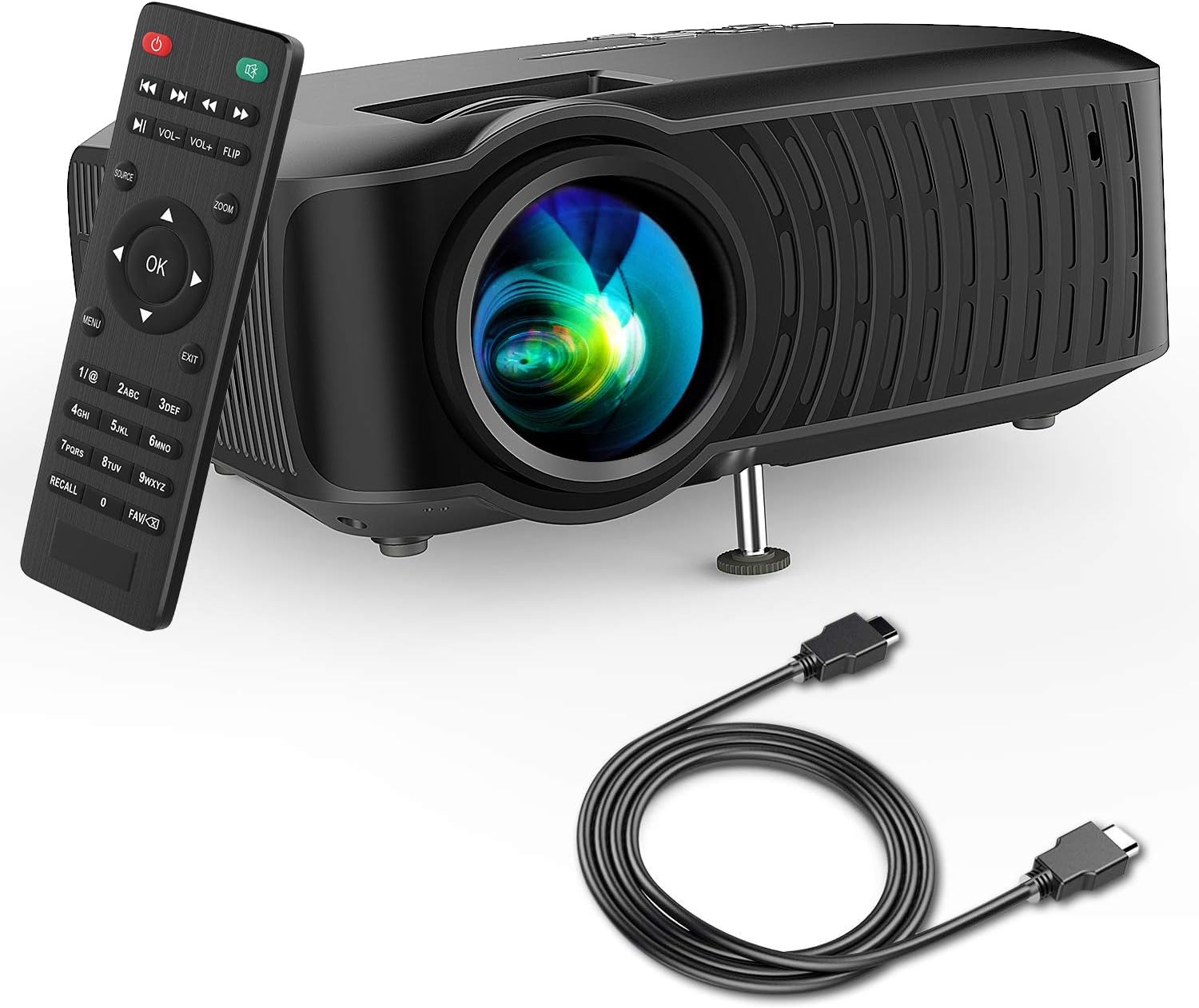
Image: The DBPOWER T22 Portable Video Projector, its remote control, and an HDMI cable, representing the typical package contents.
3. தயாரிப்பு முடிந்துவிட்டதுview
Familiarize yourself with the various parts of your DBPOWER T22 projector.
3.1 முன் மற்றும் பக்கம் View

படம்: ஒரு பக்கம் view of the DBPOWER T22 projector with dimensions indicating its compact and portable design (21.8cm length, 17.2cm width, 9.16cm height).
- ப்ரொஜெக்ஷன் லென்ஸ்: படத்தை திரையில் வெளியிடுகிறது.
- ஃபோகஸ் ரிங்: பட தெளிவை சரிசெய்கிறது.
- Keystone Correction Ring: ட்ரெப்சாய்டல் பட சிதைவை சரிசெய்கிறது.
- காற்றோட்ட துறைமுகங்கள்: வெப்பச் சிதறலுக்கு. தடுக்க வேண்டாம்.
- சரிசெய்யக்கூடிய பாதம்: Raises or lowers the front of the projector.
3.2 Rear Panel and Connectivity
The rear panel provides various input and output ports for connecting external devices.
- HDMI போர்ட்: Connects to devices like laptops, Blu-ray players, game consoles, and TV sticks.
- USB போர்ட்: Connects to USB flash drives for media playback.
- ஏவி போர்ட்: Connects to older devices using the included AV cable.
- SD கார்டு ஸ்லாட்: SD கார்டிலிருந்து நேரடியாக மீடியாவை இயக்குவதற்கு.
- ஆடியோ அவுட் (3.5மிமீ ஜாக்): வெளிப்புற ஸ்பீக்கர்கள் அல்லது ஹெட்ஃபோன்களுடன் இணைக்கிறது.
- ஆற்றல் உள்ளீடு: பவர் அடாப்டருடன் இணைக்கிறது.
3.3 தொலை கட்டுப்பாடு
The remote control allows convenient operation of the projector from a distance.
- பவர் பட்டன்: ப்ரொஜெக்டரை ஆன்/ஆஃப் செய்கிறது.
- மூல பொத்தான்: Selects input source (HDMI, AV, USB, SD).
- வழிசெலுத்தல் பொத்தான்கள் (மேல்/கீழ்/இடது/வலது): Navigates menus.
- சரி பொத்தான்: தேர்வுகளை உறுதிப்படுத்துகிறது.
- மெனு பட்டன்: Accesses projector settings.
- வெளியேறும் பொத்தான்: தற்போதைய மெனு அல்லது செயல்பாட்டிலிருந்து வெளியேறுகிறது.
- தொகுதி +/-: பேச்சாளர் அளவை சரிசெய்கிறது.
- Flip Button: Rotates the projected image.
- பெரிதாக்கு பட்டன்: Adjusts image zoom (digital zoom).
4 அமைவு
4.1 பவர் ஆன்/ஆஃப்
- Connect the power cable to the projector's power input, then plug the other end into a power outlet.
- Press the power button on the projector or the remote control to turn it on. The indicator light will change.
- அணைக்க, ஆற்றல் பொத்தானை மீண்டும் அழுத்தவும்.
4.2 Adjusting Image Focus and Keystone
Achieve a clear and rectangular image by adjusting the focus and keystone correction.

Image: Diagram showing the manual keystone correction and focus rings on the side of the projector, with examples of de-focused and focused images, and trapezoidal correction.
- கவனம்: சுழற்று ஃபோகஸ் ரிங் until the projected image appears sharp and clear.
- கீஸ்டோன் திருத்தம்: படம் ட்ரெப்சாய்டலாகத் தோன்றினால் (மேலே அல்லது கீழே அகலமாக), சுழற்றுங்கள் கீஸ்டோன் திருத்த வளையம் to make the image rectangular. The projector supports ±15° manual keystone correction.
4.3 வெளிப்புற சாதனங்களை இணைத்தல்
The DBPOWER T22 supports multiple input sources.
- , HDMI: Connect an HDMI cable from your device (e.g., laptop, game console, Amazon Fire TV Stick) to the projector's HDMI port.
- USB: USB போர்ட்டில் ஒரு USB ஃபிளாஷ் டிரைவைச் செருகவும்.
- ஏ.வி: Use the provided AV cable to connect to devices with AV output.
- SD கார்டு: Insert an SD card into the SD card slot.
- ஸ்மார்ட்போன்கள்: For iOS devices, an external Lightning to HDMI adapter is required. For Android devices, an external Micro USB/Type-C to HDMI adapter is required. (Adapters not included).
5. புரொஜெக்டரை இயக்குதல்
5.1 உள்ளீட்டு மூலத்தைத் தேர்ந்தெடுப்பது
After connecting your device, you need to select the correct input source.
- அழுத்தவும் ஆதாரம் button on the remote control or the projector.
- Use the navigation buttons to select the desired input source (e.g., HDMI, USB, AV, SD).
- அழுத்தவும் OK உறுதி செய்ய.
5.2 மீடியா பிளேபேக் (USB/SD)
When a USB drive or SD card is inserted, the projector will display a media browser.
- கோப்புறைகள் வழியாக செல்லவும் மற்றும் files using the remote control's navigation buttons.
- ஒரு தேர்ந்தெடுக்கவும் file (e.g., video, photo, music, text) and press OK விளையாட.
5.3 ஆடியோ வெளியீடு
The projector features an improved built-in speaker system. For enhanced audio, you can connect external speakers.

Image: An illustration of the DBPOWER T22 projector highlighting its stereo speakers, indicating that external speakers are not always necessary for an enjoyable audio experience.
- உள்ளமைக்கப்பட்ட ஸ்பீக்கர்: The projector's internal speaker provides audio. Adjust volume using the VOL +/- ரிமோட்டில் பொத்தான்கள்.
- External Speakers/Headphones: Connect a 3.5mm audio cable from your external audio device to the projector's Audio Out port.
5.4 Projector Settings (Menu)
அழுத்தவும் மெனு button on the remote to access settings such as Picture Mode, Aspect Ratio, Sound Mode, and other system preferences.
6. பராமரிப்பு
6.1 லென்ஸை சுத்தம் செய்தல்
Use a professional lens cleaning cloth or lens paper to clean the projector lens. Avoid touching the lens directly with your hands.

படம்: வெடித்தது view of the projector lens assembly, highlighting the tempered glass lens and the importance of a dust cover to protect it from scratches and dust.
6.2 ப்ரொஜெக்டர் உடலை சுத்தம் செய்தல்
Wipe the projector body with a soft, dry cloth. Do not use abrasive cleaners or solvents.
6.3 Heat Dispersion System
The projector features an advanced cooling system to ensure stable operation and extend lamp life. Ensure ventilation ports are clear.

படம்: ஒரு உள் view of the DBPOWER T22 projector, illustrating the advanced heat dispersion system with air flowing through cooling fins to maintain optimal operating temperature.
6.4 எல்amp வாழ்க்கை
LED எல்amp in your DBPOWER T22 projector has an extended lifespan of over 50,000 hours, significantly reducing the need for lamp மாற்று.
7. சரிசெய்தல்
நீங்கள் சிக்கல்களை எதிர்கொண்டால், பின்வரும் பொதுவான சிக்கல்கள் மற்றும் தீர்வுகளைப் பார்க்கவும்.
| பிரச்சனை | சாத்தியமான காரணம் | தீர்வு |
|---|---|---|
| படம் இல்லை அல்லது "சிக்னல் இல்லை" செய்தி இல்லை | Incorrect input source selected; loose cable connection; device not powered on. |
|
| மங்கலான படம் | ஃபோகஸ் சரிசெய்யப்படவில்லை; ப்ரொஜெக்டர் திரைக்கு மிக அருகில்/தொலைவில் உள்ளது. |
|
| Trapezoidal image | ப்ரொஜெக்டர் திரைக்கு செங்குத்தாக இல்லை. |
|
| ஒலி அல்லது குறைந்த ஒலி இல்லை | Volume too low; mute enabled; external audio device issues. |
|
| ரிமோட் கண்ட்ரோல் வேலை செய்யவில்லை | Dead batteries; obstruction; remote not pointed at IR receiver. |
|
8. விவரக்குறிப்புகள்
Detailed technical specifications for the DBPOWER T22 Portable Video Projector.
| அம்சம் | விவரம் |
|---|---|
| பிராண்ட் | DBPOWER |
| மாதிரி எண் | T22 |
| பிரகாசம் | 120 ANSI Lumens (80% brighter than most market projectors) |
| மாறுபாடு விகிதம் | 2000:1 |
| ஆதரிக்கப்படும் தீர்மானம் | 1080P (முழு HD) |
| நேட்டிவ் டிஸ்பிளே ரெசல்யூஷன் | 800 x 480 |
| காட்சி வகை | எல்சிடி |
| Lamp வாழ்க்கை | 50,000 மணிநேரம் |
| திட்ட அளவு | 32-176 அங்குலம் |
| திட்ட தூரம் | 1-5.2 மீட்டர் |
| கீஸ்டோன் திருத்தம் | கையேடு ±15° |
| இணைப்பு தொழில்நுட்பம் | HDMI, USB, AV, SD Card |
| உள்ளமைக்கப்பட்ட ஸ்பீக்கர் | Yes (Improved system) |
| தயாரிப்பு பரிமாணங்கள் | 21.59 x 17.02 x 9.14 செ.மீ |
| பொருளின் எடை | 1.9 கிலோ |
| வாட்tage | 24 வாட்ஸ் |
9. உத்தரவாதம் மற்றும் ஆதரவு
DBPOWER products are designed and manufactured to the highest quality standards. For warranty information, technical support, or customer service inquiries, please refer to the contact information provided with your purchase or visit the official DBPOWER webதளம்.
அதிகாரி Webதளம்: www.dbpower.co (கவனிக்கவும்: URL may vary by region. Refer to product packaging for specific regional support details.)