
1. அறிமுகம்
This manual provides essential instructions for the safe and effective use of your Sony Alpha a6400 mirrorless interchangeable-lens camera. Please read this manual thoroughly before operating the camera and retain it for future reference. The Sony Alpha a6400 features a 24.2MP APS-C Exmor CMOS sensor, 4K UHD video recording, and 11 frames per second continuous shooting, paired with the versatile E 18-135mm F/3.5-5.6 OSS lens.
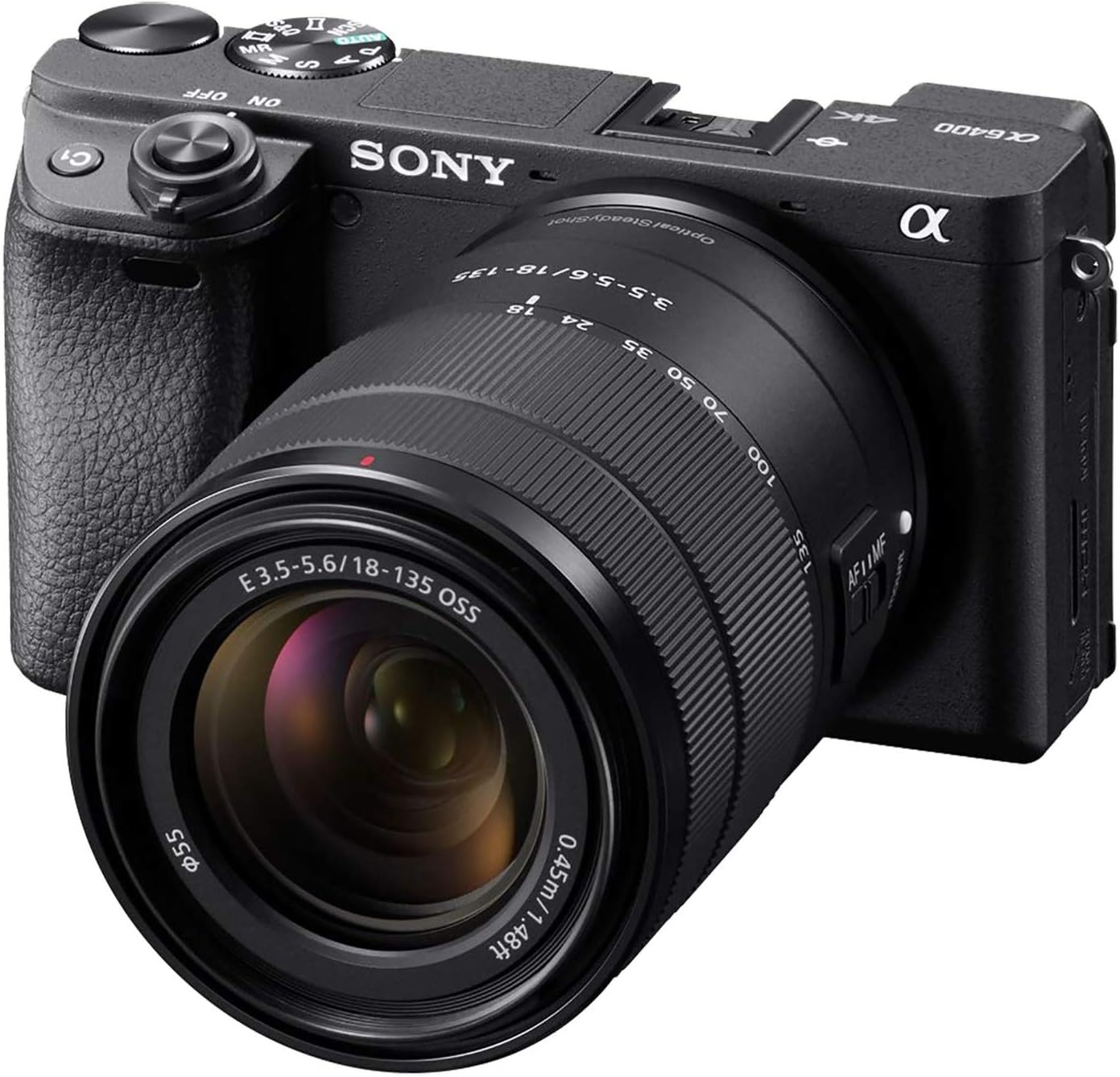
Figure 1: Sony Alpha a6400 Mirrorless Camera with E 18-135mm F/3.5-5.6 OSS Lens.
2. பெட்டியில் என்ன இருக்கிறது
Verify that all the following items are included in your camera kit:
- சோனி ஆல்பா a6400 கேமரா உடல்
- E 18-135mm F/3.5-5.6 OSS Lens
- ரிச்சார்ஜபிள் பேட்டரி (NP-FW50)
- ஏசி அடாப்டர் (AC-UUD12)
- தோள்பட்டை
- உடல் தொப்பி
- துணை ஷூ தொப்பி
- ஐபீஸ் கோப்பை
- மைக்ரோ USB கேபிள்
3. கேமரா ஓவர்view
3.1 முன்னணி View

படம் 2: முன் view of the camera, showing the lens mount, grip, and front dial.
3.2 மேல் View

படம் 3: மேல் view of the camera, highlighting the mode dial, hot shoe, and power switch.
3.3 பின்புறம் View and Tilting LCD Screen

படம் 4: பின்புறம் view of the camera, showing the LCD screen in a tilted position, ideal for various shooting angles.
4 அமைவு
4.1 லென்ஸை இணைத்தல்
- கேமராவிலிருந்து உடல் மூடியையும், லென்ஸிலிருந்து பின்புற லென்ஸ் மூடியையும் அகற்றவும்.
- லென்ஸில் உள்ள வெள்ளை குறியீட்டு குறியை கேமரா உடலில் உள்ள வெள்ளை குறியீட்டு குறியுடன் சீரமைக்கவும்.
- லென்ஸை சரியான இடத்தில் கிளிக் செய்யும் வரை கடிகார திசையில் திருப்பி பொருத்தவும்.
4.2 Inserting the Battery and Charging
- Open the battery cover on the bottom of the camera.
- Insert the NP-FW50 battery with the correct orientation until it locks.
- பேட்டரி அட்டையை மூடு.
- Connect the camera to the AC adaptor using the micro USB cable to charge the battery. The charging lamp ஒளிரச் செய்யும்.
4.3 மெமரி கார்டைச் செருகுதல்
- மெமரி கார்டு அட்டையைத் திறக்கவும்.
- Insert a compatible SD/SDHC/SDXC or Memory Stick Duo card into the slot with the contacts facing the correct direction until it clicks.
- மெமரி கார்டு அட்டையை மூடு.
4.4 ஆரம்ப அமைப்புகள்
முதல் முறையாக பவர்-ஆன் செய்தவுடன், திரையில் தோன்றும் வழிமுறைகளைப் பின்பற்றி மொழி, தேதி, நேரம் மற்றும் பகுதியை அமைக்கவும்.
5. அடிப்படை செயல்பாடு
5.1 பவர் ஆன்/ஆஃப்
Slide the ON/OFF switch located around the shutter button to power the camera on or off.
5.2 Shooting Still Images
The camera offers various shooting modes, including Program Auto, Aperture Priority, Shutter Priority, and Manual. Use the mode dial on top of the camera to select your desired mode.
- ஆட்டோஃபோகஸ்: The camera features a fast 0.02-second autofocus system with 425 phase-detection and 425 contrast-detection points covering 84% of the sensor area.
- தொடர்ச்சியான படப்பிடிப்பு: Capture fast-moving subjects with up to 11 frames per second (fps) continuous shooting.

Figure 5: The camera's capability for 11 frames per second continuous shooting.
5.3 திரைப்படங்களைப் பதிவு செய்தல்
The Sony Alpha a6400 supports 4K UHD (2160p) video recording. Press the MOVIE button to start and stop recording.
- Special Movie Functions: Create time-lapse movies or slow/quick motion videos directly in-camera without requiring post-processing.

Figure 6: The camera's ability to record high-quality 4K video.
5.4 Using the LCD Screen
The 3-inch LCD screen is tiltable up to 180 degrees, making it suitable for various shooting angles, including vlogging and low-angle shots. It also features touch screen functionality for intuitive control.

Figure 7: The LCD screen tilted 180 degrees for flexible viewing.
6. மேம்பட்ட அம்சங்கள்
6.1 Real-Time Eye AF and Tracking
The camera incorporates advanced Real-Time Eye AF and Real-Time Tracking technologies for precise and reliable subject focus, even with fast-moving subjects.

Figure 8: Demonstration of the Real-Time Eye AF feature, ensuring sharp focus on the subject's eyes.
6.2 இணைப்பு
The camera supports Wi-Fi and Bluetooth connectivity for seamless transfer of images and remote control via a smartphone or tablet.
7. பராமரிப்பு மற்றும் பராமரிப்பு
7.1 கேமரா மற்றும் லென்ஸை சுத்தம் செய்தல்
- கேமரா உடலை சுத்தம் செய்ய மென்மையான, உலர்ந்த துணியைப் பயன்படுத்தவும்.
- For the lens, use a lens brush to remove dust, then gently wipe with a lens cleaning cloth and solution if necessary. Avoid touching the lens surface directly.
- Do not use organic solvents such as alcohol or thinner to clean the camera.
7.2 பேட்டரி பராமரிப்பு
- பயன்படுத்துவதற்கு முன் பேட்டரியை முழுமையாக சார்ஜ் செய்யவும்.
- பயன்பாட்டில் இல்லாதபோது பேட்டரியை குளிர்ந்த, உலர்ந்த இடத்தில் சேமிக்கவும்.
- பேட்டரியை தீவிர வெப்பநிலைக்கு வெளிப்படுத்துவதைத் தவிர்க்கவும்.
8. சரிசெய்தல்
| பிரச்சனை | சாத்தியமான காரணம் / தீர்வு |
|---|---|
| கேமரா இயக்கப்படவில்லை. | பேட்டரி சரியாகச் செருகப்பட்டு முழுமையாக சார்ஜ் செய்யப்பட்டுள்ளதை உறுதிசெய்யவும். |
| பேட்டரி விரைவாக தீர்ந்துவிடும். | Frequent use of Wi-Fi, continuous shooting, or video recording can consume battery faster. Consider carrying spare batteries. |
| Camera becomes warm during use. | It is normal for the camera to become warm during extended video recording or continuous shooting. If it overheats, it may shut down automatically to protect internal components. Allow it to cool down. |
| படங்கள் மங்கலாக உள்ளன. | Check focus settings. Ensure the lens is clean. Use a higher shutter speed or image stabilization (if available on lens) in low light. |
| வைஃபை/புளூடூத்துடன் இணைக்க முடியவில்லை. | Ensure Wi-Fi/Bluetooth is enabled on both the camera and the connecting device. Refer to the camera's network settings. |
9. விவரக்குறிப்புகள்
| அம்சம் | விவரம் |
|---|---|
| மாதிரி பெயர் | ILCE6400M/B |
| சென்சார் வகை | APS-C type (23.5 x 15.6 mm), Exmor CMOS sensor |
| எஃபெக்டிவ் ஸ்டில் ரெசல்யூஷன் | 24.2 எம்.பி |
| வீடியோ தீர்மானம் | 2160p (4K UHD) |
| தொடர்ச்சியான படப்பிடிப்பு | 11 FPS |
| ஆட்டோஃபோகஸ் புள்ளிகள் | 850 (425 Phase Detection, 425 Contrast Detection) |
| லென்ஸ் வகை | E 18-135mm F/3.5-5.6 OSS Zoom Lens |
| திரை அளவு | 3 அங்குலம் |
| காட்சி வகை | சாய்க்கும் LCD, தொடுதிரை |
| இணைப்பு | வைஃபை, புளூடூத் |
| பேட்டரி வகை | NP-FW50 Rechargeable Battery |
| சேமிப்பக ஊடகம் | ஒற்றை ஸ்லாட்: SD/SDHC/SDXC/Memory Stick Duo Hybrid (UHS-I) |
| பொருளின் எடை | 1.61 Pounds (body with lens) |
10. உத்தரவாதம் மற்றும் ஆதரவு
10.1 உற்பத்தியாளரின் உத்தரவாதம்
This Sony Alpha a6400 camera is covered by a 1 வருட உற்பத்தியாளரின் உத்தரவாதம். உத்தரவாதக் கோரிக்கைகளுக்கு உங்கள் வாங்கியதற்கான ஆதாரத்தை வைத்திருங்கள். சாதாரண பயன்பாட்டின் கீழ் பொருட்கள் மற்றும் வேலைப்பாடுகளில் உள்ள குறைபாடுகளை உத்தரவாதம் உள்ளடக்கும்.
10.2 வாடிக்கையாளர் ஆதரவு
For further assistance, technical support, or detailed information not covered in this manual, please visit the official Sony support webதளத்தில் அல்லது சோனி வாடிக்கையாளர் சேவையைத் தொடர்பு கொள்ளவும்.
You can also refer to the official User Guide (PDF) available for download from the Sony support page for comprehensive details.


