
1. அறிமுகம்
நன்றி, நன்றி.asing the Infocus 24-inch 720p LED TV, model IM24ED800. This manual provides essential information for setting up, operating, and maintaining your television. Please read this manual thoroughly before using the product and retain it for future reference.
பாதுகாப்பு தகவல்
- மழை அல்லது ஈரப்பதத்திற்கு டிவியை வெளிப்படுத்த வேண்டாம்.
- காற்றோட்டம் திறப்புகளைத் தடுக்க வேண்டாம்.
- சரியான மின்சாரம் வழங்குவதை உறுதி செய்யவும்tage.
- பவர் கார்டு நடக்காமல் அல்லது கிள்ளப்படாமல் பாதுகாக்கவும்.
- அனைத்து சேவைகளையும் தகுதிவாய்ந்த சேவை பணியாளர்களிடம் பார்க்கவும்.
- நேரடி சூரிய ஒளி, வெப்ப மூலங்கள் மற்றும் வலுவான காந்தப்புலங்களிலிருந்து டிவியை விலக்கி வைக்கவும்.
2. தொகுப்பு உள்ளடக்கங்கள்
பின்வரும் உருப்படிகளுக்கு பெட்டியை சரிபார்க்கவும்:
- Infocus 24-inch 720p LED TV (IM24ED800)
- Remote Control (with batteries, if included)
- பவர் கார்ட்
- டிவி ஸ்டாண்ட் (2 துண்டுகள்)
- டிவி ஸ்டாண்டிற்கான திருகுகள்
- பயனர் கையேடு (இந்த ஆவணம்)
3 அமைவு
3.1 டிவி ஸ்டாண்டை இணைத்தல்
To attach the stand to your Infocus TV:
- கீறல்கள் ஏற்படாமல் இருக்க, டிவி திரையை மென்மையான, சுத்தமான மேற்பரப்பில் கவனமாக வைக்கவும்.
- ஒவ்வொரு ஸ்டாண்ட் துண்டையும் டிவியின் அடிப்பகுதியில் உள்ள தொடர்புடைய ஸ்லாட்டுகளுடன் சீரமைக்கவும்.
- வழங்கப்பட்ட திருகுகளைப் பயன்படுத்தி ஒவ்வொரு ஸ்டாண்ட் பகுதியையும் பாதுகாக்கவும். அவை உறுதியாக இறுக்கப்பட்டுள்ளதா என்பதை உறுதிப்படுத்திக் கொள்ளுங்கள்.
- டிவியை கவனமாக தூக்கி, நிலையான, சமதளமான மேற்பரப்பில் வைக்கவும்.
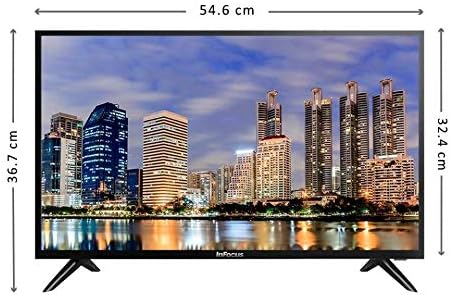
படம்: முன்பக்கம் view of the Infocus 24-inch LED TV with dimensions indicated. The TV measures approximately 54.6 cm in width and 36.7 cm in height with the stand.
3.2 இணைக்கும் சாதனங்கள்
Your Infocus TV features multiple input ports for connecting external devices.

படம்: பின்புறம் view of the Infocus 24-inch LED TV, highlighting the location of various input ports including HDMI and USB.
- HDMI இணைப்புகள்: Connect Blu-ray players, game consoles, or cable/satellite boxes to the HDMI ports. The TV has 2 HDMI inputs.
- USB இணைப்புகள்: Connect USB flash drives for media playback to the USB ports. The TV has 2 USB inputs.
- ஆண்டெனா/கேபிள்: Connect an antenna or cable TV signal to the RF input (if available, not explicitly listed but standard for TVs).
- சக்தி: பவர் கார்டை டிவியின் பவர் உள்ளீட்டுடன் இணைக்கவும், பின்னர் ஒரு சுவர் அவுட்லெட்டுடன் இணைக்கவும்.
3.3 ஆரம்ப பவர் ஆன்
தேவையான அனைத்து கேபிள்களையும் இணைத்த பிறகு:
- Ensure the power cord is securely plugged into both the TV and a power outlet.
- ரிமோட் கண்ட்ரோல் அல்லது டிவியிலேயே பவர் பட்டனை அழுத்தவும்.
- Follow the on-screen instructions for initial setup, which may include language selection, time zone, and channel scanning.
4. உங்கள் டிவியை இயக்குதல்
4.1 ரிமோட் கண்ட்ரோல் ஓவர்view
The remote control allows you to access all TV functions. While specific button layouts may vary, common functions include:
- சக்தி: டிவியை ஆன் அல்லது ஆஃப் செய்கிறது.
- உள்ளீடு/மூலம்: உள்ளீட்டு மூலத்தைத் தேர்ந்தெடுக்கிறது (HDMI 1, HDMI 2, USB, TV).
- வால்யூம் அதிக/கீழ்: ஒலி அளவை சரிசெய்யும்.
- சேனல் மேல்/கீழ்: டிவி சேனல்களை மாற்றுகிறார்.
- முடக்கு: டிவி ஆடியோவை அமைதிப்படுத்துகிறது.
- மெனு: அமைப்புகளை மாற்றுவதற்கான பிரதான மெனுவைத் திறக்கிறது.
- வழிசெலுத்தல் பொத்தான்கள் (மேல்/கீழ்/இடது/வலது/சரி): மெனுக்களில் செல்லவும் தேர்வுகளை உறுதிப்படுத்தவும் பயன்படுகிறது.
- வெளியேறு/திரும்பு: முந்தைய திரைக்குத் திரும்புகிறது அல்லது மெனுவிலிருந்து வெளியேறுகிறது.
4.2 அடிப்படை செயல்பாடுகள்
- உள்ளீட்டு மூலத்தை மாற்றுதல்: அழுத்தவும் உள்ளீடு or ஆதாரம் button on your remote control. Use the navigation buttons to select the desired input (e.g., HDMI 1, USB) and press OK.
- அளவை சரிசெய்தல்: பயன்படுத்தவும் வால்யூம் அப் (+) or ஒலியை குறை (-) பொத்தான்கள்.
- சேனல்களை மாற்றுதல்: பயன்படுத்தவும் Channel Up (CH+) or Channel Down (CH-) பொத்தான்கள்.
4.3 USB மீடியா பிளேபேக்
மீடியாவை இயக்க files from a USB flash drive:
- Insert a USB flash drive into one of the TV's USB ports.
- அழுத்தவும் உள்ளீடு or ஆதாரம் உங்கள் ரிமோட் கண்ட்ரோலில் பொத்தானைத் தேர்ந்தெடுத்து தேர்ந்தெடுக்கவும் USB.
- டிவியின் மீடியா உலாவி தோன்ற வேண்டும். உங்கள் வழியாக செல்லவும் files (photos, music, videos) using the remote control.
- ஒரு தேர்ந்தெடுக்கவும் file மற்றும் அழுத்தவும் OK அதை விளையாட.
5. பராமரிப்பு
5.1 திரையை சுத்தம் செய்தல்
- Turn off the TV and unplug the power cord before cleaning.
- திரையை மெதுவாகத் துடைக்க மென்மையான, பஞ்சு இல்லாத துணியை (எ.கா. மைக்ரோஃபைபர் துணி) பயன்படுத்தவும்.
- பிடிவாதமான குறிகளுக்கு, லேசான dampதுணியில் தண்ணீர் அல்லது சிறப்பு திரை துப்புரவாளர் பயன்படுத்தவும். ஒருபோதும் திரையில் நேரடியாக துப்புரவாளரை தெளிக்க வேண்டாம்.
- Avoid using abrasive cleaners, alcohol, benzene, or thinners, as these can damage the screen.
5.2 பொது பராமரிப்பு
- Keep the TV in a well-ventilated area.
- டிவியின் மேல் கனமான பொருட்களை வைப்பதை தவிர்க்கவும்.
- மின்னல் தாக்கும் போதோ அல்லது நீண்ட நேரம் பயன்படுத்தப்படாமல் இருக்கும் போதோ டிவியின் இணைப்பைத் துண்டிக்கவும்.
6. சரிசெய்தல்
உங்கள் டிவியில் சிக்கல்கள் ஏற்பட்டால், பின்வரும் பொதுவான சிக்கல்கள் மற்றும் தீர்வுகளைப் பார்க்கவும்:
| பிரச்சனை | சாத்தியமான காரணம் | தீர்வு |
|---|---|---|
| சக்தி இல்லை | பவர் கார்டு இணைக்கப்படவில்லை; பவர் அவுட்லெட்டில் சிக்கல் | பவர் கார்டு பாதுகாப்பாக இணைக்கப்பட்டுள்ளதா என்பதை உறுதிப்படுத்தவும். மற்றொரு சாதனத்துடன் அவுட்லெட்டை சோதிக்கவும். |
| படம் இல்லை, ஆனால் ஒலி உள்ளது. | Incorrect input source selected; loose video cable | அழுத்தவும் உள்ளீடு/மூலம் button to select the correct input. Check video cable connections. |
| ஒலி இல்லை, ஆனால் படம் உள்ளது. | Volume muted or too low; audio cable issue | அழுத்தவும் முடக்கு button or increase volume. Check audio cable connections. |
| ரிமோட் கண்ட்ரோல் வேலை செய்யவில்லை | Batteries depleted; obstruction; remote sensor blocked | Replace batteries. Remove any obstructions between the remote and TV. Ensure the TV's remote sensor is clear. |
| "சிக்னல் இல்லை" என்ற செய்தி | Incorrect input source; device not powered on; cable issue | Verify the correct input source is selected. Ensure the connected device is powered on. Check all cable connections. |
7. விவரக்குறிப்புகள்
The following are the technical specifications for the Infocus 24-inch 720p LED TV model IM24ED800:
| அம்சம் | விவரம் |
|---|---|
| மாதிரி எண் | IM24ED800 |
| திரை அளவு | 24 அங்குலம் (61 செமீ) |
| காட்சி தொழில்நுட்பம் | LED |
| தீர்மானம் | 1366 x 768 (720p HD) |
| புதுப்பிப்பு விகிதம் | 60 ஹெர்ட்ஸ் |
| HDMI உள்ளீடுகள் | 2 |
| USB உள்ளீடுகள் | 2 |
| இணைப்பு | HDMI, USB |
| மவுண்டிங் வகை | டேபிள் ஸ்டாண்ட் |
| தொகுப்பு பரிமாணங்கள் | 60.8 x 37.8 x 12 செ.மீ |
| தொகுப்பு எடை | 5 கிலோ |
8. உத்தரவாதம் மற்றும் ஆதரவு
This Infocus TV is sold as a renewed product, which typically comes with a limited warranty provided by the seller or refurbisher. Please refer to your purchase documentation or contact your retailer for specific warranty terms and conditions.
For technical support or service inquiries, please contact the customer support channel provided by your retailer or the Infocus support webதளம்.