
அறிமுகம்
This manual provides comprehensive instructions for the Hoco ES20 Original Series Wireless V5.0 Earphones. Please read this manual carefully before using the product to ensure proper operation and to maximize your user experience. Keep this manual for future reference.
தயாரிப்பு முடிந்துவிட்டதுview
The Hoco ES20 earphones are designed for wireless audio playback and hands-free communication. The package includes two wireless earphones and a portable charging case.

படம் 1: Hoco ES20 Wireless Earphones. This image displays both the left and right earphones, highlighting their in-ear design and compact form factor.
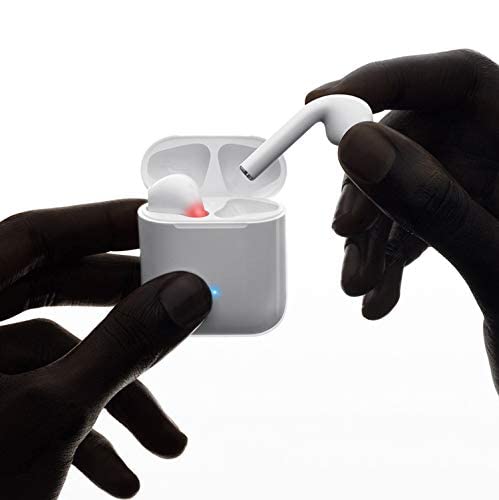
படம் 2: Hoco ES20 Earphones in Charging Case. The earphones are shown placed inside their charging case, indicating the charging status with an illuminated LED.
விவரக்குறிப்புகள்
| அம்சம் | விவரம் |
|---|---|
| வயர்லெஸ் பதிப்பு | V5.0 |
| ஆதரிக்கப்படும் நெறிமுறைகள் | Headset, Hands-free, A2DP, Avrcp |
| பரிமாற்ற அதிர்வெண் | 2.4GHz |
| பரிமாற்ற வரம்பு | 10 மீட்டர் |
| சார்ஜிங் தொகுதிtage | DC5V |
| சார்ஜ் நேரம் (இயர்போன்கள்) | சுமார் 1 மணி நேரம் |
| பேச்சு நேரம் | 2 மணிநேரம் |
| இசை பின்னணி நேரம் | 2 மணிநேரம் |
| சார்ஜிங் கேஸ் பேட்டரி திறன் | 400mAh |
| Earphone Battery Capacity (Each) | 40mAh |
| காத்திருப்பு நேரம் | 200 மணிநேரம் |
| மொத்த எடை (கேஸுடன்) | 44.8 கிராம் |
| ஒற்றை இயர்போன் எடை | 3.8 கிராம் |
| உள்ளிட்ட கூறுகள் | Bluetooth Headphones, 1 Charging Cable |
அமைவு
1. இயர்போன்கள் மற்றும் கேஸை சார்ஜ் செய்தல்
- Place both earphones into the charging case. Ensure they are correctly seated.
- Connect the charging cable to the charging port on the case and to a DC5V power source (e.g., USB wall adapter, computer USB port).
- The indicator light on the charging case will show charging status. A full charge for the earphones takes approximately 1 hour. The charging case itself has a 400mAh battery capacity.
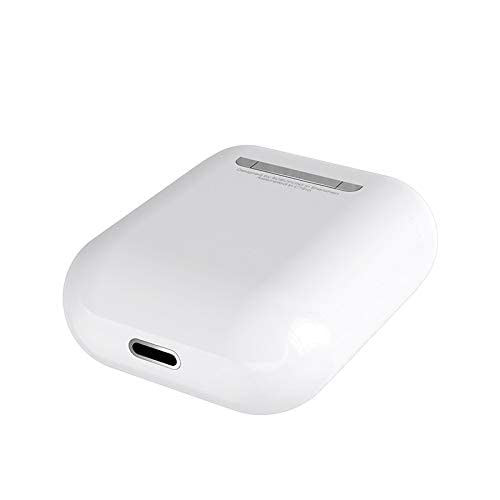
படம் 3: Hoco ES20 Charging Case Port. This image shows the charging port located at the bottom of the charging case, where the charging cable is connected.
2. ஒரு சாதனத்துடன் இணைத்தல்
- இயர்போன்கள் சார்ஜ் செய்யப்பட்டுள்ளதா என்பதை உறுதிப்படுத்தவும்.
- சார்ஜிங் கேஸைத் திறக்கவும். இயர்போன்கள் தானாகவே இணைத்தல் பயன்முறைக்குச் செல்லும்.
- உங்கள் ஸ்மார்ட்போன் அல்லது பிற புளூடூத்-இயக்கப்பட்ட சாதனத்தில், புளூடூத் அமைப்புகளுக்குச் செல்லவும்.
- தேடுங்கள் available devices and select "Hoco ES20" (or similar name) from the list.
- Once connected, the earphones will indicate successful pairing (e.g., an audio prompt or LED change).
- For Apple phones and some Android phones, the battery level of the earphones may be displayed on your device.
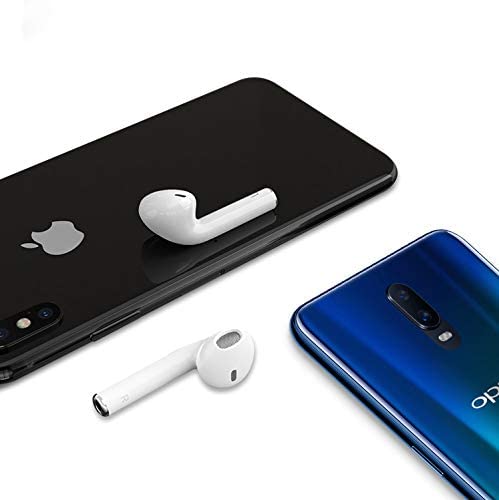
படம் 4: Hoco ES20 Earphones with Smartphones. This image illustrates the earphones positioned near two different smartphones, demonstrating their compatibility with various mobile devices.
இயக்க வழிமுறைகள்
Basic Functions (Touch Control)
- பவர் ஆன்: Earphones power on automatically when removed from the charging case.
- பவர் ஆஃப்: Earphones power off automatically when placed back into the charging case.
- விளையாடு/இடைநிறுத்தம்: Tap the touch area on either earphone once.
- பதில்/முடிவு அழைப்பு: Tap the touch area on either earphone once during an incoming call or an active call.
- அழைப்பை நிராகரி: Press and hold the touch area on either earphone for approximately 2 seconds during an incoming call.
- அடுத்த ட்ராக்: வலதுபுற இயர்போனில் தொடு பகுதியை இருமுறை தட்டவும்.
- முந்தைய ட்ராக்: இடது இயர்போனில் தொடு பகுதியை இருமுறை தட்டவும்.
- குரல் உதவியாளரைச் செயலாக்கு: Triple-tap the touch area on either earphone.
பராமரிப்பு
- இயர்போன்கள் மற்றும் சார்ஜிங் கேஸை சுத்தமாகவும் உலர்ந்ததாகவும் வைத்திருங்கள்.
- Avoid exposing the product to extreme temperatures, humidity, or corrosive substances.
- இயர்போன்கள் அல்லது சார்ஜிங் கேஸை பிரிக்கவோ அல்லது மாற்றவோ முயற்சிக்காதீர்கள், ஏனெனில் இது உத்தரவாதத்தை ரத்து செய்து சேதத்தை ஏற்படுத்தக்கூடும்.
- Use a soft, dry cloth to clean the earphones and charging contacts.
- இயர்போன்களைப் பாதுகாக்கவும், அவற்றை சார்ஜ் செய்யாமல் வைத்திருக்கவும், பயன்பாட்டில் இல்லாதபோது அவற்றை அவற்றின் சார்ஜிங் கேஸில் வைக்கவும்.
சரிசெய்தல்
பொதுவான சிக்கல்கள் மற்றும் தீர்வுகள்
- இயர்போன்கள் இணைக்கப்படவில்லை:
- இரண்டு இயர்போன்களும் சார்ஜ் செய்யப்பட்டுள்ளதா என்பதை உறுதிப்படுத்திக் கொள்ளுங்கள்.
- Place earphones back in the case, close it, then open it again.
- உங்கள் சாதனத்தில் புளூடூத்தை அணைத்து இயக்கவும்.
- Delete "Hoco ES20" from your device's Bluetooth list and try pairing again.
- ஒரே ஒரு இயர்போன் மட்டுமே வேலை செய்கிறது:
- இரண்டு இயர்போன்களும் சார்ஜ் செய்யப்பட்டுள்ளதா என்பதை உறுதிப்படுத்திக் கொள்ளுங்கள்.
- Place both earphones back in the charging case, close the lid, wait a few seconds, then open the lid and remove them together.
- If the issue persists, try resetting the earphones (refer to manufacturer's webஇந்த கையேட்டில் ஒரு குறிப்பிட்ட மீட்டமைப்பு செயல்முறை இல்லையென்றால் தளம்).
- ஒலி இல்லை அல்லது குறைந்த அளவு:
- உங்கள் சாதனம் மற்றும் இயர்போன்கள் இரண்டிலும் ஒலி அளவைச் சரிபார்க்கவும்.
- உங்கள் சாதனத்துடன் இயர்போன்கள் சரியாக இணைக்கப்பட்டுள்ளதா என்பதை உறுதிப்படுத்தவும்.
- வேறு பயன்பாடு அல்லது மூலத்திலிருந்து ஆடியோவை இயக்க முயற்சிக்கவும்.
- சார்ஜிங் சிக்கல்கள்:
- சார்ஜிங் கேபிள் கேஸ் மற்றும் பவர் சோர்ஸ் இரண்டிலும் பாதுகாப்பாக இணைக்கப்பட்டுள்ளதா என்பதை உறுதிப்படுத்தவும்.
- கேஸில் உள்ள சார்ஜிங் போர்ட் சுத்தமாகவும் குப்பைகள் இல்லாமல் இருக்கிறதா என்று சரிபார்க்கவும்.
- வேறு சார்ஜிங் கேபிள் அல்லது பவர் அடாப்டரைப் பயன்படுத்தவும்.
- Poor connection/intermittent audio:
- Ensure your device is within the 10-meter transmission range.
- Avoid obstacles between your device and the earphones.
- பிற வயர்லெஸ் சாதனங்களிலிருந்து வரும் குறுக்கீட்டைக் குறைக்கவும்.
உத்தரவாதம் மற்றும் ஆதரவு
The Hoco ES20 Wireless Earphones come with a 6 மாத உத்தரவாதம் வாங்கிய தேதியிலிருந்து. இந்த உத்தரவாதமானது உற்பத்தி குறைபாடுகளை உள்ளடக்கியது. உத்தரவாதக் கோரிக்கைகளுக்கு உங்கள் வாங்கியதற்கான ஆதாரத்தை வைத்திருங்கள்.
For technical support or warranty inquiries, please contact your retailer or the official Hoco support channels. Refer to the product packaging or Hoco's official webதொடர்பு தகவலுக்கான தளம்.