
அறிமுகம்
This manual provides instructions for the proper setup, operation, and maintenance of your Calvas 2020B0-B1 remote control. This remote is designed to be compatible with Shaw LCD LED televisions, offering a convenient replacement or secondary control unit. Please read this manual thoroughly before using the device.

படம்: முன்பக்கம் view of the Calvas 2020B0-B1 remote control.
அமைவு
1. பேட்டரி நிறுவல்
- ரிமோட் கண்ட்ரோலின் பின்புறத்தில் பேட்டரி பெட்டியைக் கண்டறியவும்.
- Press down on the latch and slide the battery cover off.
- இரண்டு AAA பேட்டரிகளைச் செருகவும் (சேர்க்கப்படவில்லை), நேர்மறை (+) மற்றும் எதிர்மறை (-) முனையங்கள் பெட்டியின் உள்ளே உள்ள அடையாளங்களுடன் சரியாக சீரமைக்கப்படுவதை உறுதிசெய்யவும்.
- அது பாதுகாப்பாக கிளிக் செய்யும் வரை பேட்டரி அட்டையை மீண்டும் இடத்திற்கு ஸ்லைடு செய்யவும்.

படம்: பின்பக்கம் view பேட்டரி பெட்டி திறந்திருக்கும் ரிமோட் கண்ட்ரோலின்.
2. Quick Setup for TV Control
The remote features a quick setup function for initial pairing with your television. Follow these steps:
- அழுத்திப் பிடிக்கவும் அமைவு button until the LED light blinks twice.
- அழுத்தவும் டிவி பவர் பொத்தான்.
- அழுத்திப் பிடிக்கவும் OK பொத்தான்.
- விடுவிக்கவும் OK key when your TV turns off. This indicates successful pairing.
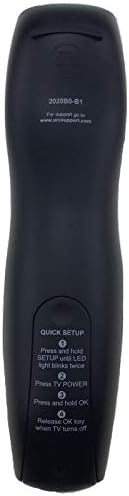
Image: Back of the remote control displaying quick setup instructions.
Note: If the TV does not turn off, repeat the steps or consult the TV's manual for specific remote programming codes if available.
இயக்க வழிமுறைகள்
The Calvas 2020B0-B1 remote control utilizes infrared (IR) technology. Ensure a clear line of sight between the remote's IR emitter and your TV's IR receiver for optimal performance.
பொத்தான் செயல்பாடுகள்:
- சக்தி: டிவியை ஆன் அல்லது ஆஃப் செய்கிறது.
- VOL +/-: அளவை அதிகரிக்கிறது அல்லது குறைக்கிறது.
- CH +/-: சேனலை மேலே அல்லது கீழ் மாற்றுகிறது.
- முடக்கு: டிவி ஆடியோவை முடக்குகிறது அல்லது முடக்குகிறது.
- NUMBER PAD (0-9): சேனல் எண்களை நேரடியாக உள்ளிடுகிறது.
- வழிகாட்டி: நிரல் வழிகாட்டியைக் காட்டுகிறது.
- பட்டியல்: டிவியின் பிரதான மெனுவை அணுகுகிறது.
- தகவல்: தற்போதைய நிரல் பற்றிய தகவலைக் காட்டுகிறது.
- சரி / வழிசெலுத்தல் அம்புகள்: தேர்வுகளை உறுதிப்படுத்தி, மெனுக்கள் வழியாகச் செல்கிறது.
- வெளியேறு: தற்போதைய மெனு அல்லது திரையில் இருந்து வெளியேறுகிறது.
- கடந்த: முந்தைய நிலைக்குத் திரும்புகிறது viewஎட் சேனல்.
- DAY +/-: Navigates through days in the program guide.
- MUSIC / FAV: Accesses music channels or favorite channels (functionality may vary by TV model).
பராமரிப்பு
சுத்தம்:
- மென்மையான, உலர்ந்த துணியால் ரிமோட் கண்ட்ரோலைத் துடைக்கவும்.
- பிடிவாதமான அழுக்குக்கு, சிறிது dampதண்ணீர் அல்லது லேசான, சிராய்ப்பு இல்லாத கிளீனர் கொண்ட துணியை en.
- கடுமையான இரசாயனங்கள், கரைப்பான்கள் அல்லது சிராய்ப்பு துப்புரவுப் பட்டைகள் ஆகியவற்றைப் பயன்படுத்த வேண்டாம், ஏனெனில் இவை ரிமோட்டின் மேற்பரப்பு அல்லது உள் கூறுகளை சேதப்படுத்தும்.
பேட்டரி மாற்று:
- Replace batteries when the remote's response becomes sluggish or the LED indicator fails to light up.
- Always replace both batteries at the same time with new AAA batteries.
- பழைய மற்றும் புதிய பேட்டரிகள் அல்லது பல்வேறு வகையான பேட்டரிகளை கலக்க வேண்டாம்.
- கசிவைத் தடுக்க ரிமோட் நீண்ட காலத்திற்குப் பயன்படுத்தப்படாவிட்டால் பேட்டரிகளை அகற்றவும்.
சேமிப்பு:
- நேரடி சூரிய ஒளி மற்றும் தீவிர வெப்பநிலையிலிருந்து விலகி, குளிர்ந்த, உலர்ந்த இடத்தில் ரிமோட்டை சேமிக்கவும்.
- ரிமோட்டை கீழே போடுவதையோ அல்லது அதிக ஈரப்பதத்திற்கு ஆளாக்குவதையோ தவிர்க்கவும்.
சரிசெய்தல்
- ரிமோட் பதிலளிக்கவில்லை:
- பேட்டரிகள் சரியாகச் செருகப்பட்டுள்ளதா என்றும் அவை தீர்ந்து போகவில்லையா என்றும் சரிபார்க்கவும். தேவைப்பட்டால் மாற்றவும்.
- ரிமோட்டுக்கும் டிவியின் ஐஆர் ரிசீவருக்கும் இடையே தெளிவான பார்வைக் கோடு இருப்பதை உறுதிசெய்து கொள்ளுங்கள். ஏதேனும் தடைகளை அகற்றவும்.
- Try re-pairing the remote with the TV using the "Quick Setup" steps.
- Only some buttons work:
- This might indicate a partial pairing issue or a specific button malfunction. Try re-pairing the remote.
- Clean the remote's surface, especially around the unresponsive buttons, to ensure no debris is interfering.
- குறுகிய இயக்க வரம்பு:
- பேட்டரிகளை புதியவற்றுடன் மாற்றவும்.
- வலுவான ஒளி மூலங்கள் (நேரடி சூரிய ஒளி அல்லது பிரகாசமான ஒளிரும் விளக்குகள் போன்றவை) IR சிக்னலில் குறுக்கிடவில்லை என்பதை உறுதிப்படுத்தவும்.
விவரக்குறிப்புகள்
| பிராண்ட் | வழுக்கை புள்ளிகள் |
| மாதிரி எண் | 2020B0-B1 (Mfr Part Number: CLS-D41D8CD98F00B204E9800998ECF8427E) |
| இணக்கமான சாதனங்கள் | Television (Shaw LCD LED TVs) |
| இணைப்பு தொழில்நுட்பம் | அகச்சிவப்பு (IR) |
| கட்டுப்படுத்தி வகை | பொத்தான் கட்டுப்பாடு |
| ஆதரிக்கப்படும் சாதனங்களின் அதிகபட்ச எண்ணிக்கை | 1 |
| அதிகபட்ச வரம்பு | 10 மீட்டர் |
| சிறப்பு அம்சம் | பணிச்சூழலியல் வடிவமைப்பு |
உத்தரவாத தகவல்
This product is typically covered by a limited warranty provided by the seller or manufacturer. Please refer to your purchase documentation or contact the retailer directly for specific warranty terms and conditions. Keep your proof of purchase for any warranty claims.
ஆதரவு
For further assistance, technical support, or inquiries regarding your Calvas 2020B0-B1 remote control, please contact the seller or manufacturer through the platform where the product was purchased. Provide your model number (2020B0-B1) and any relevant purchase details when seeking support.