
1. அறிமுகம்
Thank you for choosing the Dacom Athlete G05 Bluetooth Headset. This manual provides comprehensive instructions to help you set up, operate, and maintain your new wireless headphones. Please read this manual carefully before use to ensure optimal performance and longevity of your device.
2. தொகுப்பு உள்ளடக்கங்கள்
கீழே பட்டியலிடப்பட்டுள்ள அனைத்து பொருட்களும் உங்கள் தொகுப்பில் சேர்க்கப்பட்டுள்ளதா என்பதை சரிபார்க்கவும்:
- 1 x Dacom Athlete G05 Bluetooth Headset
- 1 x USB சார்ஜிங் கேபிள்
- 1 x பயனர் கையேடு (இந்த ஆவணம்)
3. தயாரிப்பு முடிந்துவிட்டதுview
The Dacom Athlete G05 is a wireless stereo earphone designed for sports and running, featuring a comfortable in-ear design with ear hooks for secure fit. It connects via Bluetooth V4.1.
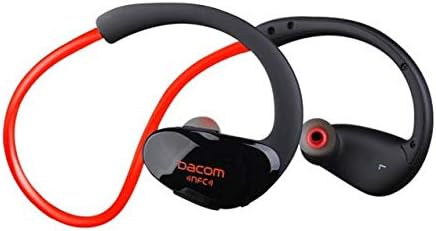
படம் 3.1: முன் view of the Dacom Athlete G05 Bluetooth Headset, showing the earbud and ear hook design.
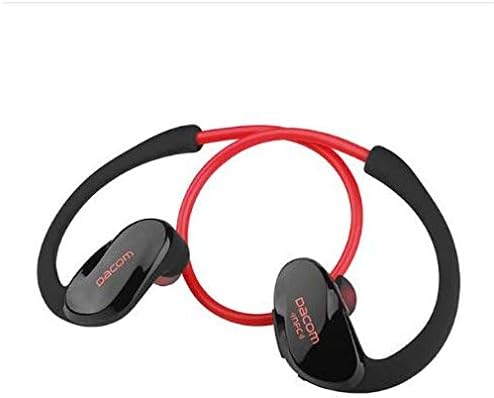
படம் 3.2: பின்புறம் view of the Dacom Athlete G05 Bluetooth Headset, illustrating the connecting cable between the two earbuds.
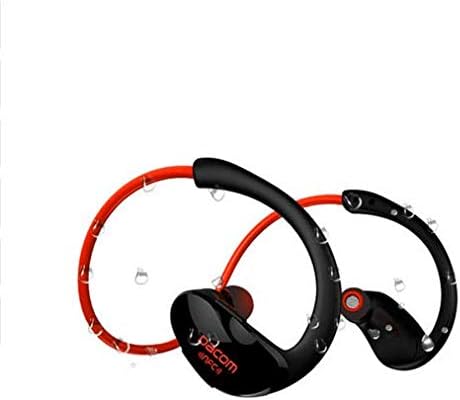
படம் 3.3: Dacom Athlete G05 Bluetooth Headset demonstrating water resistance, suitable for sports activities.
4 அமைவு
4.1 ஹெட்செட்டை சார்ஜ் செய்தல்
Before first use, fully charge your Dacom Athlete G05 headset. A full charge typically takes approximately 1.5 to 2 hours.
- Connect the provided USB charging cable to the charging port on the headset.
- Connect the other end of the USB cable to a power adapter (DC5V 150mAh output recommended) or a computer's USB port.
- The battery indicator light will illuminate during charging and change color or turn off once fully charged.
A fully charged headset provides approximately 8 hours of talk time or music playback, and up to 180 hours of standby time.
4.2 ப்ளூடூத் இணைத்தல்
To connect your headset to a Bluetooth-enabled device (e.g., smartphone, tablet):
- ஹெட்செட் முழுமையாக சார்ஜ் செய்யப்பட்டு அணைக்கப்பட்டுள்ளதா என்பதை உறுதிப்படுத்தவும்.
- Press and hold the multi-function button on the headset until the Bluetooth indicator light flashes red and blue alternately, indicating it is in pairing mode.
- உங்கள் சாதனத்தில், புளூடூத்தை இயக்கி, கிடைக்கும் சாதனங்களைத் தேடவும்.
- Select "Dacom Athlete G05" (or similar name) from the list of found devices.
- கடவுச்சொல் கேட்கப்பட்டால், "0000" (நான்கு பூஜ்ஜியங்கள்) என உள்ளிடவும்.
- Once paired, the Bluetooth indicator light will flash blue slowly or turn solid blue, and you will hear a confirmation tone.
The headset supports Bluetooth V4.1 and profiles such as Headset, Handsfree, A2DP, AVRC, and APT-X.
5. இயக்க வழிமுறைகள்
5.1 பவர் ஆன்/ஆஃப்
- பவர் ஆன்: Press and hold the multi-function button for approximately 3 seconds until the indicator light flashes blue and you hear a power-on tone.
- பவர் ஆஃப்: Press and hold the multi-function button for approximately 5 seconds until the indicator light flashes red and you hear a power-off tone.
5.2 அழைப்பு மேலாண்மை
- பதில் அழைப்பு: அழைப்பு வரும்போது பல செயல்பாட்டு பொத்தானைச் சுருக்கமாக அழுத்தவும்.
- அழைப்பை முடிக்கவும்: அழைப்பின் போது பல செயல்பாட்டு பொத்தானைச் சுருக்கமாக அழுத்தவும்.
- அழைப்பை நிராகரி: அழைப்பு வரும்போது பல செயல்பாட்டு பொத்தானை 2 வினாடிகள் அழுத்திப் பிடிக்கவும்.
- கடைசி எண்ணை மீண்டும் அனுப்பவும்: அழைப்பில் இல்லாதபோது பல செயல்பாட்டு பொத்தானை இருமுறை அழுத்தவும்.
5.3 இசை பின்னணி
- விளையாடு/இடைநிறுத்தம்: மல்டி ஃபங்ஷன் பட்டனை சுருக்கமாக அழுத்தவும்.
- அடுத்த ட்ராக்: வால்யூம் + பட்டனை நீண்ட நேரம் அழுத்தவும்.
- முந்தைய ட்ராக்: வால்யூம் - பட்டனை நீண்ட நேரம் அழுத்தவும்.
- ஒலியை பெருக்கு: வால்யூம் + பட்டனை சுருக்கமாக அழுத்தவும்.
- ஒலியை குறை: வால்யூம் - பட்டனை சுருக்கமாக அழுத்தவும்.
Note: The headset features touch control for various functions.
6. பராமரிப்பு மற்றும் பராமரிப்பு
- Keep the headset dry. Do not expose it to extreme temperatures or humidity.
- மென்மையான, உலர்ந்த துணியால் இயர்பட்கள் மற்றும் சார்ஜிங் காண்டாக்ட்களை தவறாமல் சுத்தம் செய்யவும்.
- ஹெட்செட்டை கீழே போடுவதையோ அல்லது வலுவான தாக்கங்களுக்கு உட்படுத்துவதையோ தவிர்க்கவும்.
- ஹெட்செட்டைப் பயன்படுத்தாதபோது குளிர்ந்த, உலர்ந்த இடத்தில் சேமிக்கவும்.
- ஹெட்செட்டை பிரிக்கவோ அல்லது மாற்றவோ முயற்சிக்காதீர்கள், ஏனெனில் இது உத்தரவாதத்தை ரத்து செய்யும்.
7. சரிசெய்தல்
| பிரச்சனை | சாத்தியமான தீர்வு |
|---|---|
| ஹெட்செட் இயக்கப்படவில்லை. | ஹெட்செட் முழுமையாக சார்ஜ் செய்யப்பட்டுள்ளதா என்பதை உறுதிப்படுத்திக் கொள்ளுங்கள். ஒரு மின் மூலத்துடன் இணைத்து மீண்டும் முயற்சிக்கவும். |
| சாதனத்துடன் இணைக்க முடியவில்லை. |
|
| ஒலி இல்லை அல்லது குறைந்த அளவு. |
|
| இடைப்பட்ட இணைப்பு. |
|
8. விவரக்குறிப்புகள்
| அம்சம் | விவரம் |
|---|---|
| தயாரிப்பு பெயர் | Athlete sports Bluetooth headset |
| மாதிரி எண் | G05 |
| புளூடூத் பதிப்பு | V4.1 |
| புளூடூத் வகுப்பு | வகுப்பு 2 |
| ஆதரவு புரோfiles | Headset, Handsfree, A2DP, AVRC, APT-X |
| சார்ஜிங் உள்ளீடு | DC5V 150mAh (Power adapter output) |
| பேட்டரி வகை | High-performance lithium polymer battery |
| பேச்சு நேரம் | சுமார் 8 மணி நேரம் |
| விளையாடும் நேரம் | சுமார் 8 மணி நேரம் |
| காத்திருப்பு நேரம் | சுமார் 180 மணி நேரம் |
| ஆடியோ அதிர்வெண் வரம்பு | 20Hz-20kHz |
| BT Radio Frequency | 2.400-2.481GHz |
| வெளியீட்டு மின்மறுப்பு | 16Ω 3 மெகாவாட் |
| உணர்திறன் | 100-105dB |
| ஹெட்ஃபோன்கள் படிவ காரணி | காதில் |
| இணைப்பு தொழில்நுட்பம் | வயர்லெஸ் |
| கட்டுப்பாட்டு முறை | தொடவும் |
| பொருள் | பிளாஸ்டிக் |
| நிறம் | சிவப்பு |
9. உத்தரவாதம் மற்றும் ஆதரவு
Dacom products are manufactured to the highest quality standards. For warranty information or technical support, please refer to the warranty card included with your purchase or visit the official Dacom webஉத்தரவாதக் கோரிக்கைகளுக்கு உங்கள் வாங்கியதற்கான ஆதாரத்தை வைத்திருங்கள்.