
1. அறிமுகம்
நன்றி, நன்றி.asing the UHAPPY U18 Portable Mini HD LED Projector. This manual provides essential information for the safe and efficient operation of your device. Please read it thoroughly before use and retain it for future reference.
பாதுகாப்பு முன்னெச்சரிக்கைகள்
- l இருக்கும்போது ப்ரொஜெக்டர் லென்ஸை நேரடியாகப் பார்க்க வேண்டாம்amp உள்ளது.
- அதிக வெப்பத்தைத் தடுக்க ப்ரொஜெக்டரைச் சுற்றி சரியான காற்றோட்டத்தை உறுதி செய்யவும்.
- மழை அல்லது ஈரப்பதத்தில் ப்ரொஜெக்டரை வெளிப்படுத்த வேண்டாம்.
- ப்ரொஜெக்டருடன் வழங்கப்பட்ட பவர் அடாப்டரை மட்டும் பயன்படுத்தவும்.
- ப்ரொஜெக்டரை நீங்களே திறக்கவோ அல்லது சரிசெய்யவோ முயற்சிக்காதீர்கள். அனைத்து சேவைகளையும் தகுதிவாய்ந்த பணியாளர்களிடம் பரிந்துரைக்கவும்.
2. தயாரிப்பு முடிந்துவிட்டதுview
Familiarize yourself with the components and ports of your UHAPPY U18 projector.
தொகுப்பு உள்ளடக்கங்கள்
The following items are included in your projector package:

Image: Contents of the UHAPPY U18 projector package, including the projector, power adapter, AV cable, remote control, and user manual.
- UHAPPY U18 Mini LED Projector
- பவர் அடாப்டர்
- ஏ.வி கேபிள்
- ரிமோட் கண்ட்ரோல்
- பயனர் கையேடு (இந்த ஆவணம்)
Projector Components and Ports

Image: Angled top-down view of the UHAPPY U18 projector, highlighting the lens, focus adjustment, and control panel.

படம்: மேல் view of the UHAPPY U18 projector, showing the integrated control buttons.

படம்: முன்பக்கம் view of the UHAPPY U18 projector, focusing on the projection lens.
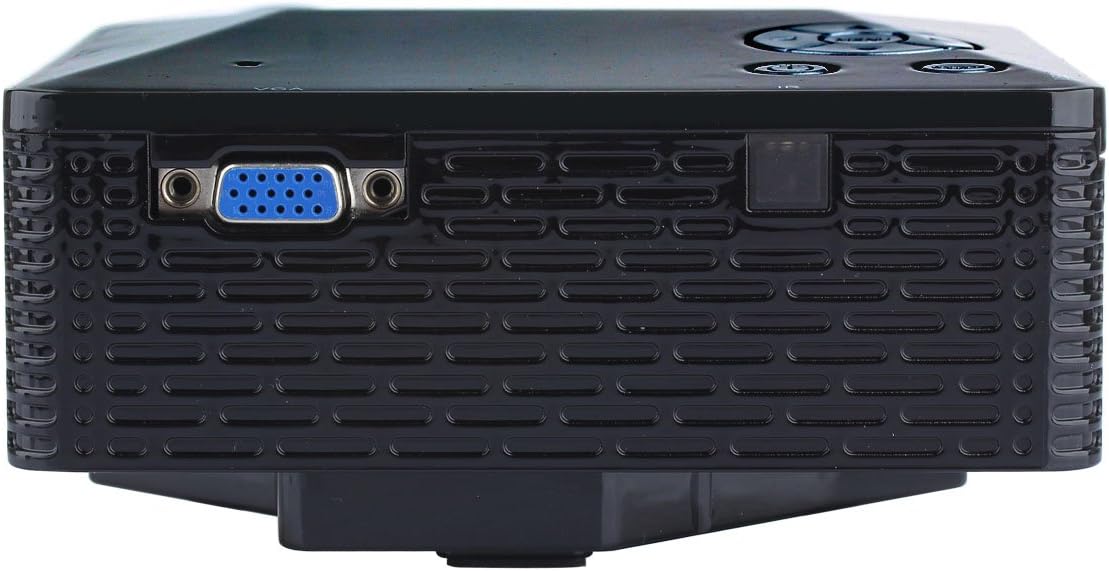
படம்: பக்கம் view of the UHAPPY U18 projector, illustrating the VGA input port.
The projector features various input ports for connectivity:
- HDMI உள்ளீடு: For connecting devices like laptops, gaming consoles, or media players.
- USB போர்ட்: For connecting USB storage devices to play media directly.
- SD கார்டு ஸ்லாட்: For inserting SD memory cards to play media directly.
- AV உள்ளீடு: For connecting older devices using the included AV cable.
- VGA உள்ளீடு: For connecting computers or laptops with a VGA output.
- DC-IN: பவர் உள்ளீடு போர்ட்.
- ஹெட்ஃபோன் வெளியீடு: வெளிப்புற ஆடியோ சாதனங்கள் அல்லது ஹெட்ஃபோன்களை இணைப்பதற்கு.
- ஃபோகஸ் குமிழ்: Located near the lens for adjusting image clarity.
3 அமைவு
3.1 வேலை வாய்ப்பு
Place the projector on a stable, flat surface. Ensure there is adequate space around the projector for ventilation. The ideal projection distance is between 1 to 4 meters, yielding an image size of 20 to 80 inches.
3.2 மின் இணைப்பு
- Connect the power adapter to the DC-IN port on the projector.
- பவர் அடாப்டரை பொருத்தமான மின் கடையில் செருகவும்.
3.3 உள்ளீட்டு சாதனங்களை இணைத்தல்
Choose the appropriate cable and port based on your source device:
- , HDMI: Connect an HDMI cable from your device (e.g., laptop, DVD player) to the projector's HDMI port.
- விஜிஏ: உங்கள் கணினியிலிருந்து ஒரு VGA கேபிளை ப்ரொஜெக்டரின் VGA போர்ட்டுடன் இணைக்கவும்.
- ஏ.வி: Use the provided AV cable to connect devices with AV output (e.g., older DVD players, set-top boxes) to the projector's AV port.
- USB/SD கார்டு: USB போர்ட்டில் ஒரு USB டிரைவை அல்லது SD கார்டு ஸ்லாட்டில் ஒரு SD கார்டைச் செருகவும்.
4. இயக்க வழிமுறைகள்
4.1 பவர் ஆன்/ஆஃப்
- பவர் ஆன் செய்ய: Press the power button on the projector or the remote control. The LED indicator will light up.
- பவர் ஆஃப் செய்ய: Press the power button again. It is recommended to allow the projector to cool down for a few minutes before unplugging it.
4.2 மூல தேர்வு
After powering on, you may need to select the input source:
- Press the 'Source' button on the projector or the remote control.
- Use the navigation buttons to select the desired input (HDMI, VGA, AV, USB, SD) and press 'OK' or 'Enter'.
4.3 கவனம் சரிசெய்தல்
If the projected image appears blurry:
- Rotate the focus knob located near the projector lens until the image becomes clear and sharp.
4.4 மெனு வழிசெலுத்தல்
Use the 'Menu' button on the projector or remote to access settings. Use the navigation arrows to move through options and 'OK' or 'Enter' to confirm selections. The projector supports multiple languages including English, Czech, Slovak, Danish, German, Spanish, French, Croatian, Italian, Hungarian, Dutch, Norwegian, Polish, Portuguese, Romanian, Slovene, Serbian, Finnish, Swedish, Bulgarian, Greek, Russian, and Chinese.
4.5 ஆதரிக்கப்படும் ஊடக வடிவங்கள்
When playing media directly from USB or SD card, the projector supports the following formats:
- படம்: BMP, JPEG, PNG
- வீடியோ: MPEG1, MPEG2, MPEG4, RM, RMVB, AVI, FLV, WMV
5. பராமரிப்பு
5.1 லென்ஸை சுத்தம் செய்தல்
ப்ரொஜெக்டர் லென்ஸை மெதுவாக துடைக்க, ஆப்டிகல் லென்ஸ்களுக்காக பிரத்யேகமாக வடிவமைக்கப்பட்ட மென்மையான, பஞ்சு இல்லாத துணியைப் பயன்படுத்தவும். சிராய்ப்பு பொருட்கள் அல்லது கடுமையான இரசாயனங்களைப் பயன்படுத்துவதைத் தவிர்க்கவும்.
5.2 பொது சுத்தம்
Wipe the projector's exterior with a soft, dry cloth. Do not use liquid cleaners directly on the device. Ensure ventilation openings are free from dust and obstructions.
5.3 சேமிப்பு
When not in use, store the projector in a cool, dry place, away from direct sunlight and extreme temperatures. It is advisable to cover the lens to protect it from dust.
6. சரிசெய்தல்
உங்கள் ப்ரொஜெக்டரில் சிக்கல்கள் ஏற்பட்டால், பின்வரும் பொதுவான சிக்கல்கள் மற்றும் தீர்வுகளைப் பார்க்கவும்:
| பிரச்சனை | சாத்தியமான காரணம் | தீர்வு |
|---|---|---|
| திரையில் படம் இல்லை | தவறான உள்ளீட்டு ஆதாரம் தேர்ந்தெடுக்கப்பட்டது தளர்வான கேபிள் இணைப்பு Source device not powered on | சரியான உள்ளீட்டு மூலத்தைத் தேர்ந்தெடுக்கவும். அனைத்து கேபிள் இணைப்புகளையும் சரிபார்க்கவும். மூல சாதனம் இயக்கப்பட்டு ஒரு சமிக்ஞையை வெளியிடுவதை உறுதிசெய்யவும். |
| படம் மங்கலாக உள்ளது | கவனம் சரிசெய்யப்படவில்லை | Rotate the focus knob until the image is clear. |
| ஒலி இல்லை | வால்யூம் மிகவும் குறைவு External audio device not connected மூல சாதன ஆடியோ அமைப்புகள் | ப்ரொஜெக்டர் ஒலியளவை அதிகரிக்கவும். Connect external speakers/headphones to the audio output. Check audio settings on your source device. |
| ப்ரொஜெக்டர் அதிக வெப்பமடைந்து அணைந்துவிடும். | தடுக்கப்பட்ட காற்றோட்டம் வெப்பமான சூழலில் நீடித்த பயன்பாடு | காற்றோட்ட திறப்புகள் தெளிவாக இருப்பதை உறுதி செய்யவும். Allow the projector to cool down. Operate in a well-ventilated area. |
7. விவரக்குறிப்புகள்
Technical specifications for the UHAPPY U18 Portable Mini HD LED Projector:
- பட அமைப்பு: எல்சிடி
- பூர்வீகத் தீர்மானம்: 320x240
- Lamp: LED
- LED வாழ்க்கை: 20,000 மணிநேரம்
- பிரகாசம்: 60 LM
- மாறுபாடு: 300:1
- லென்ஸ்: F=125
- படத்தின் அளவு: 20-80 அங்குலம்
- திட்ட தூரம்: 1-4 மீட்டர்
- திட்ட முறை: முன் திட்டம்
- செயல்பாட்டு முறை: கையேடு/ரிமோட் கண்ட்ரோல்
- உள்ளீட்டு முனையங்கள்: AV, VGA, USB, SD, HDMI
- வெளியீடு: ஹெட்ஃபோன்
- சக்தி: 24W
- நிறம்: 16.77 மில்லியன் வண்ணங்கள்
- பேச்சாளர்: 1.0W*2
- வேலை வெப்பநிலை: 10-35°C
- பரிமாணங்கள்: 135 x 132 x 52 மிமீ
- எடை: 0.44 கிலோ
8. உத்தரவாதம் மற்றும் ஆதரவு
This product is manufactured by Generic. For warranty information and technical support, please refer to the documentation provided at the time of purchase or contact your retailer. Keep your purchase receipt as proof of purchase.