
அறிமுகம்
This manual provides detailed instructions for setting up, operating, and maintaining your Aluratek 17-inch WiFi Digital Photo Frame (Model AWS17F). This digital photo frame features a touchscreen IPS LCD display, 16GB of internal memory, and offers easy wireless photo sharing capabilities. Please read this manual thoroughly to ensure optimal performance and longevity of your device.
பெட்டியில் என்ன இருக்கிறது
- 17.3 inch WiFi Digital Photo Frame with Touchscreen IPS LCD Display and 16GB Built-in Memory
- பவர் அடாப்டர்
- கற்பித்தல் கையேடு (இந்த ஆவணம்)
- பதிவு அட்டை
தயாரிப்பு முடிந்துவிட்டதுview
முக்கிய அம்சங்கள்
- Wireless Photo Sharing: Share photos from anywhere in the world with a mobile internet connection.
- Touchscreen IPS LCD: User-friendly interface for fast navigation on the 17.3" display.
- Crisp, Clear Pictures: True digital LCD panel at 1920 x 1080 resolution with a 16:9 aspect ratio.
- Mobile App, Email, Social Media Support: Send photos via the dedicated smartphone app, Facebook Messenger, Twitter, or email.
- பயன்படுத்த எளிதானது: Fast and easy navigation through touchscreen menus with no complex setup.
- உள்ளமைந்த நினைவகம்: 16GB internal memory for storing photos and videos.
- SD Card/USB Support: View photos and videos directly from an SD/SDHC card (up to 32GB) or USB flash drive.
- Clock, Calendar, Weather: Integrated functions to display time, date, and local weather.
- Digital Signage Solution: Suitable for displaying content in business environments.
தயாரிப்பு Views

முன் view of the Aluratek 17-inch WiFi Digital Photo Frame displaying its main menu interface.
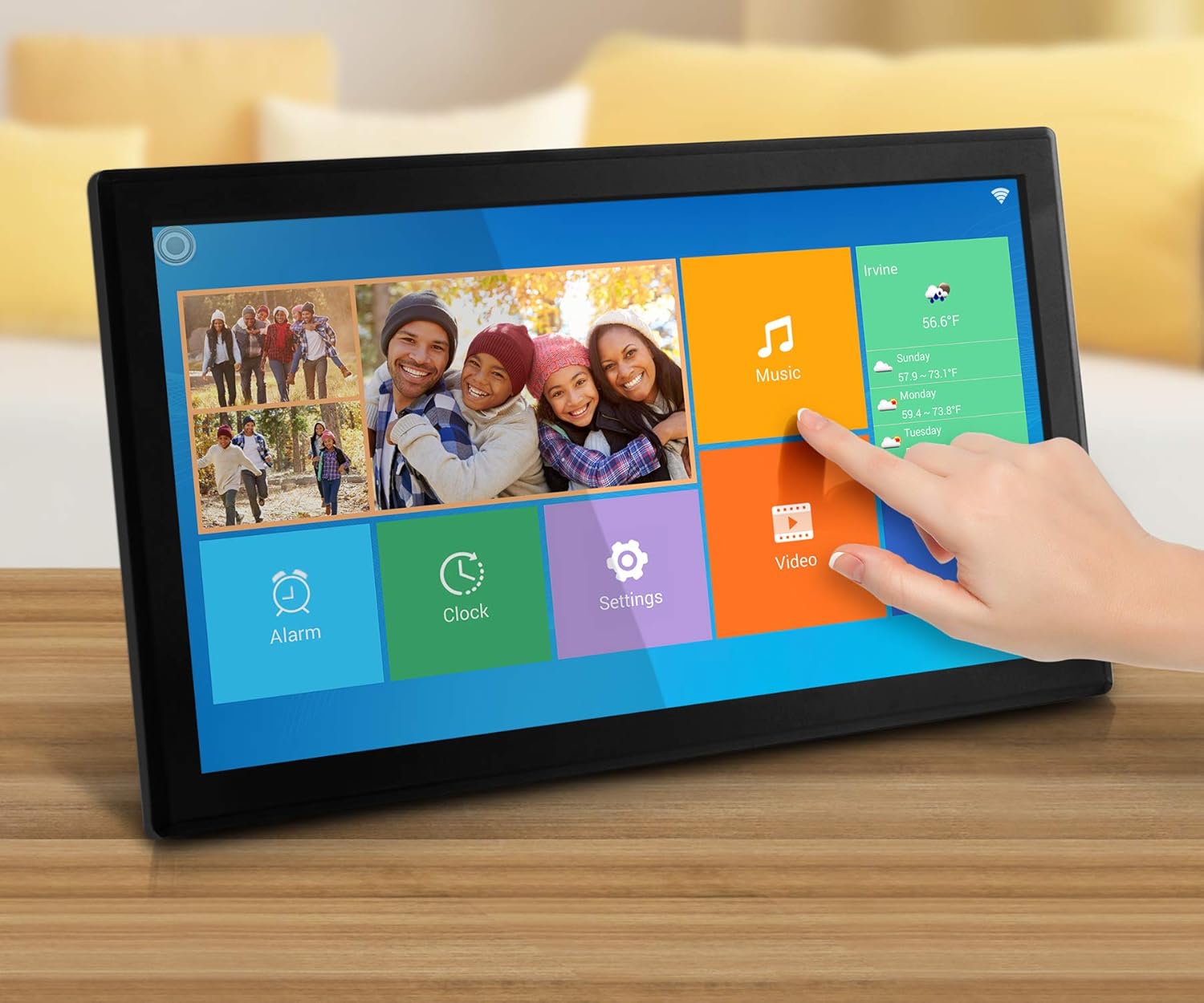
The digital photo frame showcasing a collage of family pictures on its vibrant display.

பின்புறம் view of the frame, highlighting the power input, USB port, SD card slot, and the integrated stand.

பக்க சார்புfile of the digital photo frame, illustrating its slim design and extended stand for tabletop use.
அமைவு
- பவர் ஆன்: Connect the provided power adapter to the frame and plug it into an electrical outlet. The frame will automatically power on.
- ஆரம்ப அமைப்பு: Follow the on-screen prompts to select your language, time zone, and other basic settings.
- Wi-Fi உடன் இணைக்கவும்:
- Navigate to the "Settings" menu on the touchscreen.
- Select "Wi-Fi" and choose your home network from the list.
- திரையில் உள்ள விசைப்பலகையைப் பயன்படுத்தி உங்கள் வைஃபை கடவுச்சொல்லை உள்ளிடவும்.
- இணைப்பை உறுதிப்படுத்தவும்.
- Install the Aluratek Smart Frame App:
- Download the "Aluratek Smart Frame" app from the Apple App Store (for iOS devices) or Google Play Store (for Android devices).
- பயன்பாட்டைத் திறந்து கணக்கை உருவாக்கவும்.
- Pair your frame with the app by following the in-app instructions. This typically involves entering a unique Frame ID displayed on your digital photo frame.
- Email Setup for Photo Sharing:
- The frame will have a unique email address (e.g., yourframeID@wififrame.com).
- You can send photos directly to this email address from any device.
- For Facebook sharing, send a message to "Aluratek WiFi Frame" on Facebook Messenger with the subject line 'bd+frame ID' (e.g., bd123456) to bind your Facebook account.
வீடியோ: ஒரு ஓவர்view of the Aluratek Digital Photo Frame, demonstrating initial setup and app connectivity for photo sharing. This video shows how to connect the frame to Wi-Fi and send photos using the companion app.
இயக்க வழிமுறைகள்
- தொடுதிரை வழிசெலுத்தல்:
- Tap icons to open applications (e.g., Photos, Music, Video, Settings).
- Swipe left or right to navigate through photos in a slideshow.
- Pinch to zoom in or out on images.
- Viewபுகைப்படங்கள் மற்றும் வீடியோக்கள்:
- From the home screen, tap the "Photos" or "Video" icon to access your media.
- Media can be stored on internal memory, an SD card, or a USB drive.
- The frame supports various image and video formats.
- Slideshow Settings:
- Within the photo viewer, tap the "Settings" icon (often a gear symbol).
- சரிசெய்யவும் ஸ்லைடுஷோ இடைவெளி to control how long each photo is displayed (e.g., 5, 10, 15 seconds, 1 minute, 5 minutes).
- ஒரு தேர்ந்தெடுக்கவும் ஸ்லைடுஷோ மாற்றம் விளைவு (e.g., random, fade, wipe).
- இயக்கு அல்லது முடக்கு பின்னணி இசை during slideshows.
- Multi-Photo Display:
- Some display modes allow showing multiple photos on one screen simultaneously. Check the display settings within the photo application for available layouts.
வீடியோ: This video demonstrates the touchscreen functionality and various display options of the Aluratek Digital Photo Frame, including swiping through images and accessing settings.
Media Management
- Sending Photos via App: Use the Aluratek Smart Frame app to select and send photos directly from your smartphone to the frame. Photos will appear in the frame's internal storage or designated album.
- Sending Photos via Email: Email photos to the frame's unique email address. The frame will automatically download and display them.
- Using SD Card/USB Drive: Insert an SD/SDHC card (up to 32GB) or a USB flash drive into the designated slot on the frame. The frame will detect the storage device, allowing you to browse and play media directly or transfer it to internal memory.
- உள் சேமிப்பு: The 16GB internal memory can store a large number of photos and short videos. Manage files through the frame's interface or by connecting it to a computer (if supported).
மேம்பட்ட அம்சங்கள்
- Clock, Calendar, Weather: Access these features from the main menu. Configure your location in settings for accurate weather updates.
- அலாரம்: Set alarms through the "Alarm" icon on the home screen.
- டிஜிட்டல் சிக்னேஜ்: The frame can be used to display advertisements, announcements, or other informational content in a business setting. Configure specific media playlists and display schedules through the settings.
பராமரிப்பு
- சுத்தம்: Use a soft, dry cloth to clean the screen and frame. Avoid abrasive cleaners or solvents.
- இடம்: Place the frame on a stable, flat surface or mount it securely on a wall. Ensure adequate ventilation.
- சக்தி மேலாண்மை: Always use the provided power adapter. Unplug the device during electrical storms or when not in use for extended periods.
சரிசெய்தல்
| பிரச்சனை | சாத்தியமான தீர்வு |
|---|---|
| சட்டகம் இயக்கப்படவில்லை. | பவர் அடாப்டர் பிரேம் மற்றும் வேலை செய்யும் மின் அவுட்லெட் இரண்டுடனும் பாதுகாப்பாக இணைக்கப்பட்டுள்ளதா என்பதை உறுதிப்படுத்திக் கொள்ளுங்கள். வேறு அவுட்லெட்டை முயற்சிக்கவும். |
| Wi-Fi உடன் இணைக்க முடியவில்லை. | Verify your Wi-Fi password. Ensure the frame is within range of your router. Restart both the frame and your router. |
| Photos sent via app/email do not appear. | Check your internet connection. Ensure the frame is properly paired with the app/email account. Verify the frame's unique email address is correct. Some apps may have limits on the number of photos sent at once; try sending fewer. |
| Frame loses settings after power outage. | This may indicate a software or internal battery issue. Ensure the frame is connected to a stable power source. Contact Aluratek support if the issue persists. |
| Touchscreen is unresponsive or slow. | Restart the frame. Ensure the screen is clean and free of debris. If the issue continues, a factory reset might be necessary (refer to System Settings). |
| Images appear pixelated or unclear. | அசல் படத்தை உறுதி செய்யவும். files are of high resolution. The frame's display resolution is 1920 x 1080. Lower resolution images will appear less sharp. |
விவரக்குறிப்புகள்
- பிராண்ட்: அலுராடெக்
- மாதிரி எண்: AWS17F
- திரை அளவு: 17.3 அங்குலம்
- காட்சி வகை: Touchscreen IPS LCD
- தீர்மானம்: 1920 x 1080 (1080p)
- தோற்ற விகிதம்: 16:9
- உள் நினைவகம்: 16 ஜிபி
- இணைப்பு: Wi-Fi (802.11 b/g/n)
- கட்டுப்பாட்டு முறை: Touchscreen, Mobile App
- இணக்கமான சாதனங்கள்: Personal Computer, Smartphones
- சக்தி ஆதாரம்: கம்பியூட்டப்பட்ட மின்சாரம்
- பிரேம் மெட்டீரியல்: பிளாஸ்டிக்
- பொருளின் பரிமாணங்கள் (L x W): 18.1"L x 3"W (Note: L typically refers to width and W to depth for frames.)
- பொருளின் எடை: 4.2 பவுண்டுகள்
உத்தரவாதம் மற்றும் ஆதரவு
The Aluratek 17-inch WiFi Digital Photo Frame (AWS17F) comes with a 1 வருட வரையறுக்கப்பட்ட உத்தரவாதம். For technical support, troubleshooting assistance, or warranty claims, please refer to the contact information provided on your registration card or visit the official Aluratek webதளம்.