
1. அறிமுகம்
The CEM iLDM-150 is a professional-grade laser distance meter designed for fast, accurate, and easy distance measurement. This device utilizes a precision narrow laser beam to ensure accuracy, avoiding common errors associated with extraneous objects. Beyond basic measurements, it offers advanced functionalities such as capturing images of measured distances, marking lengths, areas, or volumes, and storing data on a cloud service for convenient access and sharing.
This manual provides detailed instructions for the safe and effective use of your iLDM-150 Laser Distance Meter. Please read it thoroughly before operating the device.
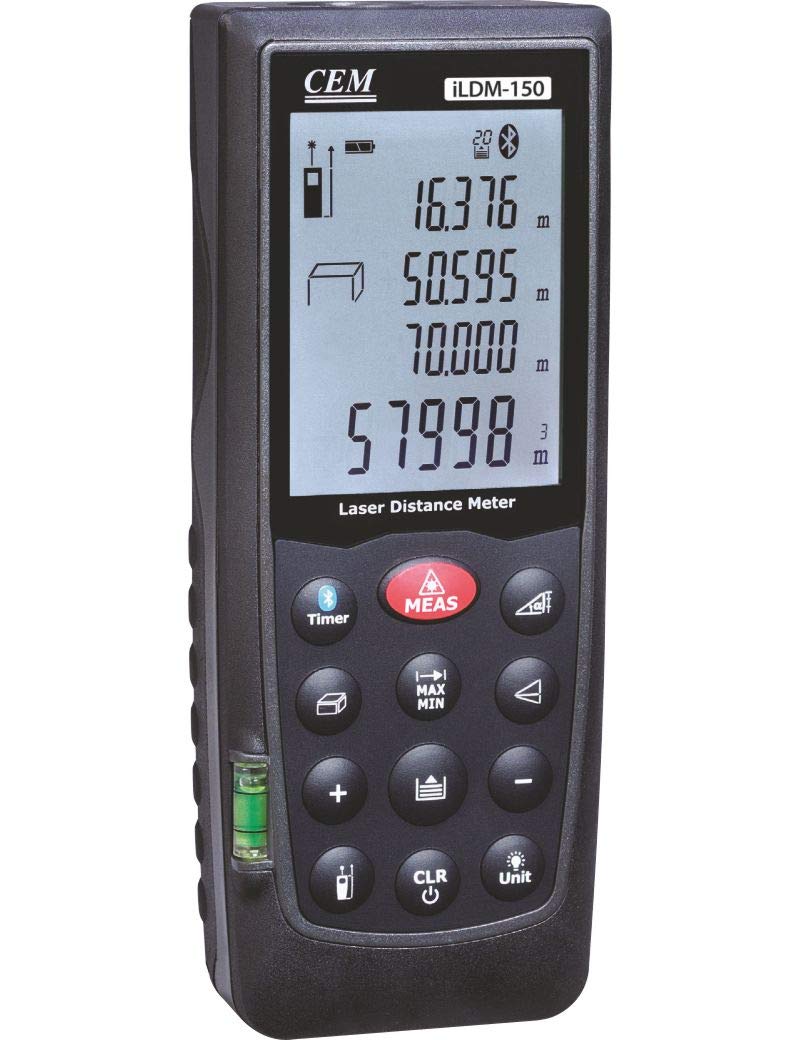
Figure 1: The CEM iLDM-150 Laser Distance Meter, displaying its compact design, digital interface, and control buttons for precise measurements.
2 முக்கிய அம்சங்கள்
The CEM iLDM-150 Laser Distance Meter includes the following key features:
- பகுதி மற்றும் தொகுதி கணக்கீடுகள்: Quickly determine areas and volumes from measured lengths.
- Indirect Measuring (Pythagoras): Calculate distances indirectly using the Pythagorean theorem.
- கோண அளவீடு: Integrated tilt sensor allows for angle measurements.
- தொடர்ச்சியான அளவீடு: Track real-time distance changes.
- பட பிடிப்பு: Take pictures of measured distances.
- கிளவுட் சேவை ஒருங்கிணைப்பு: Store and manage measurement data via the Meterbox iLDM software and cloud server.
- Measurement History: Stores the last 20 measurements for review.
3 அமைவு
3.1 பேட்டரி நிறுவல்
The iLDM-150 requires batteries for operation. Batteries are not included with the device.
- Locate the battery compartment cover on the back or side of the device.
- பேட்டரி பெட்டியின் அட்டையைத் திறக்கவும்.
- Insert the required batteries (typically AAA or AA, refer to the compartment label for exact type and polarity) ensuring correct polarity (+/-).
- பேட்டரி பெட்டியின் அட்டையை பாதுகாப்பாக மூடு.
3.2 பவர் ஆன்/ஆஃப்
- சாதனத்தை இயக்க, அழுத்தவும் [ON/MEAS] பொத்தான்.
- சாதனத்தை அணைக்க, அழுத்திப் பிடிக்கவும் [முடக்கு] button for a few seconds, or the device will automatically power off after a period of inactivity to conserve battery life.
4. இயக்க வழிமுறைகள்
4.1 அடிப்படை தூர அளவீடு
- சாதனத்தை இயக்கவும்.
- இலக்கு மேற்பரப்பில் லேசர் கற்றையை சுட்டிக்காட்டுங்கள்.
- அழுத்தவும் [ON/MEAS] பொத்தானை ஒரு முறை அழுத்தவும். அளவிடப்பட்ட தூரம் திரையில் காட்டப்படும்.
4.2 தொடர்ச்சியான அளவீடு
This mode allows you to track real-time distance changes as you move the device.
- அழுத்தவும் [ON/MEAS] button and hold it for a few seconds until 'Continuous' or a similar indicator appears on the display.
- Move the device; the distance displayed will update continuously.
- அழுத்தவும் [ON/MEAS] தொடர்ச்சியான அளவீட்டை நிறுத்த மீண்டும்.
4.3 Area and Volume Calculations
Use the dedicated shortcut keys for these functions.
- பகுதி: அழுத்தவும் [பகுதி] button. Measure the length and width as prompted by the device. The area will be calculated and displayed.
- தொகுதி: அழுத்தவும் [தொகுதி] button. Measure the length, width, and height as prompted. The volume will be calculated and displayed.
4.4 Indirect Measurement (Pythagoras)
This function is useful for measuring distances that cannot be directly accessed.
- அழுத்தவும் [PYTHAGORAS] பொத்தான்.
- Follow the on-screen instructions to take the required measurements (e.g., hypotenuse and one leg for a right triangle).
- சாதனம் தெரியாத தூரத்தைக் கணக்கிட்டு காண்பிக்கும்.
4.5 கோண அளவீடு
The integrated tilt sensor allows for angle measurements.
- அழுத்தவும் [கோணம்] button (if available) or cycle through modes until the angle measurement mode is active.
- Position the device to measure the desired angle. The angle will be displayed on the screen.
4.6 Image Capture and Cloud Service
The iLDM-150 allows you to capture images with measurements and store them.
- After taking a measurement, use the designated button (refer to device interface) to capture an image.
- Install the Meterbox iLDM software on your smartphone.
- Connect your iLDM-150 to your smartphone via Bluetooth (if supported) or transfer data as per software instructions.
- Utilize the Meterbox iLDM software and cloud server to edit, store, and share your measurement data and images.
5. பராமரிப்பு
5.1 சுத்தம் செய்தல்
- மென்மையான, டி-துணியால் சாதனத்தை தொடர்ந்து சுத்தம் செய்யவும்.amp துணி. சிராய்ப்பு கிளீனர்கள் அல்லது கரைப்பான்களைப் பயன்படுத்த வேண்டாம்.
- Ensure the laser lens and display are free from dust and debris for optimal performance. Use a lens cleaning cloth if necessary.
5.2 சேமிப்பு
- Store the iLDM-150 in a dry, dust-free environment, away from direct sunlight and extreme temperatures.
- If storing for an extended period, remove the batteries to prevent leakage and damage to the device.
6. சரிசெய்தல்
| பிரச்சனை | சாத்தியமான காரணம் | தீர்வு |
|---|---|---|
| சாதனம் இயங்கவில்லை. | குறைந்த அல்லது தீர்ந்துபோன பேட்டரிகள்; தவறான பேட்டரி நிறுவல். | பேட்டரிகளை புதியவற்றால் மாற்றவும்; சரியான துருவமுனைப்பை உறுதி செய்யவும். |
| தவறான அளவீடுகள். | Obstructed laser path; unstable measuring surface; dirty lens. | Ensure clear line of sight to target; measure on a stable surface; clean the laser lens. |
| காட்சி பிழை செய்தியைக் காட்டுகிறது. | அளவீடு வரம்பிற்கு வெளியே உள்ளது; உள் பிழை. | Ensure target is within specified range; power off and restart the device. If error persists, contact support. |
| Cannot connect to Meterbox iLDM app. | Bluetooth not enabled; app not installed or updated; device not in pairing mode. | Ensure Bluetooth is on for both devices; install/update Meterbox iLDM app; refer to app instructions for pairing. |
7. விவரக்குறிப்புகள்
| விவரக்குறிப்பு | விவரம் |
|---|---|
| பிராண்ட் | CEM |
| மாதிரி எண் | iLDM-150 |
| உற்பத்தியாளர் | CEM Instruments India Pvt Ltd |
| ASIN | B07SPL1NW2 |
| பேட்டரிகள் சேர்க்கப்பட்டுள்ளது | இல்லை |
| நிறம் | பல வண்ணம் |
| நீர் எதிர்ப்பு நிலை | நீர்ப்புகா |
8. உத்தரவாதம் மற்றும் ஆதரவு
Please note the following regarding warranty and support for your CEM iLDM-150 Laser Distance Meter:
- All sales are final. No returns are accepted.
- Replacements will be provided only in cases of a wrong item being shipped or a manufacturing defect reported.
- Any reported manufacturing defect must be replicable by the manufacturer upon receiving the product back for assessment.
For technical assistance or to report a manufacturing defect, please contact CEM Instruments India Pvt Ltd directly through their official support channels.