
Skandika Veien
Skandika Veien Recumbent Bike User Manual
Model: Veien
அறிமுகம்
Welcome to your new Skandika Veien Recumbent Bike. This manual provides essential information for the safe assembly, operation, maintenance, and troubleshooting of your fitness equipment. Please read this manual thoroughly before using the bike to ensure proper function and safety.
The Skandika Veien Recumbent Bike is designed to offer a comfortable and effective cardiovascular workout. Key features include 32 computer-controlled resistance levels, an 11 kg flywheel, integrated pulse sensors, and compatibility with iConsole and Kinomap apps for enhanced training tracking.
பாதுகாப்பு தகவல்
Before starting any exercise program, consult your physician. It is crucial to follow these safety guidelines to prevent injury and ensure the longevity of your equipment:
- Always place the recumbent bike on a stable, level surface.
- Ensure adequate space around the bike for safe operation.
- பயன்படுத்தும் போது குழந்தைகள் மற்றும் செல்லப்பிராணிகளை உபகரணங்களிலிருந்து விலக்கி வைக்கவும்.
- Regularly inspect the bike for any loose parts, wear, or damage before each use. Do not use if damaged.
- The maximum user weight for this bike is 150 கிலோ.
- The maximum user height is 200 செ.மீ.
- உடற்பயிற்சியின் போது பொருத்தமான தடகள காலணிகள் மற்றும் ஆடைகளை அணியுங்கள்.
- உங்களுக்கு மயக்கம், தலைச்சுற்றல் அல்லது வலி ஏற்பட்டால் உடனடியாக உடற்பயிற்சி செய்வதை நிறுத்துங்கள்.
அமைப்பு மற்றும் சட்டசபை
The Skandika Veien Recumbent Bike is designed for straightforward assembly. Follow these general steps:
- கூறுகளைத் திறக்கவும்: Carefully remove all parts from the packaging and verify against the parts list (not provided in this manual, refer to included documentation).
- அடிப்படை சட்டசபை: முன் மற்றும் பின்புற நிலைப்படுத்திகளை பிரதான சட்டகத்துடன் இணைக்கவும்.
- இருக்கை நிறுவல்: Mount the seat and backrest onto the seat rail. The ergonomic padded seat and backrest provide comfort during workouts.
- Console and Handlebars: Attach the console post and handlebars. Connect any necessary cables for the computer display and pulse sensors.
- பெடல்கள்: Securely attach the pedals. Ensure they are tightened correctly. The bike features anti-slip pedals for safety.
- மின் இணைப்பு: Connect the power adapter to the bike and a suitable electrical outlet.
- இருக்கை சரிசெய்தல்: Adjust the seat position for optimal comfort and proper leg extension. The bike features easy ground-level access for easier mounting and dismounting.

Image: The adjustable seat and ground-level access design of the Skandika Veien Recumbent Bike, facilitating easy mounting and dismounting.
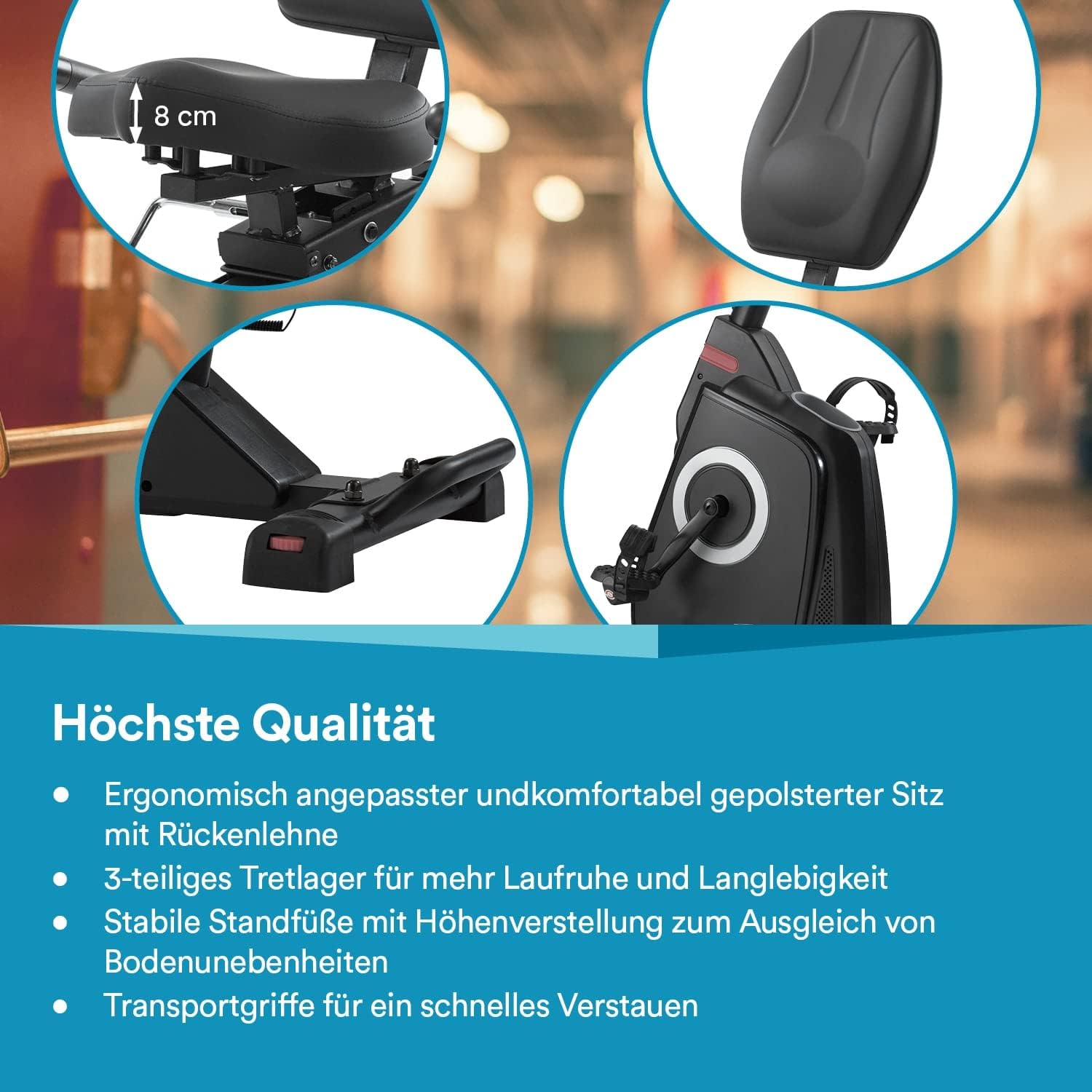
படம்: விரிவானது view of the ergonomically padded seat with backrest, 3-piece bottom bracket, and stable feet with height adjustment for uneven floors.
இயக்க வழிமுறைகள்
கன்சோல் ஓவர்view
The LCD console provides real-time feedback on your workout. It displays various metrics to help you track your progress.

Image: The central console of the Skandika Veien Recumbent Bike, displaying metrics such as pulse, RPM, watts, calories, speed, distance, and time. It also highlights the hand pulse sensors and tablet holder.
- காட்சி அளவீடுகள்: Distance, Heart Rate (Pulse), Time, Watts, RPM, Calories, Speed, Body Fat.
- நிகழ்ச்சிகள்: Choose from 14 pre-set training programs or select the 1 manual mode for a customized workout.
- எதிர்ப்பு சரிசெய்தல்: Use the console controls to adjust between 32 computer-controlled resistance levels.
- கை துடிப்பு உணரிகள்: Grip the integrated hand pulse sensors on the handlebars to monitor your heart rate during your workout.
App Connectivity (Bluetooth 4.0)
Enhance your training experience by connecting your Skandika Veien bike to compatible fitness apps via Bluetooth 4.0.

Image: The Skandika Veien Recumbent Bike console with a tablet displaying the Kinomap app, illustrating the streaming function and Bluetooth connectivity for interactive training.
- இணக்கமான பயன்பாடுகள்: The bike supports iConsole and Kinomap applications.
- தரவு கண்காணிப்பு: Use these apps to store training data, track your progress, and follow various training profiles.
- டேப்லெட் வைத்திருப்பவர்: Place your tablet or smartphone securely in the integrated holder for easy viewஉங்கள் உடற்பயிற்சியின் போது.
பராமரிப்பு
Regular maintenance ensures the longevity and safe operation of your Skandika Veien Recumbent Bike.
- சுத்தம்: விளம்பரத்துடன் பைக்கை துடைக்கவும்amp ஒவ்வொரு பயன்பாட்டிற்கும் பிறகு வியர்வை மற்றும் தூசியை அகற்ற துணியை அணியுங்கள். சிராய்ப்பு கிளீனர்களைத் தவிர்க்கவும்.
- ஆய்வு: அவ்வப்போது அனைத்து போல்ட்கள், நட்டுகள் மற்றும் நகரும் பாகங்களின் இறுக்கத்தைச் சரிபார்க்கவும். தளர்வான ஃபாஸ்டென்சர்களை இறுக்கவும்.
- பிரேக் சிஸ்டம்: The magnetic brake system is low-maintenance and generally does not require adjustment.
- பெல்ட் டிரைவ்: The belt drive system is designed to be silent and durable, requiring minimal maintenance.
- சேமிப்பு: Use the integrated transport wheels and handles to move and store the bike easily when not in use.
சரிசெய்தல்
If you encounter issues with your Skandika Veien Recumbent Bike, refer to the following common troubleshooting tips:
- கன்சோலுக்கு மின்சாரம் இல்லை:
- Ensure the power adapter is securely plugged into both the bike and a working electrical outlet.
- மற்றொரு சாதனத்தை செருகுவதன் மூலம் கடையின் செயல்பாடு உள்ளதா என சரிபார்க்கவும்.
- துல்லியமற்ற இதய துடிப்பு அளவீடு:
- Ensure your hands are firmly and completely gripping the hand pulse sensors.
- Moisture or dry skin can affect readings; ensure hands are slightly moist.
- எதிர்ப்பு மாறாது:
- Verify that the console is powered on and functioning correctly.
- சிக்கல் தொடர்ந்தால், வாடிக்கையாளர் ஆதரவைத் தொடர்பு கொள்ளவும்.
- அசாதாரண சத்தங்கள்:
- ஏதேனும் தளர்வான போல்ட்கள் அல்லது இணைப்புகள் உள்ளதா எனச் சரிபார்த்து அவற்றை இறுக்கவும்.
- பைக் ஒரு சமதளப் பரப்பில் இருப்பதை உறுதி செய்யவும்.
For issues not covered here, please contact Skandika customer support.
விவரக்குறிப்புகள்

படம்: முடிந்ததுview of the Skandika Veien Recumbent Bike's dimensions (140 x 63 x 123 cm) and maximum user weight capacity (150 kg). It also highlights transport wheels and anti-slip pedals.
| அம்சம் | விவரம் |
|---|---|
| பிரேக்கிங் சிஸ்டம் | Low-maintenance magnetic brake |
| எதிர்ப்பு நிலைகள் | 32 கணினி கட்டுப்பாட்டு நிலைகள் |
| Flywheel Mass | 11 கிலோ |
| இயக்கி அமைப்பு | Silent and durable belt drive |
| கன்சோல் காட்சி | எல்சிடி |
| Displayed Metrics | Distance, Heart Rate, Time, Watts, RPM, Calories, Speed, Body Fat |
| பயிற்சி திட்டங்கள் | 14 pre-set programs + 1 manual mode |
| பயன்பாட்டு இணக்கத்தன்மை | Bluetooth 4.0 (iConsole, Kinomap) |
| பல்ஸ் சென்சார்கள் | ஒருங்கிணைந்த கை துடிப்பு உணரிகள் |
| டேப்லெட் ஹோல்டர் | ஆம் |
| அதிகபட்சம். பயனர் எடை | 150 கிலோ |
| அதிகபட்சம். பயனர் உயரம் | 200 செ.மீ |
| பரிமாணங்கள் (L x W x H) | 140 x 63 x 123 செ.மீ |
| தயாரிப்பு எடை | 39 கிலோ |
| Transport Features | Transport wheels and handles |
| சக்தி ஆதாரம் | கம்பி மின்சாரம் |
உத்தரவாதம் மற்றும் ஆதரவு
For detailed warranty information, please refer to the documentation included with your purchase or visit the official Skandika website. Skandika is committed to providing excellent customer service.
- வாடிக்கையாளர் சேவை: Skandika offers customer service in 5 languages (German, French, English, Spanish, Italian).
- உதிரி பாகங்கள்: A dedicated spare parts service is available to ensure the continued functionality of your product.
- தொடர்பு: For support, spare parts, or warranty claims, please visit the official Skandika webதளத்தில் அல்லது அவர்களின் வாடிக்கையாளர் சேவைத் துறையை நேரடியாகத் தொடர்பு கொள்ளவும்.
Ask a question about this manual
Ask about setup, troubleshooting, compatibility, parts, safety, or missing instructions. Manuals+ will review the question and use this page’s manual context to help answer it.