
அறிமுகம்
This manual provides essential instructions for the safe and efficient use of your Redmi 10000mAh Power Bank (Model PB100LZm). Please read this manual thoroughly before using the product and retain it for future reference.
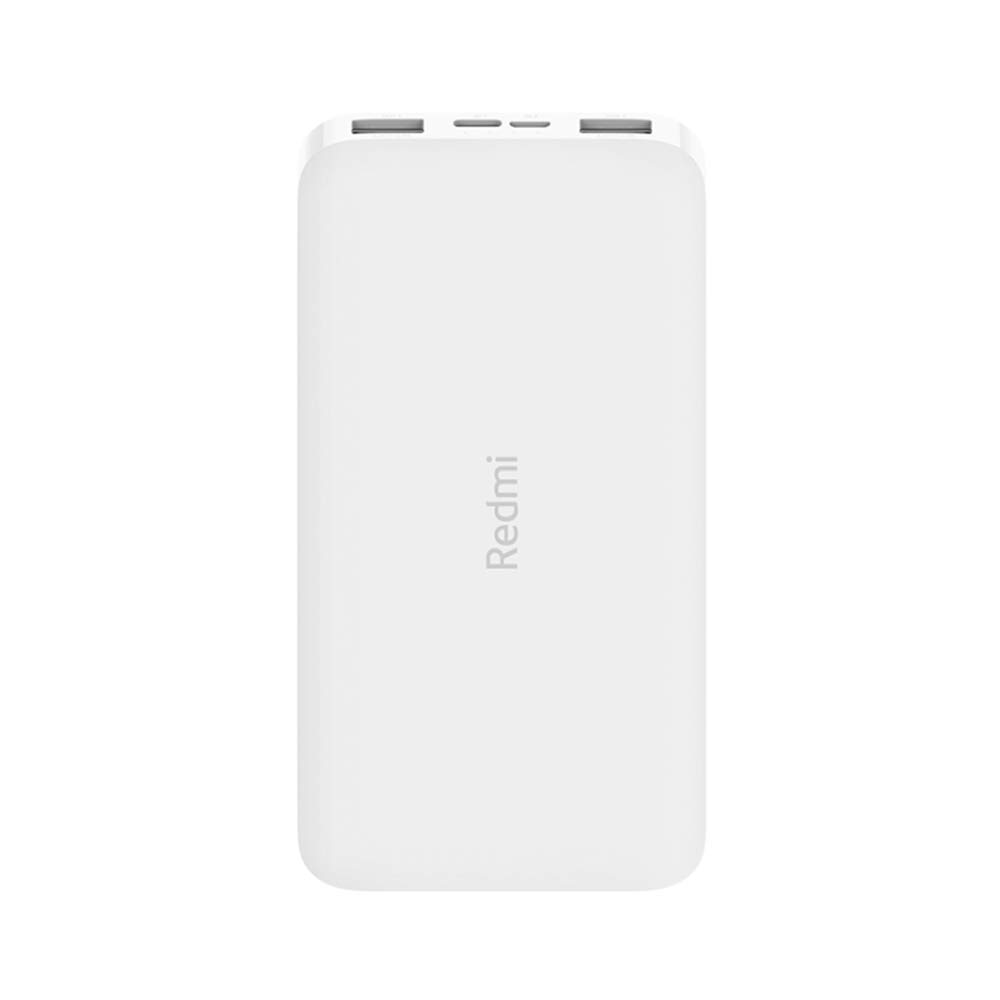
படம்: கோணல் view of the white Redmi 10000mAh Power Bank.
பாதுகாப்பு தகவல்
To prevent injury, damage to the product, or damage to property, observe the following safety precautions:
- Do not disassemble, repair, or modify the power bank.
- Do not expose the power bank to fire, high temperatures, or direct sunlight.
- நீர் அல்லது பிற திரவங்களுடன் தொடர்பு கொள்வதைத் தவிர்க்கவும்.
- பவர் பேங்கை கீழே போடவோ, மோதவோ அல்லது வலுவான அதிர்வுகளுக்கு உட்படுத்தவோ வேண்டாம்.
- குழந்தைகளுக்கு எட்டாத இடத்தில் வைக்கவும்.
- இணக்கமான சார்ஜிங் கேபிள்கள் மற்றும் அடாப்டர்களை மட்டும் பயன்படுத்தவும்.
- உள்ளூர் விதிமுறைகளின்படி பவர் பேங்கை அப்புறப்படுத்துங்கள்.
தயாரிப்பு முடிந்துவிட்டதுview
Familiarize yourself with the components of your Redmi 10000mAh Power Bank.

Image: Close-up of the power bank's top edge showing two USB-A output ports (OUT1, OUT2), one Micro-USB input port (IN1), one USB-C input port (IN2), and four LED battery level indicators.
- USB-A Output Ports (OUT1, OUT2): Used to charge external devices.
- Micro-USB Input Port (IN1): Used to charge the power bank.
- USB-C Input Port (IN2): Used to charge the power bank.
- LED குறிகாட்டிகள்: Four small lights indicating the remaining battery level.
- பவர் பட்டன்: Located on the side, used to check battery level or activate charging.

படம்: பக்கம் view of the power bank highlighting the power button.
அமைவு
பவர் பேங்கின் ஆரம்ப சார்ஜிங்
Before first use, fully charge your Redmi 10000mAh Power Bank.
- Connect a compatible USB cable to either the Micro-USB (IN1) or USB-C (IN2) input port on the power bank.
- கேபிளின் மறுமுனையை USB பவர் அடாப்டருடன் (சேர்க்கப்படவில்லை) அல்லது கணினியின் USB போர்ட்டுடன் இணைக்கவும்.
- The LED indicators will light up, showing the charging progress. All four LEDs will be solid when fully charged.
இணைக்கும் சாதனங்கள்
The power bank is compatible with mobile phones and other USB-powered devices.
- Use the appropriate charging cable for your device.
- Connect one end of the cable to one of the USB-A output ports (OUT1 or OUT2) on the power bank.
- கேபிளின் மறுமுனையை உங்கள் சாதனத்தின் சார்ஜிங் போர்ட்டுடன் இணைக்கவும்.
இயக்க வழிமுறைகள்
வெளிப்புற சாதனங்களை சார்ஜ் செய்கிறது
Once a device is connected, the power bank should automatically begin charging. If not, press the power button once to initiate charging.

Image: The power bank connected via a USB cable to charge a mobile phone, resting on a wooden table.
- The LED indicators will show the power bank's remaining battery level during charging.
- இரண்டு USB-A வெளியீட்டு போர்ட்களையும் பயன்படுத்தி ஒரே நேரத்தில் இரண்டு சாதனங்களை சார்ஜ் செய்யலாம்.
பேட்டரி அளவை சரிபார்க்கிறது
Press the power button once to check the remaining battery level. The LED indicators will light up for a few seconds:
- 1 LED: 0-25% மீதமுள்ள பேட்டரி
- 2 LEDகள்: 25-50% மீதமுள்ள பேட்டரி
- 3 LEDகள்: 50-75% மீதமுள்ள பேட்டரி
- 4 LEDகள்: 75-100% மீதமுள்ள பேட்டரி
பராமரிப்பு
- சுத்தம்: மென்மையான, உலர்ந்த துணியால் பவர் பேங்கைத் துடைக்கவும். கடுமையான இரசாயனங்கள் அல்லது சிராய்ப்புப் பொருட்களைப் பயன்படுத்த வேண்டாம்.
- சேமிப்பு: நேரடி சூரிய ஒளி மற்றும் அதிக வெப்பநிலையிலிருந்து விலகி, குளிர்ந்த, உலர்ந்த இடத்தில் பவர் பேங்கை சேமிக்கவும்.
- பேட்டரி பராமரிப்பு: For optimal battery life, avoid fully discharging the power bank frequently. Recharge it when the battery level is low. If not used for extended periods, charge it to about 50% every three months.
சரிசெய்தல்
| பிரச்சனை | சாத்தியமான தீர்வு |
|---|---|
| பவர் பேங்க் சார்ஜ் ஆகவில்லை. |
|
| பவர் பேங்கிலிருந்து சாதனம் சார்ஜ் ஆகவில்லை. |
|
| மெதுவாக சார்ஜிங். |
|
விவரக்குறிப்புகள்
| பிராண்ட் | Xiaomi |
| மாதிரி எண் | PB100LZm |
| திறன் | 10000 mAh |
| நிறம் | வெள்ளை |
| பேட்டரி வகை | லித்தியம் பாலிமர் |
| உள்ளீட்டு துறைமுகங்கள் | 1x Micro-USB, 1x USB-C |
| வெளியீடு துறைமுகங்கள் | 2x USB-A (5.1V=2.4A each) |
| இணக்கமான சாதனங்கள் | Mobile Phones and other USB-powered devices |
| பரிமாணங்கள் | 15.8 x 8 x 2 செ.மீ |
| எடை | 276 கிராம் |
உத்தரவாதம் மற்றும் ஆதரவு
Based on the provided product information, this product is indicated as having உத்தரவாதமில்லை. For any product-related inquiries or technical support, please refer to the official Xiaomi support channels or your point of purchase.