
TWS i17
i17 Dual Earbuds User Manual
Model: i17 | Brand: TWS
1. அறிமுகம்
நன்றி, நன்றி.asing the TWS i17 Dual Earbuds. This manual provides essential information for setting up, operating, and maintaining your new wireless earbuds. Please read this manual thoroughly before use to ensure optimal performance and longevity of your device.
2. பாதுகாப்பு தகவல்
To prevent damage to your earbuds or injury to yourself or others, please observe the following precautions:
- இயர்பட்கள் அல்லது சார்ஜிங் கேஸை அதிக வெப்பநிலை, ஈரப்பதம் அல்லது திரவங்களுக்கு வெளிப்படுத்த வேண்டாம்.
- சாதனத்தை கீழே போடுதல், தாக்குதல் அல்லது பிரித்தல் ஆகியவற்றைத் தவிர்க்கவும்.
- Do not use abrasive cleaners or solvents. Clean with a soft, dry cloth.
- கேட்கும் திறனைப் பாதிக்காமல் இருக்க மிதமான ஒலி அளவில் கேளுங்கள்.
- குழந்தைகளுக்கு எட்டாத இடத்தில் வைக்கவும்.
- This product is not water resistant. Avoid exposure to water or excessive moisture.
3. தொகுப்பு உள்ளடக்கங்கள்
உங்கள் தொகுப்பில் அனைத்து பொருட்களும் உள்ளதா என சரிபார்க்கவும்:
- TWS i17 Dual Earbuds (Left and Right)
- சார்ஜிங் கேஸ்
- USB சார்ஜிங் கேபிள்
- பயனர் கையேடு

Image: The TWS i17 Dual Earbuds, with one earbud partially removed from its charging case, showcasing நேர்த்தியான கருப்பு வடிவமைப்பு.
4 அமைவு
4.1 இயர்பட்ஸ் மற்றும் கேஸை சார்ஜ் செய்தல்
முதல் பயன்பாட்டிற்கு முன், இயர்பட்கள் மற்றும் சார்ஜிங் கேஸை முழுமையாக சார்ஜ் செய்யவும்.
- இரண்டு இயர்பட்களையும் சார்ஜிங் கேஸில் வைக்கவும். அவை சரியாகப் பொருத்தப்பட்டுள்ளதா என்பதை உறுதிப்படுத்திக் கொள்ளுங்கள்.
- Connect the USB charging cable to the charging port on the bottom of the case and the other end to a USB power source (e.g., computer, wall adapter).
- The indicator light on the case will show charging status. It will turn off or change color when fully charged.
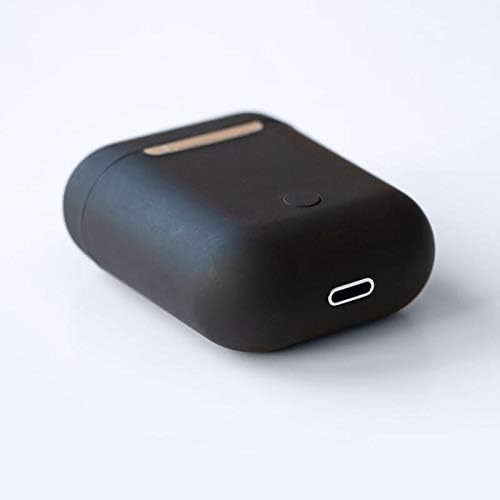
படம்: ஒரு நெருக்கமான படம் view of the bottom of the TWS i17 charging case, highlighting the USB charging port and a small button.
4.2 உங்கள் சாதனத்துடன் இணைத்தல்
The i17 earbuds use Bluetooth for wireless connection.
- இயர்பட்கள் சார்ஜ் செய்யப்படுவதை உறுதிசெய்யவும்.
- சார்ஜிங் கேஸைத் திறக்கவும். இயர்பட்கள் தானாகவே இணைத்தல் பயன்முறையில் நுழையும் (காட்டி விளக்குகள் ஒளிரும்).
- On your mobile phone or Bluetooth-enabled device, go to Bluetooth settings and turn Bluetooth on.
- தேடுங்கள் available devices. Select "i17" from the list.
- Once connected, the indicator lights on the earbuds will stop flashing. You are now ready to use your earbuds.

Image: The TWS i17 Dual Earbuds resting inside their open charging case, ready for pairing or use.
5. இயக்க வழிமுறைகள்
5.1 பவர் ஆன்/ஆஃப்
- பவர் ஆன்: Take the earbuds out of the charging case. They will automatically power on and connect to the last paired device.
- பவர் ஆஃப்: இயர்பட்களை மீண்டும் சார்ஜிங் கேஸில் வைக்கவும். அவை தானாகவே அணைந்து சார்ஜ் ஆகத் தொடங்கும்.
5.2 இசை பின்னணி
- விளையாடு/இடைநிறுத்தம்: இயர்பட்டை ஒரு முறை தட்டவும்.
- அடுத்த ட்ராக்: வலதுபுற இயர்பட்டை இருமுறை தட்டவும்.
- முந்தைய ட்ராக்: இடதுபுற இயர்பட்டை இருமுறை தட்டவும்.
5.3 அழைப்பு மேலாண்மை
- பதில்/முடிவு அழைப்பு: இயர்பட்டை ஒரு முறை தட்டவும்.
- அழைப்பை நிராகரி: இயர்பட்டை 2 வினாடிகள் அழுத்திப் பிடிக்கவும்.
5.4 குரல் உதவியாளர்
- குரல் உதவியாளரை (சிரி/கூகிள் உதவியாளர்) செயல்படுத்தவும்: இயர்பட்டை மூன்று முறை தட்டவும்.
6. பராமரிப்பு
Proper maintenance ensures the longevity of your earbuds:
- சுத்தம்: Use a soft, dry, lint-free cloth to clean the earbuds and charging case. Do not use liquids or sprays.
- சேமிப்பு: பயன்பாட்டில் இல்லாதபோது, இயர்பட்களைப் பாதுகாக்கவும், அவற்றை சார்ஜ் செய்யாமல் வைத்திருக்கவும், அவற்றை அவற்றின் சார்ஜிங் கேஸில் சேமிக்கவும். குளிர்ந்த, உலர்ந்த இடத்தில் சேமிக்கவும்.
- பேட்டரி பராமரிப்பு: To prolong battery life, avoid fully discharging the earbuds frequently. Charge them regularly.

Image: The TWS i17 Dual Earbuds securely stored within their closed charging case, ready for transport or charging.
7. சரிசெய்தல்
| பிரச்சனை | சாத்தியமான காரணம் | தீர்வு |
|---|---|---|
| இயர்பட்கள் இணைக்கப்படவில்லை | Low battery; Out of range; Not in pairing mode; Bluetooth off on device. | Charge earbuds; Move closer to device; Ensure case is open for pairing; Turn on Bluetooth on device. |
| ஒரு இயர்பட் மட்டுமே வேலை செய்கிறது | One earbud not charged; Earbuds not properly synced. | Ensure both earbuds are charged; Place both earbuds back in case, close, then reopen to re-sync. |
| ஒலி இல்லை | Volume too low; Not connected; Media paused. | Increase volume on device; Reconnect earbuds; Check media playback status. |
| சார்ஜிங் கேஸ் சார்ஜ் இல்லை | Faulty cable/adapter; Loose connection. | Try a different USB cable or power adapter; Ensure cable is securely plugged in. |
8. விவரக்குறிப்புகள்
| அம்சம் | விவரம் |
|---|---|
| மாதிரி எண் | i17 |
| பிராண்ட் | TWS |
| இணைப்பு தொழில்நுட்பம் | வயர்லெஸ் (புளூடூத்) |
| ஹெட்ஃபோன்கள் படிவ காரணி | உள்-காது |
| மைக்ரோஃபோன் சேர்க்கப்பட்டுள்ளது | ஆம் |
| சத்தம் ரத்து | இல்லை |
| உடன் இணக்கமானது | மொபைல் போன்கள் |
| நிறம் | கருப்பு |
| பொருள் | பிளாஸ்டிக் |
| கேபிள் அம்சம் | Cable-free |
| நீர் எதிர்ப்பு நிலை | வாட்டர் ரெசிஸ்டண்ட் இல்லை |
| கப்பல் பரிமாணங்கள் | 12.6 x 8.8 x 3.6 செ.மீ |
| எடை | 96 கிராம் |
| முதல் கிடைக்கும் தேதி | ஜனவரி 15, 2020 |
9. உத்தரவாதம் மற்றும் ஆதரவு
For warranty information and customer support, please refer to the contact details provided on the product packaging or the official TWS webஉத்தரவாதக் கோரிக்கைகளுக்கு உங்கள் வாங்கியதற்கான ஆதாரத்தை வைத்திருங்கள்.
For further assistance, please contact TWS customer service.
Ask a question about this manual
Ask about setup, troubleshooting, compatibility, parts, safety, or missing instructions. Manuals+ will review the question and use this page’s manual context to help answer it.