
அறிமுகம்
This manual provides essential information for the proper setup, operation, and maintenance of your MikroTik RB2011UiAS-2HnD-IN Router. Please read through these instructions carefully to ensure optimal performance and longevity of your device. This router is designed for versatile networking applications, featuring a combination of Gigabit and Fast Ethernet ports, an SFP port, and integrated wireless capabilities.
தயாரிப்பு முடிந்துவிட்டதுview
The MikroTik RB2011UiAS-2HnD-IN is a versatile router designed for various networking environments. It combines robust routing capabilities with integrated wireless functionality. Key features include:
- ஈதர்நெட் போர்ட்கள்: 5x Gigabit Ethernet ports (Eth1-Eth5) and 5x Fast Ethernet ports (Eth6-Eth10).
- SFP போர்ட்: One SFP port for fiber connectivity.
- வயர்லெஸ்: Integrated 802.11b/g/n wireless with two external antennas.
- USB போர்ட்: One USB port for additional storage or 3G/4G modem connectivity.
- பவர் ஓவர் ஈதர்நெட் (PoE): PoE output on Eth10, allowing power to be supplied to another PoE-compatible device.
- இயக்க முறைமை: RouterOS, offering extensive configuration options.

படம் 1: முன் view of the MikroTik RB2011UiAS-2HnD-IN Router. It features five Gigabit Ethernet ports (Eth1-Eth5), five Fast Ethernet ports (Eth6-Eth10), one SFP port, one USB port, and two external antennas for wireless connectivity. LED indicators for port activity are also visible.
அமைவு
1. ஆரம்ப இணைப்பு
- மின் இணைப்பு: Connect the provided power adapter to the DC jack on the router and plug it into a power outlet.
- இணைய இணைப்பு: Connect your internet service provider's modem or main network cable to the WAN port (typically Eth1 or a designated WAN port).
- Local Network Devices: Connect your computers or other network devices to any of the available Ethernet ports (Eth1-Eth10).
- வயர்லெஸ் ஆண்டெனாக்கள்: Ensure the two external antennas are securely attached and positioned for optimal signal coverage.
2. First-Time Configuration
- RouterOS ஐ அணுகவும்: திற a web browser on a computer connected to the router and navigate to the default IP address (usually http://192.168.88.1).
- உள்நுழைவு: The default username is 'admin' with no password. It is highly recommended to set a strong password immediately after logging in.
- விரைவான தொகுப்பு: Use the "Quick Set" interface for basic configuration, including setting up your internet connection, wireless network name (SSID), and password.
- மேம்பட்ட கட்டமைப்பு: For advanced settings, refer to the RouterOS documentation available on the MikroTik webதளம்.

படம் 2: ஒரு கோணம் view of the MikroTik RB2011UiAS-2HnD-IN Router, highlighting its compact design and the placement of its various ports and antennas.
இயக்க வழிமுறைகள்
1. Wireless Network Usage
- இணைக்கும் சாதனங்கள்: தேடுங்கள் your configured wireless network (SSID) on your devices and connect using the password you set during setup.
- சிக்னல் உகப்பாக்கம்: Position the router in a central location, away from obstructions and interference sources, for the best wireless signal.
2. ஈதர்நெட் போர்ட் செயல்பாடு
- Gigabit Ports (Eth1-Eth5): Use these ports for devices requiring high-speed connections, such as servers, network-attached storage (NAS), or high-performance workstations.
- Fast Ethernet Ports (Eth6-Eth10): Suitable for general network devices like printers, older computers, or devices that do not require Gigabit speeds.
- PoE Out (Eth10): Eth10 can provide power to another PoE-compatible device. Ensure the connected device supports passive PoE and the power requirements are met.
- SFP போர்ட்: The SFP port allows for fiber optic connections, providing high-speed and long-distance network links. Insert a compatible SFP module as needed.
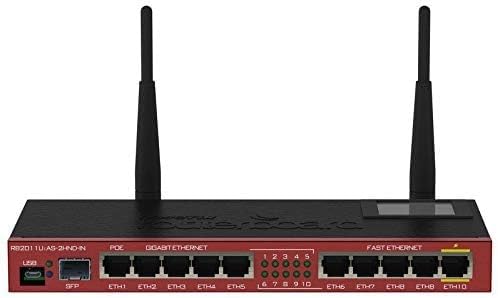
Figure 3: A top-down perspective of the router, providing a clear view of the port numbering, LED indicators, and the overall layout of the device's front panel.
பராமரிப்பு
- நிலைபொருள் புதுப்பிப்புகள்: மைக்ரோடிக்கை தவறாமல் சரிபார்க்கவும். website for RouterOS updates. Keeping your firmware up-to-date ensures security and performance improvements. Follow the official update procedures carefully.
- சுத்தம்: Keep the router clean and free from dust. Use a soft, dry cloth for cleaning. Do not use liquid cleaners or aerosols. Ensure ventilation slots are unobstructed.
- சுற்றுச்சூழல் நிலைமைகள்: Operate the router within its specified temperature and humidity ranges to prevent damage and ensure stable operation.
சரிசெய்தல்
- சக்தி இல்லை: Check the power adapter connection and the power outlet. Ensure the power LED on the router is illuminated.
- இணைய இணைப்பு இல்லை: Verify that your modem is working correctly. Check the WAN port connection on the router. Ensure your internet service provider is not experiencing outages.
- Wireless Issues: Confirm your wireless network is enabled and broadcasting. Check the wireless password. Try restarting the router. Ensure no strong interference sources are nearby.
- மெதுவான நெட்வொர்க் வேகம்: Check cable connections for damage. Ensure devices are connected to appropriate speed ports (Gigabit for high-speed). Monitor network traffic for congestion.
- தொழிற்சாலை மீட்டமைப்பு: If you encounter persistent issues or forget your password, you can perform a factory reset. Locate the reset button (usually a small pinhole) and press it for 5-10 seconds while the device is powered on. This will revert all settings to default.
விவரக்குறிப்புகள்
| அம்சம் | விவரம் |
|---|---|
| மாதிரி பெயர் | RB2011UiAS-2HnD-IN |
| தயாரிப்பு பரிமாணங்கள் | 3.54 x 9.06 x 0.98 அங்குலம் |
| பொருளின் எடை | 8.1 அவுன்ஸ் |
| ஈதர்நெட் துறைமுகங்கள் | 5x Gigabit, 5x Fast Ethernet |
| எஸ்.எஃப்.பி போர்ட் | 1x SFP |
| வயர்லெஸ் தரநிலை | 802.11b/g/n |
| அதிர்வெண் பேண்ட் வகுப்பு | ஒற்றை-இசைக்குழு (2.4GHz) |
| ஆண்டெனா வகை | Internal (with external connectors for included antennas) |
| USB போர்ட் | 1x USB |
| போ அவுட் | Yes, on Eth10 |
| உற்பத்தியாளர் | மிக்ரோடிக் |
| முதல் தேதி கிடைக்கும் | ஜனவரி 20, 2020 |
உத்தரவாதம் மற்றும் ஆதரவு
For warranty information and technical support, please refer to the official MikroTik website or contact your authorized reseller. Keep your purchase receipt as proof of purchase for warranty claims.


