

அறிமுகம்
Thank you for choosing the XO B24 Foldable Bluetooth Headphones. This manual provides essential information for the safe and efficient use of your device. Please read it carefully before use and retain it for future reference.
The XO B24 headphones are designed for comfort and portability, featuring high-quality materials and a secure fit for an optimal audio experience.
தயாரிப்பு முடிந்துவிட்டதுview
The XO B24 headphones offer both wired and wireless connectivity, a built-in microphone for calls, and a foldable design for easy storage and transport.
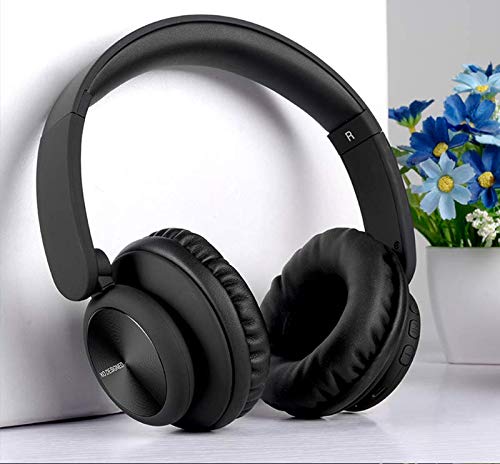
Image: XO B24 Foldable Bluetooth Headphones, showcasing their over-ear design and black color.
விவரக்குறிப்புகள்
| அம்சம் | விளக்கம் |
|---|---|
| பிராண்ட் பெயர் | XO |
| மாதிரி பெயர் | B24 |
| மாதிரி எண் | XO-B24 |
| நிறம் | கருப்பு |
| ஹெட்ஃபோன் ஃபார்ம் ஃபேக்டர் | காதில் |
| இணைப்பு தொழில்நுட்பம் | கம்பி, வயர்லெஸ் (புளூடூத்) |
| ஹெட்ஃபோன் ஜாக் | 3.5 மிமீ ஜாக் |
| வயர்லெஸ் கம்யூனிகேஷன் டெக்னாலஜி | புளூடூத் |
| சிறப்பு அம்சங்கள் | Includes Microphone, Foldable Design |
| ஒலிவாங்கி | ஆம் |
| சத்தம் ரத்து | இல்லை |
| கட்டுப்பாட்டு வகை | Volume Control, Touch Control |
| இணக்கமான சாதனங்கள் | பல சாதனம் |
| பேட்டரி தேவை | ஆம் |
அமைவு
1. ஹெட்ஃபோன்களை சார்ஜ் செய்தல்
- வழங்கப்பட்ட USB சார்ஜிங் கேபிளை ஹெட்ஃபோன்களில் உள்ள சார்ஜிங் போர்ட்டுடன் இணைக்கவும்.
- USB கேபிளின் மறுமுனையை இணக்கமான USB பவர் சோர்ஸில் (எ.கா. கணினி, சுவர் அடாப்டர்) செருகவும்.
- The LED indicator will illuminate during charging and turn off or change color once fully charged.
2. புளூடூத் இணைத்தல்
- ஹெட்ஃபோன்கள் முழுமையாக சார்ஜ் செய்யப்பட்டுள்ளதா என்பதை உறுதிப்படுத்தவும்.
- Press and hold the Power button on the headphones until the LED indicator flashes rapidly, indicating pairing mode.
- உங்கள் சாதனத்தில் (ஸ்மார்ட்போன், டேப்லெட், கணினி), புளூடூத்தை இயக்கி, கிடைக்கக்கூடிய சாதனங்களைத் தேடுங்கள்.
- Select "XO B24" from the list of found devices.
- Once paired, the LED indicator will stop flashing and may show a solid light or flash slowly.
3. கம்பி இணைப்பு (விரும்பினால்)
- Insert one end of the 3.5mm audio cable into the headphone jack on the XO B24.
- Plug the other end of the 3.5mm audio cable into the audio output jack of your device.
- The headphones will operate in wired mode, conserving battery life.
இயக்க வழிமுறைகள்
பவர் ஆன்/ஆஃப்
- பவர் ஆன்: LED காட்டி ஒளிரும் வரை பவர் பட்டனை சுமார் 3 வினாடிகள் அழுத்திப் பிடிக்கவும்.
- பவர் ஆஃப்: LED காட்டி அணைக்கப்படும் வரை பவர் பட்டனை சுமார் 3-5 வினாடிகள் அழுத்திப் பிடிக்கவும்.
இசை பின்னணி
- விளையாடு/இடைநிறுத்தம்: பல செயல்பாட்டு பொத்தானை (பெரும்பாலும் பவர் பொத்தானை) ஒரு முறை அழுத்தவும்.
- அடுத்த ட்ராக்: Press and hold the Volume Up button or a dedicated 'Next' button.
- முந்தைய ட்ராக்: Press and hold the Volume Down button or a dedicated 'Previous' button.
தொகுதி கட்டுப்பாடு
- அளவை அதிகரிக்கும்: வால்யூம் அப் பட்டனை அழுத்தவும்.
- ஒலியைக் குறைக்கவும்: ஒலியைக் குறைக்கும் பொத்தானை அழுத்தவும்.
அழைப்பு மேலாண்மை
- பதில்/முடிவு அழைப்பு: பல செயல்பாட்டு பொத்தானை ஒரு முறை அழுத்தவும்.
- அழைப்பை நிராகரி: மல்டி-ஃபங்க்ஷன் பட்டனை சுமார் 2 வினாடிகள் அழுத்திப் பிடிக்கவும்.
மடிப்பு பொறிமுறை
- To fold the headphones for storage, gently rotate the earcups inwards towards the headband until they are compact.
- To unfold, reverse the process, ensuring the earcups click securely into place.
பராமரிப்பு
- சுத்தம்: ஹெட்ஃபோன்களை சுத்தம் செய்ய மென்மையான, உலர்ந்த துணியைப் பயன்படுத்தவும். சிராய்ப்பு கிளீனர்கள் அல்லது கரைப்பான்களைப் பயன்படுத்த வேண்டாம்.
- சேமிப்பு: பயன்பாட்டில் இல்லாதபோது, ஹெட்ஃபோன்களை குளிர்ந்த, உலர்ந்த இடத்தில், நேரடி சூரிய ஒளி மற்றும் தீவிர வெப்பநிலையிலிருந்து விலகி சேமிக்கவும். சிறிய சேமிப்பிற்கு மடிக்கக்கூடிய வடிவமைப்பைப் பயன்படுத்தவும்.
- பேட்டரி பராமரிப்பு: பேட்டரி ஆயுளை நீட்டிக்க, ஹெட்ஃபோன்களை அடிக்கடி முழுமையாக சார்ஜ் செய்வதைத் தவிர்க்கவும். தொடர்ந்து பயன்படுத்தாவிட்டாலும், அவற்றை தொடர்ந்து சார்ஜ் செய்யவும்.
- ஈரப்பதத்தைத் தவிர்க்கவும்: ஹெட்ஃபோன்களை தண்ணீர் மற்றும் அதிக ஈரப்பதத்திலிருந்து விலக்கி வைக்கவும்.
சரிசெய்தல்
| பிரச்சனை | தீர்வு |
|---|---|
| ஹெட்ஃபோன்கள் இயங்கவில்லை. | ஹெட்ஃபோன்கள் முழுமையாக சார்ஜ் செய்யப்பட்டுள்ளதா என்பதை உறுதிப்படுத்திக் கொள்ளுங்கள். ஒரு மின் மூலத்துடன் இணைத்து மீண்டும் முயற்சிக்கவும். |
| புளூடூத் வழியாக இணைக்க முடியாது. | Make sure the headphones are in pairing mode (LED flashing rapidly). Disable and re-enable Bluetooth on your device. Move closer to the headphones. |
| ஒலி இல்லை அல்லது குறைந்த அளவு. | ஹெட்ஃபோன்கள் மற்றும் இணைக்கப்பட்ட சாதனம் இரண்டிலும் ஒலி அளவைச் சரிபார்க்கவும். ஹெட்ஃபோன்கள் சரியாக இணைக்கப்பட்டுள்ளதா அல்லது 3.5மிமீ கேபிள் பாதுகாப்பாக இணைக்கப்பட்டுள்ளதா என்பதை உறுதிப்படுத்திக் கொள்ளுங்கள். |
| ஒலி தரம் மோசமாக உள்ளது. | Ensure there are no obstructions between the headphones and your device. Try moving closer to your device. Disconnect and reconnect the Bluetooth connection. |
| மைக்ரோஃபோன் வேலை செய்யவில்லை. | Ensure the headphones are properly connected and selected as the audio input device on your system. Check if the microphone is muted on your device. |
உத்தரவாதம் மற்றும் ஆதரவு
The XO B24 Foldable Bluetooth Headphones come with a standard manufacturer's warranty. Please refer to the warranty card included in your product packaging for specific terms and conditions.
For technical support, troubleshooting assistance, or warranty claims, please contact your retailer or the official XO customer service. Contact information can typically be found on the product packaging or the manufacturer's webதளம்.