
அறிமுகம்
Thank you for choosing the SXFJF L350 Bluetooth Over-Ear Wireless Headphones. This manual provides essential information for the safe and efficient use of your headphones. Please read it carefully before use and retain it for future reference.
தயாரிப்பு முடிந்துவிட்டதுview
The SXFJF L350 headphones are designed for comfort and high-fidelity audio, featuring active noise cancellation, deep bass, and a built-in microphone for hands-free communication. Their foldable design enhances portability.
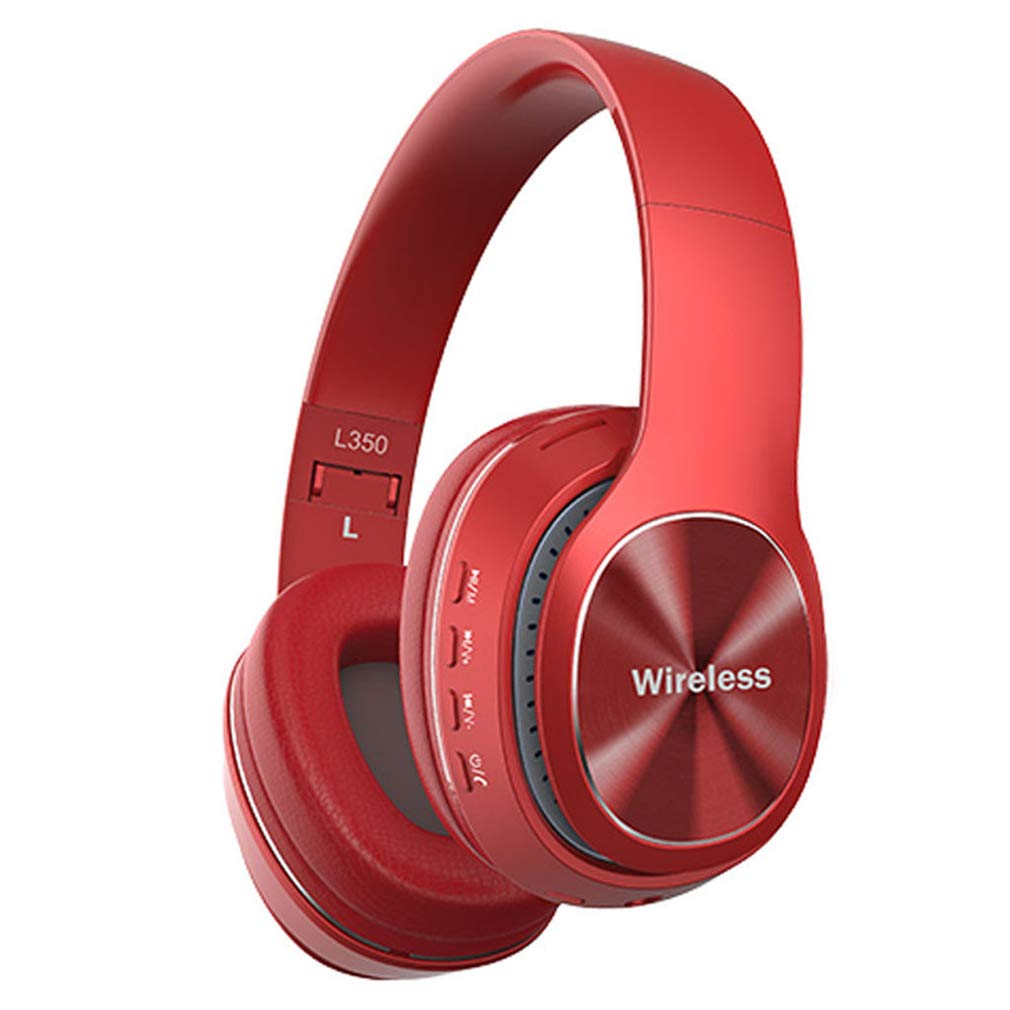
Image: SXFJF L350 Red Bluetooth Over-Ear Wireless Headphones. This image displays the red variant of the L350 headphones, highlighting the over-ear design, control buttons on the earcup, and the 'Wireless' branding.
முக்கிய அம்சங்கள்:
- Active Noise Cancelling Function
- Premium Audio with Deep Bass
- 40mm Horn Drivers
- 105dB Sensitivity and 100dB Signal-to-Noise Ratio
- Foldable Structure for Portability
- Soft Memory-Protein Earmuffs for Comfort
- பணிச்சூழலியல் பொருத்தம்
- Bluetooth 5.0 Connectivity with 15-meter working range
- 8-10 Hours Music Playback Time
- 1300 மணிநேர காத்திருப்பு நேரம்
- Built-in Microphone for Hands-Free Calls
- 3.5mm Stereo Interface for Wired Connection
அமைவு
1. ஹெட்ஃபோன்களை சார்ஜ் செய்தல்
Before first use, fully charge your headphones. Use the provided USB charging cable.
- Connect the Micro USB end of the charging cable to the charging port on the headphone earcup.
- USB-A முனையை 5V USB பவர் சோர்ஸுடன் இணைக்கவும் (எ.கா., கணினி USB போர்ட், சுவர் அடாப்டர்).
- சார்ஜ் செய்யும்போது LED இண்டிகேட்டர் ஒளிரும், முழுமையாக சார்ஜ் ஆனதும் நிறம் மாறும் அல்லது அணைந்துவிடும்.
2. புளூடூத் இணைத்தல்
உங்கள் ஹெட்ஃபோன்களை புளூடூத் இயக்கப்பட்ட சாதனத்துடன் இணைக்க இந்தப் படிகளைப் பின்பற்றவும்:
- ஹெட்ஃபோன்கள் அணைக்கப்பட்டுள்ளதா என்பதை உறுதிப்படுத்தவும்.
- Press and hold the Power button until the LED indicator flashes red and blue alternately, indicating pairing mode.
- உங்கள் சாதனத்தில் (ஸ்மார்ட்போன், டேப்லெட், கணினி), புளூடூத்தை இயக்கி, கிடைக்கக்கூடிய சாதனங்களைத் தேடுங்கள்.
- Select "L350" or "SXFJF Headphones" from the list of found devices.
- இணைக்கப்பட்டவுடன், LED காட்டி பொதுவாக ஒரு திட நீல ஒளியை அல்லது ஃபிளாஷ் நீலத்தை மெதுவாகக் காண்பிக்கும்.
- கடவுச்சொல் கேட்கப்பட்டால், "0000" ஐ உள்ளிடவும்.
3. கம்பி இணைப்பு (விரும்பினால்)
For devices without Bluetooth or when the battery is depleted, you can use the 3.5mm audio cable:
- Connect one end of the 3.5mm audio cable to the audio input jack on the headphones.
- Connect the other end to the 3.5mm audio output jack on your device.
- The headphones will function as wired headphones, and Bluetooth features will be disabled.
Video: SXFJF Bluetooth Over-Ear Wireless Headphones. This video provides a visual overview of the headphones, demonstrating their design, features, and various color options. It highlights the active noise cancellation, deep bass, and comfortable fit.
இயக்க வழிமுறைகள்
பவர் ஆன்/ஆஃப்
- பவர் ஆன்: LED காட்டி ஒளிரும் வரை பவர் பட்டனை சுமார் 3 வினாடிகள் அழுத்திப் பிடிக்கவும்.
- பவர் ஆஃப்: LED காட்டி அணைக்கப்படும் வரை பவர் பட்டனை சுமார் 3 வினாடிகள் அழுத்திப் பிடிக்கவும்.
இசை பின்னணி
- விளையாடு/இடைநிறுத்தம்: ப்ளே/பாஸ் பட்டனை ஒருமுறை அழுத்தவும்.
- அடுத்த ட்ராக்: வால்யூம் அப் (+) பட்டனை அழுத்திப் பிடிக்கவும்.
- முந்தைய ட்ராக்: ஒலியளவைக் குறைக்கும் (-) பொத்தானை அழுத்திப் பிடிக்கவும்.
அழைப்பு மேலாண்மை
- பதில்/முடிவு அழைப்பு: ப்ளே/பாஸ் பட்டனை ஒருமுறை அழுத்தவும்.
- அழைப்பை நிராகரி: ப்ளே/பாஸ் பட்டனை 2 வினாடிகள் அழுத்திப் பிடிக்கவும்.
- கடைசி எண்ணை மீண்டும் அனுப்பவும்: Play/Pause பட்டனை இருமுறை அழுத்தவும்.
தொகுதி கட்டுப்பாடு
- அளவை அதிகரிக்கும்: வால்யூம் அப் (+) பட்டனை அழுத்தவும்.
- ஒலியைக் குறைக்கவும்: ஒலியைக் குறைக்கும் (-) பொத்தானை அழுத்தவும்.
பராமரிப்பு
Proper maintenance ensures the longevity and performance of your headphones:
- சுத்தம்: ஹெட்ஃபோன்களை சுத்தம் செய்ய மென்மையான, உலர்ந்த துணியைப் பயன்படுத்தவும். சிராய்ப்பு கிளீனர்கள் அல்லது கரைப்பான்களைப் பயன்படுத்த வேண்டாம்.
- சேமிப்பு: பயன்பாட்டில் இல்லாதபோது, ஹெட்ஃபோன்களை குளிர்ந்த, உலர்ந்த இடத்தில், நேரடி சூரிய ஒளி மற்றும் தீவிர வெப்பநிலையிலிருந்து விலகி சேமிக்கவும். சிறிய சேமிப்பிற்கு மடிக்கக்கூடிய வடிவமைப்பைப் பயன்படுத்தவும்.
- தண்ணீரை தவிர்க்கவும்: இந்த ஹெட்ஃபோன்கள் நீர்ப்புகா அல்ல. தண்ணீர் அல்லது அதிகப்படியான ஈரப்பதத்திற்கு ஆளாகாமல் இருக்கவும்.
- கவனத்துடன் கையாளவும்: Do not drop, disassemble, or modify the headphones.
சரிசெய்தல்
உங்கள் ஹெட்ஃபோன்களில் சிக்கல்கள் ஏற்பட்டால், பின்வரும் பொதுவான சிக்கல்கள் மற்றும் தீர்வுகளைப் பார்க்கவும்:
| பிரச்சனை | தீர்வு |
|---|---|
| ஹெட்ஃபோன்கள் இயங்கவில்லை. | ஹெட்ஃபோன்கள் முழுமையாக சார்ஜ் செய்யப்பட்டுள்ளதா என்பதை உறுதிப்படுத்திக் கொள்ளுங்கள். ஒரு மின் மூலத்துடன் இணைத்து மீண்டும் முயற்சிக்கவும். |
| சாதனத்துடன் இணைக்க முடியவில்லை. | Ensure headphones are in pairing mode (LED flashing red/blue). Turn off and on Bluetooth on your device. Move closer to the device. |
| ஒலி இல்லை அல்லது குறைந்த அளவு. | Check volume levels on both headphones and your device. Ensure headphones are properly paired or connected via audio cable. |
| மோசமான ஒலி தரம். | Ensure there are no obstructions between the headphones and your device. Avoid interference from other wireless devices. Try a wired connection. |
| மைக்ரோஃபோன் வேலை செய்யவில்லை. | Ensure the headphones are properly connected and selected as the input device on your phone/computer. |
விவரக்குறிப்புகள்
Technical specifications for the SXFJF L350 Bluetooth Over-Ear Wireless Headphones:
| அம்சம் | விவரம் |
|---|---|
| புளூடூத் பதிப்பு | புளூடூத் 5.0 |
| வேலை வரம்பு | 15 மீட்டர் வரை |
| இசை நேரம் | 8-10 மணி நேரம் |
| காத்திருப்பு நேரம் | 1300 மணிநேரம் |
| பேட்டரி திறன் | 200 mAh |
| சார்ஜிங் தொகுதிtage | 5V |
| சார்ஜிங் கரண்ட் | 5V500mA |
| சார்ஜிங் இடைமுகம் | மைக்ரோ USB |
| பிளக் வகை | 3.5mm Stereo Interface |
| கொம்பு விவரக்குறிப்பு | 40மிமீ |
| பவர் ஏற்றவும் | 50மெகாவாட் |
| வழங்கல் தொகுதிtage | 3.3-4.2V |
| SNR (சிக்னல்-டு-இரைச்சல் விகிதம்) | 100dB |
| உணர்திறன் | 105dB |
| வேலை செய்யும் மின்னோட்டம் | 30mA |
| அதிர்வெண் வரம்பு | 24GHz-2480GHz |
உத்தரவாதம் மற்றும் ஆதரவு
For warranty information, product support, or any issues not covered in this manual, please refer to the product detail page on Amazon or contact SXFJF customer service directly. Contact details are typically available on the product packaging or the seller's Amazon storefront.