
Altec Lansing AL-5003
Altec Lansing AL-5003 Multimedia DJ Trolly Speaker User Manual
மாடல்: AL-5003
அறிமுகம்
நன்றி, நன்றி.asing the Altec Lansing AL-5003 Multimedia DJ Trolly Speaker. This speaker is designed to deliver powerful audio for various applications, including parties and surround sound systems. Featuring wireless connectivity, a built-in trolley for portability, and multiple input options, the AL-5003 offers a versatile audio experience. Please read this manual carefully to ensure proper setup, operation, and maintenance of your speaker.
முக்கியமான பாதுகாப்பு வழிமுறைகள்
- Read these instructions thoroughly before operating the speaker.
- எதிர்கால குறிப்புக்காக இந்த கையேட்டை வைத்திருங்கள்.
- ஸ்பீக்கரை மழை அல்லது ஈரப்பதத்திற்கு வெளிப்படுத்த வேண்டாம்.
- காற்றோட்டம் திறப்புகளைத் தடுக்க வேண்டாம்.
- ரேடியேட்டர்கள், வெப்பப் பதிவேடுகள், அடுப்புகள் அல்லது பிற சாதனங்கள் (உட்பட) போன்ற எந்த வெப்ப மூலங்களுக்கும் அருகில் நிறுவ வேண்டாம் ampலிஃபையர்ஸ்) வெப்பத்தை உற்பத்தி செய்யும்.
- குறிப்பாக பிளக்குகள், கன்வீனியன் ரிசெப்டக்கிள்கள் மற்றும் எந்திரத்தில் இருந்து அவை வெளியேறும் இடத்தில் பவர் கார்டு நடக்காமல் அல்லது கிள்ளப்படாமல் பாதுகாக்கவும்.
- உற்பத்தியாளரால் குறிப்பிடப்பட்ட இணைப்புகள் / துணைக்கருவிகளை மட்டுமே பயன்படுத்தவும்.
- மின்னல் புயல்களின் போது அல்லது நீண்ட காலத்திற்கு பயன்படுத்தப்படாத போது இந்த கருவியை துண்டிக்கவும்.
- அனைத்து சேவைகளையும் தகுதிவாய்ந்த சேவை பணியாளர்களிடம் பார்க்கவும்.
தொகுப்பு உள்ளடக்கங்கள்
பின்வரும் பொருட்களுக்கு தொகுப்பைச் சரிபார்க்கவும்:
- Altec Lansing AL-5003 Multimedia DJ Trolly Speaker
- பவர் கார்ட்
- ரிமோட் கண்ட்ரோல்
- பயனர் கையேடு
- Auxiliary Cable (may vary by region)
தயாரிப்பு முடிந்துவிட்டதுview
The AL-5003 speaker features a robust design with integrated wheels and a handle for easy transport. It includes a powerful 10-inch speaker and a 1-inch tweeter, providing clear and dynamic sound. The control panel is located on the top of the unit, offering easy access to various functions.
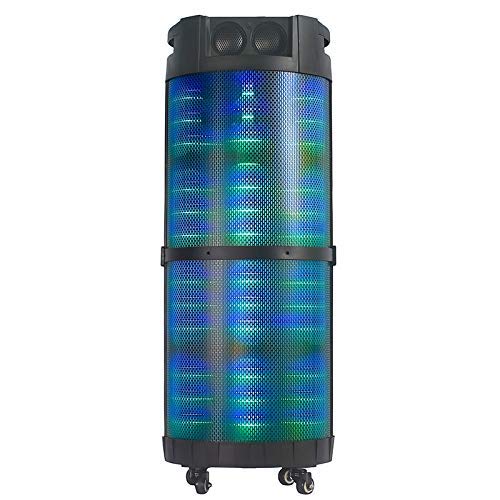
படம் 1: முன் view of the Altec Lansing AL-5003 speaker, showcasing its cylindrical design and illuminated grille. The speaker features a sturdy build with integrated wheels at the base for portability.
கண்ட்ரோல் பேனல் மற்றும் இணைப்புகள்
The top panel of the speaker houses the main controls and input/output ports.
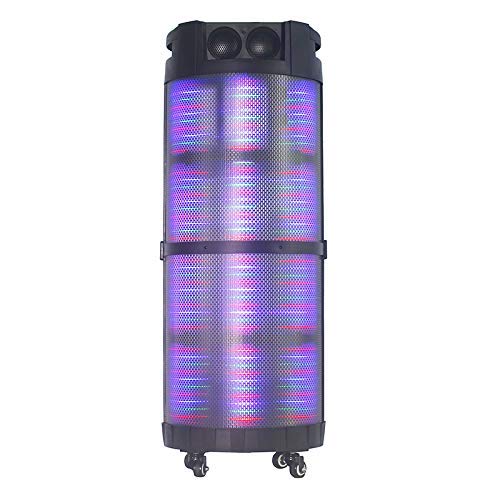
படம் 2: மேலிருந்து கீழ் view of the AL-5003 speaker, highlighting the control panel with various buttons and knobs, along with the top-mounted speakers. This view also shows the integrated handle for easy transport.
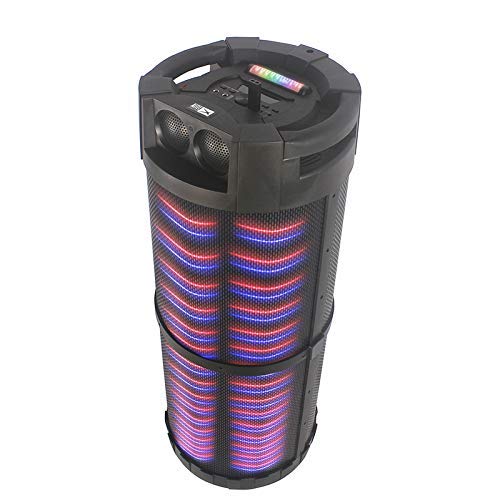
படம் 3: கோணல் view of the AL-5003 speaker, providing a perspective of its overall structure, including the side grille and the top control area. The dynamic lighting effects are visible through the mesh.
Common controls include Power, Volume, Mode selection, Play/Pause, Track Skip, and inputs for USB, Auxiliary, and potentially Microphone (if available on the model).
அமைவு வழிமுறைகள்
- பேக்கிங்: Carefully remove the speaker and all accessories from the packaging. Retain the packaging for future transport or storage.
- இடம்: Place the speaker on a stable, flat surface. Ensure there is adequate ventilation around the unit. For optimal sound, position the speaker in a central location within the listening area.
- மின் இணைப்பு: Connect the provided power cord to the AC input on the speaker and then plug it into a standard wall outlet (AC 100-240V, 50/60Hz).
- ஆரம்ப கட்டணம் (பொருந்தினால்): If the speaker has an internal battery (Lead Acid battery mentioned in specs), it is recommended to fully charge it before first use. The charging indicator light will typically show charging status.
- பவர் ஆன்: Press the Power button on the control panel or remote control to turn on the speaker.
இயக்க வழிமுறைகள்
1. புளூடூத் பயன்முறை
- புளூடூத்தை இயக்கவும்: Turn on the speaker. Press the "Mode" button on the control panel or remote until "Bluetooth" or "BT" is displayed (or indicated by a blue LED). The speaker will enter pairing mode, indicated by a flashing light or audible prompt.
- சாதனத்துடன் இணைத்தல்: உங்கள் மொபைல் சாதனத்தில் (ஸ்மார்ட்போன், டேப்லெட், மடிக்கணினி), புளூடூத் அமைப்புகளுக்குச் சென்று புளூடூத்தை இயக்கவும். தேடுங்கள் available devices. You should see "AL-5003" or "Altec Lansing" in the list. Select it to pair.
- இணைப்பு உறுதிப்படுத்தல்: Once successfully paired, the speaker will emit a confirmation sound, and the Bluetooth indicator light will become solid.
- பின்னணி: Start playing audio on your connected device. Use the speaker's volume controls or your device's volume controls to adjust the sound level. Use the Play/Pause, Next, and Previous buttons on the speaker or remote to control playback.
2. Auxiliary (AUX) Mode
- AUX கேபிளை இணைக்கவும்: Insert one end of a 3.5mm auxiliary cable into the AUX input port on the speaker. Connect the other end to the headphone jack or audio output of your external audio device (e.g., MP3 player, laptop).
- AUX பயன்முறையைத் தேர்ந்தெடுக்கவும்: Press the "Mode" button on the speaker or remote until "AUX" is displayed or indicated.
- பின்னணி: Play audio from your connected device. Adjust volume using both the speaker's controls and your device's volume.
3. USB Playback Mode
- யூ.எஸ்.பி டிரைவைச் செருகவும்: MP3 ஆடியோ கொண்ட USB ஃபிளாஷ் டிரைவைச் செருகவும். fileஸ்பீக்கரில் உள்ள USB போர்ட்டில் கள்.
- Select USB Mode: The speaker may automatically switch to USB mode. If not, press the "Mode" button until "USB" is displayed or indicated.
- பின்னணி: ஸ்பீக்கர் தானாகவே ஆடியோவை இயக்கத் தொடங்கும். files from the USB drive. Use the Play/Pause, Next, and Previous buttons to control playback.
4. Karaoke Function (if applicable)
If your AL-5003 model includes a microphone input, you can use it for karaoke:
- மைக்ரோஃபோனை இணைக்கவும்: Plug a wired microphone into the designated microphone input jack.
- ஒலியளவைச் சரிசெய்யவும்: Use the dedicated Microphone Volume knob (if present) to adjust the microphone's volume.
- எதிரொலி கட்டுப்பாடு: Some models may have an Echo knob to add an echo effect to the microphone audio.
5. ரிமோட் கண்ட்ரோல் ஆபரேஷன்
The included remote control provides convenient access to all major functions:
- சக்தி: Turn the speaker On/Off.
- பயன்முறை: Switch between Bluetooth, AUX, USB, and other available modes.
- தொகுதி +/-: முதன்மை ஒலியளவைச் சரிசெய்யவும்.
- விளையாடு/இடைநிறுத்தம்: பிளேபேக்கைத் தொடங்கவும் அல்லது இடைநிறுத்தவும்.
- முந்தைய/அடுத்து: முந்தைய அல்லது அடுத்த தடத்திற்குச் செல்லவும்.
- ஈக்யூ: Select different equalizer presets (if available).
- முடக்கு: ஆடியோவை ஒலியடக்கு அல்லது ஒலியடக்கு.
பராமரிப்பு
- சுத்தம்: ஸ்பீக்கரின் வெளிப்புறத்தை சுத்தம் செய்ய மென்மையான, உலர்ந்த துணியைப் பயன்படுத்தவும். திரவ கிளீனர்கள் அல்லது சிராய்ப்புப் பொருட்களைப் பயன்படுத்த வேண்டாம்.
- சேமிப்பு: நீண்ட நேரம் பயன்பாட்டில் இல்லாதபோது, ஸ்பீக்கரை குளிர்ந்த, உலர்ந்த இடத்தில், நேரடி சூரிய ஒளி மற்றும் தீவிர வெப்பநிலையிலிருந்து விலகி சேமிக்கவும்.
- பேட்டரி பராமரிப்பு: If the speaker has a built-in rechargeable battery, avoid fully discharging it frequently. For long-term storage, charge the battery to approximately 50-70% every few months to prolong its lifespan.
- காற்றோட்டம்: அதிக வெப்பத்தைத் தடுக்க காற்றோட்டம் திறப்புகள் தடுக்கப்படவில்லை என்பதை உறுதிப்படுத்தவும்.
சரிசெய்தல்
| பிரச்சனை | சாத்தியமான காரணம் | தீர்வு |
|---|---|---|
| சக்தி இல்லை | Power cord not connected; Power outlet not working; Speaker is off; Battery drained. | Ensure power cord is securely connected. Try a different outlet. Press the Power button. Charge the battery. |
| ஒலி இல்லை | Volume too low; Incorrect mode selected; Device not connected properly; Mute function active. | Increase volume on speaker and source device. Select the correct input mode (Bluetooth, AUX, USB). Reconnect device. Check if mute is active on remote. |
| புளூடூத் இணைத்தல் தோல்வி | Speaker not in pairing mode; Device Bluetooth off; Speaker too far from device; Interference. | Ensure speaker is in Bluetooth pairing mode. Turn on Bluetooth on your device. Move device closer to speaker. Turn off other Bluetooth devices nearby. |
| USB பிளேபேக் வேலை செய்யவில்லை | USB டிரைவ் சரியாகச் செருகப்படவில்லை; இணக்கமற்றது. file வடிவம்; USB டிரைவ் சிதைந்துள்ளது. | Reinsert USB drive. Ensure files are in MP3 format. Try a different USB drive. |
| ரிமோட் கண்ட்ரோல் வேலை செய்யவில்லை | Batteries drained; Obstruction between remote and speaker; Remote not pointed at sensor. | Replace remote control batteries. Remove any obstructions. Point remote directly at the speaker's IR sensor. |
விவரக்குறிப்புகள்
| அம்சம் | விவரம் |
|---|---|
| மாதிரி பெயர் | Altec Lansing AL-5003 Multimedia DJ Trolly Speaker |
| பேச்சாளர் வகை | சரவுண்ட் சவுண்ட் |
| சிறப்பு அம்சம் | வயர்லெஸ் |
| பரிந்துரைக்கப்பட்ட பயன்பாடுகள் | For Surround Sound Systems, Party |
| இணக்கமான சாதனங்கள் | Gaming Console, Karaoke Machine, Laptop, MP3 Player, Smartphone, Tablet |
| சரவுண்ட் சவுண்ட் சேனல் உள்ளமைவு | 1.0 |
| கட்டுப்பாட்டு முறை | ரிமோட் |
| வயர்லெஸ் கம்யூனிகேஷன் டெக்னாலஜி | புளூடூத் |
| பேச்சாளர் அளவு | 10 அங்குலம் |
| சக்தி ஆதாரம் | கம்பியூட்டப்பட்ட மின்சாரம் |
| ட்வீட்டர் விட்டம் | 1 அங்குலம் |
| Audio Input Compatible | துணை, USB |
| பேச்சாளர் இணைப்பு | Wired (for power), Wireless (Bluetooth) |
| ஆடியோ வாட்tage | 100 வாட்ஸ் |
| பேட்டரி செல் கலவை | ஈய அமிலம் |
| மவுண்டிங் வகை | மாடி நிற்கும் |
உத்தரவாதம் மற்றும் ஆதரவு
Altec Lansing products are manufactured to the highest quality standards. For information regarding warranty coverage, technical support, or service inquiries, please refer to the warranty card included with your product or visit the official Altec Lansing website. Please have your model number (AL-5003) and purchase details ready when contacting support.
Webதளம்: www.alteclansing.com (This is a generic link, actual link might vary by region)
Ask a question about this manual
Ask about setup, troubleshooting, compatibility, parts, safety, or missing instructions. Manuals+ will review the question and use this page’s manual context to help answer it.