
அறிமுகம்
Welcome to your new Gembird GHS-U-5.1-01 USB 5.1 Surround Headset. This manual provides essential information for setup, operation, and maintenance to ensure optimal performance and an immersive audio experience.
தொகுப்பு உள்ளடக்கங்கள்
தொகுப்பில் பின்வரும் பொருட்கள் இருக்க வேண்டும்:
- Gembird GHS-U-5.1-01 USB 5.1 Surround Headset

Image: Retail packaging for the Gembird GHS-U-5.1-01 USB 5.1 Surround Headset, showing the headset inside a clear window.
தயாரிப்பு முடிந்துவிட்டதுview
The Gembird GHS-U-5.1-01 is a USB headset designed for immersive audio experiences with 5.1 surround sound. It features an adjustable microphone, built-in volume control, comfortable ear pads, and an adjustable headband for extended use.
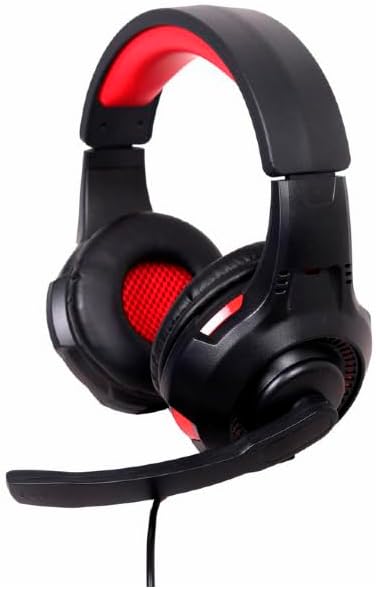
படம்: கோணல் view of the Gembird GHS-U-5.1-01 USB 5.1 Surround Headset, showcasing its black and red design with the microphone boom extended.

படம்: முன்பக்கம் view of the Gembird GHS-U-5.1-01 USB 5.1 Surround Headset, highlighting the adjustable headband and earcups.

Image: Close-up of the in-line control unit for the Gembird GHS-U-5.1-01 headset, showing volume up/down and microphone mute buttons.
அமைவு
ஹெட்செட்டை இணைக்கிறது
The Gembird GHS-U-5.1-01 headset connects via a standard USB port.
- உங்கள் கணினியில் கிடைக்கும் USB போர்ட்டைக் கண்டறியவும்.
- ஹெட்செட்டின் USB இணைப்பியை USB போர்ட்டில் செருகவும்.
- உங்கள் இயக்க முறைமை தானாகவே தேவையான இயக்கிகளைக் கண்டறிந்து நிறுவ வேண்டும். இந்த செயல்முறை சில நிமிடங்கள் ஆகலாம்.
- Once installed, the headset will be ready for use as an audio input and output device.
Audio Settings Configuration
For optimal 5.1 surround sound experience, you may need to configure your computer's audio settings.
- விண்டோஸ்: Go to "Sound Settings" (right-click speaker icon in taskbar) > "Sound Control Panel" > "Playback" tab. Select the Gembird headset, click "Configure," and choose "5.1 Surround."
- MacOS: Go to "System Preferences" > "Sound" > "Output" tab. Select the Gembird headset.
இயக்க வழிமுறைகள்
தொகுதி கட்டுப்பாடு
The headset features an in-line remote control for easy volume adjustment.
- பயன்படுத்தவும் "+" ஒலியளவை அதிகரிக்க பொத்தான்.
- பயன்படுத்தவும் "-" ஒலி அளவைக் குறைக்க பொத்தான்.
மைக்ரோஃபோன் பயன்பாடு
The adjustable microphone boom allows for precise positioning.
- Position the microphone approximately 1-2 inches from your mouth for clear voice capture.
- Use the microphone mute button on the in-line remote to toggle the microphone on or off.
ஆறுதல் சரிசெய்தல்
Adjust the headband to fit comfortably on your head. The ear pads are designed for extended use.
பராமரிப்பு
To ensure the longevity and performance of your headset, follow these maintenance guidelines:
- சுத்தம்: Use a soft, dry cloth to wipe the headset. Do not use harsh chemicals or abrasive cleaners.
- சேமிப்பு: Store the headset in a clean, dry place away from extreme temperatures.
- கேபிள் பராமரிப்பு: சேதத்தைத் தடுக்க, கூர்மையான வளைவுகள் அல்லது USB கேபிளை அதிகமாக இழுப்பதைத் தவிர்க்கவும்.
சரிசெய்தல்
No Sound or Microphone Not Working
- யூ.எஸ்.பி இணைப்பைச் சரிபார்க்கவும்: USB இணைப்பான் போர்ட்டில் முழுமையாகச் செருகப்பட்டுள்ளதா என்பதை உறுதிப்படுத்திக் கொள்ளுங்கள். வேறு USB போர்ட்டை முயற்சிக்கவும்.
- ஒலி அளவுகளைச் சரிபார்க்கவும்: Verify that the volume on the in-line control, your computer's system volume, and application-specific volumes are not muted or set too low.
- Check Audio Settings: Confirm that the Gembird headset is selected as the default playback and recording device in your computer's sound settings.
- கணினியை மறுதொடக்கம்: Sometimes a simple restart can resolve driver or software conflicts.
ஒலி தர சிக்கல்கள்
- இயக்கி புதுப்பிப்பு: Ensure your operating system drivers are up to date.
- மூல தரம்: Poor audio quality may stem from the audio source itself. Test with different audio fileகள் அல்லது பயன்பாடுகள்.
விவரக்குறிப்புகள்
| மாதிரி பெயர் | GHS-U-5.1-01 |
| இணைப்பு | கம்பி USB |
| படிவம் காரணி | காதில் |
| நிறம் | கருப்பு |
| பொருள் | Aluminum (Enclosure) |
| எடை | 0.4 கிலோகிராம் |
| கூடுதல் அம்சங்கள் | Adjustable microphone boom, Built-in volume control, Comfortable ear pads, Adjustable headband |
உத்தரவாத தகவல்
This Gembird headset comes with a 24 Month Manufacturer Guarantee. Please retain your proof of purchase for warranty claims. For detailed warranty terms and conditions, refer to the documentation provided with your product or contact Gembird customer support.
ஆதரவு
If you encounter issues not covered in this manual or require further assistance, please visit the official Gembird website or contact their customer support for technical assistance.