
HyperGear 14294
HyperGear Sport True Wireless Earbuds User Manual
Model: 14294 | Brand: HyperGear
அறிமுகம்
This manual provides detailed instructions for the HyperGear Sport True Wireless Earbuds, designed for an active lifestyle. Learn how to set up, operate, and maintain your earbuds for optimal performance and longevity.
தயாரிப்பு முடிந்துவிட்டதுview
The HyperGear Sport True Wireless Earbuds offer immersive HD stereo sound, quick-pair technology, and a noise-cancelling microphone for clear calls. Their ergonomic secure-fit ear hooks ensure stability during intense workouts, and the sweatproof design provides durability for active use.

Image: HyperGear Sport True Wireless Earbuds shown with their retail packaging, highlighting the secure-fit design.

Image: Close-up of a HyperGear earbud with callouts for HD Stereo Sound, Quick-Pair Technology, Crystal Clear Conversations, Control at Your Fingertips, and Superior Battery Life.
பெட்டியில் என்ன இருக்கிறது
Your HyperGear Sport True Wireless Earbuds package includes:
- HyperGear Sport True Wireless Earbuds
- சார்ஜிங் கேஸ்
- சார்ஜிங் கேபிள்
- பயனர் கையேடு
- S | M | L Ear Gels
- Travel Pouch & Carabiner

Image: The earbuds connected to a charging cable, alongside a travel pouch, carabiner, and different sized ear gels, illustrating the included accessories.
அமைவு
இயர்பட்களை சார்ஜ் செய்கிறது
Before first use, fully charge your earbuds. Connect the charging cable to the earbuds and a power source. A full charge takes approximately 2 hours. A quick 10-minute charge provides an extra hour of playtime.
Image: The HyperGear Sport True Wireless Earbuds connected via their charging cable, indicating the charging process.
உங்கள் சாதனத்துடன் இணைத்தல்
- இயர்பட்கள் சார்ஜ் செய்யப்பட்டு இயக்கப்பட்டிருப்பதை உறுதிசெய்யவும்.
- உங்கள் சாதனத்தில் (ஸ்மார்ட்போன், டேப்லெட், முதலியன) புளூடூத்தை இயக்கவும்.
- தேடுங்கள் "HyperGear Sport X2" or similar in your device's Bluetooth settings.
- இணைக்க இயர்பட்களைத் தேர்ந்தெடுக்கவும். குரல் அறிவிப்பு இணைப்பு வெற்றிகரமாக இருப்பதை உறுதிப்படுத்தும்.
The quick-pair technology ensures a stable connection up to 33 feet.

Image: A smartphone screen displaying Bluetooth settings, showing the HyperGear Sport X2 earbuds as connected, illustrating the pairing process.
இயக்க வழிமுறைகள்
பவர் ஆன்/ஆஃப்
Press and hold the On/Off button on the earbud for approximately 3 seconds to power on or off.
இசை பின்னணி
- விளையாடு/இடைநிறுத்தம்: பல செயல்பாட்டு பொத்தானை ஒருமுறை அழுத்தவும்.
- அடுத்த ட்ராக்: வலதுபுற இயர்பட்டில் உள்ள மல்டி-ஃபங்க்ஷன் பட்டனை இருமுறை அழுத்தவும்.
- முந்தைய ட்ராக்: இடதுபுற இயர்பட்டில் உள்ள பல செயல்பாட்டு பொத்தானை இருமுறை அழுத்தவும்.
- ஒலியை பெருக்கு: '+' பொத்தானை அழுத்தவும்.
- ஒலியை குறை: '-' பொத்தானை அழுத்தவும்.
அழைப்பு மேலாண்மை
- பதில்/முடிவு அழைப்பு: பல செயல்பாட்டு பொத்தானை ஒருமுறை அழுத்தவும்.
- அழைப்பை நிராகரி: பல செயல்பாட்டு பொத்தானை 2 விநாடிகள் அழுத்திப் பிடிக்கவும்.
The built-in noise-cancelling microphone ensures clear conversations.
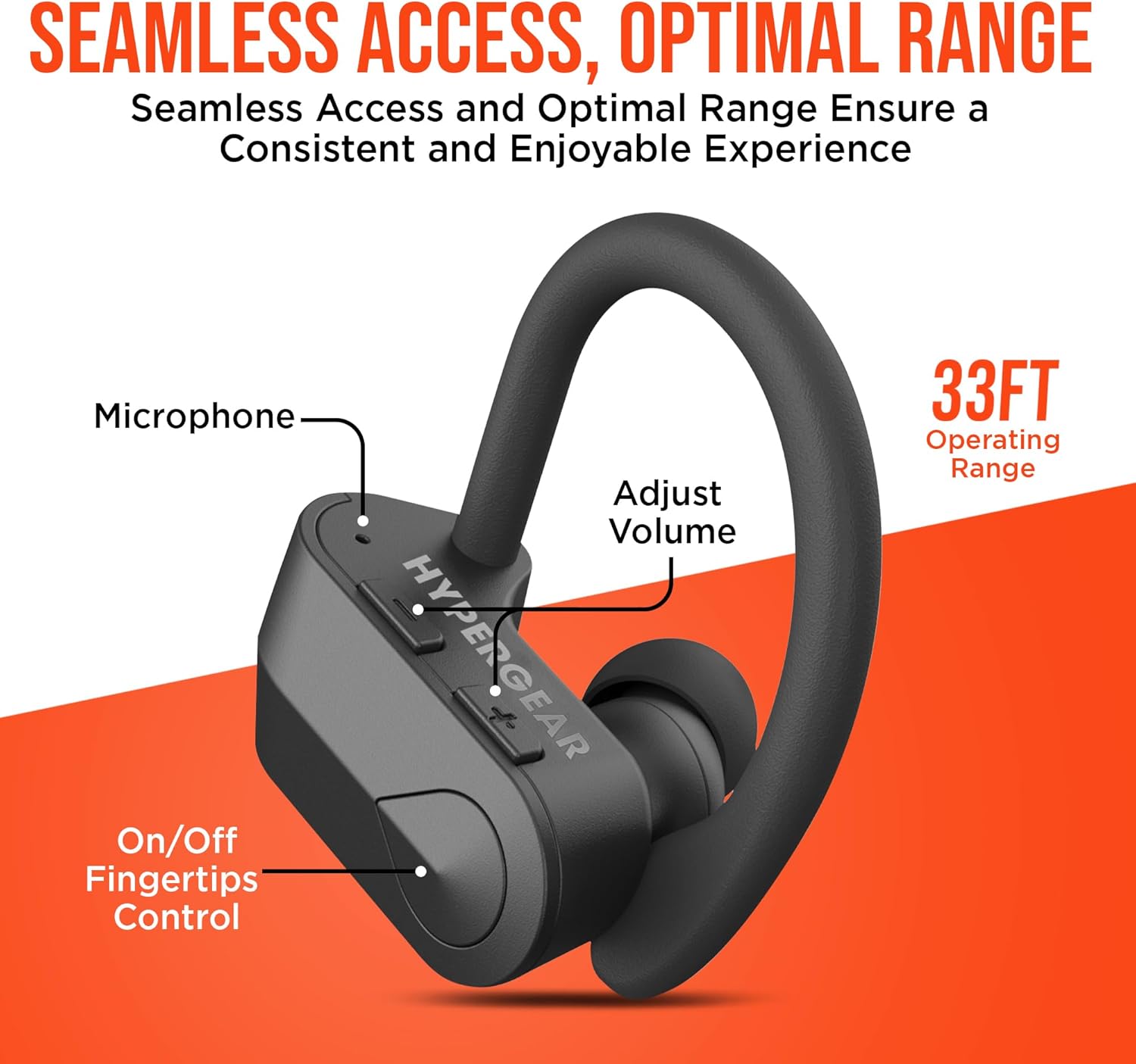
படம்: ஒரு விரிவான view of the earbud showing the microphone, volume adjustment buttons, and on/off fingertip control, along with an operating range of 33 feet.
பராமரிப்பு
- மென்மையான, உலர்ந்த துணியால் இயர்பட்களை அடிக்கடி சுத்தம் செய்யவும்.
- சிராய்ப்பு கிளீனர்கள் அல்லது கரைப்பான்களைப் பயன்படுத்துவதைத் தவிர்க்கவும்.
- இயர்பட்களைப் பாதுகாக்கவும், சார்ஜ் ஆகவும் பயன்படுத்தாத போது, அவற்றின் சார்ஜிங் கேஸில் சேமித்து வைக்கவும்.
- தீவிர வெப்பநிலை மற்றும் ஈரப்பதத்திலிருந்து விலகி இருங்கள்.
- The earbuds are sweatproof and water-resistant, but not fully waterproof. Do not submerge them in water.
சரிசெய்தல்
| பிரச்சனை | தீர்வு |
|---|---|
| இயர்பட்ஸ் ஆன் ஆகாது. | Ensure earbuds are fully charged. Press and hold the power button for 3-5 seconds. |
| சாதனத்துடன் இணைக்க முடியவில்லை. | Make sure Bluetooth is enabled on your device and the earbuds are in pairing mode. Move closer to the device (within 33 ft). Forget the device in Bluetooth settings and re-pair. |
| ஒலி சிதைக்கப்படுகிறது அல்லது துண்டிக்கப்படுகிறது. | Check the distance between earbuds and device. Ensure no obstacles are blocking the signal. Recharge earbuds if battery is low. |
| மைக்ரோஃபோன் வேலை செய்யவில்லை. | Ensure the earbuds are properly connected. Check device's audio input settings. |
விவரக்குறிப்புகள்
- இணைப்பு தொழில்நுட்பம்: புளூடூத்
- வயர்லெஸ் கம்யூனிகேஷன் டெக்னாலஜி: புளூடூத்
- புளூடூத் பதிப்பு: 5.0
- புளூடூத் வீச்சு: 33 அடி
- பேட்டரி ஆயுள்: Up to 4 Hours playtime
- சார்ஜிங் நேரம்: 2 Hours (10 min quick charge for 1 hour playtime)
- கட்டுப்பாட்டு வகை: Media Control (Touch/Button)
- சத்தம் கட்டுப்பாடு: Active Noise Cancellation (for mic)
- நீர் எதிர்ப்பு நிலை: நீர் எதிர்ப்பு (வியர்வை எதிர்ப்பு)
- அதிர்வெண் வரம்பு: 20 ஹெர்ட்ஸ் - 20,000 ஹெர்ட்ஸ்
- பொருளின் எடை: 4.6 அவுன்ஸ்
- தயாரிப்பு பரிமாணங்கள்: 2.36 x 1.18 x 1.18 அங்குலம்
- மாதிரி எண்: 14294
உத்தரவாதம் மற்றும் ஆதரவு
HyperGear products are designed for quality and performance. For warranty information or technical support, please visit the official HyperGear website or contact their customer service. Details can typically be found on the product packaging or the brand's official online store.
ஆன்லைன் ஆதரவு: Visit the HyperGear Store on Amazon
Ask a question about this manual
Ask about setup, troubleshooting, compatibility, parts, safety, or missing instructions. Manuals+ will review the question and use this page’s manual context to help answer it.