
1. தயாரிப்பு முடிந்துவிட்டதுview
The SXFJF 4K Ultra HD WiFi Action Camera is designed for capturing high-quality video and photos during various outdoor and sports activities. It features 4K video recording, a wide-angle lens, electronic image stabilization, and a waterproof design, making it suitable for adventures both on land and underwater.
முக்கிய அம்சங்கள்:
- Ultra HD Video: Records crystal clear 4K video and high-quality images with a wide-angle lens.
- Anti-shake Function: Built-in electronic image stabilization ensures smooth and steady footage even during fast-moving activities.
- நீர்ப்புகா வடிவமைப்பு: Equipped with a waterproof case, allowing for underwater use in sports like swimming, surfing, and diving.
- நீண்ட பேட்டரி ஆயுள்: Rechargeable batteries provide extended recording time.
- பல்துறை பாகங்கள்: Comes with various accessories for adapting to different indoor and outdoor activities.
- இணைப்பு: Features Wi-Fi and HDMI output for easy sharing and viewing.

Image 1.1: The SXFJF 4K Ultra HD WiFi Action Camera, showcasing அதன் சிறிய வடிவமைப்பு மற்றும் முதன்மை லென்ஸ்.
2. தொடங்குதல்: அமைப்பு
2.1 உள்ளடக்கங்களைத் திறத்தல் மற்றும் சரிபார்த்தல்
Before using your camera, please ensure all components are present in the package:
- SXFJF 4K Ultra HD WiFi Action Camera
- நீர்ப்புகா வழக்கு
- ரிச்சார்ஜபிள் பேட்டரி
- Various Mounting Accessories
- USB கேபிள்
- பயனர் கையேடு (இந்த ஆவணம்)
2.2 பேட்டரி நிறுவல் மற்றும் சார்ஜிங்
- கேமராவில் பேட்டரி பெட்டியைக் கண்டறியவும்.
- Open the compartment cover and insert the rechargeable battery, ensuring the correct orientation according to the polarity indicators.
- பேட்டரி பெட்டியின் அட்டையை பாதுகாப்பாக மூடு.
- To charge, connect the camera to a power source using the provided USB cable. The charging indicator light will illuminate.
- A full charge typically takes approximately 2-3 hours. The indicator light will change or turn off once charging is complete.
2.3 Micro SD Card Insertion
The camera requires a Micro SD card (not included) for storing photos and videos. A Class 10 or UHS-I (U1) or higher speed rating is recommended for 4K recording.
- Locate the Micro SD card slot on the side or bottom of the camera.
- Insert the Micro SD card with the gold contacts facing the front of the camera until it clicks into place.
- அகற்ற, அட்டை வெளியே வரும் வரை மெதுவாக உள்நோக்கித் தள்ளுங்கள்.
2.4 நீர்ப்புகா உறையைப் பயன்படுத்துதல்
The included waterproof case allows the camera to be used underwater. Before first use, perform a waterproof test without the camera inside.
- Open the waterproof case latch and carefully place the camera inside, ensuring it fits snugly.
- Close the latch firmly to create a watertight seal.
- Always ensure the rubber seal is clean and free of debris before closing the case.
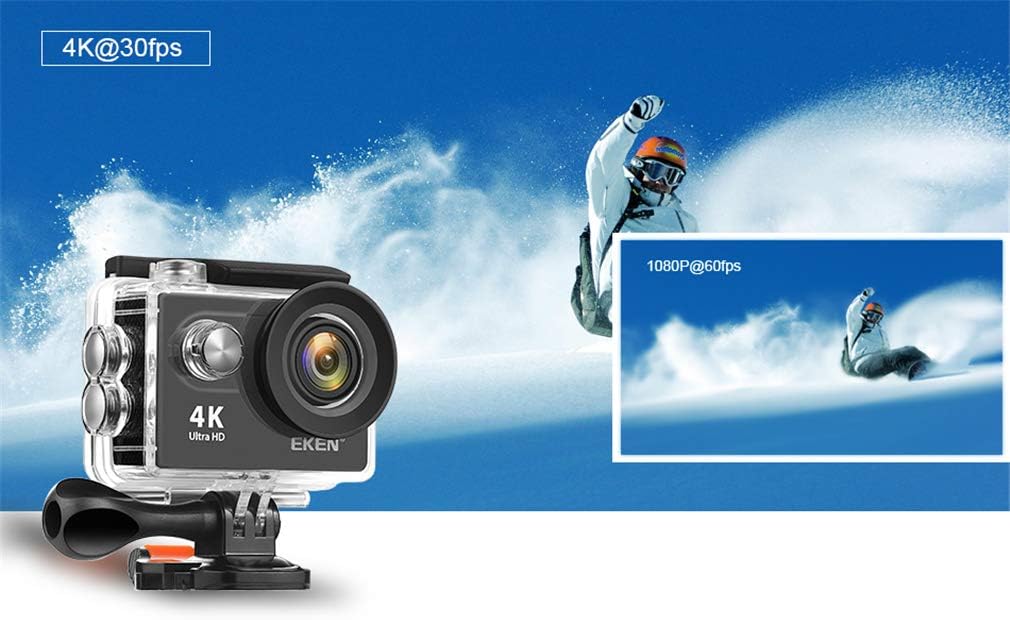
Image 2.1: The action camera enclosed in its waterproof housing, highlighting its 4K and 1080P video recording capabilities for various action shots.
2.5 Attaching Mounting Accessories
The camera comes with various mounts for different scenarios. Refer to the accessory guide for specific attachment instructions. Generally, mounts attach to the waterproof case or directly to the camera via a standard tripod screw mount.
3. கேமராவை இயக்குதல்
3.1 பவர் ஆன்/ஆஃப்
- பவர் ஆன்: திரை ஒளிரும் வரை பவர்/மோட் பட்டனை சில வினாடிகள் அழுத்திப் பிடிக்கவும்.
- பவர் ஆஃப்: திரை அணைக்கப்படும் வரை பவர்/மோட் பட்டனை மீண்டும் அழுத்திப் பிடிக்கவும்.
3.2 பயன்முறை தேர்வு
Press the Power/Mode button repeatedly to cycle through different modes:
- வீடியோ பயன்முறை: For recording video footage.
- புகைப்பட முறை: For taking still images.
- பின்னணி முறை: க்குviewing recorded videos and photos.
- அமைப்புகள் முறை: To adjust camera settings.
3.3 காணொளி பதிவு செய்தல் மற்றும் புகைப்படங்கள் எடுத்தல்
- வீடியோ பதிவு செய்ய: In Video Mode, press the Shutter/OK button to start recording. Press it again to stop. A red indicator light will usually flash during recording.
- புகைப்படம் எடுக்க: In Photo Mode, press the Shutter/OK button to capture an image.

Image 3.1: The action camera highlighting its 12-megapixel photo capability, suitable for capturing detailed images in various environments.
3.4 வைஃபை இணைப்பு
The camera can connect to your smartphone via Wi-Fi for remote control and file பரிமாற்றம்.
- அமைப்புகள் மெனு மூலம் கேமராவில் வைஃபையை இயக்கவும்.
- Download the dedicated camera app (refer to the camera's display or packaging for the app name) on your smartphone.
- உங்கள் ஸ்மார்ட்போனில், கேமராவின் வைஃபை நெட்வொர்க்குடன் இணைக்கவும் (SSID மற்றும் கடவுச்சொல் கேமரா திரையில் காட்டப்படும்).
- கேமராவை தொலைவிலிருந்து கட்டுப்படுத்த பயன்பாட்டைத் திறக்கவும், view வாழ்க footage, and download files.
3.5 ரிமோட் கண்ட்ரோலைப் பயன்படுத்துதல்
The 2.4G remote control allows for convenient operation from a distance.
- Ensure the remote control is paired with the camera (refer to the camera's settings for pairing instructions).
- Use the designated buttons on the remote to start/stop recording or take photos.
3.6 பட நிலைப்படுத்தல்
The camera features electronic image stabilization (EIS) to reduce blur and shakiness in your videos. This feature is typically enabled by default or can be toggled in the camera's video settings menu for smoother footage.
3.7 HDMI வெளியீடு
Connect the camera to an HDMI-compatible display (e.g., TV, monitor) using an HDMI cable (not included) to view your recordings on a larger screen.

Image 3.2: The action camera demonstrating its various features including 4K video, 12MP photos, waterproof capability, Wi-Fi, and remote control, shown in an active outdoor setting.
4. பராமரிப்பு
4.1 Cleaning the Camera and Case
- Use a soft, lint-free cloth to clean the camera body and lens. For stubborn smudges, a slightly damp துணியைப் பயன்படுத்தலாம், அதைத் தொடர்ந்து உலர்ந்த ஒன்றைப் பயன்படுத்தலாம்.
- Clean the waterproof case, especially the rubber seal, after each use, particularly after exposure to saltwater, sand, or dirt. Rinse with fresh water and allow to air dry.
- கடுமையான இரசாயனங்கள் அல்லது சிராய்ப்பு பொருட்களை சுத்தம் செய்ய பயன்படுத்த வேண்டாம்.
4.2 பேட்டரி பராமரிப்பு
- பயன்பாட்டில் இல்லாத போது பேட்டரிகளை குளிர்ந்த, உலர்ந்த இடத்தில் சேமிக்கவும்.
- பேட்டரிகளின் ஆயுளை நீட்டிக்க, அவற்றை முழுமையாக டிஸ்சார்ஜ் செய்வதைத் தவிர்க்கவும்.
- நீண்ட நேரம் சேமித்து வைத்தால், பேட்டரிகளை தோராயமாக 50% கொள்ளளவுக்கு சார்ஜ் செய்யவும்.
4.3 சேமிப்பு
When not in use, store the camera and accessories in a protective case in a cool, dry environment, away from direct sunlight and extreme temperatures.
5. சரிசெய்தல்
உங்கள் கேமராவில் சிக்கல்கள் ஏற்பட்டால், பின்வரும் பொதுவான தீர்வுகளைப் பார்க்கவும்:
| பிரச்சனை | சாத்தியமான காரணம் / தீர்வு |
|---|---|
| கேமரா இயக்கப்படவில்லை. | Battery is depleted or not inserted correctly. Charge the battery or re-insert it. |
| வீடியோ பதிவு செய்ய/புகைப்படங்கள் எடுக்க முடியாது. | Micro SD card is full, not inserted, or corrupted. Format the card (this will erase all data) or replace it. Ensure the camera is in the correct mode. |
| மோசமான வீடியோ/புகைப்பட தரம். | Lens may be dirty. Clean the lens. Ensure sufficient lighting. Check resolution settings. |
| வைஃபை இணைப்புச் சிக்கல்கள். | Ensure Wi-Fi is enabled on the camera and smartphone. Check app permissions. Restart both devices. |
| Water leakage in waterproof case. | Rubber seal is dirty, damaged, or case not closed properly. Clean the seal, inspect for damage, and ensure the latch is securely fastened. |
சிக்கல் தொடர்ந்தால், வாடிக்கையாளர் ஆதரவைத் தொடர்பு கொள்ளவும்.
6. விவரக்குறிப்புகள்
Detailed technical specifications for the SXFJF 4K Ultra HD WiFi Action Camera:
| அம்சம் | விவரக்குறிப்பு |
|---|---|
| பிராண்ட் | SXFJF |
| வீடியோ பிடிப்பு தீர்மானம் | 4K |
| ஃபிளாஷ் நினைவக வகை | மைக்ரோ எஸ்டி |
| வீடியோ பிடிப்பு வடிவம் | MP4 |
| திரை அளவு | 2 அங்குலம் |
| இணைப்பு தொழில்நுட்பம் | HDMI, Wi-Fi |
| சிறப்பு அம்சம் | போர்ட்டபிள், நீர்ப்புகா |
| கேம்கோடர் வகை | அதிரடி கேமரா |
| உள்ளிட்ட கூறுகள் | பேட்டரி |
| நீர் எதிர்ப்பு நிலை | நீர்ப்புகா |
| பட நிலைப்படுத்தல் | மின்னணு |
| படிவம் காரணி | கச்சிதமான |
| பேட்டரி சராசரி ஆயுள் | 60 நிமிடங்கள் (தோராயமாக) |
| லென்ஸ் வகை | பரந்த கோணம் |
| கவனம் வகை | ஆட்டோ ஃபோகஸ் |
| காட்சி தெளிவுத்திறன் அதிகபட்சம் | 4K UHD |
| இணக்கமான சாதனங்கள் | Smartphone, TV |
| வீடியோ தீர்மானம் | 4K |
| படப்பிடிப்பு முறைகள் | நேரமின்மை |
| படத்தின் தோற்ற விகிதம் | 16:9 |
| ஆதரிக்கப்பட்ட பட வடிவமைப்பு | JPEG |
| File வடிவம் | MP4 |
| பெரிதாக்கு | ஆப்டிகல் |
7. உத்தரவாதம் மற்றும் ஆதரவு
For warranty information, please refer to the documentation included with your purchase or contact the retailer. For technical support or further assistance, please reach out to SXFJF customer service through their official webஉங்கள் தயாரிப்புடன் வழங்கப்பட்ட வலைத்தளம் அல்லது தொடர்புத் தகவல்.