
1. முக்கியமான பாதுகாப்பு தகவல்
Please read all instructions carefully before installing or operating this appliance. Keep this manual for future reference.
- மின் பாதுகாப்பு: Installation must be performed by a qualified electrician in accordance with all local codes and ordinances. Ensure the appliance is properly grounded.
- சமையல் பாத்திரங்கள்: தூண்டல்-இணக்கமான சமையல் பாத்திரங்களை மட்டுமே பயன்படுத்தவும். காந்தம் இல்லாத சமையல் பாத்திரங்கள் வெப்பமடையாது.
- எரியும் ஆபத்து: The cooktop surface may remain hot after use due to residual heat. Do not touch the surface until it has cooled.
- குழந்தைகள்: சாதனத்தை இயக்கும் போதும், அது குளிர்விக்கப்படும் போதும் குழந்தைகளை அதிலிருந்து விலக்கி வைக்கவும்.
- எரியக்கூடிய பொருட்கள்: Do not store flammable materials or aerosols near the cooktop.
- மருத்துவ உள்வைப்புகள்: Individuals with pacemakers or similar medical implants should consult their doctor before using an induction cooktop.
- காற்றோட்டம்: Ensure adequate ventilation around the cooktop as specified in the installation instructions.
2. தயாரிப்பு முடிந்துவிட்டதுview
The ZLINE RCIND-24 is a 24-inch induction cooktop featuring four heating elements and intuitive touch controls. Its design prioritizes efficiency and safety in modern kitchens.
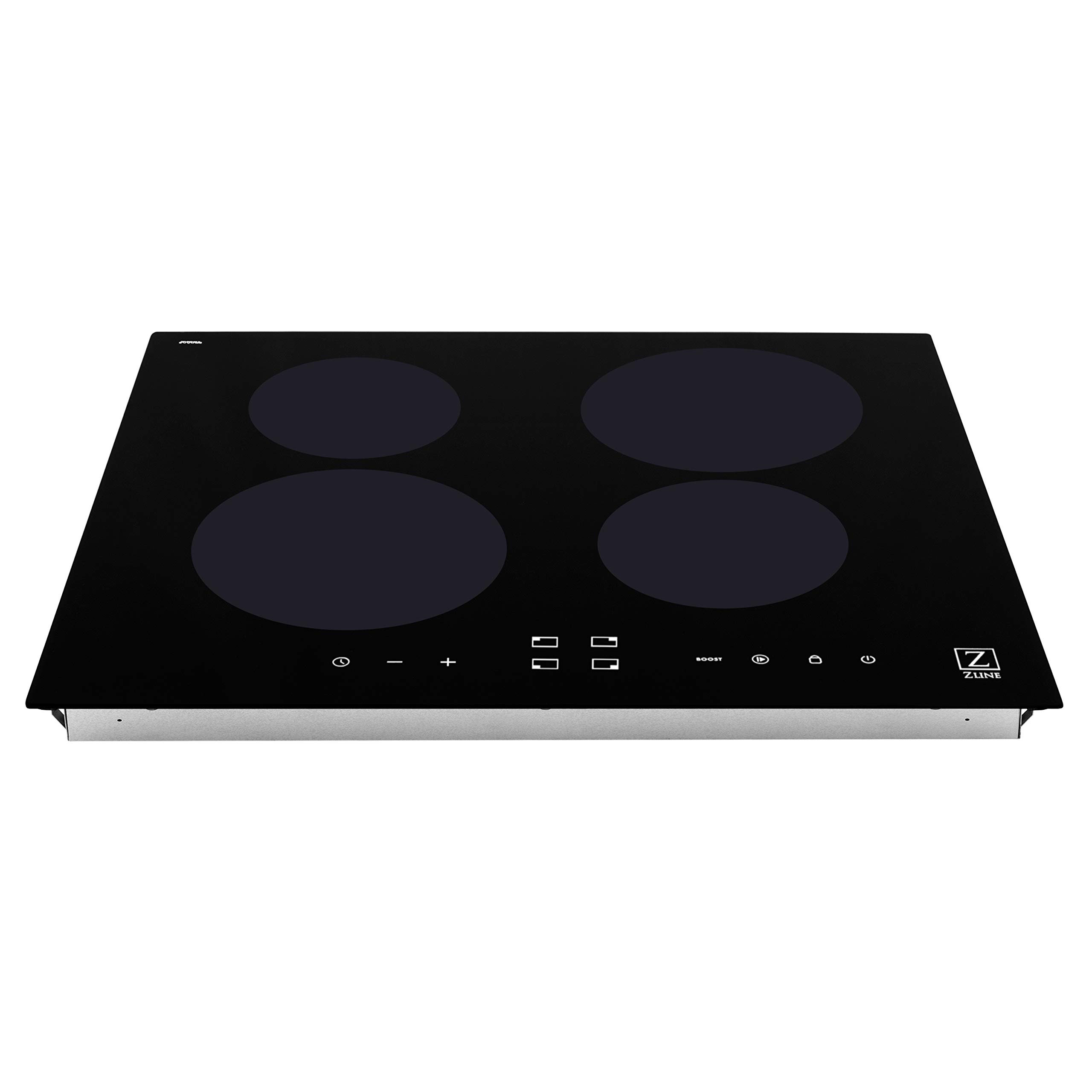
படம் 2.1: ஒட்டுமொத்தமாக view of the ZLINE 24 inch Induction Cooktop (RCIND-24).
முக்கிய அம்சங்கள்:
- பவர் பூஸ்ட் பயன்முறை: Provides maximum power to a cooking zone for a short period, ideal for rapid boiling.
- Power Sharing Mode: Allows for convenient heat transitions between cooking zones, optimizing power distribution.
- தொடு கட்டுப்பாடுகள்: White LED illuminated touch controls offer precise adjustment of heat and time settings.
- Independent Countdown Timers: Each cooking zone can have its own timer for precise cooking control.
- எஞ்சிய வெப்ப காட்டி: Visually alerts when a cooking zone is still hot to the touch after use.
- Control Locks: Manual and automatic control locks enhance safety by preventing accidental changes to settings.
- Automatic Power Level Control: Prevents overheating by automatically adjusting power levels.
- சூடான பயன்முறையை வைத்திருங்கள்: உணவை பரிமாறும் வெப்பநிலையில் பராமரிக்கிறது.
- ஆற்றல் திறன்: Superior induction technology provides a more heat and energy-efficient cooking experience.

படம் 2.2: விரிவானது view of the touch control panel with white LED indicators.
3. நிறுவல்
This induction cooktop is designed for drop-in installation. Proper electrical connection is critical for safe and efficient operation.
மின் தேவைகள்:
- சக்தி ஆதாரம்: மின்சாரம்
- தொகுதிtage: 240 வோல்ட்
- வாட்tage: 8160 வாட்ஸ்
- இணைப்பு: Hardwired - 3 Copper Wire Cable from Home Power Supply.
பரிமாணங்கள் மற்றும் கட்அவுட்:
Ensure your countertop cutout meets the specified dimensions for a proper fit.
- தயாரிப்பு பரிமாணங்கள் (D x W x H): 20.5" x 23.5" x 2.56" (521மிமீ x 597மிமீ x 65மிமீ)
- பொருளின் எடை: 28 பவுண்டுகள்

Figure 3.1: Dimensional drawing showing the cooktop's measurements for installation planning.
Refer to the detailed installation guide provided with your appliance for specific cutout dimensions and wiring diagrams. Always consult a professional for installation.
4. இயக்க வழிமுறைகள்
Familiarize yourself with the touch controls for optimal cooking performance.
அடிப்படை செயல்பாடு:
- பவர் ஆன்/ஆஃப்: சக்தி சின்னத்தைத் தொடவும் (U) சமையல் பாத்திரத்தை இயக்க அல்லது அணைக்க.
- சமையல் மண்டலத்தைத் தேர்ந்தெடுக்கவும்: Touch the corresponding zone selection button for the desired burner.
- வெப்ப அளவை சரிசெய்யவும்: Use the '+' and '-' symbols to increase or decrease the heat level (typically 1-9).
மேம்பட்ட செயல்பாடுகள்:
- பவர் பூஸ்ட் பயன்முறை: Select a cooking zone and then touch the 'BOOST' button. This provides maximum power for a short duration. The boost function will automatically deactivate after a set time or if the cooktop detects overheating.
- Power Sharing Mode: This feature automatically manages power distribution between linked cooking zones to prevent exceeding the total power limit.
- Independent Timers: Select a cooking zone, then touch the timer button. Use '+' and '-' to set the desired cooking time. The timer will count down and automatically turn off the selected zone when complete.
- சூடான பயன்முறையை வைத்திருங்கள்: Select a cooking zone and activate the 'Keep Warm' function (refer to specific icon in your manual). This maintains a low, consistent temperature.
- கட்டுப்பாட்டு பூட்டு: To prevent accidental operation, touch and hold the lock symbol (P) for a few seconds. Repeat to unlock.
பாதுகாப்பு குறிகாட்டிகள்:
- Residual Heat Indicator ('H'): An 'H' will appear on the display for a cooking zone that is still hot after being turned off. Do not touch the surface while 'H' is displayed.
- தானியங்கி பணிநிறுத்தம்: If a cooking zone is left on for an extended period without adjustment, it will automatically shut off as a safety measure.
5. பராமரிப்பு மற்றும் சுத்தம்
Regular cleaning helps maintain the appearance and performance of your induction cooktop.
- தினசரி சுத்தம்: Wipe the glass ceramic surface with a soft cloth and a mild detergent after each use, once the surface has cooled.
- பிடிவாதமான கறைகள்: For burnt-on food or stubborn stains, use a ceramic cooktop cleaner and a non-abrasive pad. Follow the cleaner's instructions.
- தவிர்க்கவும்: Do not use abrasive cleaners, scouring pads, or harsh chemicals, as these can scratch or damage the glass surface. Avoid spilling sugary substances on the hot cooktop, as they can cause pitting.
- கண்ட்ரோல் பேனல்: விளம்பரத்துடன் தொடு கட்டுப்பாட்டுப் பலகத்தைத் துடைக்கவும்.amp துணி. சமையல் மேற்பரப்பை இயக்குவதற்கு முன் அது உலர்ந்திருப்பதை உறுதி செய்யவும்.
6. சரிசெய்தல்
If you encounter issues with your cooktop, refer to the following common problems and solutions before contacting service.
| பிரச்சனை | சாத்தியமான காரணம் | தீர்வு |
|---|---|---|
| குக்டாப் ஆன் ஆகவில்லை | No power supply; Control lock activated | Check circuit breaker; Unlock controls by pressing and holding the lock button. |
| சமையல் மண்டலம் சூடாகவில்லை | Non-induction compatible cookware; Cookware not centered; Small cookware size | Use magnetic cookware; Center cookware on the zone; Use cookware with a base diameter appropriate for the zone. |
| காட்சி 'E' அல்லது பிழைக் குறியீட்டைக் காட்டுகிறது. | Internal fault; Overheating; Voltagஇ பிரச்சினை | Turn off the cooktop, wait a few minutes, then restart. If error persists, consult a qualified technician. |
| Cooktop makes humming noise | Normal operation of induction technology; Cookware vibration | இது சாதாரணமானது. சில சமையல் பாத்திரங்கள் மற்றவற்றை விட அதிக சத்தத்தை உருவாக்கக்கூடும். |
For issues not listed here or if solutions do not resolve the problem, please contact ZLINE customer support or a qualified service technician.
7. தொழில்நுட்ப விவரக்குறிப்புகள்
| விவரக்குறிப்பு | விவரம் |
|---|---|
| மாதிரி எண் | ஆர்சிஐஎன்டி -24 |
| பிராண்ட் | ZLINE சமையலறை மற்றும் குளியல் |
| நிறுவல் வகை | டிராப்-இன் |
| வெப்பமூட்டும் கூறுகளின் எண்ணிக்கை | 4 |
| பர்னர் வகை | தூண்டல் |
| கட்டுப்பாட்டு வகை | தொடவும் |
| ஹீட்டர் மேற்பரப்பு பொருள் | கண்ணாடி பீங்கான் |
| பொருள் | கண்ணாடி |
| நிறம் | கருப்பு |
| சக்தி ஆதாரம் | மின்சாரம் |
| தொகுதிtage | 240 வோல்ட் |
| வாட்tage | 8160 வாட்ஸ் |
| தயாரிப்பு பரிமாணங்கள் (அளவு x அளவு x அளவு) | 20.5" x 23.5" x 2.56" |
| பொருளின் எடை | 28 பவுண்டுகள் |
| உள்ளிட்ட கூறுகள் | கருவிகள் |
| சான்றிதழ்கள் | ETL Listed, ADA Compliant |
8. உத்தரவாதம் மற்றும் வாடிக்கையாளர் ஆதரவு
For warranty information, please refer to the warranty card included with your product or visit the official ZLINE Kitchen and Bath website. For technical assistance, parts, or service inquiries, please contact ZLINE customer support directly.
Always provide your product model number (RCIND-24) and serial number when contacting support to ensure efficient service.