
Logitech C505/C505e
Logitech C505/C505e HD Wired Business Webகேம் பயனர் கையேடு
Model: C505/C505e
1. ஓவர்view
The Logitech C505/C505e HD Wired Business Webcam is designed to enhance your video communication experience. It provides crisp, smooth, and colorful widescreen HD 720p video with a 60° diagonal field of view. தி webcam features fixed focus and automatic light correction, adapting to various lighting conditions. Its single, omnidirectional microphone incorporates noise-reduction technology, supporting clear conversations up to 3 meters away, even in noisy environments. The extra-long USB-A cable and universal clip offer flexible placement options on your computer or up to 7 feet away.
2. அமைவு வழிமுறைகள்
Setting up your Logitech C505/C505e webcam is a straightforward plug-and-play process. No additional software installation or charging is required.
- இணைக்கவும் Webகேம்: Plug the USB-A cable from the webcam into an available USB port on your desktop or laptop computer.
- நிலை Webகேம்: Use the universal clip to securely mount the webcam on your monitor, laptop screen, or place it on a flat surface. The extra-long cable allows for flexible positioning.
- என்பதைத் தேர்ந்தெடுக்கவும் Webகேம்: உங்கள் கணினி தானாகவே கண்டறிய வேண்டும் webcam. If you have multiple cameras or microphones, you may need to select the "Logitech C505/C505e" in your application's settings (e.g., video conferencing software, recording applications) or your operating system's device settings.

Image: The Logitech C505/C505e webcam easily clips onto a monitor for convenient placement.
3. இயக்குதல் Webகேமரா
Once connected, the Logitech C505/C505e is ready for use with most video conferencing and recording applications.
- வீடியோ தரம்: தி webcam delivers HD 720p video at 30 frames per second, providing clear visuals for your calls and recordings.
- புலம் View: ஒரு 60° மூலைவிட்ட புலம் view ensures you are framed appropriately without capturing excessive background.
- நிலையான கவனம்: The fixed focus lens maintains sharpness for subjects within its optimal range, simplifying operation.
- தானியங்கி ஒளி திருத்தம்: தி webcam automatically adjusts to the lighting conditions of your environment, helping to ensure you appear well-lit even in varying light. Optimal lighting conditions will yield the best video quality.
- ஒலிவாங்கி: The integrated omnidirectional microphone with noise-reduction technology is designed to capture your voice clearly from up to 3 meters away, minimizing background distractions.

Image: The Logitech C505/C505e provides HD 720p widescreen video for clear communication.
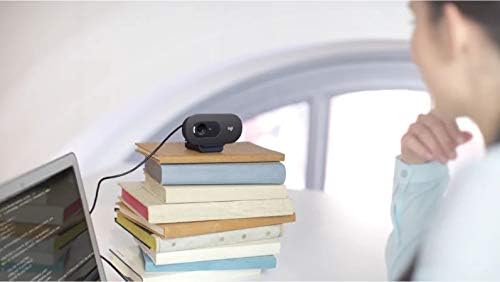
Image: Flexible placement options allow the webcam to be positioned on various surfaces.
4. பராமரிப்பு
To ensure optimal performance and longevity of your Logitech C505/C505e webcam, follow these simple maintenance guidelines:
- லென்ஸை சுத்தம் செய்தல்: மெதுவாக துடைக்கவும் webcam lens with a soft, lint-free cloth. Avoid using harsh chemicals or abrasive materials that could scratch the lens.
- சேமிப்பு: பயன்பாட்டில் இல்லாதபோது, சேமித்து வைக்கவும் webதீவிர வெப்பநிலை மற்றும் நேரடி சூரிய ஒளி படாத சுத்தமான, வறண்ட இடத்தில் கேமை வைக்கவும்.
- கேபிள் பராமரிப்பு: Avoid sharply bending or crimping the USB cable to prevent internal damage.
5. சரிசெய்தல்
If you encounter issues with your Logitech C505/C505e webcam, try the following troubleshooting steps:
- வீடியோ/ஆடியோ இல்லை:
- USB கேபிள் இரண்டிலும் பாதுகாப்பாக செருகப்பட்டுள்ளதா என்பதை உறுதிப்படுத்தவும் webகேம் மற்றும் உங்கள் கணினி.
- செருக முயற்சிக்கவும் webவேறு யூ.எஸ்.பி போர்ட்டில் கேம்.
- Check your application's settings (e.g., Zoom, Microsoft Teams) to confirm the Logitech C505/C505e is selected as the active camera and microphone.
- Verify your operating system's privacy settings allow applications to access the camera and microphone.
- மோசமான வீடியோ தரம்:
- உங்கள் சூழலில் போதுமான வெளிச்சத்தை உறுதி செய்யுங்கள். webcam performs best with good illumination.
- சுத்தம் செய்யவும் webமென்மையான துணியால் கேம் லென்ஸ்.
- Check for any obstructions in front of the lens.
- மோசமான ஆடியோ தரம்:
- உறுதி செய்யவும் webcam's microphone is selected in your application and system audio settings.
- Reduce background noise in your environment.
- Ensure you are within the 3-meter optimal range of the microphone.
- Webcam Not Recognized:
- உங்கள் கணினியை மறுதொடக்கம் செய்யுங்கள்.
- Check your computer's Device Manager (Windows) or System Information (macOS) to see if the webcam is listed. You may need to update or reinstall drivers, though typically the webcam is plug-and-play.
6. விவரக்குறிப்புகள்
| பிராண்ட் | லாஜிடெக் |
| மாதிரி எண் | Logitech C505/C505e |
| வீடியோ பிடிப்பு தீர்மானம் | 720p |
| வீடியோ தீர்மானம் | 720p |
| இணைப்பு தொழில்நுட்பம் | வயர்டு (USB-A) |
| கவனம் வகை | நிலையான கவனம் |
| Viewing கோணம் | 60 டிகிரி |
| ஒலிவாங்கி | Omnidirectional with Noise-Reduction |
| இயக்க முறைமை | Multiple (Windows 8 or later, macOS 10.10 or later, ChromeOS) |
| உள்ளமைக்கப்பட்ட ஊடகம் | USB Cable, Universal Clip |
| அம்சங்கள் | Automatic Light Correction, Low Light Performance |
7. உத்தரவாதம் மற்றும் ஆதரவு
For detailed warranty information and technical support, please visit the official Logitech support webதளம். நீங்கள் அங்கு ஓட்டுநர்கள், அடிக்கடி கேட்கப்படும் கேள்விகள் மற்றும் வாடிக்கையாளர் சேவைக்கான தொடர்புத் தகவலைக் காணலாம்.