
அறிமுகம்
Thank you for choosing the Opal Selfie Stick OP-Sel-BT-01. This manual provides essential information for the safe and effective use of your device. Please read it thoroughly before operation and retain it for future reference.
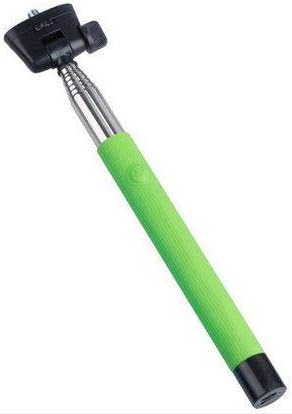
படம் 1: The Opal Selfie Stick OP-Sel-BT-01 in green, showing its extendable arm, phone holder, and comfortable grip.
தயாரிப்பு அம்சங்கள்
- நிறம்: பச்சை
- முக்கிய பொருள்: எஃகு
- அதிகபட்ச சுமை திறன்: 500 கிராம்
- இணைப்பு: வயர்லெஸ் (புளூடூத்)
- இணக்கமான அமைப்புகள்: Android 3.0 மற்றும் அதற்கு மேல், iOS 4.0 மற்றும் அதற்கு மேல்
அமைவு
- Unfold the Selfie Stick: Gently pull the phone holder section upwards to extend the stick.
- Adjust Phone Holder: ஃபோனைத் திறக்கவும்amp and securely place your smartphone within it. Ensure the phone is centered and stable. The clamp is designed to hold various phone sizes.
- பவர் ஆன்: Locate the power button (if applicable, usually on the handle) and press it to turn on the selfie stick. An indicator light may illuminate.
இயக்க வழிமுறைகள்
புளூடூத் இணைத்தல்
- Ensure the selfie stick is powered on and in pairing mode (indicator light may flash rapidly).
- On your smartphone, go to அமைப்புகள் > புளூடூத்.
- புளூடூத்தை இயக்கி, கிடைக்கக்கூடிய சாதனங்களைத் தேடுங்கள்.
- Select "Opal OP-Sel-BT-01" or a similar name from the list of devices.
- Once paired, the indicator light on the selfie stick may turn solid or turn off, indicating a successful connection.
புகைப்படங்கள்/வீடியோக்களை எடுத்தல்
- உங்கள் ஸ்மார்ட்போனின் கேமரா பயன்பாட்டைத் திறக்கவும்.
- செல்ஃபி ஸ்டிக்கை நீங்கள் விரும்பிய நீளத்திற்கு நீட்டவும்.
- Position your phone for the desired shot.
- Press the shutter button on the selfie stick handle to capture a photo or start/stop video recording.
பராமரிப்பு
- சுத்தம்: மென்மையான, உலர்ந்த துணியால் செல்ஃபி ஸ்டிக்கைத் துடைக்கவும். சிராய்ப்பு கிளீனர்கள் அல்லது கரைப்பான்களைப் பயன்படுத்த வேண்டாம்.
- சேமிப்பு: Store the device in a cool, dry place away from direct sunlight and extreme temperatures. Retract the stick fully before storage.
- பேட்டரி பராமரிப்பு: If the selfie stick has a rechargeable battery, ensure it is charged periodically even when not in use to maintain battery health.
சரிசெய்தல்
| பிரச்சனை | சாத்தியமான காரணம் | தீர்வு |
|---|---|---|
| தொலைபேசியுடன் இணைக்க முடியவில்லை | Selfie stick not in pairing mode; Bluetooth off on phone; battery low. | Ensure stick is on and in pairing mode. Turn phone's Bluetooth off/on. Charge the selfie stick. |
| Shutter button not working | Not paired; camera app settings. | Verify successful Bluetooth pairing. Check camera app settings for volume button shutter control. |
| Phone not stable in clamp | Phone not centered; clamp not fully secured. | Re-position phone to be centered. Ensure clamp is firmly gripping the phone. |
விவரக்குறிப்புகள்
- மாதிரி: OP-Sel-BT-01
- பிராண்ட்: ஓபல்
- நிறம்: பச்சை
- முக்கிய பொருள்: எஃகு
- அதிகபட்ச சுமை திறன்: 500 கிராம்
- இணைப்பு: வயர்லெஸ் (புளூடூத்)
- ஆதரிக்கப்படும் இயக்க முறைமைகள்: Android 3.0+, iOS 4.0+
- ASIN: B091DBB122
- முதலில் கிடைக்கும் தேதி: 30 மார்ச் 2021
உத்தரவாதம் மற்றும் ஆதரவு
For information regarding warranty coverage or technical support, please refer to the documentation included with your purchase or visit the official Opal webதளம். குறிப்பிட்ட உத்தரவாத விதிமுறைகள் பிராந்தியம் மற்றும் சில்லறை விற்பனையாளரைப் பொறுத்து மாறுபடலாம்.
பாதுகாப்பு தகவல்
- சாதனத்தை அதிக வெப்பநிலை, ஈரப்பதம் அல்லது நேரடி சூரிய ஒளியில் நீண்ட நேரம் வெளிப்படுத்த வேண்டாம்.
- குழந்தைகளுக்கு எட்டாத இடத்தில் வைக்கவும்.
- சாதனத்தை பிரிக்கவோ அல்லது மாற்றவோ முயற்சிக்காதீர்கள். இது உத்தரவாதத்தை ரத்து செய்து சேதத்தை ஏற்படுத்தக்கூடும்.
- Ensure your phone is securely fastened in the clamp before extending the stick.