
1. அறிமுகம்
நன்றி, நன்றி.asing the Generic B10 Hi-Fi Stereo Wireless Bluetooth Over-Ear Headphones. This manual provides essential information for the safe and efficient operation of your device. Please read it thoroughly before use and retain it for future reference.
2. தயாரிப்பு முடிந்துவிட்டதுview
The B10 headphones offer versatile audio playback options, including wireless Bluetooth connectivity, an integrated SD card reader, FM radio, and a wired audio input. They feature an over-ear design for comfort and include a built-in microphone for hands-free calls.
தொகுப்பு உள்ளடக்கம்:
- Generic B10 Over-Ear Headphones
- USB சார்ஜிங் கேபிள்
- 3.5மிமீ ஆடியோ கேபிள்
- பயனர் கையேடு
Headphone Diagram:
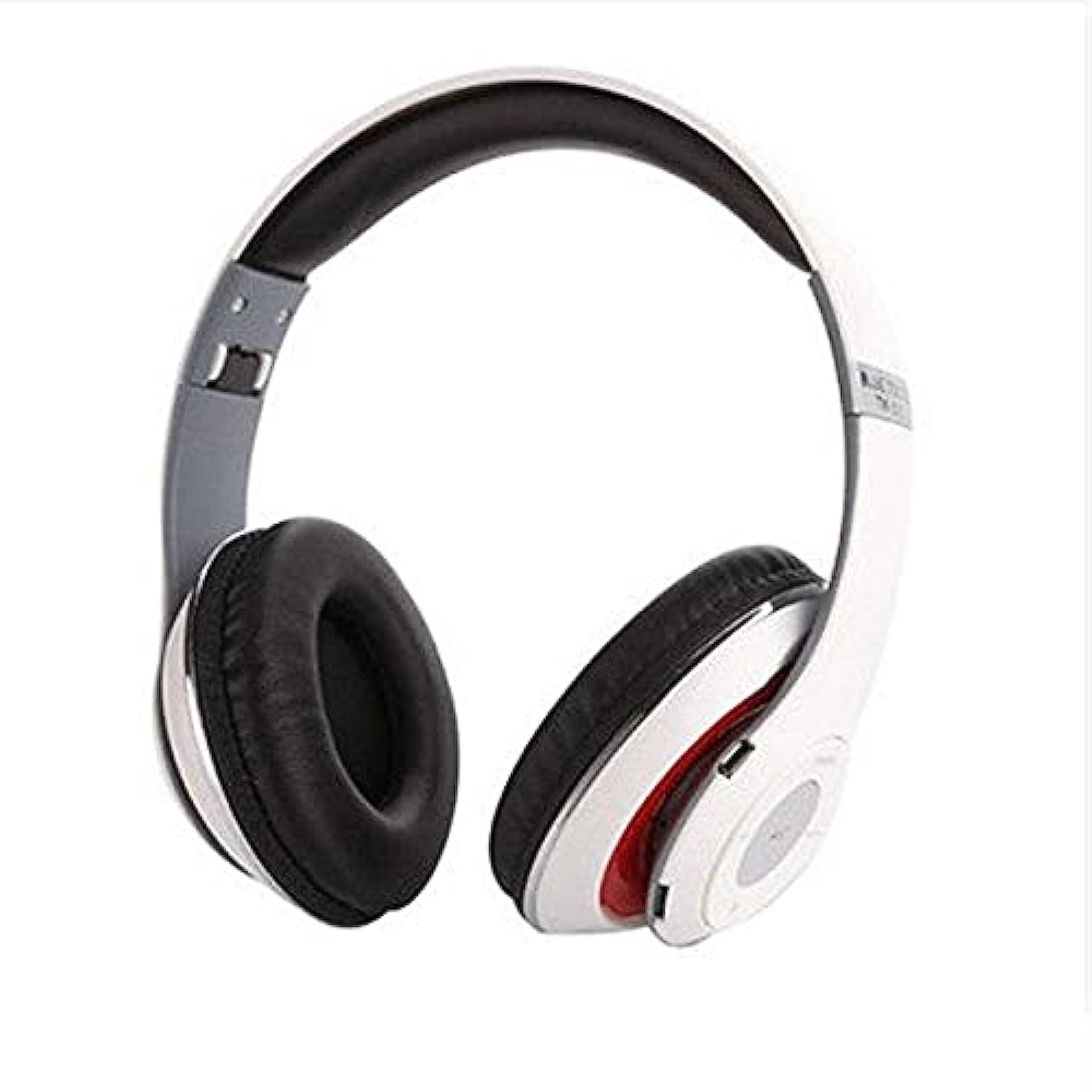
Image: The Generic B10 Over-Ear Headphones, featuring the adjustable headband, cushioned earcups, and visible control buttons on one earcup.
முக்கிய அம்சங்கள்:
- வயர்லெஸ் புளூடூத் இணைப்பு
- Built-in SD Card Reader for MP3 Playback
- Integrated FM Radio Tuner
- Wired Audio Input (3.5mm AUX)
- ஹேண்ட்ஸ்-ஃப்ரீ அழைப்பிற்கான உள்ளமைக்கப்பட்ட மைக்ரோஃபோன்
- சத்தம் தனிமைப்படுத்தல்
- Over-Ear Design for Comfort
3 அமைவு
3.1. ஹெட்ஃபோன்களை சார்ஜ் செய்தல்
- USB சார்ஜிங் கேபிளின் சிறிய முனையை ஹெட்ஃபோன்களில் உள்ள சார்ஜிங் போர்ட்டுடன் இணைக்கவும்.
- USB சார்ஜிங் கேபிளின் பெரிய முனையை USB பவர் அடாப்டருடன் (சேர்க்கப்படவில்லை) அல்லது கணினியின் USB போர்ட்டுடன் இணைக்கவும்.
- The LED indicator will illuminate, typically red, during charging.
- Once fully charged, the LED indicator will change color or turn off (refer to specific LED behavior in the specifications).
- சார்ஜிங் கேபிளைத் துண்டிக்கவும்.
குறிப்பு: For optimal battery life, fully charge the headphones before first use.
3.2. ஆன் / ஆஃப் செய்தல்
- பவர் ஆன் செய்ய: Press and hold the Power/Multi-function button for approximately 3-5 seconds until the LED indicator flashes and an audible prompt is heard.
- பவர் ஆஃப் செய்ய: Press and hold the Power/Multi-function button for approximately 3-5 seconds until the LED indicator turns off and an audible prompt is heard.
4. இயக்க வழிமுறைகள்
4.1. புளூடூத் இணைத்தல்
- ஹெட்ஃபோன்கள் அணைக்கப்பட்டுள்ளன என்பதை உறுதிப்படுத்தவும்.
- Press and hold the Power/Multi-function button for about 5-7 seconds until the LED indicator flashes red and blue alternately, indicating pairing mode.
- உங்கள் சாதனத்தில் புளூடூத்தை இயக்கவும் (ஸ்மார்ட்ஃபோன், டேப்லெட், கணினி).
- தேடுங்கள் available Bluetooth devices. The headphones will appear as "B10" or a similar name.
- Select "B10" to connect. Once paired, the LED indicator will typically flash blue slowly, and an audible confirmation will be heard.
- கடவுச்சொல் கேட்கப்பட்டால், "0000" ஐ உள்ளிடவும்.
4.2. SD கார்டு பிளேபேக்
- Insert a microSD card (TF card) with MP3 audio files into the SD card slot on the headphones. Ensure the card is inserted correctly until it clicks into place.
- The headphones will automatically switch to MP3 mode and begin playing music from the SD card.
- Use the 'Next Track' and 'Previous Track' buttons to navigate songs.
- Press the 'Play/Pause' button to pause or resume playback.
4.3. எஃப்எம் ரேடியோ பயன்முறை
- With the headphones powered on, press the 'Mode' button to switch to FM Radio mode.
- Press the 'Play/Pause' button once to automatically scan and save available FM stations. This process may take a few minutes.
- Use the 'Next Track' and 'Previous Track' buttons to switch between saved FM stations.
4.4. Wired Audio Mode (AUX)
- Connect one end of the 3.5mm audio cable to the AUX input port on the headphones.
- Connect the other end of the 3.5mm audio cable to the audio output jack of your device (e.g., smartphone, computer, MP3 player).
- ஹெட்ஃபோன்கள் தானாகவே வயர்டு பயன்முறைக்கு மாறும்.
- குறிப்பு: In wired mode, the headphone controls (volume, track, play/pause) may not function. Control playback directly from your connected device.
4.5. அழைப்பு செயல்பாடுகள்
- பதில் அழைப்பு: பவர்/மல்டி-ஃபங்க்ஷன் பட்டனை ஒரு முறை அழுத்தவும்.
- அழைப்பை முடிக்கவும்: அழைப்பின் போது பவர்/மல்டி-ஃபங்க்ஷன் பட்டனை ஒரு முறை அழுத்தவும்.
- அழைப்பை நிராகரி: Press and hold the Power/Multi-function button for approximately 2 seconds.
- கடைசி எண்ணை மீண்டும் அனுப்பவும்: பவர்/மல்டி-ஃபங்க்ஷன் பட்டனை இருமுறை அழுத்தவும்.
4.6. பொது கட்டுப்பாடுகள்
| பொத்தான் | செயல்பாடு |
|---|---|
| Power/Multi-function | Power On/Off, Play/Pause, Answer/End/Reject Call, Redial |
| தொகுதி + / அடுத்த ட்ராக் | Short press: Next Track/Station; Long press: Volume Up |
| தொகுதி - / முந்தைய பாடல் | Short press: Previous Track/Station; Long press: Volume Down |
| பயன்முறை (எம்) | Switch between Bluetooth, SD Card, and FM Radio modes |
5. பராமரிப்பு
- மென்மையான, உலர்ந்த துணியால் ஹெட்ஃபோன்களை சுத்தம் செய்யவும். சிராய்ப்பு கிளீனர்கள் அல்லது கரைப்பான்களைப் பயன்படுத்த வேண்டாம்.
- ஹெட்ஃபோன்களை அதிக வெப்பநிலை, ஈரப்பதம் அல்லது நேரடி சூரிய ஒளியில் வெளிப்படுத்துவதைத் தவிர்க்கவும்.
- ஹெட்ஃபோன்களை பயன்படுத்தாத போது குளிர்ந்த, உலர்ந்த இடத்தில் சேமிக்கவும்.
- Do not attempt to disassemble or modify the headphones, as this will void the warranty and may cause damage.
6. சரிசெய்தல்
| பிரச்சனை | சாத்தியமான தீர்வு |
|---|---|
| ஹெட்ஃபோன்கள் இயங்கவில்லை. | பேட்டரி சார்ஜ் செய்யப்பட்டுள்ளதா என்பதை உறுதிப்படுத்திக் கொள்ளுங்கள். USB கேபிளைப் பயன்படுத்தி ஒரு மின் மூலத்துடன் இணைக்கவும். |
| புளூடூத் வழியாக இணைக்க முடியாது. | Ensure headphones are in pairing mode (flashing red/blue). Turn off and on Bluetooth on your device. Move closer to the headphones. |
| ஹெட்ஃபோன்களிலிருந்து சத்தம் இல்லை. | Check volume levels on both headphones and connected device. Ensure headphones are correctly paired or connected via AUX cable. Check if the correct mode (Bluetooth, SD, FM) is selected. |
| SD card music not playing. | Ensure the SD card is inserted correctly and contains compatible MP3 files. Press the 'Mode' button to switch to SD card mode. |
| எஃப்எம் ரேடியோ வேலை செய்யவில்லை. | Ensure you are in FM mode. Perform an auto-scan for stations by pressing the Play/Pause button. Try in a location with better signal. |
7. விவரக்குறிப்புகள்
| அம்சம் | விவரம் |
|---|---|
| பிராண்ட் | பொதுவான |
| மாதிரி எண் | B10 |
| நிறம் | வெள்ளை |
| இணைப்பு தொழில்நுட்பம் | Wired/Wireless (Bluetooth) |
| காது வைப்பு | மேல் காது |
| படிவம் காரணி | மேல் காது |
| சத்தம் கட்டுப்பாடு | சத்தம் தனிமைப்படுத்தல் |
| ஒலிவாங்கி | ஆம் |
| பேட்டரி | Rechargeable (Included) |
| இணக்கமான சாதனங்கள் | All devices with Bluetooth or 3.5mm audio output |
| சிறப்பு அம்சங்கள் | இரைச்சல் ரத்து, மைக்ரோஃபோன் சேர்க்கப்பட்டுள்ளது |
| கட்டுப்பாட்டு வகை | தொகுதி கட்டுப்பாடு |
| கட்டுப்பாட்டு முறை | (பொத்தான்கள்) தொடவும் |
| நீர் எதிர்ப்பு நிலை | வாட்டர் ரெசிஸ்டண்ட் இல்லை |
8. பாதுகாப்பு தகவல்
- Do not use the headphones at high volume for extended periods to prevent hearing damage.
- Do not use the headphones while driving, cycling, or in situations where you need to hear ambient sounds.
- Keep the headphones away from water, moisture, and extreme temperatures.
- Dispose of the battery according to local regulations. Do not expose to fire or extreme heat.
- குழந்தைகளுக்கு எட்டாத இடத்தில் வைக்கவும்.
9. உத்தரவாதம் மற்றும் ஆதரவு
This product comes with a standard manufacturer's warranty. For warranty claims or technical support, please refer to the contact information provided at your point of purchase. Keep your proof of purchase for warranty validation.