
Moxee MT-T800
Moxee MT-T800 Tablet User Manual
Model: MT-T800 | Brand: Moxee
1. அறிமுகம்
Thank you for choosing the Moxee MT-T800 Tablet. This manual provides essential information to help you get started, understand the features, and maintain your device. Please read this manual carefully before using your tablet to ensure proper operation and to maximize its lifespan.
2. பாதுகாப்பு தகவல்
To prevent damage to your device or injury to yourself or others, please observe the following safety precautions:
- டேப்லெட்டை தீவிர வெப்பநிலை, நேரடி சூரிய ஒளி அல்லது அதிக ஈரப்பதத்திற்கு வெளிப்படுத்த வேண்டாம்.
- மாத்திரையை கீழே போடுவதையோ அல்லது கடுமையான தாக்கத்திற்கு ஆளாக்குவதையோ தவிர்க்கவும்.
- அங்கீகரிக்கப்பட்ட சார்ஜர்கள் மற்றும் துணைக்கருவிகளை மட்டுமே பயன்படுத்தவும்.
- டேப்லெட்டை நீங்களே பிரிக்கவோ அல்லது சரிசெய்யவோ முயற்சிக்காதீர்கள். தகுதிவாய்ந்த சேவை பணியாளர்களைப் பார்க்கவும்.
- மருத்துவ சாதனங்களிலிருந்து டேப்லெட்டை விலக்கி வைக்கவும், ஏனெனில் அது அவற்றின் செயல்பாட்டில் தலையிடக்கூடும்.
3. தொகுப்பு உள்ளடக்கங்கள்
பின்வரும் உருப்படிகளுக்கு பெட்டியை சரிபார்க்கவும்:
- Moxee MT-T800 Tablet
- USB சார்ஜிங் கேபிள்
- பவர் அடாப்டர்
- Case or Cover (if included with your specific package)
- விரைவு தொடக்க வழிகாட்டி
ஏதேனும் பொருட்கள் காணாமல் போயிருந்தாலோ அல்லது சேதமடைந்திருந்தாலோ, உங்கள் சில்லறை விற்பனையாளரைத் தொடர்பு கொள்ளவும்.
4. தயாரிப்பு முடிந்துவிட்டதுview
Familiarize yourself with the physical features of your Moxee MT-T800 Tablet.

படம் 4.1: ஒட்டுமொத்த view of the Moxee MT-T800 Tablet, showing both the front display and the textured back panel with the camera module.
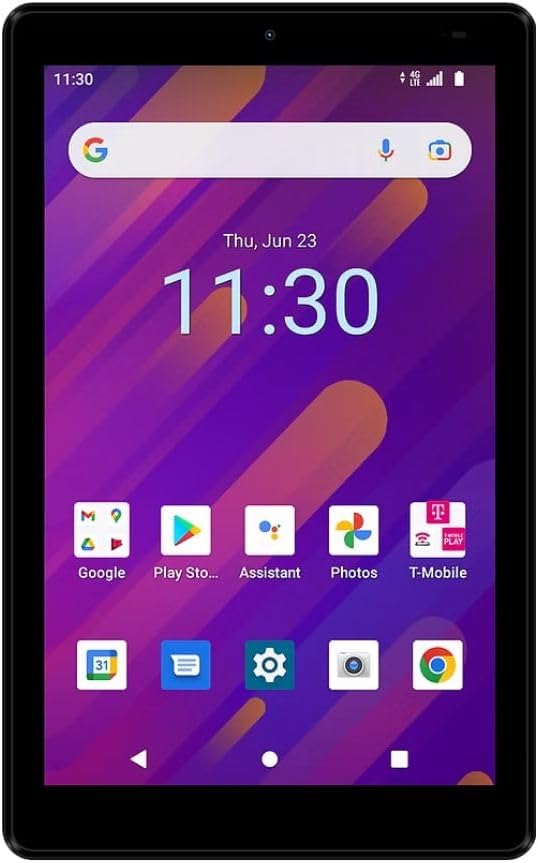
படம் 4.2: முன் view of the Moxee MT-T800 Tablet, displaying the 8-inch screen with the Android interface, including app icons and the date/time.

படம் 4.3: பின்புறம் view of the Moxee MT-T800 Tablet, highlighting the textured back panel, the 'moxee' logo, and the rear camera module with 'AI CAMERA' text.
4.1. இயற்பியல் கூறுகள்
- முன் கேமரா: Located above the display, used for video calls and selfies.
- காட்சி: 8-inch HD+ touchscreen for interaction and content viewing.
- பவர் பட்டன்: Typically on the side, used to turn the tablet on/off or wake/sleep the screen.
- தொகுதி பொத்தான்கள்: Usually adjacent to the power button, for adjusting audio levels.
- யூ.எஸ்.பி-சி போர்ட்: சார்ஜிங் மற்றும் டேட்டா பரிமாற்றத்திற்கு.
- பேச்சாளர்: ஆடியோ வெளியீட்டிற்கு.
- பின்புற கேமரா: Located on the back, used for taking photos and videos.
- சிம்/எஸ்டி கார்டு ஸ்லாட்: (Location may vary) For inserting a SIM card for mobile data and an SD card for expandable storage.
5 அமைவு
5.1. ஆரம்ப கட்டணம் வசூலித்தல்
Before first use, fully charge your tablet. Connect the USB charging cable to the tablet's USB-C port and the power adapter. Plug the adapter into a wall outlet. The charging indicator will show the charging status.
5.2. ஆன் / ஆஃப் செய்தல்
- பவர் ஆன் செய்ய: Press and hold the Power button until the Moxee logo appears on the screen.
- பவர் ஆஃப் செய்ய: Press and hold the Power button until the power options menu appears. Tap 'Power off' and confirm.
5.3. சிம் கார்டு மற்றும் SD கார்டு நிறுவல்
The Moxee MT-T800 supports 4G LTE connectivity and expandable storage.
- டேப்லெட்டின் பக்கத்தில் சிம்/எஸ்டி கார்டு ட்ரேயைக் கண்டறியவும்.
- Insert the SIM ejector tool (or a small paperclip) into the small hole next to the tray to open it.
- Place your Nano-SIM card and/or microSD card into the designated slots on the tray, ensuring correct orientation.
- தட்டில் சரியாகப் பொருந்தும் வரை மெதுவாக அதை டேப்லெட்டுக்குள் தள்ளுங்கள்.
5.4. ஆரம்ப அமைவு வழிகாட்டி
Upon first power-on, the tablet will guide you through the initial setup process. This includes selecting your language, connecting to a Wi-Fi network, setting up your Google account, and configuring basic settings.
6. டேப்லெட்டை இயக்குதல்
6.1. தொடுதிரை வழிசெலுத்தல்
The tablet's primary interaction is through its capacitive touchscreen:
- தட்டவும்: ஒரு பொருளைத் தேர்ந்தெடுக்க அல்லது ஒரு பயன்பாட்டைத் திறக்க.
- தொட்டுப் பிடி: சூழல் மெனுக்களை அணுக அல்லது உருப்படிகளை நகர்த்த.
- ஸ்வைப்: திரைகள் அல்லது பட்டியல்களை உருட்ட.
- பெரிதாக்க பின்ச்: படங்களை பெரிதாக்க அல்லது குறைக்க அல்லது web பக்கங்கள்.
6.2. Wi-Fi இணைப்பு
வைஃபை நெட்வொர்க்குடன் இணைக்க:
- செல்க அமைப்புகள் > நெட்வொர்க் & இணையம் > Wi-Fi.
- வைஃபையை இயக்கவும்.
- பட்டியலிலிருந்து உங்களுக்கு விருப்பமான நெட்வொர்க்கைத் தேர்ந்தெடுக்கவும்.
- கேட்கப்பட்டால் கடவுச்சொல்லை உள்ளிட்டு, பின்னர் தட்டவும் இணைக்கவும்.
6.3. Mobile Data (4G LTE)
If you have an active SIM card with a data plan (for T-Mobile/Sprint Only):
- செல்க அமைப்புகள் > நெட்வொர்க் & இணையம் > மொபைல் நெட்வொர்க்.
- உறுதி மொபைல் தரவு இயக்கப்பட்டுள்ளது.
- Configure APN settings if necessary, as provided by your carrier.
6.4. மொபைல் ஹாட்ஸ்பாட்
The tablet can act as a mobile hotspot, sharing its 4G LTE connection with up to 10 devices.
- செல்க அமைப்புகள் > நெட்வொர்க் & இணையம் > ஹாட்ஸ்பாட் & டெதரிங்.
- தட்டவும் வைஃபை ஹாட்ஸ்பாட்.
- நிலைமாற்று வைஃபை ஹாட்ஸ்பாட் அன்று.
- You can configure the hotspot name (SSID) and password in this menu.
6.5. கேமரா பயன்பாடு
டேப்லெட்டின் கேமராக்களைப் பயன்படுத்த:
- திற கேமரா விண்ணப்பம்.
- புகைப்படம் எடுக்க ஷட்டர் பொத்தானைத் தட்டவும்.
- கேமரா சுவிட்ச் ஐகானைப் பயன்படுத்தி முன் மற்றும் பின் கேமராக்களுக்கு இடையில் மாறவும்.
- வீடியோக்களைப் பதிவு செய்ய வீடியோ பயன்முறையைத் தேர்ந்தெடுக்கவும்.
6.6. புளூடூத் இணைப்பு
புளூடூத் சாதனங்களுடன் இணைக்க (எ.கா. ஹெட்ஃபோன்கள், ஸ்பீக்கர்கள்):
- செல்க அமைப்புகள் > இணைக்கப்பட்ட சாதனங்கள் > புளூடூத்.
- புளூடூத்தை இயக்கவும்.
- The tablet will scan for available devices. Select your device from the list to pair.
7. பராமரிப்பு
7.1. உங்கள் டேப்லெட்டை சுத்தம் செய்தல்
Use a soft, lint-free cloth to clean the screen and body of the tablet. Do not use abrasive cleaners or solvents.
7.2. பேட்டரி பராமரிப்பு
- பேட்டரியை அடிக்கடி முழுமையாக சார்ஜ் செய்வதைத் தவிர்க்கவும்.
- முழுமையாக சார்ஜ் ஆன பிறகு டேப்லெட்டை நீண்ட நேரம் சார்ஜருடன் இணைத்து வைக்க வேண்டாம்.
- நீண்ட நேரம் பயன்படுத்தப்படாவிட்டால், மாத்திரையை குளிர்ந்த, உலர்ந்த இடத்தில் சேமிக்கவும்.
7.3. மென்பொருள் புதுப்பிப்புகள்
உகந்த செயல்திறன் மற்றும் பாதுகாப்பை உறுதிசெய்ய, கணினி புதுப்பிப்புகளை தொடர்ந்து சரிபார்க்கவும். செல்க அமைப்புகள் > அமைப்பு > கணினி மேம்படுத்தல்.
7.4. சேமிப்பு மேலாண்மை
சேமிப்பிட இடத்தை விடுவிக்க, இவற்றைக் கவனியுங்கள்:
- பயன்படுத்தப்படாத பயன்பாடுகளை நிறுவல் நீக்குதல்.
- Deleting old photos and videos or moving them to cloud storage/SD card.
- Clearing cached data from apps (அமைப்புகள் > பயன்பாடுகள் மற்றும் அறிவிப்புகள் > பயன்பாட்டைத் தேர்ந்தெடுக்கவும் > சேமிப்பகம் & தற்காலிக சேமிப்பு > தேக்ககத்தை அழிக்கவும்).
8. சரிசெய்தல்
உங்கள் டேப்லெட்டில் சிக்கல்கள் ஏற்பட்டால், பின்வரும் தீர்வுகளை முயற்சிக்கவும்:
8.1. Tablet Will Not Turn On
- பேட்டரி சார்ஜ் செய்யப்பட்டுள்ளதா என்பதை உறுதிப்படுத்திக் கொள்ளுங்கள். சார்ஜரை இணைத்து, சில நிமிடங்கள் காத்திருந்து பவரை ஆன் செய்ய முயற்சிக்கவும்.
- கட்டாய மறுதொடக்கம் செய்ய பவர் பட்டனை குறைந்தது 10-15 வினாடிகள் அழுத்திப் பிடிக்கவும்.
8.2. Wi-Fi இணைப்பு இல்லை
- அமைப்புகளில் வைஃபை இயக்கப்பட்டுள்ளதை உறுதிசெய்யவும்.
- உங்கள் வைஃபை ரூட்டரை மறுதொடக்கம் செய்யுங்கள்.
- நெட்வொர்க்கை மறந்துவிட்டு மீண்டும் இணைக்கவும் (அமைப்புகள் > நெட்வொர்க் & இணையம் > Wi-Fi > நெட்வொர்க்கைத் தட்டவும் > மறந்துவிடு).
8.3. மெதுவான செயல்திறன்
- பின்னணியில் இயங்கும் பயன்படுத்தப்படாத பயன்பாடுகளை மூடு.
- Clear app caches and manage storage as described in Section 7.4.
- டேப்லெட்டை மறுதொடக்கம் செய்யுங்கள்.
8.4. சார்ஜிங் சிக்கல்கள்
- Ensure the charging cable and adapter are securely connected and undamaged.
- வேறு பவர் அவுட்லெட்டை முயற்சிக்கவும்.
- அசல் அல்லது சான்றளிக்கப்பட்ட இணக்கமான சார்ஜிங் பாகங்களை மட்டும் பயன்படுத்தவும்.
சிக்கல்கள் தொடர்ந்தால், வாடிக்கையாளர் ஆதரவைத் தொடர்புகொள்ளவும்.
9. விவரக்குறிப்புகள்
| அம்சம் | விவரம் |
|---|---|
| மாதிரி பெயர் | MT-T800 |
| காட்சி | 8-inch HD+ (1280 x 800) |
| இயக்க முறைமை | ஆண்ட்ராய்டு 10 |
| செயலி | Octa-Core Processor (Qualcomm Chipset) |
| GPU | அட்ரினோ 505 |
| ரேம் | 3 ஜிபி |
| உள் சேமிப்பு | 32 ஜிபி |
| விரிவாக்கக்கூடிய சேமிப்பு | ஆம் (மைக்ரோ எஸ்.டி) |
| பின்புற கேமரா | 5 எம்.பி |
| முன் கேமரா | 5 எம்.பி |
| வயர்லெஸ் இணைப்பு | Wi-Fi (802.11g), Bluetooth, 4G LTE (T-Mobile/Sprint Only) |
| மொபைல் ஹாட்ஸ்பாட் | 10 சாதனங்கள் வரை ஆதரிக்கிறது |
| பரிமாணங்கள் (LxWxH) | 8.57" x 4.89" x 0.35" (Product) / 6 x 4 x 8 inches (Shipping) |
| எடை | 14.3 அவுன்ஸ் |
| நிறம் | கருப்பு |
| பேட்டரி | 1 லித்தியம் அயன் பேட்டரி தேவை |
10. உத்தரவாதம் மற்றும் ஆதரவு
This Moxee MT-T800 Tablet is covered by a limited warranty. For specific warranty terms and conditions, please refer to the documentation provided at the time of purchase or contact your retailer. For technical support, troubleshooting assistance, or service inquiries, please visit the official Moxee support webதளம் அல்லது அவர்களின் வாடிக்கையாளர் சேவையை தொடர்பு கொள்ளவும்.
Ask a question about this manual
Ask about setup, troubleshooting, compatibility, parts, safety, or missing instructions. Manuals+ will review the question and use this page’s manual context to help answer it.