
1. தயாரிப்பு முடிந்துவிட்டதுview
The Elitech RCW-3200-TH is a wireless data collector designed for temperature and humidity monitoring. It operates as part of the RCW-3000 split network monitoring system, utilizing various communication technologies such as LoRa, 4G, Wi-Fi, and Ethernet. This system comprises wireless data collectors (like the RCW-3200-TH), gateways (RCW-3000), a cloud platform, and a mobile application.
The RCW-3200-TH sensor can be flexibly deployed in various monitoring locations. The RCW-3000 gateway facilitates data upload to the cloud platform via 4G, Wi-Fi, or Ethernet. This integrated system enables remote data viewing, historical data querying, and remote alarm notifications through the cloud platform and mobile application.
The RCW-3000 network monitoring system is suitable for applications in large-scale cold storage facilities, shaded storage areas, hospitals, and fresh produce supermarkets.

Figure 1: Elitech RCW-3200 sensors deployed in a warehouse, communicating with an RCW-3000 gateway. The system supports up to 100 sensors with a 1-minute upload interval.
2 முக்கிய அம்சங்கள்
- வயர்லெஸ் இணைப்பு: Eliminates the need for extensive wiring, simplifying installation. Supports wireless data transmission up to 1000 meters in visible distance.
- நீட்டிக்கப்பட்ட பேட்டரி ஆயுள்: Equipped with a 3200mAh rechargeable lithium battery, providing over 12 months of operation with a 10-minute or 3-minute upload interval.
- பல தொடர்பு விருப்பங்கள்: Offers flexible 4G and Wi-Fi connectivity, allowing adaptation to various environmental communication requirements.
- அலாரம் அறிவிப்புகள்: Supports email, SMS, and mobile application alarm notifications. The Elitech App (available for iOS and Android) enables remote parameter settings and device management.
- Cloud Data Service: The standard plan provides email alerts, remote settings, and 30 days of data review and storage. Advanced and professional plans offer extended data storage (3-5 years), data export, and user management.
3 சாதன தளவமைப்பு
Familiarize yourself with the components of the RCW-3200-TH sensor:

படம் 2: முன் view of the RCW-3200-TH device components.
- சார்ஜிங் காட்டி: சார்ஜிங் நிலையைக் குறிக்கிறது.
- நிலை காட்டி: Displays device operational status.
- LCD திரை: Shows real-time temperature, humidity, time, and logging status.
- பவர் பட்டன்: Used to power the device on or off.
- அடைப்புக்குறி: சாதனத்தை பொருத்துவதற்கு.
- உள்ளமைந்த சென்சார்: ஒருங்கிணைந்த வெப்பநிலை மற்றும் ஈரப்பதம் சென்சார்.
- யூனிட் ஸ்விட்ச் பட்டன்: Toggles between Celsius (°C) and Fahrenheit (°F).
- USB இடைமுகம்: Micro USB port for charging and data export.
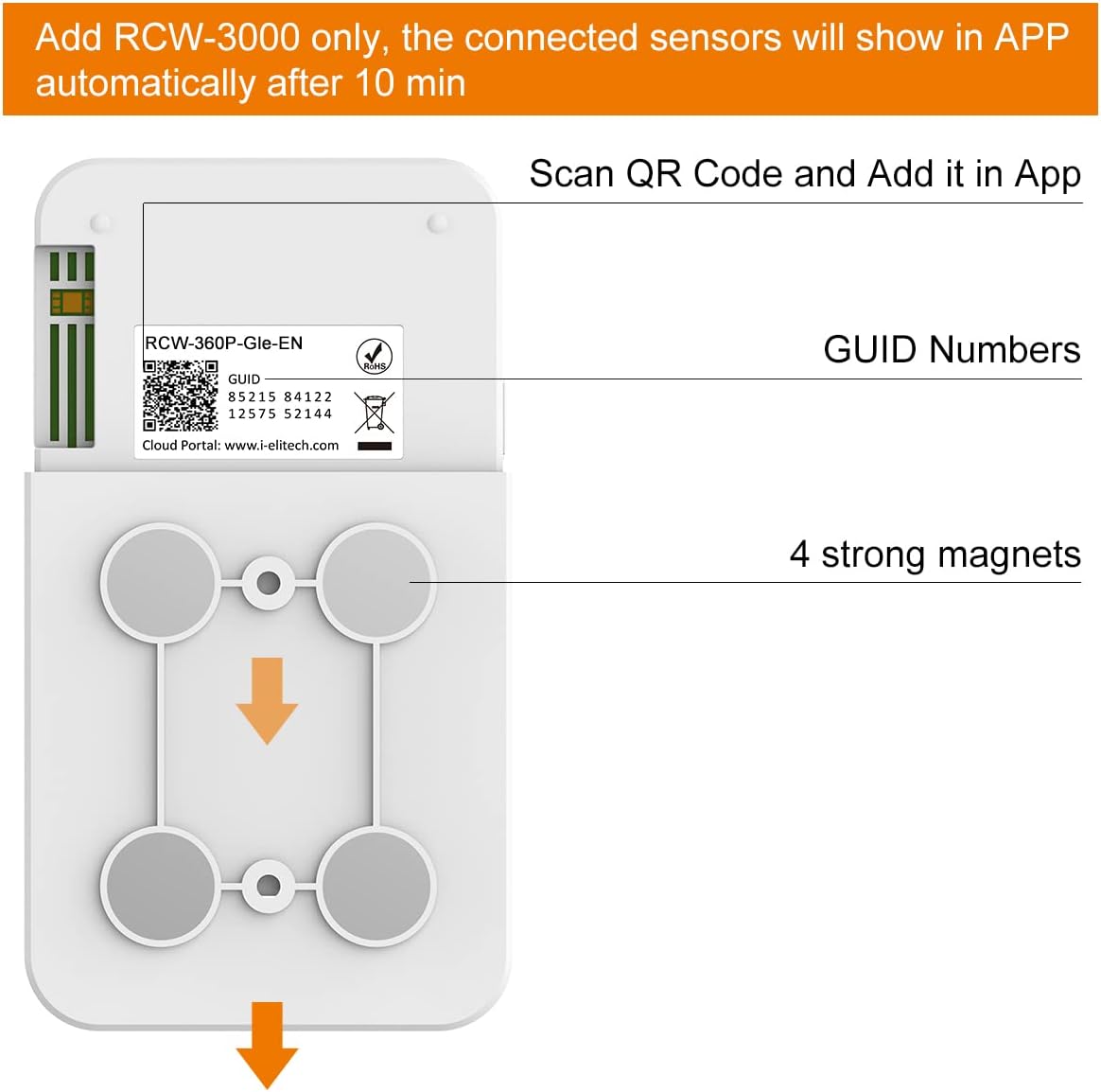
படம் 3: பின் view of the RCW-3200-TH device, showing the QR code for app integration and magnetic mounts.
- க்யு ஆர் குறியீடு: Used for scanning and adding the device to the mobile application.
- GUID Numbers: Unique identification numbers for the device.
- வலுவான காந்தங்கள்: Four integrated magnets for secure mounting on metallic surfaces.
4. அமைவு வழிமுறைகள்
4.1 சாதனத்தை இயக்குதல்
- Locate the Power Button on the side of the RCW-3200-TH device.
- LCD திரை ஒளிரும் வரை பவர் பட்டனை அழுத்திப் பிடிக்கவும்.
- Once powered on, the RCW-3200-TH will automatically attempt to connect to the RCW-3000 gateway. Ensure your RCW-3000 gateway is powered on and configured.

Figure 4: Location of the Power Button on the RCW-3200-TH.
4.2 பயன்பாட்டு ஒருங்கிணைப்பு
To integrate the sensor with the Elitech iCold cloud platform and mobile app:
- Ensure the RCW-3000 gateway is set up and connected to the internet.
- Download the Elitech iCold mobile application from your device's app store (iOS or Android).
- பயன்பாட்டைத் திறந்து ஒரு கணக்கை உருவாக்கவும் அல்லது உள்நுழையவும்.
- Navigate to the device management section within the app.
- Select the option to add a new device. The app will prompt you to scan a QR code.
- Scan the QR code located on the back of your RCW-3200-TH device (refer to Figure 3).
- After scanning, the connected sensors should appear in the app automatically within approximately 10 minutes, provided the gateway is active and the sensor is powered on and within range.
4.3 சாதனத்தை ஏற்றுதல்
The RCW-3200-TH features four strong magnets on its back for easy mounting. Simply place the device on any suitable metallic surface. Ensure the device is positioned to allow for optimal signal transmission to the RCW-3000 gateway.
5. இயக்க வழிமுறைகள்
5.1 Reading Data on the LCD Screen
The LCD screen displays real-time temperature and humidity readings, along with other status indicators such as battery level and signal strength.
5.2 வெப்பநிலை அலகுகளை மாற்றுதல்
Press the Unit Switch Button (labeled °C/°F) on the front of the device to toggle between Celsius and Fahrenheit temperature displays.
5.3 Data Logging and Upload Intervals
The device logs data at a default interval of 5 minutes, which is adjustable from 1 to 1440 minutes. Alarm log intervals are adjustable from 1 to 1440 minutes, with a default of 2 minutes. These settings can typically be configured remotely via the Elitech iCold cloud platform or mobile application.
5.4 Remote Monitoring via App/Cloud
Once the device is connected to the RCW-3000 gateway and integrated with the Elitech iCold platform, you can:
- View real-time data from multiple sensors.
- Access historical data and generate reports.
- Set up alarm thresholds and receive notifications via email, SMS, or app push.
- Adjust device parameters remotely.
6. பராமரிப்பு
6.1 பேட்டரியை சார்ஜ் செய்தல்
The RCW-3200-TH is equipped with a 3200mAh rechargeable lithium battery. When the battery level is low, connect the device to a 5V/1A power source using a Micro USB cable. The charging indicator will show the charging status.
6.2 சுத்தம் செய்தல்
Wipe the device exterior with a soft, dry cloth. Do not use abrasive cleaners or solvents, as these may damage the device. Ensure no liquids enter the USB port or sensor openings.
7. சரிசெய்தல்
- சாதனம் இயக்கப்படவில்லை: Ensure the battery is charged. Connect to a power source via Micro USB.
- No data in app/cloud: Verify the RCW-3200-TH is powered on and within range of the RCW-3000 gateway. Check the gateway's internet connection (4G/Wi-Fi/Ethernet). Ensure the device has been correctly added to the app by scanning the QR code.
- தவறான அளவீடுகள்: Ensure the sensor is not obstructed and is placed in an area with proper air circulation. Avoid placing it near heat sources or direct sunlight.
- Poor signal strength: Reposition the RCW-3200-TH or the RCW-3000 gateway to improve signal reception. Avoid physical obstructions between the sensor and gateway.
8. தொழில்நுட்ப விவரக்குறிப்புகள்
| விவரக்குறிப்பு | மதிப்பு |
|---|---|
| மாதிரி எண் | RCW-3200-TH |
| வெப்பநிலை அளவீட்டு வரம்பு | -20~50℃ |
| ஈரப்பதத்தை அளவிடும் வரம்பு | 0~99%RH |
| பதிவு இடைவெளி | 1~1440 min (adjustable, 5 min by default) |
| Alarm Log Interval | 1~1440 min (adjustable, 2 min by default) |
| சேமிப்பு திறன் | 32,000 தரவு புள்ளிகள் |
| Charging/Data Export | மைக்ரோ USB |
| வேலை அதிர்வெண் | 470~510 MHz ISM Frequency Band |
| பேட்டரி திறன் | 3200mAh ரிச்சார்ஜபிள் லித்தியம் பேட்டரி |
| ஆற்றல் உள்ளீடு | 5V/1A |
| பாதுகாப்பு தரம் | IP65 |
| பரிமாணங்கள் | 110 x 70 x 18 மிமீ (4.33 x 2.76 x 0.71 அங்குலம்) |
| எடை | 226.8 கிராம் |
| பேட்டரிகள் சேர்க்கப்பட்டுள்ளது | ஆம் (1 லித்தியம் அயன் பேட்டரி) |
9. ஆதரவு
For technical assistance or support, Elitech offers 24/7 US Technician Support via email and phone. Please refer to the Elitech official webதொடர்பு விவரங்களுக்கு தளம்.