
அறிமுகம்
This manual provides essential information for setting up, operating, and maintaining your NiPoGi Mini PC Stick T6 PRO 6-128. Please read it carefully before using the device to ensure optimal performance and longevity. The NiPoGi Mini PC Stick is a compact and powerful micro desktop computer designed for various tasks, including web browsing, media consumption, office work, and light gaming.
தொகுப்பு உள்ளடக்கங்கள்
தொகுப்பில் அனைத்து பொருட்களும் உள்ளதா என சரிபார்க்கவும்:
- 1 x NiPoGi Mini PC Stick
- 1 x பவர் அடாப்டர்
- 1 x HDMI நீட்டிப்பு கேபிள்
- 1 x பயனர் கையேடு
- 1 x VESA Mount Bracket
தயாரிப்பு முடிந்துவிட்டதுview
The NiPoGi Mini PC Stick T6 PRO 6-128 is a highly portable and efficient computing solution. Its compact design allows it to be easily carried for travel or business. It features a robust cooling system and a variety of connectivity options.

படம்: முடிந்துவிட்டதுview of the NiPoGi Mini PC Stick, highlighting its various ports including USB 3.0, HDMI, and Ethernet, along with the power button.
முக்கிய அம்சங்கள்:
- இயக்க முறைமை: Pre-installed Windows 10 Pro (upgradeable to Windows 11).
- செயலி: Intel Celeron J4125 Quad-Core (up to 2.7 GHz).
- நினைவகம்: 6 ஜிபி DDR4 ரேம்.
- சேமிப்பு: 128GB eMMC.
- கிராபிக்ஸ்: Intel UHD Graphics 600 with 4K UHD @60Hz support via HDMI 2.0.
- இணைப்பு: Dual-Band Wi-Fi (2.4G/5G), Gigabit Ethernet, Bluetooth 4.2.
- துறைமுகங்கள்: 2x USB 3.0 ports, 1x HDMI port, 1x Gigabit Ethernet port.
- சிறப்பு அம்சங்கள்: Supports Wake on LAN, PXE, Auto Power On, RTC Wake.

படம்: The compact size of the Mini PC Stick, measuring approximately 4.7 x 1.9 x 0.7 inches (12 x 5 x 1.8 cm).
குளிரூட்டும் அமைப்பு:
The device incorporates a built-in fan designed for rapid heat dissipation and low noise operation, ensuring stable performance during extended use.
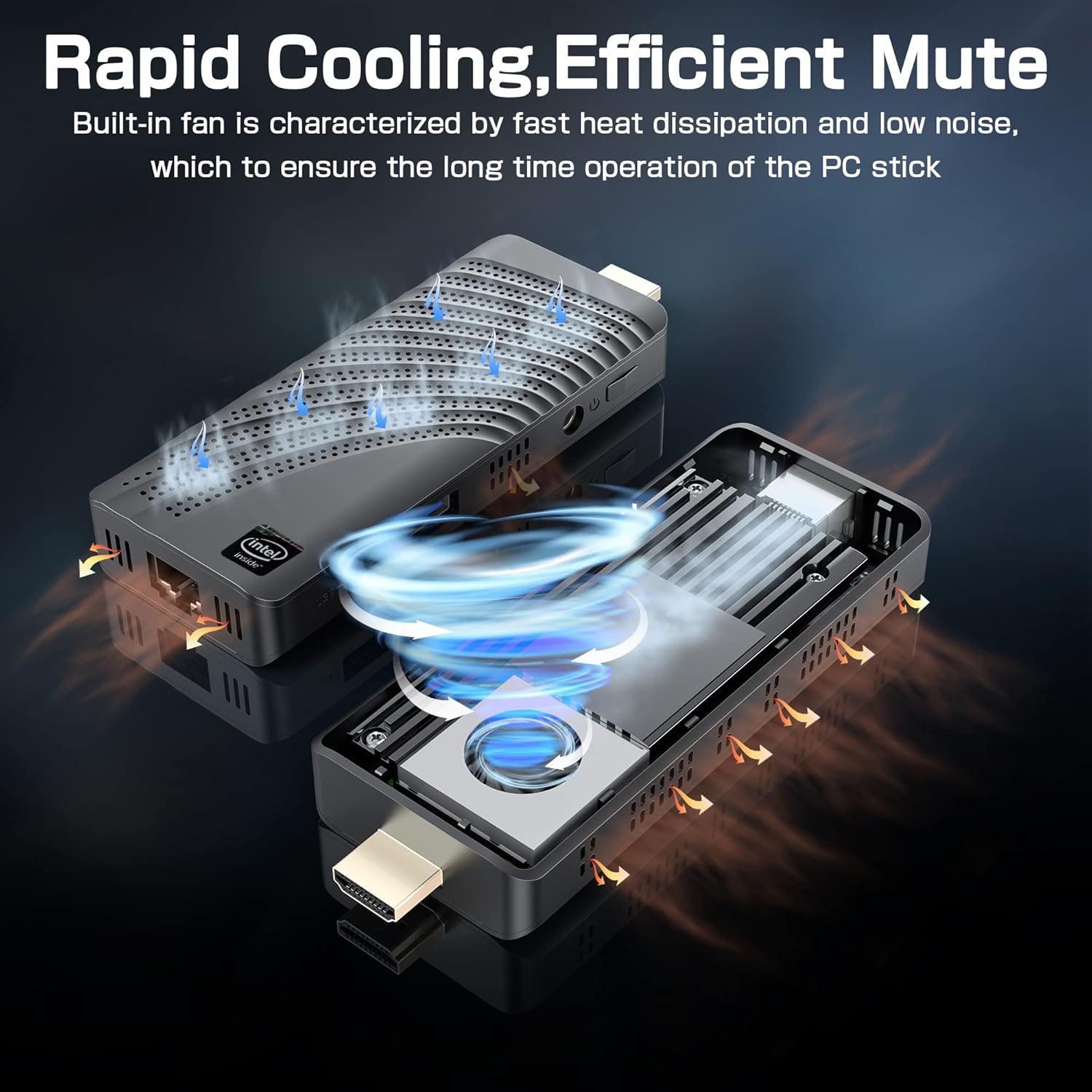
படம்: An illustration showing the internal fan design and airflow for efficient cooling within the Mini PC Stick.
அமைவு வழிகாட்டி
Follow these steps to set up your NiPoGi Mini PC Stick:
- காட்சிப்படுத்தலுடன் இணைக்கவும்: Plug the Mini PC Stick directly into an HDMI port on your monitor or TV. If space is limited, use the provided HDMI extension cable.

படம்: A visual guide demonstrating how to connect the Mini PC Stick to a monitor using the HDMI port, with an option to use an extension cable.
- பவர் இணைக்கவும்: Connect the power adapter to the DC-in port on the Mini PC Stick and then plug it into a power outlet.
- சாதனங்களை இணைக்கவும்: Connect your USB keyboard and mouse to the available USB 3.0 ports. Alternatively, pair Bluetooth devices (keyboard, mouse, speakers) after initial setup.
- பவர் ஆன்: Press the power button on the side of the Mini PC Stick. The device will boot up, and the Windows 10 Pro operating system will load.
- ஆரம்ப விண்டோஸ் அமைப்பு: மொழி, பகுதி, நெட்வொர்க் இணைப்பு மற்றும் பயனர் கணக்கு உருவாக்கம் உள்ளிட்ட Windows 10 Pro அமைப்பை முடிக்க திரையில் உள்ள வழிமுறைகளைப் பின்பற்றவும்.
இயக்க வழிமுறைகள்
பிணைய இணைப்பு:
- வைஃபை: The Mini PC Stick supports dual-band 2.4G/5G Wi-Fi. During Windows setup or via network settings, connect to your preferred wireless network.
- ஈதர்நெட்: For a stable wired connection, plug an Ethernet cable into the Gigabit Ethernet port on the device.

படம்: Icons representing Dual-band WiFi and Gigabit Ethernet connectivity options for the Mini PC Stick.
புளூடூத் சாதனங்கள்:
The Mini PC Stick features Bluetooth 4.2, allowing connection to various peripherals such as keyboards, mice, and speakers. Access Bluetooth settings in Windows to pair new devices.

படம்: The Mini PC Stick demonstrating its Bluetooth 4.2 compatibility with over 10 types of devices, including monitors, TVs, speakers, and various input devices.
4K UHD Output:
The device supports 4K UHD resolution at 60Hz via its HDMI 2.0 port, providing a clear and smooth visual experience for compatible displays.

படம்: A visual representation of the advanced image decoding and processing techniques, showcasing smooth and natural 4K HD picture quality.
மேம்பட்ட அம்சங்கள்:
- லேனில் எழுந்திரு: Allows the device to be powered on remotely over a network.
- PXE துவக்கம்: Enables booting from a network server.
- ஆட்டோ பவர் ஆன்: Configures the device to automatically power on when connected to power.
- ஆர்டிசி விழிப்பு: Schedules the device to wake up at a specific time.
These features can typically be configured in the BIOS settings. Refer to the Windows documentation for specific instructions on accessing and modifying these settings.
பராமரிப்பு
- சுத்தம்: Use a soft, dry cloth to clean the exterior of the device. Avoid liquid cleaners. Ensure ventilation holes are free from dust to maintain optimal cooling.
- மென்பொருள் புதுப்பிப்புகள்: Regularly check for and install Windows updates to ensure system stability, security, and performance.
- சுற்றுச்சூழல் நிலைமைகள்: Operate the Mini PC Stick in a well-ventilated area, away from direct sunlight, heat sources, and excessive moisture.
சரிசெய்தல்
காட்சி இல்லை:
- Ensure the HDMI cable is securely connected to both the Mini PC Stick and the display.
- Verify that the display is set to the correct HDMI input source.
- Try a different HDMI cable or display if possible.
சக்தி இல்லை:
- Check if the power adapter is correctly plugged into the device and a working power outlet.
- Ensure the power button has been pressed.
- வேறு பவர் அவுட்லெட்டை முயற்சிக்கவும்.
நெட்வொர்க் இணைப்பு சிக்கல்கள்:
- வைஃபை: Check if Wi-Fi is enabled in Windows settings. Restart your router. Ensure you are within range of your Wi-Fi network.
- ஈதர்நெட்: Verify the Ethernet cable is properly connected. Check your router/modem status.
மெதுவான செயல்திறன்:
- பின்னணியில் இயங்கும் தேவையற்ற பயன்பாடுகளை மூடு.
- Ensure the device has adequate ventilation and is not overheating.
- Run Windows updates and disk cleanup.
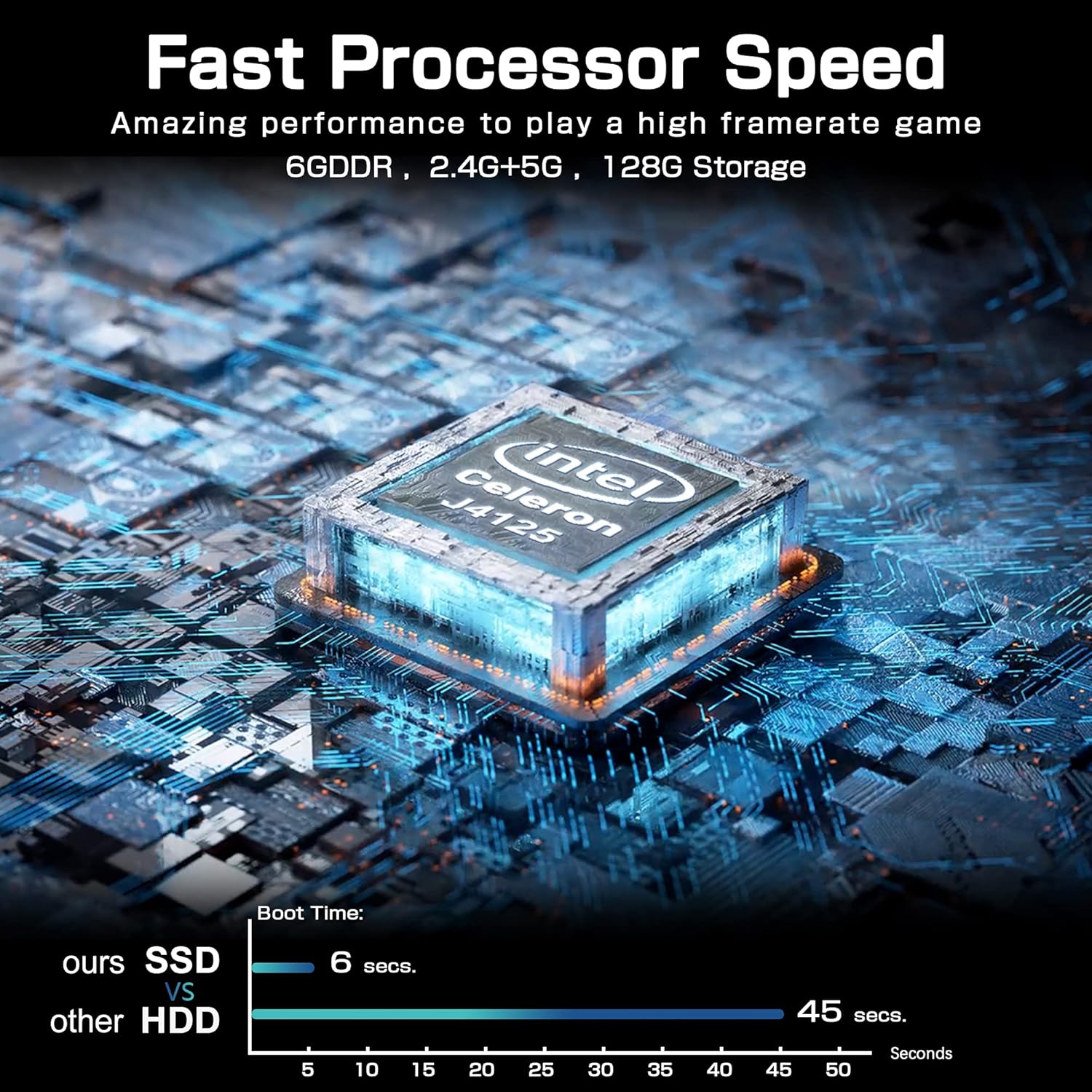
படம்: A comparison chart illustrating the fast boot time of the Mini PC Stick (6 seconds) compared to traditional HDD systems (45 seconds).
விவரக்குறிப்புகள்
Detailed technical specifications for the NiPoGi Mini PC Stick T6 PRO 6-128:
| அம்சம் | விவரக்குறிப்பு |
|---|---|
| பிராண்ட் | NiPoGi |
| மாதிரி எண் | T6 PRO 6-128 |
| இயக்க முறைமை | விண்டோஸ் 10 ப்ரோ |
| CPU மாதிரி | இன்டெல் செலரான் J4125 |
| CPU வேகம் | 2.7 GHz (Burst) |
| செயலிகளின் எண்ணிக்கை | 4 |
| கிராபிக்ஸ் கோப்ராசசர் | இன்டெல் UHD கிராபிக்ஸ் 600 |
| நிறுவப்பட்ட RAM நினைவக அளவு | 6 ஜிபி |
| ரேம் நினைவக தொழில்நுட்பம் | DDR4 SDRAM |
| சேமிப்பு திறன் | 128 ஜிபி ஈஎம்எம்சி |
| ஹார்ட் டிரைவ் இடைமுகம் | USB 3.0 |
| வீடியோ வெளியீடு இடைமுகம் | HDMI |
| மொத்த HDMI போர்ட்கள் | 1 |
| மொத்த USB போர்ட்கள் | 2 |
| இணைப்பு தொழில்நுட்பம் | Ethernet, WiFi Built-in, Bluetooth, USB |
| வயர்லெஸ் வகை | 802.11a/b/g/n/ac (Dual-Band Wi-Fi) |
| புளூடூத் | புளூடூத் 4.2 |
| அதிகபட்ச காட்சி தெளிவுத்திறன் | 3840 x 2160 (4K UHD) |
| தயாரிப்பு பரிமாணங்கள் (L x W x H) | 10 x 4 x 3 செமீ (3.94 x 1.57 x 1.18 அங்குலம்) |
| பொருளின் எடை | 390 கிராம்கள் (0.86 பவுண்டுகள்) |
| சிறப்பு அம்சங்கள் | Auto Power On, Wake On LAN, PXE, RTC Wake |
உத்தரவாதம் மற்றும் ஆதரவு
For warranty information and technical support, please refer to the documentation included with your product or visit the official NiPoGi webதளம். குறிப்பிட்ட உத்தரவாத விதிமுறைகள் மற்றும் நிபந்தனைகள் பிராந்தியம் மற்றும் சில்லறை விற்பனையாளரைப் பொறுத்து மாறுபடலாம்.