
1. முக்கியமான பாதுகாப்பு வழிமுறைகள்
Please read all instructions carefully before using the Inventum OV307B convection oven to ensure safe and efficient operation. Keep this manual for future reference.
- மின் பாதுகாப்பு: அடுப்பு சரியான மின்னழுத்தத்துடன் தரையிறக்கப்பட்ட மின் நிலையத்துடன் இணைக்கப்பட்டுள்ளதா என்பதை உறுதிப்படுத்திக் கொள்ளுங்கள்.tage. Do not immerse the cord, plug, or oven in water or other liquids.
- சூடான மேற்பரப்புகள்: The oven's exterior and interior surfaces become very hot during operation. Always use oven mitts when handling hot items or reaching into the oven.
- மேற்பார்வை: Close supervision is necessary when the oven is used by or near children. Do not leave the oven unattended during operation.
- காற்றோட்டம்: சரியான காற்றோட்டத்திற்காக அடுப்பைச் சுற்றி போதுமான இடத்தை உறுதி செய்யுங்கள். காற்றோட்ட திறப்புகளை அடைக்க வேண்டாம்.
- எரியக்கூடிய பொருட்கள்: Do not place flammable materials (e.g., paper, plastic, cloth) on or near the oven.
- சுத்தம்: எப்போதும் அடுப்பைத் துண்டித்து, சுத்தம் செய்வதற்கு முன் முழுமையாக குளிர்விக்க அனுமதிக்கவும்.
- சேதம்: Do not operate the oven if it has a damaged cord or plug, or if it has been dropped or damaged in any way. Contact customer support for assistance.
2. தயாரிப்பு முடிந்துவிட்டதுview
Familiarize yourself with the components and controls of your Inventum OV307B convection oven.
2.1 Oven Exterior and Controls
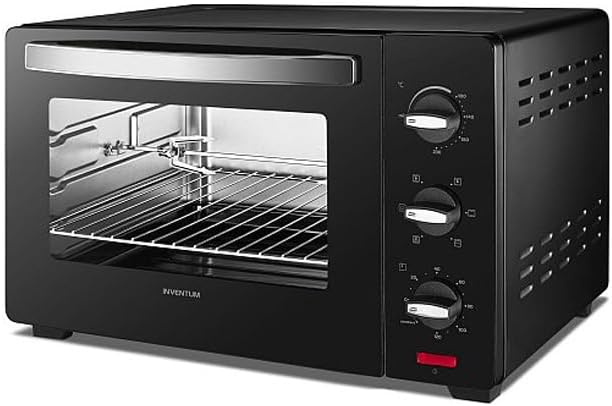
படம் 1: முன் view of the Inventum OV307B convection oven, showcasing its black finish, glass door, and control panel with three rotary knobs on the right side.
The Inventum OV307B features a compact design with a durable black exterior. The front includes a large glass door for easy viewing of food during cooking. On the right side, a control panel houses three rotary knobs for adjusting temperature, cooking function, and timer settings.
2.2 Oven Interior and Accessories
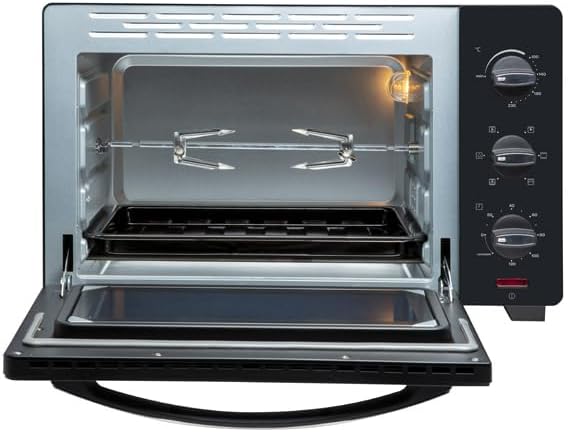
படம் 2: உள்துறை view of the Inventum OV307B convection oven with the door open, showing the oven rack, crumb tray, and rotisserie spit assembly.
The oven interior is designed for efficient heat distribution. It includes a removable oven rack for placing baking dishes and a crumb tray at the bottom to collect drips and crumbs, making cleaning easier. A rotisserie spit assembly is also visible, indicating the oven's rotisserie function.
2.3 கண்ட்ரோல் பேனல் செயல்பாடுகள்
- வெப்பநிலை கட்டுப்பாட்டு குமிழ்: தேவையான சமையல் வெப்பநிலையை அமைக்கப் பயன்படுகிறது.
- செயல்பாட்டுத் தேர்வி குமிழ்: Used to choose the cooking mode (e.g., top heat, bottom heat, convection, rotisserie).
- டைமர் நாப்: Used to set the cooking duration. May include a 'stay on' function.
2.4 சேர்க்கப்பட்ட பாகங்கள்
- ஓவன் ரேக்: For supporting baking pans, dishes, or food directly.
- க்ரம்ப் ட்ரே: Placed at the bottom to catch food particles and drips.
- ரொட்டிசெரி ஸ்பிட்: For roasting poultry or other meats evenly.
3 அமைவு
3.1 பேக்கிங் மற்றும் பிளேஸ்மெண்ட்
- எந்தவொரு உள் பேக்கிங் அல்லது பாதுகாப்பு படலங்கள் உட்பட அனைத்து பேக்கேஜிங் பொருட்களையும் கவனமாக அகற்றவும்.
- அடுப்பை ஒரு நிலையான, வெப்ப-எதிர்ப்பு மற்றும் சமமான மேற்பரப்பில் வைக்கவும்.
- Ensure there is at least 10-15 cm (4-6 inches) of clear space on all sides and above the oven for proper ventilation. Do not place the oven directly against a wall or under cabinets.
- எரியக்கூடிய பொருட்கள் அல்லது வெப்ப மூலங்களுக்கு அருகில் அடுப்பை வைக்க வேண்டாம்.
3.2 முதல் பயன்பாட்டிற்கு முன்
- Wash the oven rack, crumb tray, and rotisserie spit in warm, soapy water. Rinse thoroughly and dry completely.
- விளம்பரத்துடன் அடுப்பின் உட்புறத்தையும் வெளிப்புறத்தையும் துடைக்கவும்amp துணி.
- To eliminate any manufacturing odors, operate the oven empty for approximately 15 minutes at the highest temperature setting (e.g., 230°C) using the convection function. Ensure the room is well-ventilated during this process. A slight odor or smoke is normal during this initial burn-off.
- உணவுடன் முதல் முறையாகப் பயன்படுத்துவதற்கு முன்பு அடுப்பை முழுமையாக குளிர்விக்க அனுமதிக்கவும்.
4. இயக்க வழிமுறைகள்
4.1 அடிப்படை செயல்பாடு
- செருகு: Connect the oven to a suitable power outlet.
- உணவு இடம்: Place food on the oven rack or in a suitable baking dish, then insert it into the oven. Ensure the crumb tray is in place at the bottom.
- வெப்பநிலையை அமைக்கவும்: Turn the Temperature Control Knob to the desired cooking temperature.
- செயல்பாட்டைத் தேர்ந்தெடுக்கவும்: Turn the Function Selector Knob to choose the appropriate cooking mode (e.g., top heat, bottom heat, top and bottom heat with convection, rotisserie).
- டைமரை அமைக்கவும்: Turn the Timer Knob to the desired cooking time. The oven will begin heating. A bell will sound when the timer expires, and the oven will turn off automatically. For continuous operation, select the 'stay on' position if available.
4.2 ரோட்டிசெரி செயல்பாட்டைப் பயன்படுத்துதல்
- Skewer the food (e.g., whole chicken) onto the rotisserie spit, securing it with the forks.
- அடுப்பின் உள்ளே நியமிக்கப்பட்ட இடங்களில் ரொட்டிசெரி ஸ்பிட்டைச் செருகவும்.
- Select the rotisserie function using the Function Selector Knob.
- Set the temperature and timer as required for your recipe.
4.3 முன்கூட்டியே சூடாக்குதல்
For best results, preheat the oven to the desired temperature before placing food inside. Set the temperature and function, then allow the oven to heat for 5-10 minutes, or until the indicator light (if present) turns off, signaling the temperature has been reached.
5. பராமரிப்பு மற்றும் சுத்தம்
வழக்கமான சுத்தம் உகந்த செயல்திறனை உறுதிசெய்து உங்கள் அடுப்பின் ஆயுளை நீட்டிக்கிறது.
- எப்போதும் இணைப்பைத் துண்டிக்கவும்: சுத்தம் செய்வதற்கு முன், எப்போதும் அடுப்பை மின் இணைப்பிலிருந்து துண்டித்து, அதை முழுமையாக குளிர்விக்க அனுமதிக்கவும்.
- வெளிப்புறம்: வெளிப்புற மேற்பரப்புகளை ஒரு மென்மையான, டி மூலம் துடைக்கவும்amp cloth. Do not use abrasive cleaners or scouring pads, as they can damage the finish.
- உட்புறம்: உள் சுவர்களை விளம்பரத்துடன் துடைக்கவும்amp cloth and mild detergent. For stubborn stains, a non-abrasive oven cleaner designed for convection ovens can be used, following the product instructions carefully. Ensure all cleaner residue is removed.
- துணைக்கருவிகள்: The oven rack, crumb tray, and rotisserie spit can be washed in warm, soapy water. Rinse and dry thoroughly.
- கண்ணாடி கதவு: கண்ணாடி கதவை கண்ணாடி கிளீனர் அல்லது விளம்பரம் மூலம் சுத்தம் செய்யவும்.amp துணி.
- மூழ்க வேண்டாம்: அடுப்பு உடல், தண்டு அல்லது பிளக்கை ஒருபோதும் தண்ணீரில் அல்லது வேறு எந்த திரவத்திலும் மூழ்கடிக்காதீர்கள்.
6. சரிசெய்தல்
If you encounter issues with your Inventum OV307B, refer to the table below for common problems and solutions.
| பிரச்சனை | சாத்தியமான காரணம் | தீர்வு |
|---|---|---|
| ஓவன் ஆன் ஆகவில்லை. | இணைக்கப்படவில்லை; மின்சாரம் அல்லதுtage; டைமர் அமைக்கப்படவில்லை. | Ensure the oven is securely plugged into a working outlet. Check your household circuit breaker. Turn the timer knob to a desired cooking time. |
| உணவு சமமாக சமைக்கப்படவில்லை. | Oven not preheated; food placed too close to heating elements; overcrowding. | Preheat the oven before placing food inside. Ensure proper spacing around food for air circulation. Avoid overcrowding the oven. |
| சமைக்கும் போது அதிகப்படியான புகை. | Food spills; grease buildup; initial burn-off. | Clean the oven interior and crumb tray thoroughly. Ensure the crumb tray is clean before each use. If it's the first use, some smoke is normal during burn-off. |
| ரொட்டிசெரி துப்புதல் சுழலவில்லை. | Spit not correctly installed; rotisserie function not selected. | Ensure the rotisserie spit is properly seated in its drive mechanism. Select the rotisserie function using the Function Selector Knob. |
If the problem persists after attempting these solutions, please contact Inventum customer support.
7. விவரக்குறிப்புகள்
Key technical details for the Inventum OV307B convection oven:
- பிராண்ட்: கண்டுபிடிப்பு
- மாதிரி: OV307B
- நிறம்: கருப்பு
- கட்டுப்பாட்டு வகை: ரோட்டரி நாப்ஸ்
- சக்தி ஆதாரம்: மின்சாரம்
- சேர்க்கப்பட்ட கூறுகள்: Oven rack, Crumb tray, Rotisserie spit
- அலமாரிகளின் எண்ணிக்கை: 1
- ASIN: B09C8VFFC7
8. உத்தரவாதம் மற்றும் ஆதரவு
8.1 உத்தரவாதத் தகவல்
Your Inventum OV307B convection oven comes with a standard manufacturer's warranty. Please refer to the separate warranty card included with your purchase for specific terms, conditions, and duration. Keep your proof of purchase for warranty claims.
8.2 வாடிக்கையாளர் ஆதரவு
For technical assistance, spare parts, or any questions regarding your Inventum OV307B, please contact Inventum customer support. Contact details can typically be found on the official Inventum webதளத்தில் அல்லது உங்கள் உத்தரவாத ஆவணத்தில்.